In this article
What is VLA fine-tuning?At a glanceWhy fine-tuned VLAs fail: symptoms, causes, and checksHow to check robot demonstrations before fine-tuning a VLAHow much data does a VLA fine-tune need?How to evaluate a VLA fine-tune and close the loopVLA fine-tuning tutorials and guides from the Voxel51 blogCore concepts in VLA fine-tuningTry VLA data checks in your browser
In this article
What is VLA fine-tuning?At a glanceWhy fine-tuned VLAs fail: symptoms, causes, and checksHow to check robot demonstrations before fine-tuning a VLAHow much data does a VLA fine-tune need?How to evaluate a VLA fine-tune and close the loopVLA fine-tuning tutorials and guides from the Voxel51 blogCore concepts in VLA fine-tuningTry VLA data checks in your browser
Try Voxel51 for yourself
VLA fine-tuning adapts a pretrained vision-language-action (VLA) model to your robot using your own demonstrations, and it's the step where data problems surface. This guide covers the data side: the failure patterns that open VLA projects document, the checks that catch them before training, how much data a fine-tune needs, and how to trace a failed fine-tune back to its episodes.
What is VLA fine-tuning?
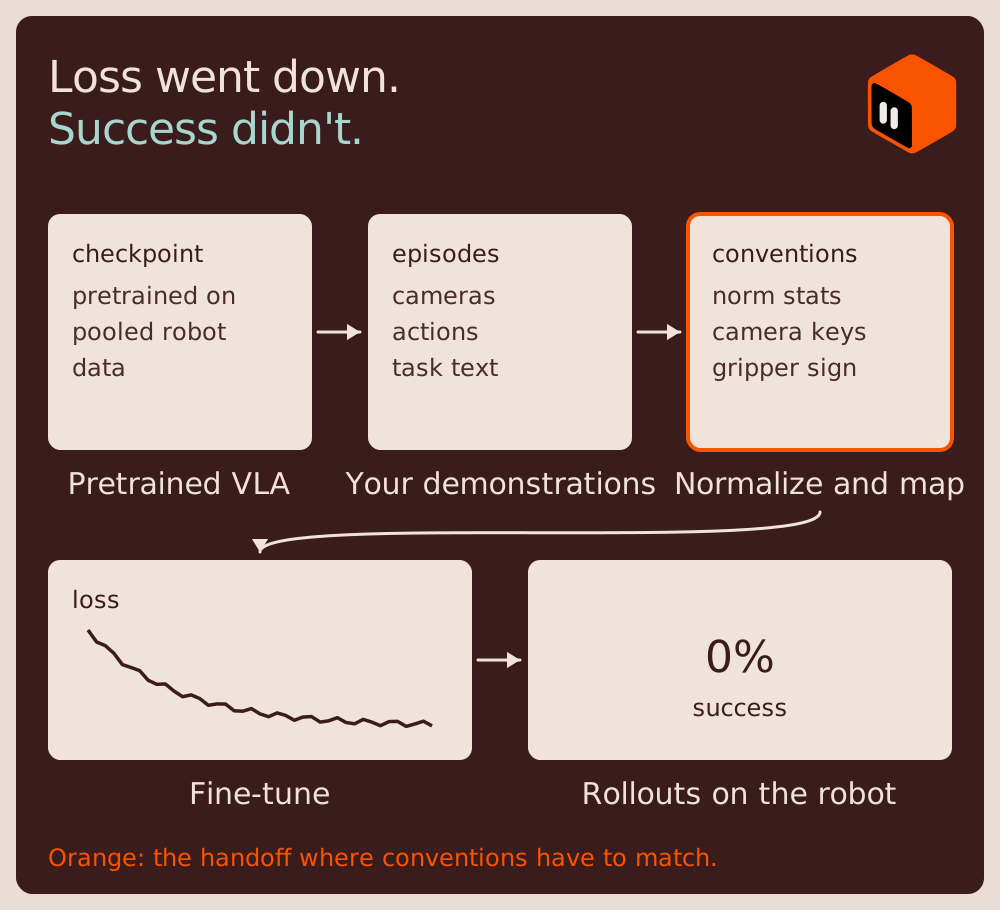
A vision-language-action model takes camera images and a language instruction and outputs robot actions. VLAs are pretrained on large pooled robot datasets, such as Open X-Embodiment and DROID, and increasingly on first-person human video. Fine-tuning continues training on demonstrations from your own robot, cameras, and tasks, so the model learns your embodiment and your action space.
Fine-tuning data is small, recorded on one rig, and full of conventions that the pretrained model and the robot's controller both have to agree with: which numbers are the actions, which direction the gripper value counts, what each camera is called, how fast the data was recorded, and which statistics normalize it all. When one of those conventions is off, training usually still runs and the loss still goes down. The failure shows up later, on the robot. That's why the checks in this guide work on the episodes themselves, where config files can't see the problem.
Not every failed fine-tune is a data problem. Training defaults, evaluation scripts that differ from training, and control rates also break fine-tunes, so each symptom below lists the non-data causes to rule out alongside the data causes.
VLAs come in two kinds. Open checkpoints, such as π0 and π0.5 through openpi, NVIDIA Isaac GR00T N1.7, SmolVLA, OpenVLA-OFT, and MolmoAct2, are fine-tuned on your own hardware. Hosted or partner-only models, such as those offered through the Physical Intelligence API beta and Google DeepMind's Gemini Robotics, are fine-tuned through a provider. The data problems in this guide apply to both. For choosing a model, see VLA models compared.
At a glance
- VLA fine-tuning adapts a pretrained vision-language-action model to a new robot and task using that robot's demonstrations.
- The VLA fine-tuning failures documented across open projects cluster around a few data problems: action space and gripper convention, normalization statistics, camera mapping, idle frames, and task text.
- Most VLA fine-tuning data mismatches don't stop training, so check your demonstration episodes for them before the first training run.
- When a VLA fine-tune fails, rule out non-data causes too: training defaults, evaluation scripts that differ from training, and stale caches.
- A fine-tuned VLA's success rate from 25 or fewer rollouts has wide error bars, so slice failures by condition before deciding which data to fix.
Why fine-tuned VLAs fail: symptoms, causes, and checks
A common report reads like this. Training finishes, the loss converges, and the robot doesn't do the task. In one LeRobot issue, the training ran "without issues (loss converges and wandb plots look fine)," and the evaluation still yielded 0% success. The author fixed a stale dataset cache that explained a feature mismatch, the success rate stayed at 0%, and the issue was closed a year later without a diagnosis. The table below maps the common symptoms to their likely data causes, the non-data causes to rule out first, and how to check each one on the episodes.
| Symptom | Likely data cause | Rule out first (not the data) | How to check on the episodes |
|---|---|---|---|
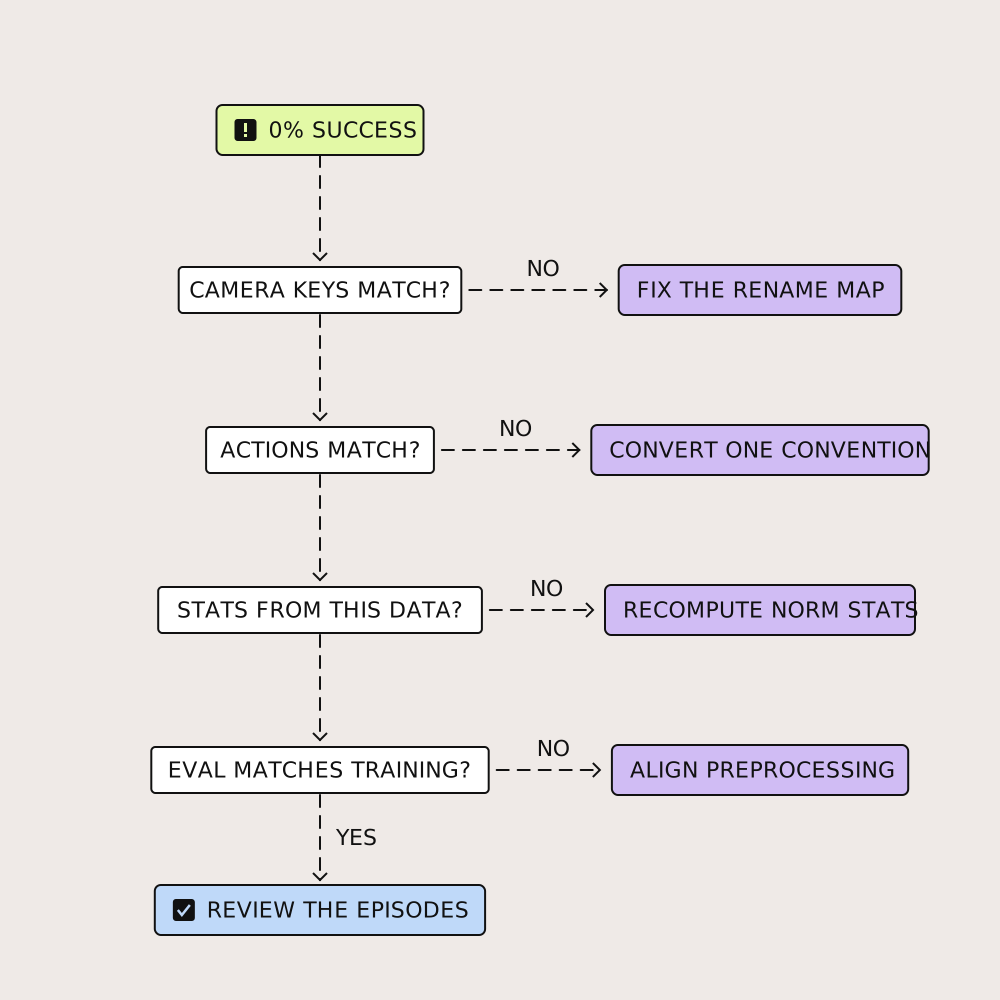
| 0% success, loss converged | Camera keys mapped to the wrong view, actions in the wrong space or convention, or missing normalization statistics | Stale dataset cache, an evaluation script that preprocesses differently from training, or the wrong checkpoint or embodiment tag | Step through a few episodes per source and confirm every camera and action dimension |
| Works, but well below published numbers | Fewer or different demonstrations, cameras, or action conventions than the paper used | A training configuration that differs from the paper's (steps, batch size, schedule) | Compare episode count, cameras, and action format with the paper's |
| Training loss diverges | A rarely used action or state dimension with very small 1st or 99th percentile values (q01, q99) or standard deviation | Learning rate | Look for flat dimensions in the normalization statistics |
| Robot barely moves or stops partway | Long idle stretches in the demonstrations, often at the start and end | Actions not reaching the controller, or a control rate lower than the training rate | Check how much of each episode the robot spends still |
| Gripper never closes, or closes at the wrong time | A gripper convention that differs between datasets, or between the data and the robot | Gripper calibration, or an evaluation script whose gripper inversion doesn't match the environment | Plot commanded gripper against measured gripper over one episode |
| Hesitates or stalls mid-task | Pauses and regrasps in the demonstrations | Inference latency, or gaps between action chunks | Time the longest still stretch per episode, and watch episodes with many grasps |
| Ignores the instruction or does the wrong task | Task text that doesn't match the episode, or few phrasings per task | A test without a wrong-instruction check, where ignoring language can look like robustness | Read the task text next to the first and last frames |
| Fails when objects or the camera move | Demonstrations that start from nearly the same layout or one viewpoint | A benchmark that rewards memorization, so a high score never showed generalization | Compare start states and viewpoints across episodes of one task |
Sources: LeRobot SmolVLA docs (camera mapping), openpi (normalization and diverging loss), openpi DROID training notes (idle frames), OpenVLA's evaluation on the LIBERO simulation benchmark (gripper inversion), the Action Chunking with Transformers (ACT) paper (pauses), a study of instruction reliance in VLAs (wrong-instruction probes), and LIBERO-PRO, LIBERO-Plus, and a k-nearest-neighbor (kNN) retrieval study (memorization). The kNN study scored 91.7% on LIBERO with plain nearest-neighbor retrieval of demonstrated actions and no policy training.
Loss converged, 0% success: what to check first
A fine-tuned VLA can reach 0% success with a converged loss when the training data doesn't mean what the robot expects. Three common data causes are camera views mapped to the wrong input, actions in a different space or gripper convention than the controller uses, and missing or mismatched normalization statistics. LeRobot's SmolVLA docs note that without a rename map from the dataset's camera names to the policy's camera1, camera2, and camera3 inputs, "training stops with a feature mismatch error." A swap between two cameras with the same image size fails silently: nothing in the shapes catches it, so training runs and the policy learns from the wrong views. Step through a few episodes per source and confirm every camera and action dimension before training.
Why is my fine-tune well below the published numbers?
Published results come from a specific dataset, episode count, camera setup, and training configuration. A LeRobot issue reproducing SmolVLA on LIBERO reported 44.8% on the long-horizon suite against roughly 71% in the paper. The author later named a learning-rate schedule default, which ended decay at 30,000 steps of a 100,000-step run, as the largest factor, alongside architecture settings. Fixing them raised the long-horizon score to about 60%, still short of the paper. Match the paper's configuration first. Then compare your episodes with theirs: count, cameras, action format, and how the task text is written.
Why does my robot barely move after fine-tuning?
Idle frames are a common cause of a policy that barely moves. Demonstrations often include stretches where the robot stands still, at the start while the operator gets ready, at the end, and sometimes in between. A policy trained on enough of those frames learns that standing still is a valid action. Physical Intelligence notes that the DROID dataset "contains many idle timesteps in which the robot does not move," and openpi ships the idle filter used to train its DROID models, which drops timesteps where the next chunk of actions would be largely idle. Filter or trim the long idle stretches, and check the controller too: if the policy outputs real motion and the robot still doesn't move, the problem is between the policy and the hardware.
A worked check on DROID
DROID is a large real-world manipulation dataset of teleoperated demonstrations. The free tier of Voxel51 includes 1,000 DROID episodes as MCAP, with three synced cameras, end-effector and joint actions, robot state, and a phase timeline. The phase labels were added when the sample was prepared and aren't part of the original DROID release. These are demonstrations, not rollouts from a fine-tuned policy, so they show how to run the checks above, not that any particular failure came from this data. Three checks take a few minutes each.
1. Idle frames. Each episode has a phase timeline that splits it into idle, reaching, grasping, transporting, releasing, and retreating. In the episode plotted below, the robot puts a blue Lego in a drawer in 11.2 seconds, and it's idle for its first half second and for two more short stretches near the end. Reading the phase timeline on a sample of episodes shows how much standing still a policy will train on. It's a rough signal, not the same rule openpi uses to filter DROID.
2. Command vs. measured gripper. Plot the commanded gripper value from the action stream against the measured gripper position from the robot state. In the same episode, the command jumps from 0 to about 0.92 at 3.4 seconds. The measured position follows after a short lag and levels off at about 0.64. Both values rise as the gripper closes and both stay between 0 and 1, so the command and the measurement agree on direction in this episode. The gap between 0.92 and 0.64 is consistent with the block stopping the fingers. That doesn't show the data matches what a pretrained model expects. The base models in openpi document gripper positions from 0.0, fully open, to 1.0, fully closed, and note that DROID and ALOHA follow their own conventions. OpenVLA's data loader uses 0 as closed and 1 as open. Run the same plot on one episode from each dataset you plan to mix, and check each against the model's documented convention.
3. Grasp counts. Filter on the number of grasps per episode. In the 1,000-episode sample, 108 episodes have three or more grasps, and every one of the 1,000 is labeled a success. Some of those are multi-step tasks and some are retries. A success label alone won't tell you which, so read the task text and watch the grasps.
How to check robot demonstrations before fine-tuning a VLA
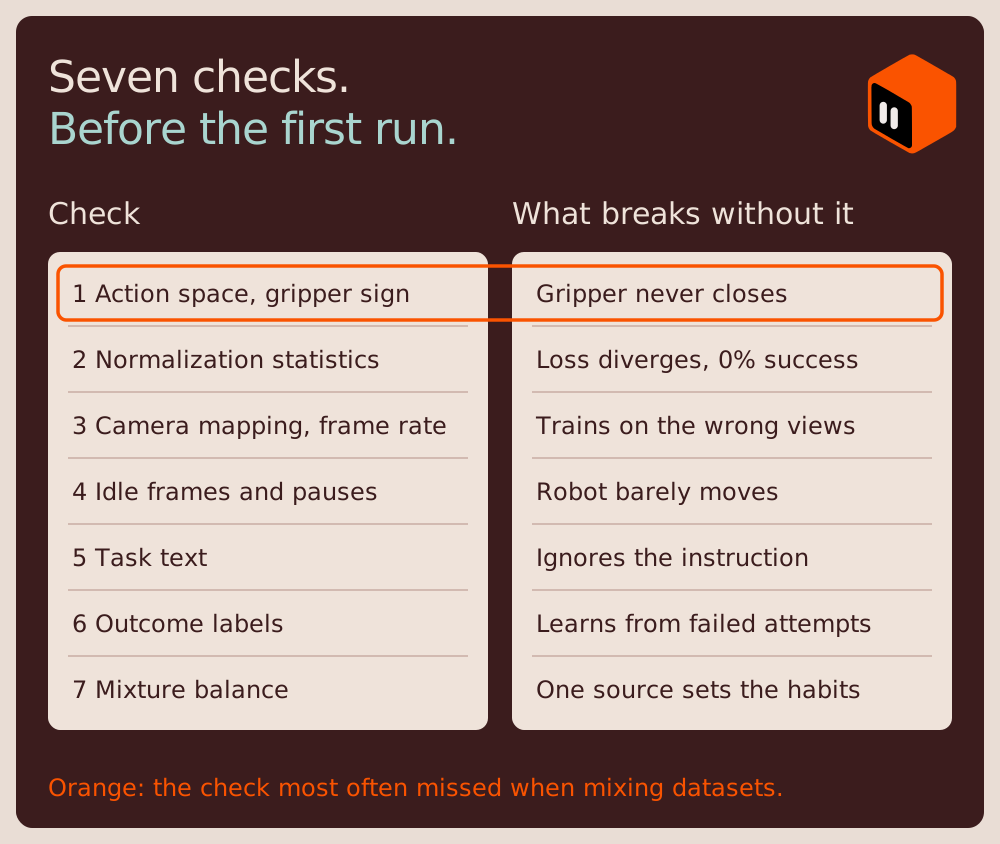
To check robot demonstrations before fine-tuning a VLA, step through a few episodes from every source and confirm seven things: the action space and gripper convention, normalization statistics, camera mapping and frame rate, idle frames, task text, outcome labels, and the balance across sources. Each check maps to a row in the symptom table above.
- Action space and gripper convention. Confirm joint or end-effector, absolute or delta, and which way the gripper counts. OpenVLA's data loader flips the gripper sign "to align with other datasets," and its LIBERO evaluation flips it back before sending actions to the simulator. See action space.
- Normalization statistics. Compute them for your data before training (openpi's compute_norm_stats.py does this). If your robot matches one in the pretraining mix, openpi suggests also trying the pretraining statistics.
- Camera mapping and frame rate. Map each camera to the view the model expects. SmolVLA's pretraining data mapped cameras to standard view types and was standardized at 30 frames per second (FPS). GR00T N1.7 expects LeRobot v2 data with a modality.json file that names each state, action, and video field, so LeRobot v3 datasets need converting first.
- Idle frames and pauses. Trim long idle stretches. The ACT paper hypothesizes that single-step policies struggle with pauses in the middle of a demonstration, and that action chunking helps. Either way, a policy is trained to reproduce the pauses in its data. See robot demonstration.
- Task text. Count the phrasings per task. SmolVLA's authors regenerated task descriptions for their pretraining data with a vision-language model because community labels were noisy or missing.
- Outcome labels. Check whether failed attempts are in the set, and whether they're marked. A dataset where every episode is a success can't show what to avoid. See success detection.
- Mixture balance. Count episodes per source, lab, and task. One large source sets the policy's habits. See data mixture.
How much data does a VLA fine-tune need?
There's no universal number for how much data a VLA fine-tune needs. Published starting points run from about 50 episodes for SmolVLA to 1 to 20 hours of demonstrations for π0. Coverage counts for more than volume, so spread demonstrations across object positions, lighting, and objects.
LeRobot recommends recording about 50 episodes for SmolVLA, with an example of 5 cube positions and 10 episodes each, and notes that 25 episodes "was not enough." Physical Intelligence's February 2025 openpi announcement said 1 to 20 hours of data was enough to fine-tune π0 to a range of tasks, with the caveat that results vary. Google DeepMind says Gemini Robotics On-Device 2 adapts to a new bi-arm embodiment in a few hours, "typically with less than 200 examples," though the model is available only to early-access partners, so the claim can't be reproduced independently. The VLA comparison post lists GPU requirements per model, and how much data a robot policy needs covers data scaling more broadly.
Fewer, better demonstrations
Research on demonstration curation keeps finding that removing the right episodes can match or beat training on all of them. On smaller policies in the robomimic benchmark, DemInf improved imitation policies by 5 to 10% by ranking demonstrations by their mutual information, and CUPID reached state-of-the-art diffusion policies using under 33% of curated data. At VLA scale, ATHENA matched full-data fine-tuning with 50% of demonstrations in simulation and 66.7% on real robots, and RoboDrop raised a real-robot π0.5 policy from 35.0% to 63.75% success by removing a fixed 20% of demonstrations, measured over 20 rollouts per task. For why coverage beats volume, see how data diversity drives VLA generalization.
How to evaluate a VLA fine-tune and close the loop
Rollouts decide whether a fine-tune worked, and rollout counts are small. The PhAIL benchmark paper (2026) notes that real-robot VLA evaluation still rests on 25 or fewer rollouts per condition, "almost always without confidence intervals." At that scale, nine successes in ten rollouts has an exact 95% interval from about 56% to nearly 100%. The model evaluation guide covers success rate intervals, why LIBERO scores mislead, and how to review failed rollouts.
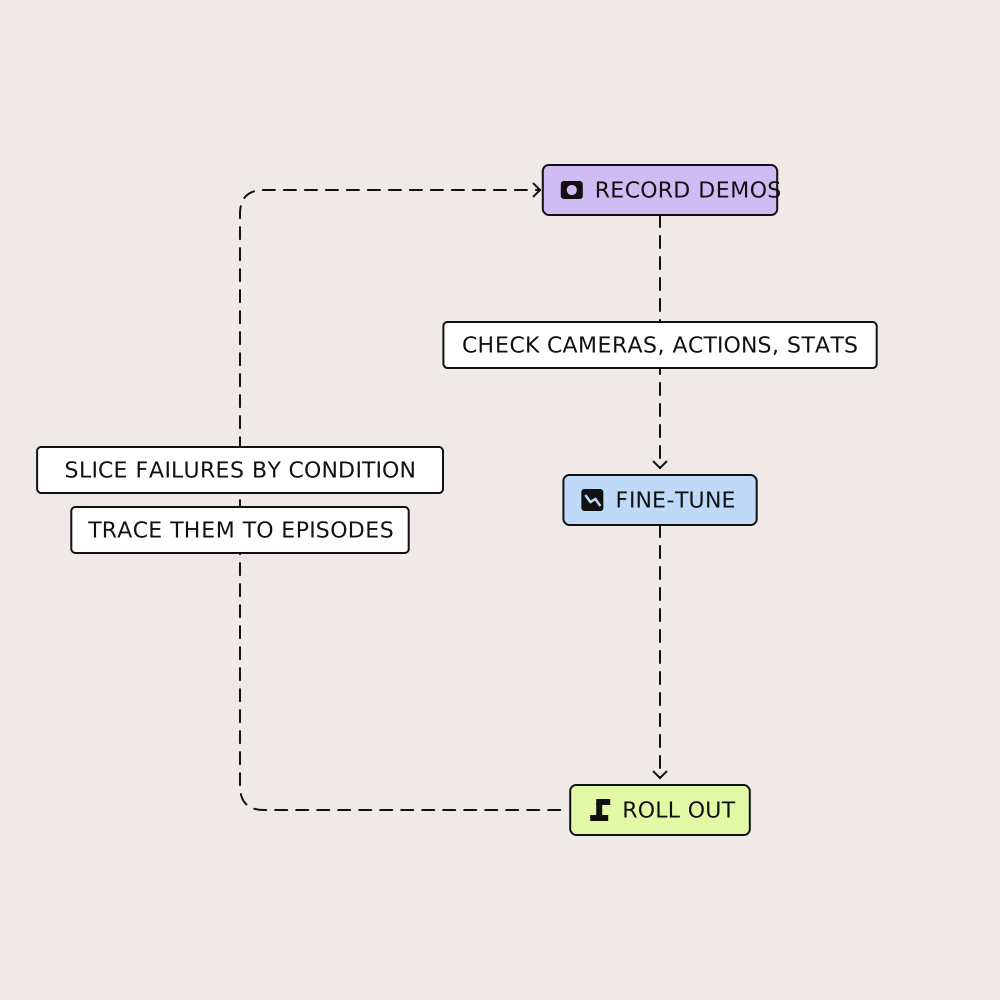
For a fine-tune, the useful step is slicing. Group failed rollouts by condition, such as object, layout, lighting, or lab, then review them next to the training episodes that should have covered that condition. A failure with no matching training episodes is a coverage gap. A failure with plenty of matching episodes points back to the episodes themselves, or to a non-data cause from the table above.
Record evaluation rollouts in the same format as the training data, so the same review works on both. In Voxel51, rollouts and demonstrations recorded as MCAP or LeRobot episodes play back with every camera on one timeline, and similarity search pulls every episode that looks like a failure you found. Corrections an operator makes during those rollouts are worth keeping as demonstrations for the next fine-tune.
Related: model evaluation guide, policy evaluation and success rate, failure mining in robotics, on the sim-to-real gap
VLA fine-tuning tutorials and guides from the Voxel51 blog
- VLA models compared: OpenVLA, π0, GR00T, SmolVLA, and more: open and hosted VLAs side by side, with fine-tuning entry points and GPU requirements.
- How much data does your robot policy actually need?: what moves success rate besides more hours.
- Everyone is scoring robot data, nobody is looking at it: why quality scores need a human check.
- How data diversity drives VLA generalization in robotics: diversity over volume.
- How to collect teleoperation data for robot learning: setup, latency, calibration, and cleaning.
- Failure mining in robotics: find one failure, surface every similar case.
- On the sim-to-real gap: diagnosing failures that only appear on the real robot.
- VLA models: why data-centric AI will unlock next generation robotics: why data decides VLA performance.
Core concepts in VLA fine-tuning
- Action space: what each number a policy outputs means.
- Action chunking: predicting several actions at once.
- Action head: the part of a VLA that turns its internal state into actions.
- Robot demonstration: a recorded example of a task that a policy learns to imitate.
- Data mixture: how often training samples each source.
- Success detection: how episodes get labeled success or failure.
- Cross-embodiment: training one model across different robot bodies.
- Proprioception: the robot's own sense of its joint and gripper positions.
- Policy evaluation and success rate: how policies are scored by rollouts.
Try VLA data checks in your browser
You can run the checks in this guide on real robot data without writing code. In the free tier of Voxel51, you can:
- Add 1,000 DROID episodes as MCAP, with three cameras, end-effector and joint actions, and a phase timeline. Each dataset you add uses one of three free dataset slots.
- Step through an episode with every camera on one timeline, and plot the commanded gripper value against the measured gripper position.
- Filter by number of grasps or by lab, and tag the episodes you don't trust.
- Open the list of task values and compare how differently the same task is worded across episodes.
For pooled community data, the LeRobot Community demo puts 2,378 episodes from 117 community datasets on one embeddings plot, so you can find the outliers before you fine-tune. Try Voxel51 free with a work or .edu email.
Try Voxel51 for yourself
Frequently asked questions about VLA fine-tuning
To fine-tune a VLA, start from an open checkpoint, convert your demonstrations to the format it expects, map cameras and actions to the model's inputs, compute normalization statistics, train, and evaluate with rollouts on the robot. Run the data checks in this guide before the first training run, because most of the mismatches they catch don't stop training.
A VLA can fail after fine-tuning, even with a converged loss, when the training data doesn't mean what the robot or the evaluation expects. Check that each camera maps to the right input, that actions use the controller's convention, and that normalization statistics match the data. Then rule out non-data causes, such as a stale dataset cache or an evaluation script that preprocesses differently from training.
The data a VLA fine-tune needs depends on the model and task: published starting points run from about 50 episodes for SmolVLA to 1 to 20 hours of demonstrations for π0. Demonstrations spread across positions, lighting, and objects teach more than the same number from one layout.
When fine-tuning a VLA with openpi, compute normalization statistics on your own data first. If your robot matches one in the pretraining mix, openpi suggests also trying the pretraining statistics and comparing. In both cases, look for dimensions with very small percentile values or standard deviation, which openpi lists as a cause of diverging loss.
Yes, trim long idle stretches before VLA fine-tuning, because they can teach a policy to stand still. The openpi project filters idle timesteps when training on DROID. Keep pauses the task actually requires.
To find bad episodes before fine-tuning a VLA, step through a sample from every source, then use per-episode signals, such as a phase timeline where one exists, the number of grasps, and task text, to find the outliers. Once you've found one bad episode, similarity search pulls every episode that looks like it.
© 2026 Voxel51 All Rights Reserved