From Recorded Session to Training Set: Auditing MCAP Robot Logs with FiftyOne
Author

Chief Community Officer
Jimmy is the Chief Community Officer at Voxel51, where he leads developer relations and growth. With 25+ years of experience connecting developers and enterprises to cutting-edge ML and open-source solutions, Jimmy drives impactful content, events, and education that fuel awareness, adoption, and community engagement.
See all articles by Jimmy Guerrero
In this article
Try Voxel51 for yourself
Every robotics team that runs a fleet ends up with the same thing: a storage bucket full of
.mcap files. Thousands of them. Every teleoperation session, every autonomous run, every eval — recorded, timestamped, and dropped into object storage. ros2 bag record and its cousins make the recording trivial. And then the recordings just... sit there.Ask a team what's in those logs and watch what happens. Not "how many files" — they know that. Ask what tasks are in there. What lighting conditions. How many failures, and of what kind. Which robot, which gripper, which camera rig. These are the questions that decide what you can actually train on. And for most teams the honest answer is a shrug, or a spreadsheet someone maintained by hand for three weeks in the spring and then abandoned.
That gap — between a pile of recorded sessions and a dataset you can train on — has no defined path. There's excellent tooling for recording logs and excellent tooling for training on curated datasets, but the bridge in between, the part where you look at months of accumulated logs and decide what goes into the training set and why, is improvised every single time. This post walks that bridge end to end, on real data, in three moves: ingest, audit, export.
Everything below is backed by a companion notebook that runs the whole path against a real, public teleoperation dataset. You can follow along and reproduce every screenshot.
The pain, stated plainly
Two problems compound each other.
The first is that logs accumulate with no defined path to a trainable dataset. Recording is cheap, so recordings pile up faster than anyone curates them. There's no repeatable procedure that takes a recorded session and turns it into a training sample with a documented reason for inclusion. So curation, when it happens at all, is a one-off dredge that no one can reproduce or defend.
The second is that teams can't answer basic distribution questions about what the logs contain. Not because the information isn't there — it's all sitting in the MCAP files — but because getting to it means writing bespoke parsing code for a firehose of independently-ticking channels, and nobody has time. The result: you train on what you happened to grab, discover the gaps after the model underperforms, and go back for more data without ever having seen the distribution you were sampling from.
The fix isn't more storage or a better bag format. It's a defined, inspectable path from recorded session to training set — one where the audit step is not optional.
Key takeaways
- FiftyOne 1.19+ ingests MCAP robot logs directly: point a sample's filepath at an
.mcapfile and the media type is inferred as multimodal, with no conversion or importer code. - Auditing MCAP logs at scale means embedding one representative frame per episode with CLIP, projecting with UMAP, and reading the corpus as an interactive map.
- The lasso in Voxel51's embeddings panel is the curation gesture: circling a cluster selects your candidate training subset.
- Exporting from FiftyOne writes a lossless dataset, a
manifest.csv, and arecipe.json, so the curation decision is reproducible rather than improvised. - The workflow is demonstrated on ABC-130k, the largest open bimanual robot-teleoperation dataset, distributed natively as MCAP.
The MCAP data: ABC-130k
To make this concrete rather than hypothetical, the companion notebook uses ABC-130k (Allshire et al., 2026). This is the largest open bimanual robot-teleoperation dataset: roughly 130,000 episodes across ~195 tasks, ~3,550 hours, collected on two-arm YAM stations with parallel-jaw grippers, and distributed natively as MCAP.
The full dataset is ~22 TB and gated. So the notebook uses Voxel51/ABC-130k, an ungated, FiftyOne-native subset (~3.5 GB): a diversity-first slice of the validation split — about 40 real episodes spanning about 40 distinct tasks, all H.264, each an
.mcap carrying a top camera plus two wrist cameras and per-arm RobotState / GripperState telemetry. Tasks in the slice are the genuinely mundane, genuinely hard stuff of real manipulation: load_the_bowls_into_the_dish_rack, insert_the_plug, fold_the_inside_out_t_shirt, place_the_coffee_filter_in_the_dripper, unload_the_batteries_from_the_remote_control.Note that this subset is diversity-first, roughly one episode per task. That's the opposite of what you'd curate for training (many episodes per task), and it changes what the embedding plot looks like, more on that when we get there. Everything about the ingest, audit, and export mechanics is identical whether you have 40 episodes or 40,000; only the shape of the resulting distribution differs.
Ingest: an MCAP file is a sample
The step that "doesn't exist anywhere" as a defined path starts by not existing as a problem. In FiftyOne 1.19+, you point a sample's filepath at a
.mcap file and the dataset's media type is inferred as multimodal automatically. No importer class. No schema mapping. No server-side conversion to frames. The multimodal viewer reads the MCAP directly via byte-range reads.In the notebook this is one call:
import fiftyone.utils.huggingface as fouh
dataset = fouh.load_from_hub("Voxel51/ABC-130k", name="ABC-130k", persistent=True)
One FiftyOne sample per recorded episode — which is exactly the right unit for auditing a corpus, because the questions you want to ask ("how many of these, how long are those") are per-session questions.
What you see in the App: open a sample and you get the tiled multimodal viewer —
top-camera and right-wrist-camera playing on a shared timeline, with the robot telemetry available as Plot tiles tracking the same playhead. Everything is synced to one clock, so scrubbing moves every tile together. This is the recording, played back natively, with nothing pre-processed.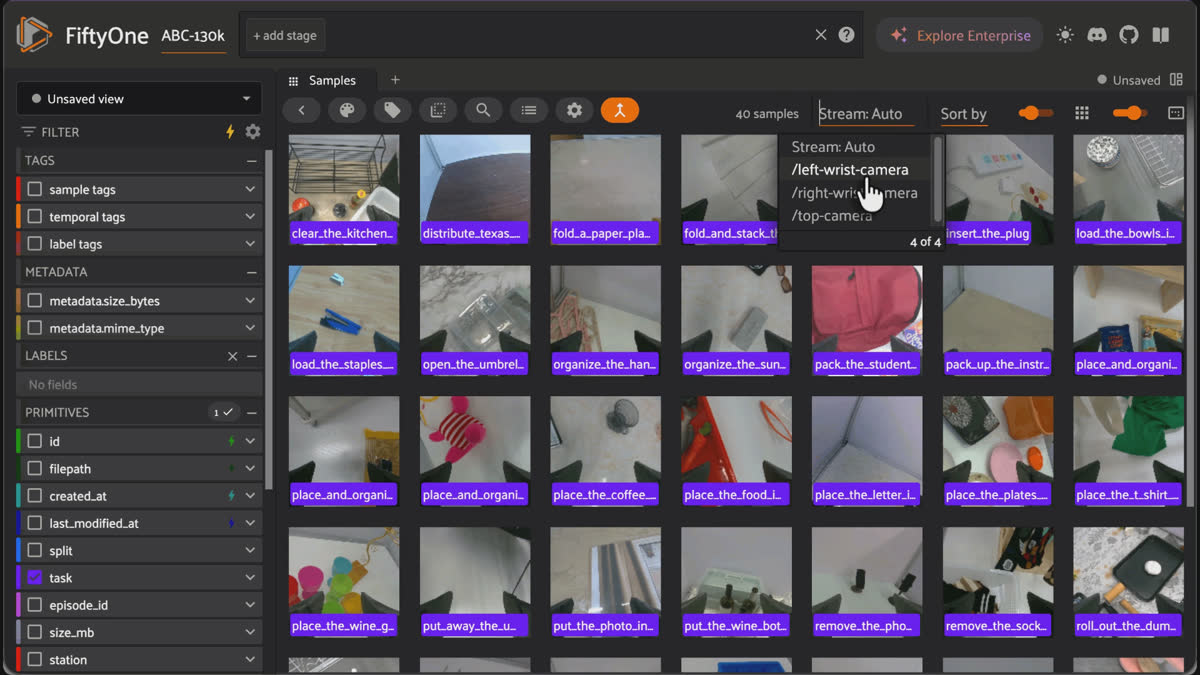
Browsing MCAP episodes in the FiftyOne App grid with task labels, switching the previewed stream between the top and wrist cameras.
The sample also arrives with real fields already populated from the source:
task, episode_id, station, duration_s, n_messages, camera_topics, camera_codecs. These are the raw material of the audit, and you didn't have to write a single line of MCAP parsing to get them.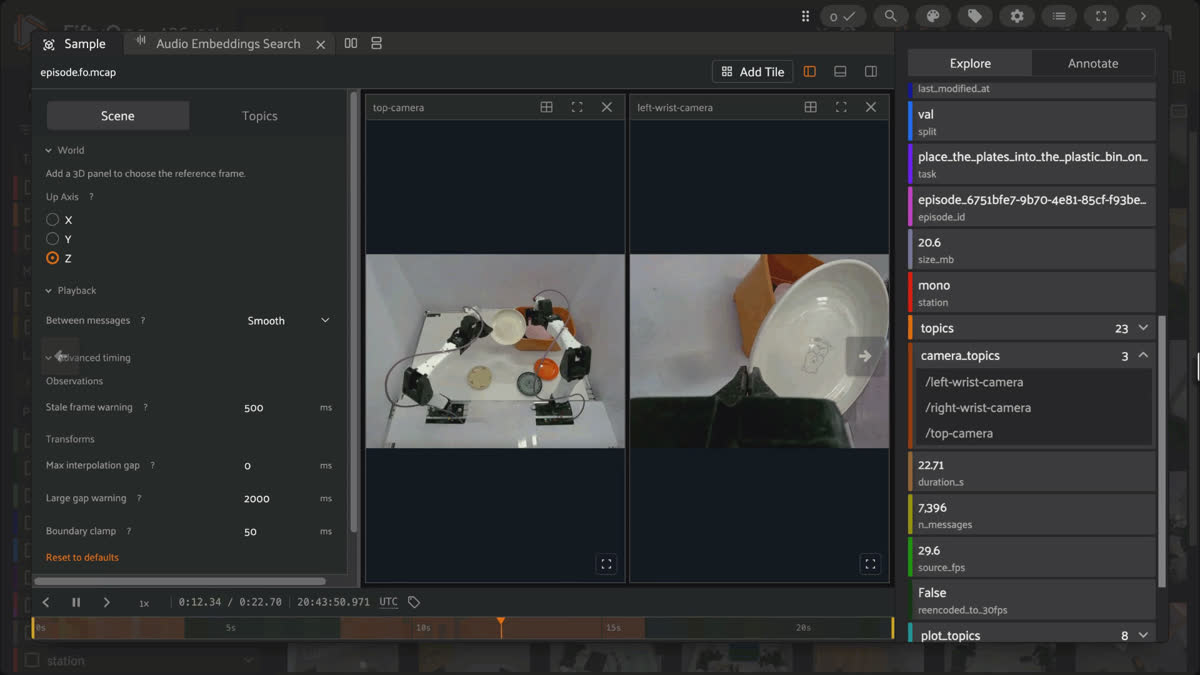
FiftyOne's multimodal viewer playing an MCAP episode with top-camera and wrist-camera tiles on a shared timeline, alongside populated fields like task, episode_id, station, and camera_topics.
Audit: what is actually in months of robot logs
Knowing which sensors a file contains is not the same as knowing what the file is about. To see what a corpus actually contains — the tasks, the visual conditions, the outliers, the failures — you need to look at content, and the scalable way to look at content across thousands of sessions is embeddings.
The recipe is simple and general. Decode one representative frame per episode. (Middle frame, not first — the first frame at t=0 often precedes a keyframe, which is the same reason grid tiles flash black.) Embed each frame with a vision model; the notebook uses CLIP, which places visually and semantically similar scenes near each other, so task and scene structure surfaces as spatial structure. Then project those embeddings to 2-D with UMAP and plot them.
That plot is the audit act. It is the moment a folder of opaque
.mcap files becomes a map of what your fleet recorded. Clusters are tasks and scenes. Sparse regions are coverage gaps. Points off on their own are the weird sessions worth opening. If you color the same cloud by failure outcome, you can see where in the distribution failures concentrate — whether they cluster under one lighting condition, one task, one embodiment, or scatter everywhere.What you see in the App: the embeddings panel renders the projection interactively next to the sample grid. Lasso a region and the grid filters to exactly those episodes. Color by
task to see coverage; color by station to see the two camera configurations separate; color by any field you've computed. This is not a static chart you screenshot and paste into a deck — it's a selection tool. The lasso is the curation gesture: circle the cluster you want, and you're looking at your candidate training subset.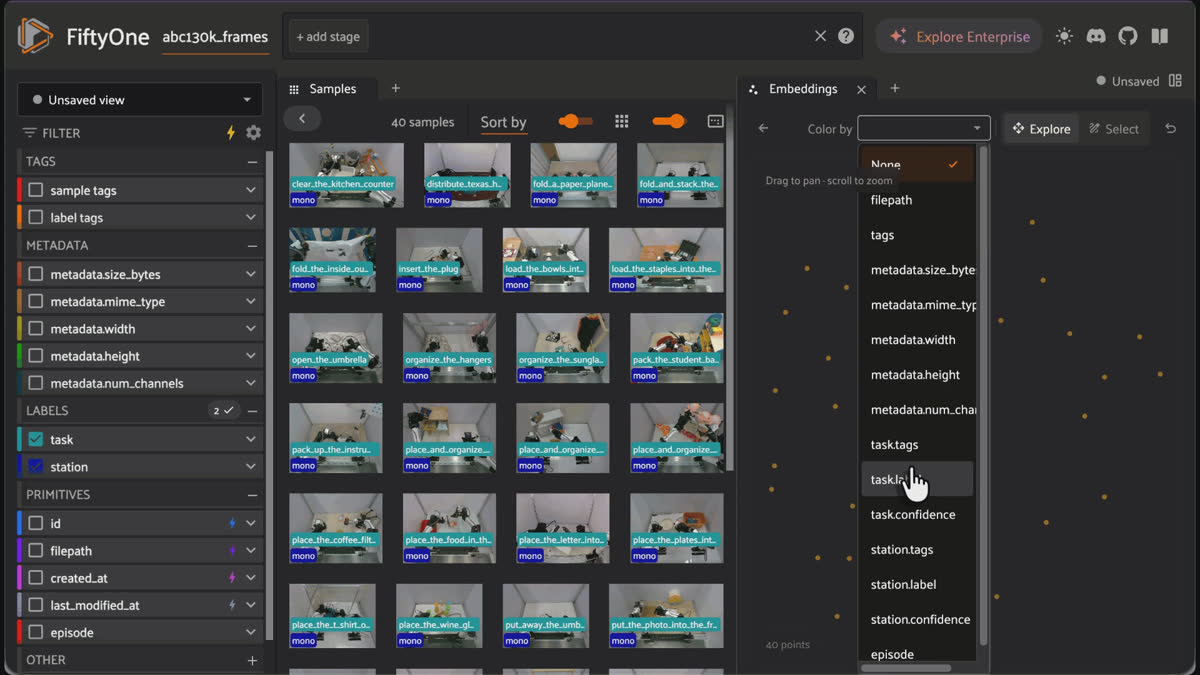
Lassoing points in Voxel51's embeddings panel, colored by task, to filter the sample grid to the selected MCAP episodes.
Because
Voxel51/ABC-130k is diversity-first — about one episode per task — the "by task" panel is essentially one point per task. It's a coverage map, not a cluster map: it shows you the spread of what's represented, with no dense clumps because no task repeats. That's genuinely informative (it tells you the slice was built for breadth), but it's not the dramatic many-points-per-cluster picture you may be expecting. To get that picture — the one where a hundred insert_the_plug episodes form a tight island you can lasso — you load many episodes per task. The notebook points at the loader that does exactly this, with flags for episodes-per-task and a download budget. The mechanics don't change; the distribution gets richer.In a nutshell, you looked at the distribution before you sampled from it. That is the thing teams cannot currently do, and it takes one panel.
Alongside the plot, the notebook prints the distribution report the plot implies — episodes per task, station mix, duration statistics, camera counts. This is the tabular answer to "what's in here," and it comes straight from the real fields, no hand-maintained spreadsheet required. Between the plot and the table, "we don't really know what's in our logs" stops being true.
Export: a curated set with a recipe
The audit tells you what you have. The export turns a decision about that into a training-ready artifact — and, crucially, records the decision so it's reproducible.
Curation in FiftyOne is a filter over the dataset, which means the curation is the specification. In the notebook, the training slice is defined by a rule: keep episodes that decoded a representative frame and are at least as long as the median duration; hold the shorter ones out into a separate review split, since very short episodes are more likely to be truncated or degenerate. That rule is a defensible data-quality decision, and it's written down as code rather than executed by hand and forgotten.
train_view = (
    dataset
    .match(F("rep_frame") != None)
    .match(F("duration_s") >= median_duration)
)
The export writes three things: a lossless FiftyOne dataset that round-trips every field and the MCAP filepaths; a portable
manifest.csv (one row per episode with its path, task, station, duration, and split) that a training pipeline reads directly; and a recipe.json capturing the exact filter, the median threshold, the embedding method, and the counts. A teammate can reload the FiftyOne dataset and get the identical curated corpus back, or read the manifest into a dataloader, or read the recipe and understand why these episodes and not others.| Artifact | What it contains | Who consumes it |
|---|---|---|
| FiftyOne dataset | Lossless round-trip of every field and MCAP filepath | A teammate reloading the identical curated corpus |
| manifest.csv | One row per episode: path, task, station, duration, split | A training pipeline or dataloader |
| recipe.json | The exact filter, median threshold, embedding method, and counts | Anyone asking why these episodes and not others |
What you see in the App: tag the training view and the hold-out view, and both tags appear in the sidebar. Click
train and the grid shows exactly the curated episodes; click review_holdout and you see what you set aside. The split is now a first-class, inspectable property of the dataset — not a folder someone moved files into.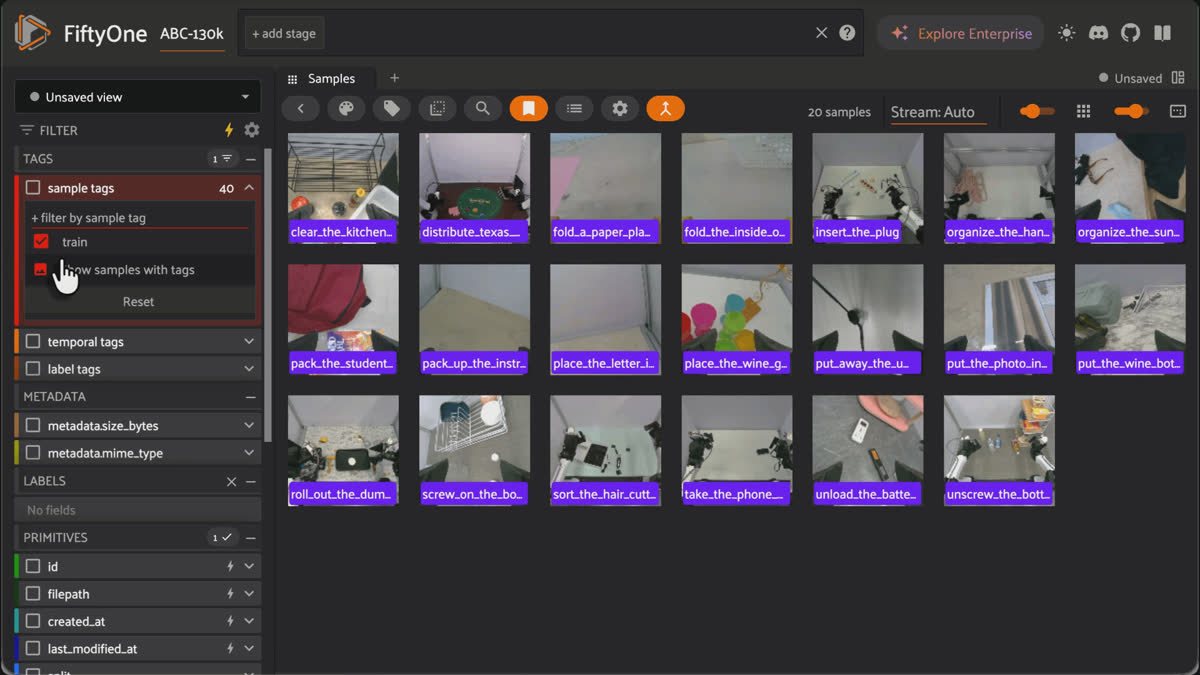
Filtering ABC-130k episodes by train and review_holdout sample tags in the FiftyOne App sidebar after export.
That's the bridge. Recorded session on one end, training set on the other, and a documented, reproducible, inspectable path connecting them.
Recorded, audited, trainable
The individual tools here aren't new. What's new is that the audit step — the part where you see the distribution before you commit to it — is no longer a special project. It's a panel. And once auditing is cheap, the whole path changes character: instead of grabbing logs, training, discovering gaps, and grabbing more, you look first, curate deliberately, and write down what you did.
Concretely, the path is:
- Ingest — point samples at
.mcapfiles; media type is inferred as multimodal; no conversion. One sample per recorded session. - Audit — embed a representative frame per session, project with UMAP, and read the distribution off the interactive plot and the accompanying table. Lasso to select. This is the act that answers "what's actually in months of logs."
- Export — express the curation decision as a filter, then export a lossless dataset plus a manifest and a recipe. The decision is reproducible because it's written down as the thing that produced the data.
Try it
The companion notebook runs all three tasks: ingest, audit and export against the real
Voxel51/ABC-130k subset, in an isolated environment it sets up for you. It handles the unglamorous but real parts too: building a dedicated virtualenv with its own private database, installing the multimodal extra, and launching Jupyter Lab. Then the Phase 2 cells load the data, run the audit, produce the embeddings plot, export the curated set, and open the App so you can lasso the distribution yourself.Load a few tasks' worth of episodes if you want the cluster picture; load the diversity subset if you want the coverage map. Either way, you'll have done the thing that currently doesn't exist anywhere as a repeatable procedure: you'll have looked at what's in your logs, and turned a defensible slice of it into a dataset you can train on.
Dataset: ABC-130k (Allshire et al., 2026), released under Apache-2.0.
Voxel51/ABC-130k is an unofficial FiftyOne-repackaged subset of the validation split; please cite the original paper.FAQ
Yes. In FiftyOne 1.19+ you point a sample's filepath at an .mcap file and the dataset's media type is inferred as multimodal, with the viewer reading the MCAP via byte-range reads and no server-side conversion.
Embed one representative frame per episode with a vision model like CLIP, project the embeddings to 2-D with UMAP, and read tasks, coverage gaps, and outliers off the interactive plot, alongside a tabular report of episodes per task, station mix, and durations.
ABC-130k (Allshire et al., 2026) is the largest open bimanual robot-teleoperation dataset: roughly 130,000 episodes across ~195 tasks and ~3,550 hours, collected on two-arm YAM stations and distributed natively as MCAP. The post uses Voxel51/ABC-130k, an ungated ~3.5 GB FiftyOne-native subset.
Express the curation decision as a filter over the dataset, then export a lossless FiftyOne dataset, a manifest.csv a training pipeline can read directly, and a recipe.json capturing the exact filter and thresholds so a teammate can reproduce the identical corpus.
Chief Community Officer
Jimmy is the Chief Community Officer at Voxel51, where he leads developer relations and growth. With 25+ years of experience connecting developers and enterprises to cutting-edge ML and open-source solutions, Jimmy drives impactful content, events, and education that fuel awareness, adoption, and community engagement.
See all articles by Jimmy Guerrero
Try Voxel51 for yourself
Loading related posts...
© 2026 Voxel51 All Rights Reserved


