50 Embodiments, 497 Episodes, One Indexed Dataset: Curating the LeRobot Community Dataset with FiftyOne
Author

Hacker-in-Residence
Harpreet is Hacker-in-Residence at Voxel51, where he turns cutting-edge AI ideas into open-source prototypes and demos that push the boundaries of deep learning. From building tools that inspire to creating content that educates, Harpreet helps the AI community level up—one wild idea at a time.
See all articles by Harpreet Sahota
In this article
Key takeawaysWhat you needHow the LeRobot community dataset is organizedStep 1: load the datasetWhat "one sample = one episode" actually meansFrom inspection to curationStep 2: what's already on the datasetStep 3: Compute similarity, uniqueness, and representativenessStep 4: Save views that answer real questionsStep 5: similarity search by episode and by textPutting it together: export a curated LeRobot v3 training splitFrequently Asked Questions
In this article
Key takeawaysWhat you needHow the LeRobot community dataset is organizedStep 1: load the datasetWhat "one sample = one episode" actually meansFrom inspection to curationStep 2: what's already on the datasetStep 3: Compute similarity, uniqueness, and representativenessStep 4: Save views that answer real questionsStep 5: similarity search by episode and by textPutting it together: export a curated LeRobot v3 training splitFrequently Asked Questions
Try Voxel51 for yourself
A single prompt to an AI agent running FiftyOne Skills pulled 10 episodes from every robot embodiment in the LeRobot community dataset, computed video embeddings with Qwen3-VL, and built a queryable similarity index. Here's the code and the thinking behind it.
The LeRobot community dataset is one of the largest community-built pools of cross-embodiment robot data: 235 contributors, 50 robot types, ~900 GB. Hugging Face's dataset card lists 46 robot types across 791 cleaned datasets. The 50 here come from scanning
robot_type in all 1,755 contributor folders, so the two counts cover different sets of datasets. It's organized as 1,755 contributor datasets, one per folder, so picking a balanced slice starts with reading each one's metadata. If you're training a policy that has to generalize across robots, you need episodes from every embodiment and a way to see which clips are actually worth keeping.Now that FiftyOne natively supports LeRobot, I figured I’d use the FiftyOne skill to import LeRobot datasets and check it out. All it took was a one-sentence prompt:
"i want to have a little bit from every embodiment, i have enough disk space for the whole dataset... but let's take 10 episodes from each embodiment to start"
That sentence kicked off a session that read every contributor dataset's metadata, found 50 unique robot types, downloaded the right shard files for each, imported 497 episodes into FiftyOne, embedded every clip with Qwen3-VL, computed a similarity index, and saved 75 queryable views. All without writing a data loader, a Parquet parser, or a video decode loop.
One sentence was enough because the agent had FiftyOne Skills installed. Skills are packaged workflows that teach AI assistants how to do complex FiftyOne tasks: importing LeRobot episodes, running zoo models, computing embeddings, finding duplicates. The agent didn't have to guess at the LeRobot v3 layout or the FiftyOne API. It followed the skill. Install them in Cursor, Claude Code, Codex, or Gemini CLI with one command:
curl -sL skil.sh | sh -s -- voxel51/fiftyone-skillsThis is what FiftyOne is for. Not visualization. Dataset curation at the scale that robot learning actually requires.
New here? FiftyOne is an open-source toolkit for loading, querying, visualizing, and curating ML datasets — images, videos, and multimodal data. LeRobot is Hugging Face's framework for robot learning: it defines a standard v3 dataset format (Parquet + MP4 shards with episode metadata) that the community uses to share teleoperation recordings.
Key takeaways
lerobot/community_dataset_v3is a collection of 1,755 contributor datasets across 50 robot embodiments, each a complete LeRobot v3 dataset with its ownmeta/info.json.- Using the FiftyOne Skills dataset-import workflow, the agent scanned every
*/*/meta/info.json, grouped byrobot_type, picked the smallest source dataset per embodiment with ≥10 episodes, and downloaded only the needed shard-0 files. - Each FiftyOne sample is one episode — not a frame, not a video file — with fields
robot_type,task,duration,fps,dataset_name, and amedia_referencepointer into the local LeRobot directory tree. Qwen3-VL-Embedding-2Bturns each episode (up to 32 frames from its time window) into one 2048-dimensional video embedding. The similarity index, Uniform Manifold Approximation and Projection (UMAP), uniqueness, and representativeness all run from that one field in under a minute.- The same model embeds text into the same space, so the index answers text queries: type "folding a cloth" and get the
same bimanualcloth-folding episodes back, with no labels involved. uniquenessscores range from 0.013 to 1.0 across the 497 episodes. 292 clips score below 0.1 because each embodiment's 10 clips come from one recording session. The two highest scores, the only ones above 0.7, both belong to single-frame episodes (0.02–0.03 s long): uniqueness flags broken recordings as readily as rare behavior.- 75 saved views — 50 by robot type plus analytical cuts by frames per second (FPS), duration, robot category, task keyword, and curation intent — are stored in the dataset and load from the App's Views dropdown with no code.
What you need
To load and query the pre-built dataset (no GPU required):
pip install "fiftyone>=1.22.0" "huggingface_hub[cli]" transformers qwen-vl-utils torch torchvisionTo re-run UMAP visualization yourself (Step 3):
pip install umap-learnFiftyOne 1.22.0 is the first release with
fo.types.LeRobotDataset. The dataset loads from the Hub with embeddings, similarity index, UMAP layout, and curation scores already computed. Steps 1–2, Step 4, and episode-to-episode search in Step 5 run entirely on the pre-built data, with no GPU or model weights. Text search in Step 5 downloads Qwen3-VL-Embedding-2B (about 4 GB) to embed your query; it runs on CPU and is faster on a GPU. Step 3 is for readers building their own dataset who want to replicate the embedding pipeline.How the LeRobot community dataset is organized
FiftyOne App grid of LeRobot community dataset episodes with bar charts of robot type and an episode duration histogram, then one episode opened with its camera views and state and action values
lerobot/community_dataset_v3 is a collection of contributor datasets. Each one is a complete LeRobot v3 dataset in its own <contributor>/<dataset>/ folder:community_dataset_v3/
kuehnrobin/
g1_stack_cube_left/
meta/info.json
data/
videos/
villekuosmanen/
pick_coffee_capsule_under_dome/
meta/info.json
...1,755 directories. 17,617 files. 897.5 GB total. Each sub-dataset carries its own
meta/info.json with its robot type, episode count, and FPS.fo.types.LeRobotDataset reads one LeRobot v3 dataset at a time, so the agent started by downloading all */*/meta/info.json files — a 56-second fetch — and then scanning them to build the plan:# Counts across all 1,755 sub-datasets
Robot types (50 unique):
so100 899 datasets 34801 total_episodes
so101 312 datasets 7490 total_episodes
so101_follower 121 datasets 4414 total_episodes
so100_follower 120 datasets 3065 total_episodes
arx5 43 datasets 2108 total_episodes
Unitree_G1_inspire 1 dataset 7 total_episodes # only 7 available
so100MovellaDot 75 datasets 157 total_episodes # max 5 per source
...All 1,755 sub-datasets were already at
codebase_version: v3.0. No conversion needed.Good to know. What's a shard-0 set? LeRobot v3 packs many episodes into shared MP4 and Parquet shards.
file-000.parquet and file-000.mp4 hold the first batch of episodes for each dataset. Downloading only those files makes a 10-episode subset cheap, even from a 50-GB source dataset.Step 1: load the dataset
The agent session did the heavy lifting — reading every contributor dataset's metadata, picking the right shard files, importing 497 episodes, computing embeddings, and pushing the result to the Hub. The import step is covered in How to Import LeRobot Datasets into FiftyOne Using Agent Skills.
The dataset is at
Voxel51/community_v3_10per_embodiment. Load it:import fiftyone as fo
import fiftyone.utils.huggingface as fouh
ds = fouh.load_from_hub("Voxel51/community_v3_10per_embodiment")
print(len(ds)) # 497
print(ds.distinct("robot_type")) # 50 embodiments
print(ds.get_field_schema()) # episode_index, robot_type, task, duration, fps,
# dataset_name, media_reference,
# qwen3vl_embedding, qwen3vl_embedding_camera,
# uniqueness, representativeness, ...From here on, the source videos live in the Hub repo alongside the metadata. FiftyOne reads through the
media_reference pointer — nothing to download separately. And because the unit is an episode rather than a file, every query you run is a dataset-level question, not a file-browser search.What "one sample = one episode" actually means
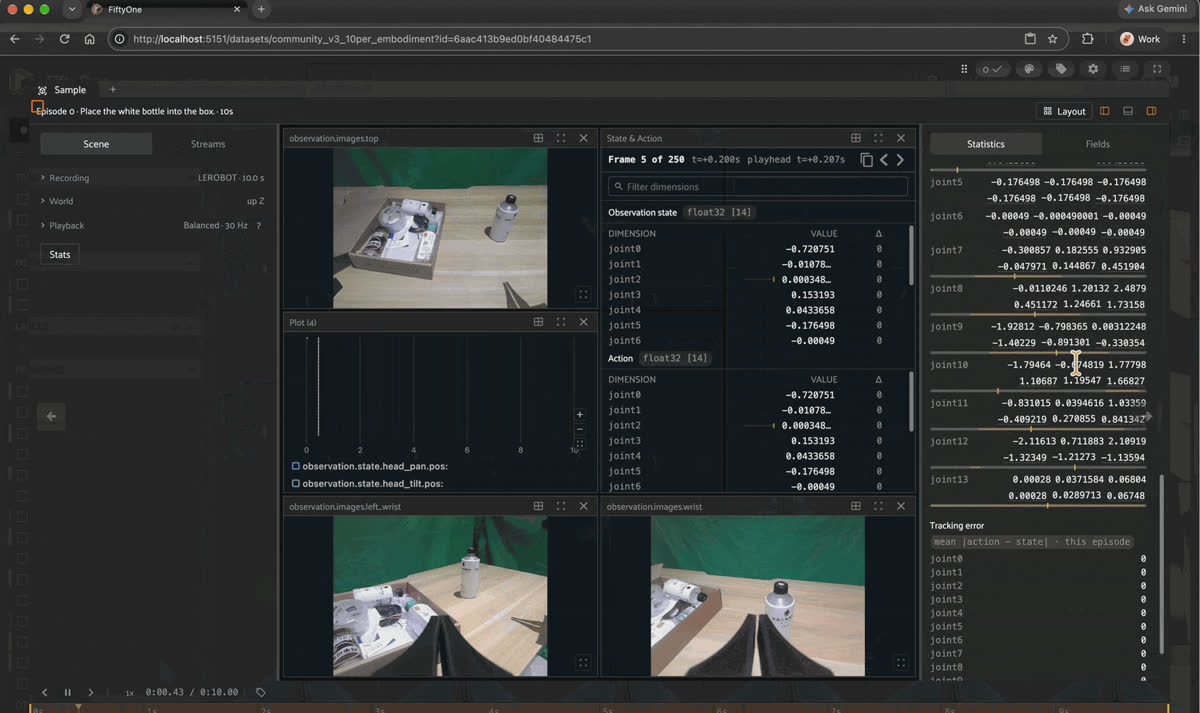
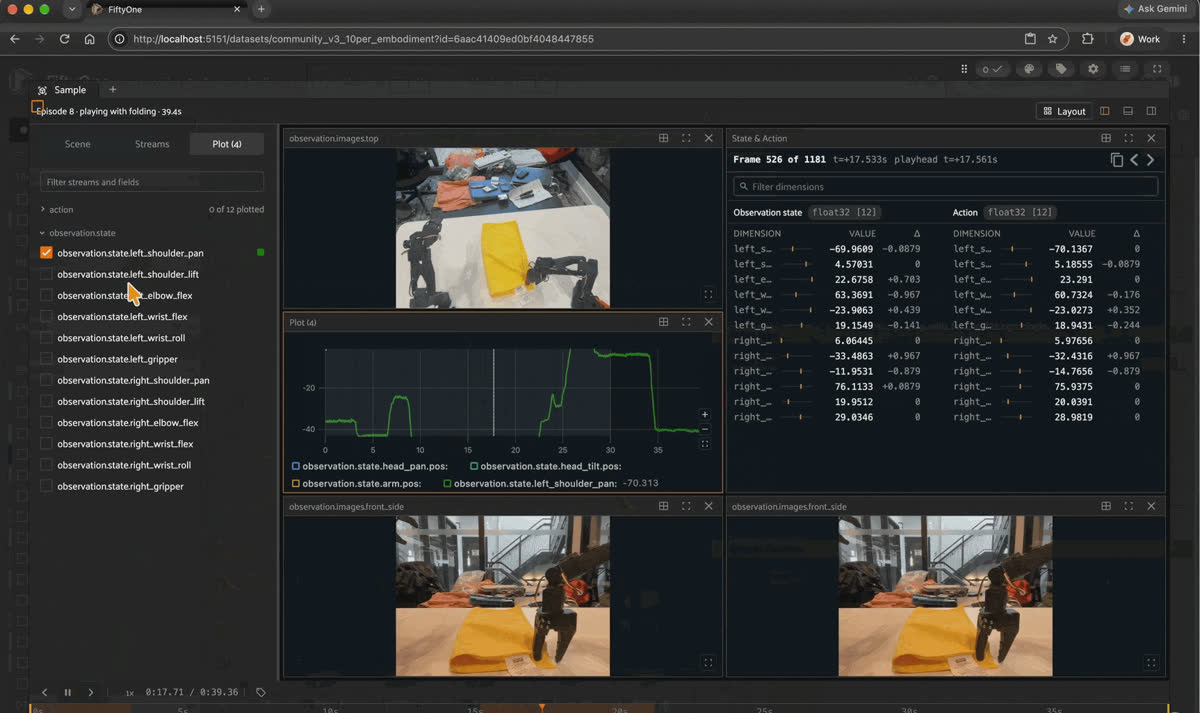
A single LeRobot episode opened in the FiftyOne App, showing synced top and wrist camera views, a joint state and action table, a joint position plot, and the sample's fields, including media_reference
Most tools treat robot data as video files or frame sequences. FiftyOne takes a different unit: the episode.
Every sample in this dataset carries:
sample.episode_index   # int — 0..9 within the source dataset
sample.robot_type      # str — e.g. "arx5", "so100", "Unitree_G1_Dex3"
sample.dataset_name    # str — e.g. "villekuosmanen/pick_coffee_capsule_under_dome"
sample.task            # str — e.g. "Pick up the coffee capsule"
sample.duration        # float — seconds (0.02 to 148.6 in this dataset)
sample.fps             # float — 10, 15, 20, 25, 30, or 50
sample.media_reference # LeRobotEpisodeReference — a FiftyOne type with two fields:
                       #   .data   = [chunk_index, file_index, first_row, last_row]  (Parquet)
                       #   .videos = {camera: [chunk_index, file_index, from_ts, to_ts]}  (MP4)
Think of a FiftyOne sample as a row in a table: the left side has filterable scalar fields (
robot_type, task, duration, fps) and the right side has the media_reference pointer. The pointer's two values — data[2:4] and videos[top][2:4] — map to the actual Parquet rows and MP4 time window in the LeRobot folder on disk.Three roads lead from a FiftyOne view back to frame data:
- Read in place via
sample.media_reference.data— no copy, your code, one episode at a time. - Torch dataset via
view.values("episode_index")passed toLeRobotDataset(..., episodes=...)— no copy, for training loops.episode_indexrestarts at 0 in every source dataset, so filter the view to onedataset_namefirst; for a mix of sources, export instead - Export via
view.export(dataset_type=fo.types.LeRobotDataset)— copies data, produces a standalone v3 repo. Each export must come from a single source dataset, so filter bydataset_namefirst.
The rule: in-process → don't copy. Out-of-process → copy.
| Path | Call | Copies data? | Use it when |
|---|---|---|---|
| Read in place | sample.media_reference.data | No | Your own code needs one episode's rows, such as for a plot, a metric, or a policy |
| Torch dataset | LeRobotDataset(..., episodes=view.values("episode_index")) | No | A training loop reads batches from a curated subset filtered to one dataset_name |
| Export | view.export(dataset_type=fo.types.LeRobotDataset) | Yes | Something outside the Python process needs a standalone LeRobot v3 repo, one source per export |
From inspection to curation
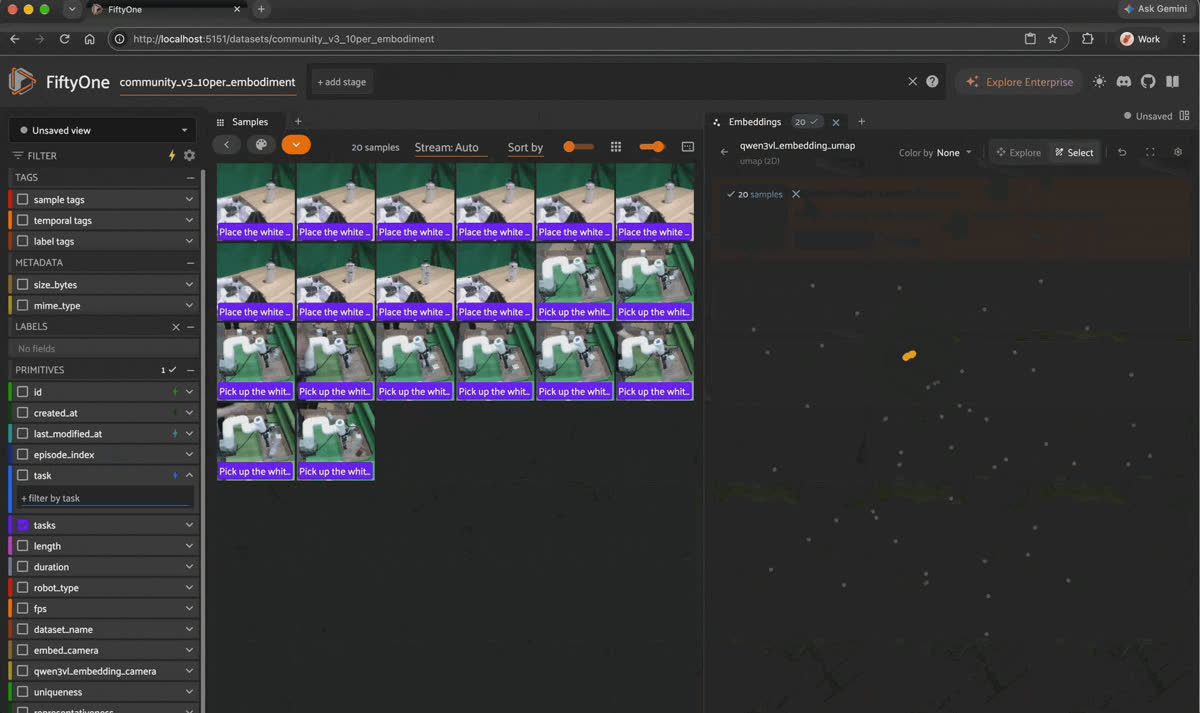
Filtering LeRobot episodes by task in the FiftyOne App sidebar and lasso-selecting points in the Embeddings panel to show the matching episodes in the grid
Timeline viewers are built for inspecting one recording at a time: open a log, scrub the timeline, and watch camera, inertial measurement unit (IMU), and joint streams in sync. That's the right tool when you're debugging one specific run.
FiftyOne starts where that ends. Once a run is recorded and you have hundreds of episodes, the question isn't "what happened in this episode?" It's "across all 497 episodes from 50 different robots, which clips are visually unique, which are near-duplicates, which ones actually belong in my training set?"
A timeline scrubber can't answer that. A queryable, indexed dataset can.
The rest of this post shows exactly what that looks like — every step from here on is something you can't do in a timeline scrubber.
Step 2: what's already on the dataset
The Hub dataset ships with a video embedding for every episode, computed with
Qwen/Qwen3-VL-Embedding-2B from the qwen3vl_embeddings remote zoo source. Each episode's time window is decoded with PyAV; up to 32 evenly spaced frames go to the model as one video clip, producing a 2048-dimensional qwen3vl_embedding field. qwen3vl_embedding_camera records which camera stream the frames came from, since camera names and layouts differ across the 50 embodiments.What Qwen3-VL-Embedding actually produces, and why it matters
Qwen3-VL is an open vision-language model family from Qwen/Alibaba. It comes in two variants:
Qwen3-VL-Instruct (generates text — captions, bounding boxes, answers) and Qwen3-VL-Embedding (trained for retrieval, so it produces dense vectors directly). The embedding model reads the clip, and the hidden state of the last token becomes the vector, L2-normalized:# what produced qwen3vl_embedding (inside the qwen3vl_embeddings zoo model)
outputs = model(**inputs) # frames + instruction
embedding = outputs.last_hidden_state[row, last_token_position] # one 2048-d vector per clip
embedding = F.normalize(embedding, p=2, dim=-1)This model is useful for robotics data because video and text map into the same vector space. The similarity index
qwen3vl_embedding_sim keeps the model name, so it accepts text queries as well as episodes: ds.sort_by_similarity("folding a cloth", k=10, brain_key="qwen3vl_embedding_sim") — no labels, no metadata matching, just the model's understanding of what was in the clip.For Vision-Language-Action (VLA) model development, this is specifically useful at the data curation stage. A VLA policy needs to generalize across scenes, embodiments, and task variations. But you can only curate what you can measure. Video embeddings give you a numeric handle on task semantics and visual appearance simultaneously, which makes it possible to compute:
- Similarity — which episodes, across all 50 embodiments, are doing visually similar things?
- Uniqueness — which demonstrations cover behavior your dataset hasn't seen much of?
- Representativeness — which episodes best stand in for entire clusters of similar behavior?
You can't extract these signals from episode metadata alone. They require a model that actually watched the clips.
You also get
uniqueness and representativeness scores out of the box. More on those below.If you want to try a different model, such as
Qwen/Qwen3-VL-Embedding-8B, write its vectors to a new field; Step 5 shows the full embedding loop for LeRobot episodes.Step 3: Compute similarity, uniqueness, and representativeness
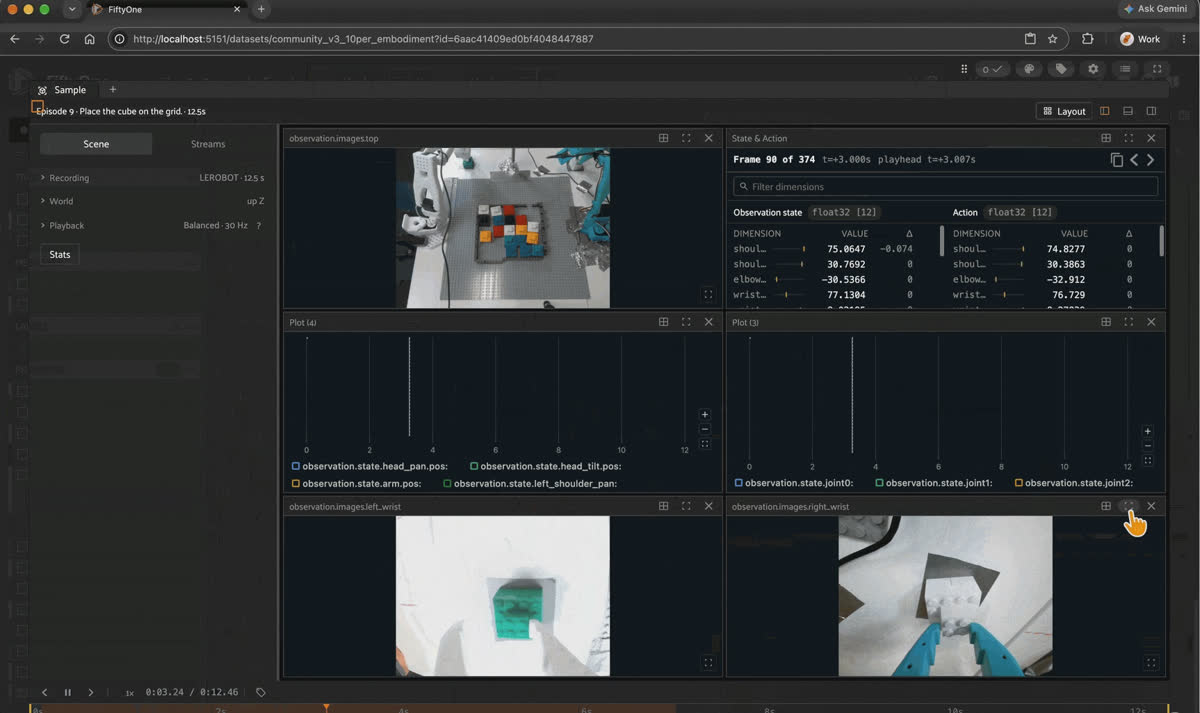
FiftyOne App grid of LeRobot episodes tagged with uniqueness and representativeness scores, next to the Embeddings panel and a score histogram
Skip the code if you loaded from the Hub. The pre-built dataset already includes
qwen3vl_embedding_sim, qwen3vl_embedding_umap, uniqueness, and representativeness. The code block below is for readers building their own LeRobot dataset — it requires umap-learn and an existing embedding field. The explanations after it apply either way.If you're building your own dataset, compute the
qwen3vl_embedding field first (the loop is in Step 5), then run the four calls:import fiftyone.brain as fob
EMBED = "qwen3vl_embedding"
# Similarity index — powers Sort by Similarity in the App. Passing the model name
# lets the index embed text queries (register the qwen3vl_embeddings source first)
fob.compute_similarity(
ds, embeddings=EMBED, model="Qwen/Qwen3-VL-Embedding-2B",
brain_key="qwen3vl_embedding_sim",
)
# UMAP — 2D layout for the Embeddings panel
fob.compute_visualization(
ds, embeddings=EMBED, method="umap",
brain_key="qwen3vl_embedding_umap", num_dims=2, seed=51,
)
# Uniqueness — how different each episode is from its nearest neighbors
fob.compute_uniqueness(
ds, embeddings=EMBED,
uniqueness_field="uniqueness",
similarity_index="qwen3vl_embedding_sim",
)
# Representativeness — how close each episode is to a cluster center
fob.compute_representativeness(
ds, embeddings=EMBED,
representativeness_field="representativeness",
similarity_index="qwen3vl_embedding_sim",
)Why UMAP for video embeddings?
Each episode is a 2048-dimensional vector. You can't look at that. Dimensionality reduction maps it to 2D so you can see structure in the Embeddings panel.
The three common choices are principal component analysis (PCA), t-distributed stochastic neighbor embedding (t-SNE), and UMAP:
- PCA is linear. It finds the axes of maximum variance, which is fast but can't capture the curved manifold structure that emerges when you embed semantically diverse video. A pick-and-place cluster and a folding cluster may sit on a low-variance direction PCA ignores entirely.
- t-SNE is non-linear and good at revealing local clusters, but it destroys global structure — the distance between clusters in the 2D plot is meaningless, and it's slow on datasets larger than a few thousand samples.
- UMAP is non-linear, keeps local cluster structure, and usually keeps more of the arrangement between clusters than t-SNE does. Don't over-read it, though: distances between far-apart clusters are still only roughly meaningful. It runs on 500 episodes in seconds. FiftyOne's UMAP backend uses Euclidean distance with
min_dist=0.1by default, which gives tight clusters.
For a first look at a cross-embodiment dataset, UMAP is the practical choice: you get clusters you can click into, and their rough arrangement is meaningful.
The map also shows what the embeddings respond to most: the recording session. For 495 of the 497 episodes, the nearest neighbor comes from the same source dataset. Step past a clip's own siblings, though, and the next matches in the full 2048-d space often share the task on a different robot. The nearest non-sibling to the
so100 box-in-bin episodes is a so100MovellaDot ball-in-box episode (cosine distance 0.157), and the nearest non-sibling to the arx5 dome-lifting episodes is a trossen_ai_stationary cube-in-box episode (0.170).What uniqueness and representativeness actually compute
Both metrics are grounded in the embedding space. The FiftyOne Brain docs cover
uniqueness and representativeness; here's what each one computes:Uniqueness — K-nearest-neighbor distance, K=3. For each episode, FiftyOne finds its 3 nearest neighbors in embedding space and computes a weighted mean of those distances:
uniqueness = weighted_mean(distances_to_3_nearest_neighbors)
             weights = [0.6, 0.3, 0.1]   # closer neighbors count more
             normalized to [0, 1] by dividing by the dataset maximum
Interpretation:
uniqueness=1.0 means this episode is farther from its nearest neighbors than any other episode in the set — it occupies a region of embedding space that no other clip is near. uniqueness=0.013 means the episode is almost on top of another one — effectively a near-duplicate.Representativeness — K-Means distance to cluster center, K=20 clusters. For each episode, FiftyOne finds the nearest cluster center and scores it as:
representativeness = 1 / (1 + distance_to_nearest_cluster_center)
                     normalized locally within each cluster
Interpretation:
representativeness=1.0 means this episode is at the heart of its cluster — it's the most "typical" example of that group of behaviors. Low representativeness means the episode sits at the edge of a cluster, more idiosyncratic than central.Why these two metrics are the right pair for VLA data curation
A Vision-Language-Action model needs two things from its training data:
- Coverage — enough behavioral diversity for the policy to generalize to new scenes and task variations. Low-uniqueness episodes (near-duplicates) don't add coverage; they just add training compute and risk overfitting to that one scene configuration.
- Signal density — enough repetition of each important behavior for the policy to learn it. Keeping only high-uniqueness episodes would discard the repetitions that make a skill learnable.
Uniqueness and representativeness together let you navigate that tradeoff explicitly:
| Goal | Query |
|---|---|
| Seed set: diverse AND learnable | High uniqueness + high representativeness |
| Redundancy audit: what can be cut? | Low uniqueness floor (near-duplicates) |
| Canonical demos per task | Sort by representativeness within each task view |
| Rare demonstrations (or broken ones) | Uniqueness > 0.7, then check duration |
In this dataset,
uniqueness ranges from 0.013 to 1.0. The floor shows near-identical clips in the set — 292 of 497 score below 0.1, and the bottom six are four moss cube-stacking episodes and two sam_bimanual cloth-folding episodes, each from a single recording session. At the top, only two episodes score above 0.7: an arx5 clip at 1.0 and an xarm6 clip at 0.86. Both are single-frame episodes, 0.02–0.03 seconds long. representativeness ranges from 0.33 → 1.0 — no episode is a pure outlier; even the most peripheral clips are loosely connected to a cluster.Keep it honest. Both ends of the uniqueness ranking come from how we built this subset, not from rare behavior or wasted data. Each embodiment contributes 10 consecutive episodes from one recording session, so every clip has nine siblings sitting right next to it in embedding space. On this dataset, every one of the 50 episodes in
curate_redundant_candidates has a sibling as its nearest neighbor, sampled on purpose. The top of the ranking has the opposite story: the five single-frame episodes look unlike everything else because there's almost nothing in them. They take the top two spots, and all five land in curate_diverse_seeds. Uniqueness did its job by surfacing recordings worth a second look. Those clips belong in the cut pile, though, not the seed set, so pair uniqueness with a duration filter.These two numbers let you make dataset decisions — what to keep, what to cut, what's overrepresented — without watching a single video. A log viewer shows you one episode at a time. FiftyOne gives you a signal across all 497 at once.
Step 4: Save views that answer real questions
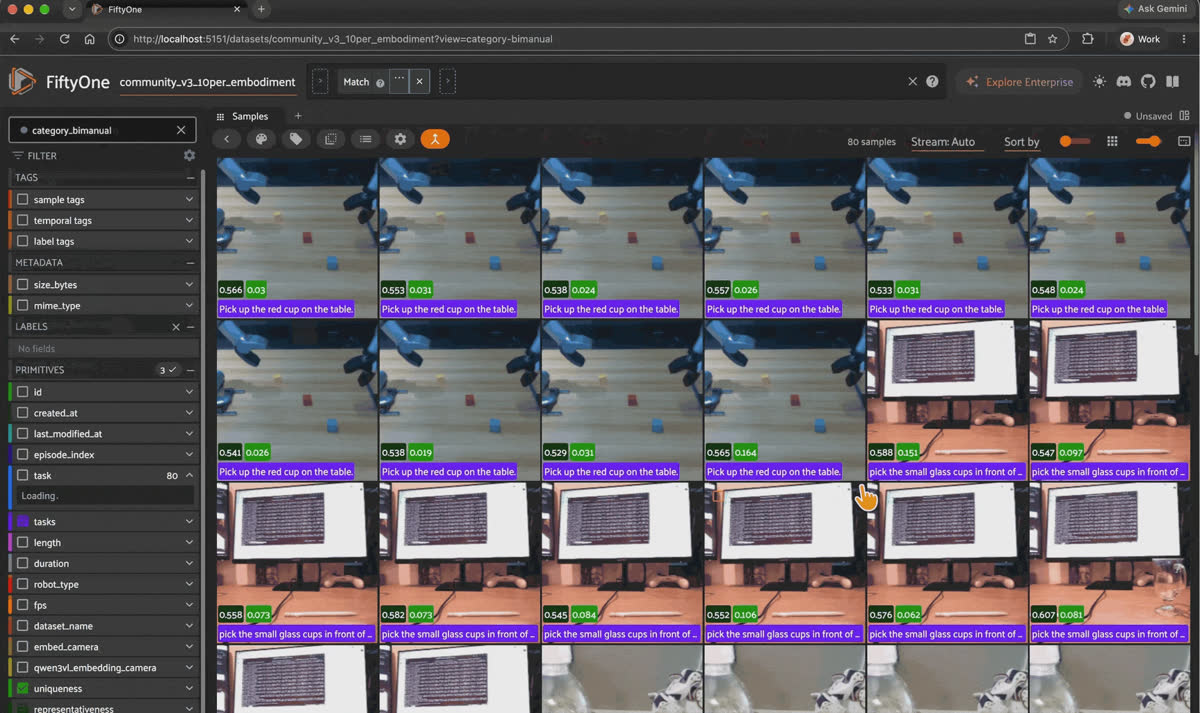
Switching between the category_single_arm and category_bimanual saved views from the Views dropdown in the FiftyOne App
Views in FiftyOne are lazy queries — no data is copied, they resolve on load. Once saved, they appear in the App's Views dropdown.
The pre-built dataset already has 75 views saved. Check what's there:
import fiftyone as fo

print(ds.list_saved_views())
# ['so100', 'so101', ..., 'curate_diverse_seeds', 'curate_redundant_candidates',
#  'category_humanoid', 'task_pick_place', 'fps_30', ...]
To build them yourself on your own dataset:
import fiftyone as fo

# Curation: 50 most visually distinct AND cluster-representative episodes
ds.save_view(
    "curate_diverse_seeds",
    ds.sort_by("uniqueness", reverse=True)
      .match(fo.ViewField("representativeness") > 0.5)
      .limit(50),
)

# Redundancy candidates: bottom 50 by uniqueness
ds.save_view(
    "curate_redundant_candidates",
    ds.sort_by("uniqueness").limit(50),
)

# Robot category views
HUMANOID = ["Unitree_G1_Dex3", "Unitree_G1_Gripper",
            "Unitree_G1_Inspire", "Unitree_G1_inspire", "g1"]
ds.save_view("category_humanoid",
    ds.match(fo.ViewField("robot_type").is_in(HUMANOID)))

# Task keyword views
ds.save_view("task_pick_place",
    ds.match(fo.ViewField("task").re_match("pick|place|grasp|grab", options="i")))

# FPS views — reveal recording-condition variation across embodiments
for fps_val in [10.0, 15.0, 20.0, 25.0, 30.0, 50.0]:
    view = ds.match(fo.ViewField("fps") == fps_val)
    if len(view) > 0:
        ds.save_view(f"fps_{int(fps_val)}", view)
75 views total. fps_30 covers 387 of the 497 episodes.
fps_10 covers 30 — all from three stationary arms: widowx, ur5e_gello, and mycobot320. task_pick_place returns 367 episodes; task_fold_pour returns 70.Each is a reusable, shareable slice of the dataset that resolves in milliseconds. No script, no re-download, no custom data loader — just a name in a dropdown.
Step 5: similarity search by episode and by text
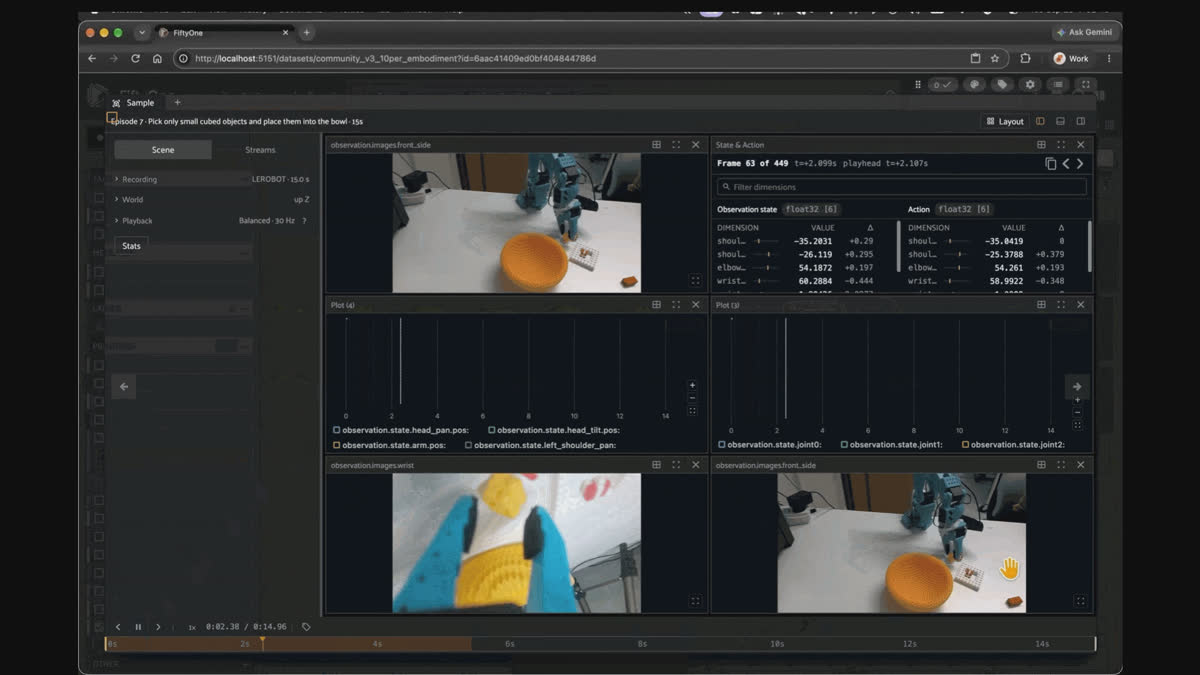
Running a text similarity search for "robot arm picking up lego pieces" against the qwen3vl_embedding_sim index in the FiftyOne App's Similarity Search panel
Search by episode
The
qwen3vl_embedding_sim index powers episode-to-episode search directly from the App or from Python. Pass any sample's ID, and FiftyOne returns the nearest neighbors by video embedding distance. Because every clip's closest matches are its own recording session, filter out the query's dataset_name to see what other robots are doing something similar:from fiftyone import ViewField as F
# one sam_bimanual cloth-folding episode as the query
query = ds.match(
(F("dataset_name") == "girardijp/sam_fold_cloth_single")
& (F("episode_index") == 0)
).first()
# unfiltered: the query and its 9 siblings from the same session
same_session = ds.sort_by_similarity(query.id, k=10, brain_key="qwen3vl_embedding_sim")
# filtered: the 10 nearest episodes from other source datasets
others = (
ds.sort_by_similarity(query.id, k=100, brain_key="qwen3vl_embedding_sim")
.match(F("dataset_name") != query.dataset_name)
.limit(10)
)
for s in others:
print(f"[{s.robot_type}] {s.task}")
# [so100_bimanual] playing with folding (all 10 hits)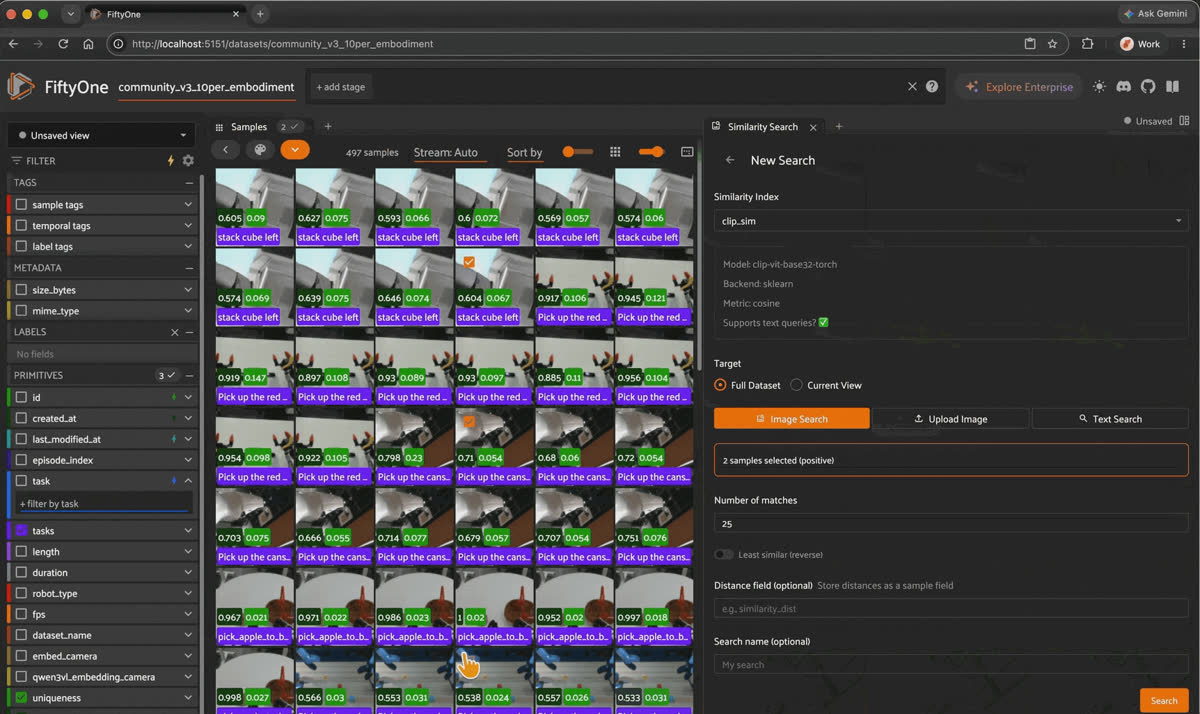
Selecting LeRobot episodes in the FiftyOne App and running an image similarity search from the Similarity Search panel
A
sam_bimanual rig folding a cloth and a pair of SO-100 arms folding cloth look nothing alike as robots, and the model still puts them next to each other. That's the cross-embodiment signal. Some sessions pull in a neighboring robot type instead: the 10 Unitree_G1_Dex3 cube-stacking clips sit within 0.030 of each other, and the first other episode, at rank 10, is a Unitree_Z1_Dual red-cup pick (0.142).Search by text
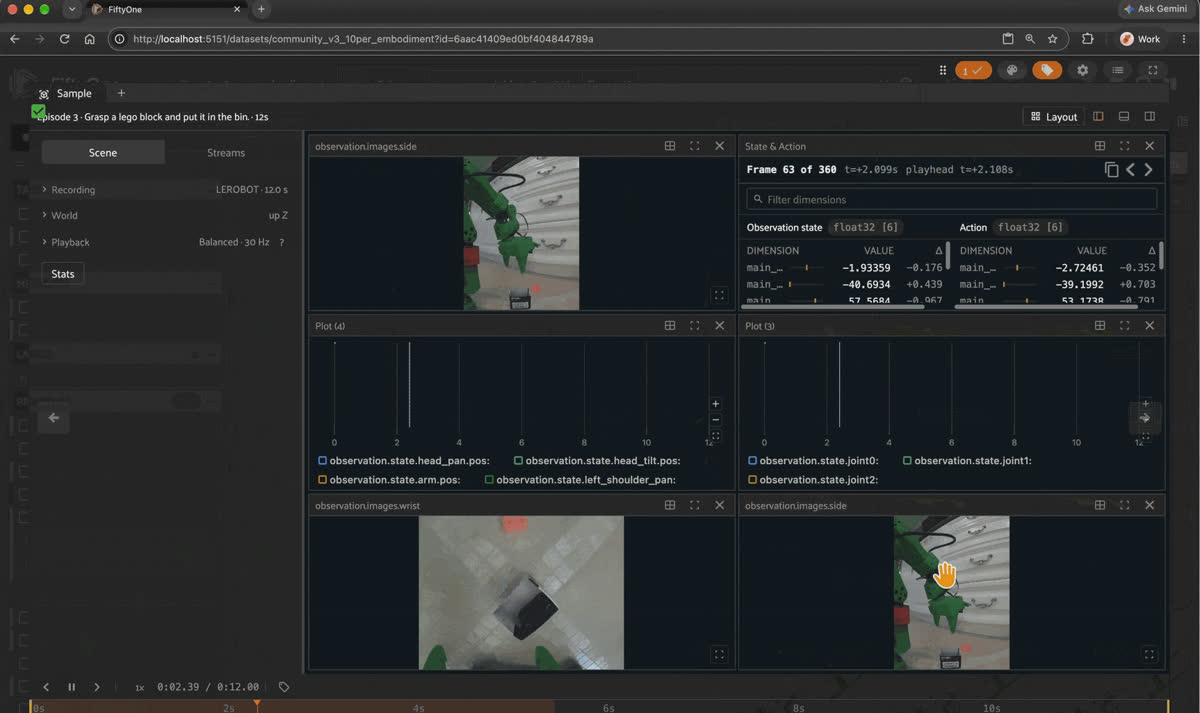
Reopening saved similarity searches in the FiftyOne App, such as "robot arm picking up lego pieces" and "blue robotic arm," to reload their matching LeRobot episodes
The same index takes text. The dataset stores the episode vectors, but FiftyOne still needs the model to embed your query, so register the
qwen3vl_embeddings remote zoo source first:import fiftyone.zoo as foz
# declare which models the remote source provides
foz.register_zoo_model_source(
"https://github.com/harpreetsahota204/qwen3vl_embeddings",
overwrite=True,
)
# optional: the first text query downloads the weights automatically
foz.download_zoo_model("Qwen/Qwen3-VL-Embedding-2B")
for query in ["folding a cloth", "pouring water into a cup", "humanoid robot picking up a can"]:
view = ds.sort_by_similarity(query, k=3, brain_key="qwen3vl_embedding_sim")
print(query, "->", [(s.robot_type, s.task) for s in view])
# summarised output:
# folding a cloth -> sam_bimanual, "Fold a cloth" (x3)
# pouring water into a cup -> bi_so100_follower, "bi soarm100 pour water" (x3)
# humanoid robot picking up a can -> Unitree_G1_Inspire, "Pick up the cans into the box on the table." (x3)The same text box works in the App's similarity panel once
qwen3vl_embedding_sim is selected. Not every query lands: "robot stacking a cube" returns a Unitree_Z1_Single red-cup pick rather than the Unitree_G1_Dex3 cube-stacking clips. Treat text search as a fast way to find candidates, then check them.Build the embedding and index on your own dataset
LeRobot samples have no
filepath, so compute_embeddings can't read the clips for you: decode each episode's time window with PyAV and pass the frames to the model as one video. This is the code behind qwen3vl_embedding (set ROOT to the folder that holds your <contributor>/<dataset>/ directories):from pathlib import Path
import av
import fiftyone.brain as fob
import fiftyone.zoo as foz
ROOT = Path("/path/to/community_dataset_v3")
def episode_frames(video_path, from_ts, to_ts, max_frames=32):
frames = []
with av.open(str(video_path)) as container:
stream = container.streams.video[0]
fps = float(stream.average_rate or 30)
step = max(1, int((to_ts - from_ts) * fps) // max_frames)
container.seek(int(from_ts * 1_000_000), any_frame=False, backward=True)
i = 0
for frame in container.decode(stream):
ts = float(frame.pts * stream.time_base)
if ts < from_ts:
continue
if ts > to_ts or len(frames) >= max_frames:
break
if i % step == 0:
frames.append(frame.to_image())
i += 1
return frames
foz.register_zoo_model_source(
"https://github.com/harpreetsahota204/qwen3vl_embeddings", overwrite=True
)
model = foz.load_zoo_model("Qwen/Qwen3-VL-Embedding-2B") # or Qwen/Qwen3-VL-Embedding-8B
if model._embedder is None:
model._load_model()
for sample in ds.iter_samples(autosave=True, progress=True):
cam, (chunk, file, from_ts, to_ts) = next(iter(sample.media_reference.videos.items()))
path = ROOT / sample.dataset_name / "videos" / cam / f"chunk-{chunk:03d}" / f"file-{file:03d}.mp4"
frames = episode_frames(path, from_ts, to_ts)
# model.embed() expects a file path; the underlying embedder accepts a frame list as a video
sample["qwen3vl_embedding"] = model._embedder.process([{"video": frames}])[0].cpu().float().numpy()
sample["qwen3vl_embedding_camera"] = cam
fob.compute_similarity(
ds,
embeddings="qwen3vl_embedding",
model="Qwen/Qwen3-VL-Embedding-2B",
brain_key="qwen3vl_embedding_sim",
)Passing the model name to
compute_similarity lets the index embed text at query time; an index built without it accepts only episodes as queries. On a GPU, the 497 episodes take about 20 minutes. Then run the UMAP, uniqueness, and representativeness calls from Step 3.Putting it together: export a curated LeRobot v3 training split
Once loaded, querying across 50 embodiments looks like this:
# 50 most unique AND representative episodes, minus the single-frame recordings
seed_view = ds.load_saved_view("curate_diverse_seeds").match(fo.ViewField("duration") > 1)

# Episodes from other robots that look like a given clip
query = ds.match(fo.ViewField("robot_type") == "sam_bimanual").first()
similar = (
    ds.sort_by_similarity(query.id, k=100, brain_key="qwen3vl_embedding_sim")
    .match(fo.ViewField("dataset_name") != query.dataset_name)
    .limit(10)
)

# Episodes matching a description (register the qwen3vl_embeddings source first)
cloth = ds.sort_by_similarity("folding a cloth", k=10, brain_key="qwen3vl_embedding_sim")

# Export the curated subset as standalone LeRobot v3 repos, one per source dataset
for name in seed_view.distinct("dataset_name"):
    seed_view.match(fo.ViewField("dataset_name") == name).export(
        export_dir=f"./my_training_subset/{name.replace('/', '__')}",
        dataset_type=fo.types.LeRobotDataset,
    )
The export loops over
dataset_name because a LeRobot v3 repo has one feature schema, and the 50 embodiments here have different cameras and action dimensions. The 45 seed episodes come from 16 source datasets, so you get 16 repos.That last step is the point. You went from a 900 GB community dataset to a curated, re-indexed LeRobot v3 training split — filtered by visual uniqueness, robot category, task type, or any combination — without writing a parser, a data loader, or a custom video decode loop. A viewer shows you what the robot did. A curated dataset decides what goes into the model.
Frequently Asked Questions
Episode-level metadata only:
episode_index, task, duration, fps, robot_type, and a media_reference that points into the local LeRobot directory. No pixel data, no Parquet rows. The source files stay where they are; FiftyOne reads through the pointer.Not for a standard zoo model — those expect
sample.filepath pointing to a video or image file, and LeRobot samples use media_reference instead. The embedding in this post was computed by working around that: PyAV extracts frames from the episode's time window, and the frames go to the model as a list of PIL images. Step 5 shows the full loop.That's how
Qwen3-VL-Embedding was trained. It's a decoder-only model with no CLS token, and its retrieval training teaches the final token's hidden state to summarize the whole input, whether it's a video clip or a sentence. Using the same pooling for both is what puts episodes and text queries in one space. Mean pooling over an instruction-tuned model's hidden states gives usable vectors for comparing clips, but not for matching them against text.They're stored in the FiftyOne dataset document alongside the samples.
ds.list_saved_views() returns all 75 names; ds.load_saved_view("curate_diverse_seeds") returns the 50 episodes matching that query, resolved against whatever embeddings and fields exist locally.Export a curated view as standalone LeRobot v3 repos, one per source dataset:
for name in view.distinct("dataset_name"):
    view.match(fo.ViewField("dataset_name") == name).export(
        export_dir=f"./my_curated_subset/{name.replace('/', '__')}",
        dataset_type=fo.types.LeRobotDataset,
    )
The exporter refuses to mix episodes from different sources in one repo, since each embodiment has its own cameras and action layout. For each source, it re-indexes episodes from 0, recomputes stats, and writes a self-contained v3 structure that any LeRobot-compatible trainer can read directly.
Hacker-in-Residence
Harpreet is Hacker-in-Residence at Voxel51, where he turns cutting-edge AI ideas into open-source prototypes and demos that push the boundaries of deep learning. From building tools that inspire to creating content that educates, Harpreet helps the AI community level up—one wild idea at a time.
See all articles by Harpreet Sahota
Try Voxel51 for yourself
Loading related posts...
© 2026 Voxel51 All Rights Reserved


