Your Photogrammetry Dataset Is Secretly a Robotics Log: Converting PIVOT to MCAP Episodes in FiftyOne
Author

Hacker-in-Residence
Harpreet is Hacker-in-Residence at Voxel51, where he turns cutting-edge AI ideas into open-source prototypes and demos that push the boundaries of deep learning. From building tools that inspire to creating content that educates, Harpreet helps the AI community level up—one wild idea at a time.
See all articles by Harpreet Sahota
In this article
Try Voxel51 for yourself
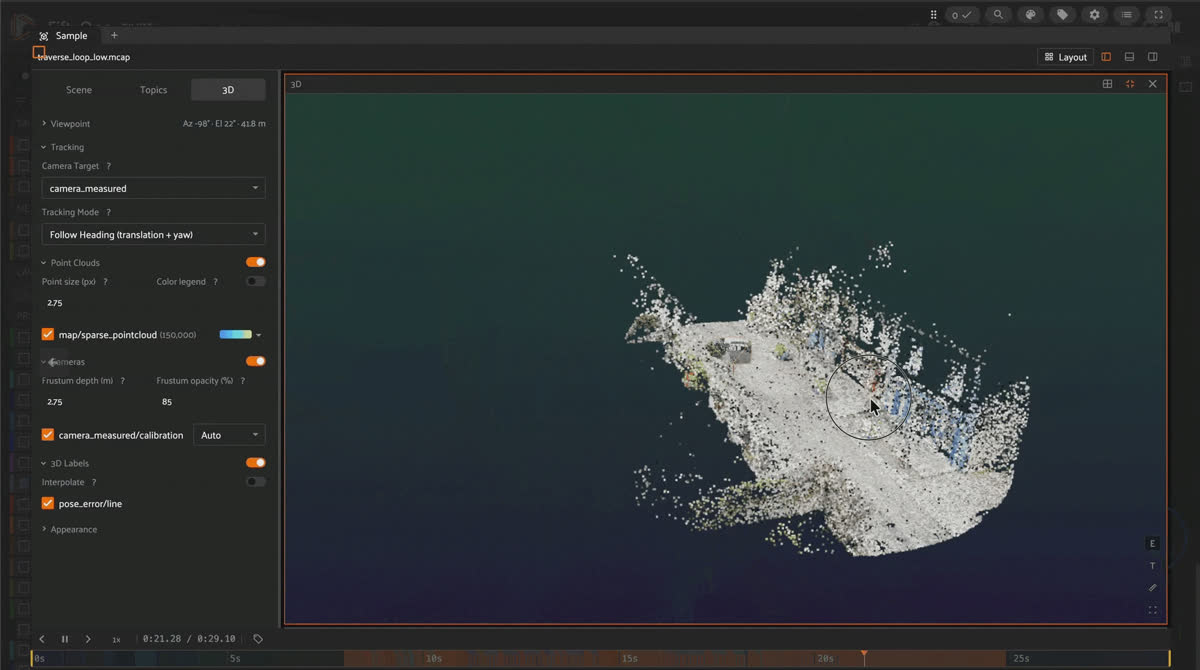
Scrubbing a PIVOT MCAP episode in FiftyOne, with the camera frustum moving along its flight path through the scene's sparse point cloud.
How to turn a 56GB drone photogrammetry dataset into MCAP episodes FiftyOne can scrub through in 3D, using hf download, foxglove-sdk, and one coordinate-conversion function.
PIVOT ships as five folders of JPEGs and one big
scene_data.json per scene. Open the dataset card, and it reads like every other NeRF/3D Gaussian splatting benchmark: scenes, trajectories, camera poses, a sparse point cloud. Nothing about that layout says “robotics dataset.”But look at what’s actually inside
scene_data.json. Every frame carries two camera poses, not one: a measured pose from the drone’s GPS, flight attitude, and gimbal angle, and a COLMAP-optimized pose computed offline from the images themselves. Every trajectory shares one static sparse point cloud with every other trajectory in its scene. And every trajectory is, structurally, a single camera moving through a fixed 3D map over time.MCAP is built for exactly that: timestamped messages on named topics, each with a declared schema, all replayable in sync. Two poses per frame become two
/tf transforms against one map. One point cloud becomes one message logged at the start of the episode, rather than duplicated per frame. This post covers the three steps to get from PIVOT’s raw files to a FiftyOne dataset you can scrub through: download only what you need, author one MCAP per trajectory, load the episodes as samples.Key takeaways
- PIVOT advertises 56GB, but 26GB of that is
PYCOLMAP_soft_prior/— COLMAP’s disposable feature-matching database and candidate reconstructions, already summarized intoscene_data.jsonandsparse_model.ply. Excluding it with hf download --exclude cuts the real download to about 27GB. - Each trajectory becomes one
.mcapfile with four topics:/camera/image_raw (foxglove.CompressedImage),/camera/calibration (foxglove.CameraCalibration),/tf (foxglove.FrameTransform, logged per frame for each pose source), and/map/points (foxglove.PointCloud, logged once). - PIVOT’s world frame is NED (north, east, down) with an OpenGL-style camera convention; Foxglove and FiftyOne expect a Z-up world and an OpenCV/ROS optical camera. Two 3x3 rotation matrices, applied consistently to poses and point-cloud vertices, fix both.
- COLMAP doesn’t register every frame.
church/rocket_upwardhas zero registered frames. The code below checks forcolmap_pose_c2wper frame and skips the transform if it’s missing, rather than fabricating a pose. - The resulting FiftyOne dataset has
media_type == "multimodal": one sample per trajectory, and opening a sample plays the camera moving through the scene’s point cloud.
Installation
pip install "huggingface_hub[cli]" foxglove-sdk plyfile numpy scipy fiftyonehuggingface_hub[cli] provides the hf command used in Step 1. foxglove-sdk provides the foxglove package used to author MCAP files in Step 2, and plyfile reads PIVOT’s .ply point clouds. fiftyone loads the finished episodes in Step 3.Budget disk space for both copies of the data at once: about 27GB for the downloaded JPEGs/JSON/PLY files from Step 1, plus another ~28GB for the .mcap episodes Step 2 writes alongside them, so roughly 55GB free before you start.
Step 1: Download only the data you need
PIVOT’s Hugging Face repo is 56GB, but half of that is COLMAP’s intermediate working files: a multi-gigabyte feature-matching database and several candidate sparse reconstructions per scene, all superseded by the curated
scene_data.json and sparse_model.ply that PIVOT already ships alongside them. Exclude that directory and the download drops to about 27GB:hf download MaryRaymond/PIVOT \
--repo-type dataset \
--local-dir ./PIVOT_dataset \
--exclude "*/PYCOLMAP_soft_prior/*"That leaves this layout on disk, one folder per scene under scenes/:
PIVOT_dataset/
└── scenes/
    ├── backyard/
    │   ├── scene_data.json         # poses, calibration, per-trajectory metadata
    │   ├── sparse_model.ply        # the scene's sparse point cloud
    │   └── trajectories/
    │       ├── orbit_inward_low/
    │       │   ├── frame_000000.JPG
    │       │   └── ...
    │       └── ...                 # 22 trajectory folders in this scene
    ├── church/
    ├── frontyard/
    ├── victorian_garden/
    └── village_street/
Five scenes, 103 trajectories in total. Step 2 reads
scene_data.json and sparse_model.ply directly; it never touches the JPEGs except through the file names listed inside scene_data.json. A single frame entry inside that file looks like this:{
"file_name": "trajectories/orbit_inward_low/frame_000000.JPG",
"measured_pose_c2w": [[...], [...], [...], [0, 0, 0, 1]],
"colmap_pose_c2w": [[...], [...], [...], [0, 0, 0, 1]]
}colmap_pose_c2w is present on registered frames. On frames COLMAP couldn’t place, the key is absent entirely, not set to null.Step 2: Author one MCAP per trajectory
PIVOT’s poses are 4x4 camera-to-world matrices in the NED world frame (X-north, Y-east, Z-down) with an OpenGL-style camera (X-right, Y-up, Z-backward). Foxglove expects a Z-up world and an OpenCV/ROS optical camera (X right, Y down, Z forward). Two rotation matrices, applied the same way to every pose and to the point cloud, handle both:
import numpy as np
from scipy.spatial.transform import Rotation

# PIVOT's world frame is NED: X points north, Y points east, Z points down.
# Foxglove/FiftyOne expect a right-handed, Z-up world, so the world basis
# needs X and Y swapped and Z flipped.
R_NED_TO_ENU = np.array([[0.0, 1.0, 0.0], [1.0, 0.0, 0.0], [0.0, 0.0, -1.0]])

# PIVOT's camera frame is OpenGL-style: X right, Y up, Z backward (the camera
# looks down -Z). Foxglove/ROS expect the optical convention: X right, Y down,
# Z forward (the camera looks down +Z). Flipping Y and Z gets you there.
R_OPENGL_TO_OPENCV = np.diag([1.0, -1.0, -1.0])


def convert_pose(pose_c2w: np.ndarray) -> np.ndarray:
    """Convert one 4x4 camera-to-world pose from PIVOT's convention
    (NED world, OpenGL camera) to Foxglove's (Z-up world, OpenCV camera).

    The world rotation goes on the left because it redefines what "world"
    means; the camera rotation goes on the right because it redefines what
    "camera-local" means. Composing world @ pose @ cam applies both without
    disturbing the translation PIVOT already computed.
    """
    world = np.eye(4)
    world[:3, :3] = R_NED_TO_ENU
    cam = np.eye(4)
    cam[:3, :3] = R_OPENGL_TO_OPENCV
    return world @ pose_c2w @ cam


def convert_points(xyz: np.ndarray) -> np.ndarray:
    """Rotate Nx3 point-cloud vertices into the same Z-up world frame used
    by convert_pose. Points have no camera-local frame, so only the world
    rotation applies here -- no camera term, no translation."""
    return (R_NED_TO_ENU @ xyz.T).T


def translation_and_quat(c2w: np.ndarray):
    """Split a 4x4 camera-to-world matrix into the (translation, quaternion)
    pair that foxglove.messages.FrameTransform expects."""
    quat = Rotation.from_matrix(c2w[:3, :3]).as_quat()  # scipy returns (x, y, z, w)
    return c2w[:3, 3], quat
PIVOT ships no real per-frame capture timestamps — the JPEG EXIF timestamps are stripped; only GPS and gimbal angles survive. The MCAP uses a synthetic 10 fps sequence clock instead, so frame order is preserved without claiming a real elapsed flight time:
import json
from pathlib import Path

import foxglove
from foxglove.channels import (
    CameraCalibrationChannel, CompressedImageChannel,
    FrameTransformChannel, PointCloudChannel,
)
from foxglove.messages import (
    CameraCalibration, CompressedImage, FrameTransform,
    PackedElementField, PackedElementFieldNumericType,
    PointCloud, Pose, Quaternion, Timestamp, Vector3,
)
from plyfile import PlyData

FRAME_PERIOD_NS = 100_000_000  # synthetic 10 fps clock -- PIVOT has no real timestamps
# MCAP timestamps are always nanoseconds since the Unix epoch, never seconds --
# that unit mixup is the most common way an MCAP file loads but shows dates in
# 1970 or refuses to seek. Keeping everything in the "_NS" suffix and building
# on it (never converting to float seconds) sidesteps the whole bug class.


def ts(ns: int) -> Timestamp:
    """Foxglove's Timestamp is a (seconds, nanoseconds) pair, not one integer,
    so every logged message needs this split."""
    return Timestamp(sec=ns // 1_000_000_000, nsec=ns % 1_000_000_000)


def build_episode(scene_dir: Path, trajectory: str, out_path: Path):
    """Write one MCAP file for one PIVOT trajectory.

    An episode replays five things together, all keyed on log_time:
      - one point cloud, logged once, in the "world" frame
      - one image per frame, on /camera/image_raw
      - one calibration message per frame, on /camera/calibration
      - one "world -> camera" transform per frame (the measured pose)
      - one "world -> camera_colmap" transform per frame, but only on
        frames COLMAP actually registered

    Because Foxglove/FiftyOne replay all of these in sync, scrubbing the
    episode moves a camera frustum through the point cloud instead of just
    paging through a folder of unrelated JPEGs.
    """
    scene = json.loads((scene_dir / "scene_data.json").read_text())
    traj = scene["trajectories"][trajectory]
    calib = traj["camera_intrinsic_calibration"]
    fx, fy, cx, cy = calib["fl_x"], calib["fl_y"], calib["cx"], calib["cy"]

    # The point cloud belongs to the scene, not the trajectory -- every
    # trajectory in this scene shares it, so it's loaded and converted once
    # per episode here, not once per frame.
    ply = PlyData.read(str(scene_dir / "sparse_model.ply"))
    v = ply["vertex"]
    points = convert_points(np.vstack([v["x"], v["y"], v["z"]]).T.astype(np.float64))
    colors = np.vstack([v["red"], v["green"], v["blue"]]).T.astype(np.uint8)

    # A channel is a named, schema-typed topic. Create one per topic, then
    # call .log() on it once per message -- that's how foxglove-sdk writes
    # an MCAP file.
    img_ch = CompressedImageChannel(
        # The viewer only draws a frustum on the image if the topic name's
        # last segment contains "image" plus one of raw/rect/rectified --
        # this exact name is doing real work, not just a label.
        topic="/camera/image_raw",
        # This is the pairing that makes viewers draw a camera frustum on the
        # image: the image channel names its calibration topic explicitly,
        # in its own metadata. Without this key, the CameraCalibration
        # messages below are logged but never associated with the image.
        metadata={"mcap.calibration_topic": "/camera/calibration"},
    )
    calib_ch = CameraCalibrationChannel(topic="/camera/calibration")
    tf_ch = FrameTransformChannel(topic="/tf")
    pc_ch = PointCloudChannel(topic="/map/points")

    with foxglove.open_mcap(str(out_path), allow_overwrite=True):
        # foxglove.PointCloud stores one interleaved byte buffer per point:
        # 12 bytes of XYZ (three float32) followed by 4 bytes of RGBA (four
        # uint8) = 16 bytes/point. point_stride and the `fields` list below
        # describe that exact byte layout so viewers know how to decode it.
        rgba = np.concatenate([colors, np.full((len(colors), 1), 255, dtype=np.uint8)], axis=1)
        xyz_bytes = np.ascontiguousarray(points, dtype=np.float32).view(np.uint8).reshape(len(points), 12)
        pc_ch.log(
            PointCloud(
                timestamp=ts(0), frame_id="world",
                pose=Pose(position=Vector3(x=0.0, y=0.0, z=0.0),
                          orientation=Quaternion(x=0.0, y=0.0, z=0.0, w=1.0)),
                point_stride=16,
                fields=[
                    PackedElementField(name="x", offset=0, type=PackedElementFieldNumericType.Float32),
                    PackedElementField(name="y", offset=4, type=PackedElementFieldNumericType.Float32),
                    PackedElementField(name="z", offset=8, type=PackedElementFieldNumericType.Float32),
                    PackedElementField(name="red", offset=12, type=PackedElementFieldNumericType.Uint8),
                    PackedElementField(name="green", offset=13, type=PackedElementFieldNumericType.Uint8),
                    PackedElementField(name="blue", offset=14, type=PackedElementFieldNumericType.Uint8),
                    PackedElementField(name="alpha", offset=15, type=PackedElementFieldNumericType.Uint8),
                ],
                data=np.concatenate([xyz_bytes, rgba], axis=1).tobytes(),
            ),
            log_time=0,  # logged once, at the start of the episode -- never repeated per frame
        )

        for i, frame in enumerate(traj["frames"]):
            # No real capture clock exists (see the note above), so log_time
            # is just the frame index times the synthetic 100 ms period.
            t_ns = i * FRAME_PERIOD_NS

            img_ch.log(
                CompressedImage(timestamp=ts(t_ns), frame_id="camera", format="jpeg",
                                 data=(scene_dir / frame["file_name"]).read_bytes()),
                log_time=t_ns,
            )

            # The intrinsics are constant for the whole trajectory, but logging
            # them on every frame keeps each timestamp fully self-describing --
            # a viewer scrubbed to any single frame still has a calibration
            # message to pair with the image, with no lookup required.
            calib_ch.log(
                CameraCalibration(
                    timestamp=ts(t_ns), frame_id="camera", width=calib["w"], height=calib["h"],
                    distortion_model="plumb_bob",  # OpenCV's 5-coefficient model: k1, k2, p1, p2, k3
                    D=[calib["k1"], calib["k2"], calib["p1"], calib["p2"], calib["k3"]],
                    K=[fx, 0, cx, 0, fy, cy, 0, 0, 1],
                    R=[1, 0, 0, 0, 1, 0, 0, 0, 1],  # identity -- no stereo rectification here
                    P=[fx, 0, cx, 0, 0, fy, cy, 0, 0, 0, 1, 0],
                ),
                log_time=t_ns,
            )

            # Measured pose: always present, straight from the drone's onboard
            # GPS, flight attitude, and gimbal angle. This is the pose a real
            # deployed robot would actually have, with no offline optimization.
            t_m, q_m = translation_and_quat(convert_pose(np.array(frame["measured_pose_c2w"])))
            tf_ch.log(
                FrameTransform(timestamp=ts(t_ns), parent_frame_id="world", child_frame_id="camera",
                                translation=Vector3(x=t_m[0], y=t_m[1], z=t_m[2]),
                                rotation=Quaternion(x=q_m[0], y=q_m[1], z=q_m[2], w=q_m[3])),
                log_time=t_ns,
            )

            # COLMAP pose: only logged when this specific frame registered.
            # Checking for the key's presence (not its value) matters here --
            # PIVOT omits the key entirely on unregistered frames rather than
            # setting it to null, so frame.get("colmap_pose_c2w") with a
            # fallback would silently invent a fake pose instead of skipping
            # the frame the way this `in` check does.
            if "colmap_pose_c2w" in frame:
                t_c, q_c = translation_and_quat(convert_pose(np.array(frame["colmap_pose_c2w"])))
                tf_ch.log(
                    FrameTransform(timestamp=ts(t_ns), parent_frame_id="world", child_frame_id="camera_colmap",
                                    translation=Vector3(x=t_c[0], y=t_c[1], z=t_c[2]),
                                    rotation=Quaternion(x=q_c[0], y=q_c[1], z=q_c[2], w=q_c[3])),
                    log_time=t_ns,
                )
Good to know. Why does calibration render silently fail so often?
Pairing an image with a
CameraCalibration message has four independent gates, and missing any one of them just gives you an image with no frustum, no error: the calibration message has to exist, the image channel has to name its calibration topic in metadata (as above), the image topic’s last path segment has to contain image plus raw/rect/rectified, and distortion_model has to be spelled exactly plumb_bob, rational_polynomial, equidistant, or fisheye — kannala_brandt, for instance, is rejected even though it’s the same model as equidistant.Good to know. Why two /tf transforms per frame instead of one?
PIVOT’s whole design rests on comparing pose sources:
measured_pose_c2w comes from the drone’s onboard sensors, colmap_pose_c2w comes from offline structure-from-motion. Logging both against the same /map/points on separate child frames (camera and camera_colmap) keeps that comparison intact rather than collapsing it to a single “correct” pose.Keep it honest.
This trajectory
(orbit_inward_low) uses a standard-field of view (FOV) lens, so a 5-coefficient plumb_bob model is enough. PIVOT’s wide-FOV trajectories use a genuine 4-coefficient fisheye fit, and at least one of those fits turns non-invertible near the edge of the frame. That’s a real gotcha, but a distortion-model detail rather than part of the MCAP-authoring story, so it’s left out here.| Topic | Foxglove schema | Logged | What it carries |
|---|---|---|---|
| /camera/image_raw | CompressedImage | Every frame | The original JPEG bytes, unmodified |
| /camera/calibration | CameraCalibration | Every frame | Trajectory intrinsics and plumb_bob distortion, repeated so each timestamp is self-describing |
| /tf (world to camera) | FrameTransform | Every frame | The measured pose from the drone's GPS, flight attitude, and gimbal angle |
| /tf (world to camera_colmap) | FrameTransform | Registered frames only | The COLMAP-optimized pose, skipped when the key is absent |
| /map/points | PointCloud | Once, at log_time=0 | The scene's static sparse point cloud, shared by every trajectory |
Validate before you batch.
A message-count check is not proof the file is good — one MCAP conversion can report every channel count matching its source and still contain a multi-gigabyte hole of zeros, or camera poses composed with a reversed rotation, and the summary read at the end still parses fine either way. Before generating all 103 files, decode at least one message per channel from the first one and eyeball a real value:
from mcap.reader import make_reader

with open(out_path, "rb") as f:
    reader = make_reader(f)
    print(reader.get_summary().statistics)  # message_count, channel_count, time range
    next(reader.iter_messages())            # actually decodes a message -- proves the file isn't corrupt
Only once that one episode looks right — ideally opened in a viewer, not just decoded in Python — is it worth calling
build_episode() for the rest. Every trajectory name lives as a key in scene_data.json’s "trajectories" dict, so walking the five scene folders from Step 1 and that dict’s keys is enough to drive all 103 calls:PIVOT_ROOT = Path("./PIVOT_dataset/scenes") # the --local-dir from Step 1
EPISODES_DIR = Path("./episodes") # Step 3 reads .mcap files back out of here
for scene_dir in sorted(PIVOT_ROOT.iterdir()):
if not scene_dir.is_dir():
continue
scene = json.loads((scene_dir / "scene_data.json").read_text())
out_dir = EPISODES_DIR / scene_dir.name
out_dir.mkdir(parents=True, exist_ok=True)
for trajectory in scene["trajectories"]:
build_episode(scene_dir, trajectory, out_dir / f"{trajectory}.mcap")
print(f"wrote {scene_dir.name}/{trajectory}.mcap")That’s the full pipeline: 5 scene folders in, 103 .mcap files out, one per drone flight, laid out as
episodes/<scene>/<trajectory>.mcap for Step 3 to glob.Step 3: Load the MCAP episodes into a FiftyOne dataset
Each
.mcap file is one sample. FiftyOne reads the file extension and sets media_type to "multimodal" automatically:from pathlib import Path
import fiftyone as fo
EPISODES_DIR = Path("./episodes") # one subfolder per scene, one .mcap file per trajectory
dataset = fo.Dataset("PIVOT-mcap", persistent=True)
dataset.add_samples([
# filepath is the only field FiftyOne strictly needs: it reads the .mcap
# extension and infers the sample's channels, schemas, and duration
# straight from the file. scene/trajectory are just convenience fields
# for filtering samples in the App afterward.
fo.Sample(filepath=str(mcap_path), scene=mcap_path.parent.name, trajectory=mcap_path.stem)
for mcap_path in sorted(EPISODES_DIR.glob("*/*.mcap"))
])
print(dataset.media_type) # "multimodal" -- set automatically because the samples are .mcap files
session = fo.launch_app(dataset) # scrub through an episode to watch the camera moveOpen a sample in the App, and you get a synchronized 3D view: the point cloud sitting still, the measured-pose camera frustum moving along its real flight path, and, on every frame COLMAP registered, a second frustum tracking the optimized pose next to it.
Try it yourself
- PIVOT-mcap on Hugging Face (the pre-built FiftyOne dataset from this post)
- PIVOT-mcap dataset running in a Hugging Face Space (no install or code necessary)
- MaryRaymond/PIVOT (the source dataset)
- PIVOT paper (arXiv:2608.25401)
- PIVOT GitHub repository
Frequently Asked Questions
Because a trajectory is already a time series: one camera moving through one fixed map, with more than one candidate pose per moment. A flat image dataset can hold pose values as metadata, but it can’t play them back in sync with a shared 3D map the way an MCAP episode does in the FiftyOne/Foxglove viewer.
They keep their measured pose and lose nothing else. church/rocket_upward has zero registered frames dataset-wide, a documented issue in PIVOT’s own dataset card, not a bug in this pipeline. Its MCAP has a camera frustum moving throughout the entire flight, with no camera_colmap frustum at all.
Only if you’re building all 103 trajectories, not just the standard-FOV ones this post walks through. PIVOT’s wide-FOV calibration is a genuine k1-k4 fisheye fit, and it can turn non-monotonic (non-invertible) near the edge of the frame. Worth knowing before you hit an “invalid projection domain” error, but a distortion-model problem, not an MCAP-authoring one.
Roughly 28GB across 103 files for all five scenes, smaller than PIVOT’s own 56GB Hugging Face listing since the raw COLMAP intermediates never get downloaded in the first place.
Hacker-in-Residence
Harpreet is Hacker-in-Residence at Voxel51, where he turns cutting-edge AI ideas into open-source prototypes and demos that push the boundaries of deep learning. From building tools that inspire to creating content that educates, Harpreet helps the AI community level up—one wild idea at a time.
See all articles by Harpreet Sahota
Try Voxel51 for yourself
Loading related posts...
© 2026 Voxel51 All Rights Reserved


