What Actually Breaks When You Author MCAP by Hand
Author

Hacker-in-Residence
Harpreet is Hacker-in-Residence at Voxel51, where he turns cutting-edge AI ideas into open-source prototypes and demos that push the boundaries of deep learning. From building tools that inspire to creating content that educates, Harpreet helps the AI community level up—one wild idea at a time.
See all articles by Harpreet Sahota
In this article
Key takeawaysThe MCAP file that writes clean and plays back brokenNanoseconds aren't what you think they areUppercase, lowercase, three failed calibration attemptsStop writing your own PLY parserThe bug that never throws an errorTwo sensors, two clocks, one schemaA short MCAP authoring checklistQuestions? We have answers.
In this article
Key takeawaysThe MCAP file that writes clean and plays back brokenNanoseconds aren't what you think they areUppercase, lowercase, three failed calibration attemptsStop writing your own PLY parserThe bug that never throws an errorTwo sensors, two clocks, one schemaA short MCAP authoring checklistQuestions? We have answers.
Try Voxel51 for yourself
Six bugs I hit writing raw sensor data into MCAP files by hand, none of which showed up until I least expected them.
You write the MCAP file. The writer finishes without complaint. The validator passes. The message count matches your source data exactly. You open it in a viewer and nothing plays.
That is the defining characteristic of MCAP authoring errors: they stay silent during serialization, rarely triggering a runtime exception.
I've spent a good chunk of the last few months converting raw sensor data (image folders, point cloud files, CSV telemetry, HDF5 logs) into MCAP files so I could load them into FiftyOne's multimodal viewer:
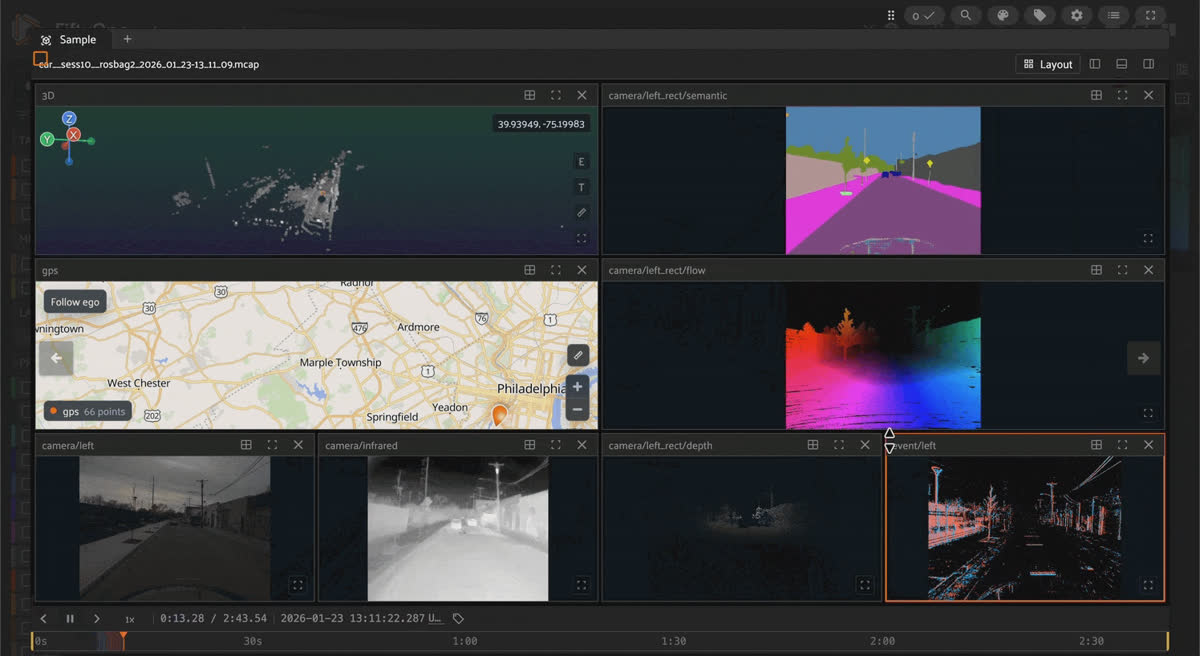
FiftyOne multimodal viewer playing an MCAP file, with panels for a 3D point cloud, GPS map, semantic segmentation, optical flow, RGB, infrared, depth, and event camera streams on a shared timeline.
Some of that data came from ROS bags. Most of it didn't come from anything MCAP-shaped at all, which meant writing the files by hand: registering schemas, registering channels, and calling the writer message by message.
I've now hit the same handful of bugs enough times across unrelated datasets that I want you to feel assured that these issues are common. This guide is the resource I wish I had when I first started. Whether creating MCAP files from scratch or troubleshooting an unplayable, newly written file, these insights aim to give you confidence and clarity to avoid hours of frustration.
Before getting into it, let's clarify two key concepts:
- MCAP: A container format designed for timestamped sensor data. It uses Foxglove's built-in message schemas (such as foxglove.CompressedImage and foxglove.PointCloud) while also supporting any custom schemas you define.
- "Authoring": The process of manually constructing one of these files from raw dataset sources that did not originate from a live recording pipeline, rather than capturing streams directly from an active system.
Key takeaways
- A schema literally named foxglove.CompressedImage written with JSON encoding compiles and writes with zero errors. It only fails during playback, with every topic showing "Encoding unsupported".
- nsec is the sub-second remainder of a timestamp (0 to 999,999,999), not the epoch nanosecond value. Getting this backwards throws OverflowError. I hit it twice, once from a full-value pass-through and once from a negative timestamp.
- Camera calibration field-name casing (D/K/R/P vs d/k/r/p) in the Foxglove SDK cost me three failed attempts on a single message.
- Hand-rolled binary parsers for PLY and PCD files break on real data. I rewrote mine twice, on two unrelated datasets, after they silently dropped faces or misread strides.
- The most expensive bugs never throw an error at all. A flipped sign convention or a mismatched calibration matrix decodes fine, plays back fine, and is just wrong.
- A single schema can carry two different clock domains at once, with no field indicating which is which. Only a magnitude check catches it.
| Bug | What you see | Fix |
|---|---|---|
| foxglove.* schema written as JSON | Validator passes, viewer shows "Encoding unsupported" | Use msgs.X.get_schema() and protobuf encoding |
| Full epoch nanoseconds in nsec | OverflowError on nsec | One ns_to_ts() helper: sec = ns // 1e9, nsec = ns % 1e9 |
| Negative relative timestamp | Same OverflowError | Filter rows where event_ns - anchor_ns < 0 |
| Calibration field casing | TypeError or AttributeError | Uppercase D, K, R, P, check help(cls) |
| Hand-rolled PLY/PCD parser | Silently dropped faces, wrong strides | trimesh, open3d, or pypcd4 |
| Sign or calibration mismatch | Nothing, values decode fine | Numeric assertion against a known reference |
| Mixed clock domains | Channels pinned to 1970 in the timeline | Magnitude check against a Unix floor |
The MCAP file that writes clean and plays back broken
Foxglove ships a set of well-known schemas (
foxglove.CompressedImage, foxglove.PointCloud, foxglove.FrameTransform, and others) that viewers can decode natively. Nothing stops you from declaring a schema with one of these exact names and encoding it as JSON instead of the protobuf format the name implies. The writer has no way to object: the file it produces is byte-valid and passes every check you can run against it offline.The only place this actually shows up is in a viewer, where every one of those topics comes back as
"Encoding unsupported" and nothing previews.Good to know. Viewers match a decoder to a message by the schema's *name*, not its encoding. A schema named foxglove.CompressedImage written as JSON looks, from the writer's side, exactly as valid as the real protobuf version. The mismatch is invisible until something tries to decode it.
# Compiles, writes, and plays back nothing:
schema = foxglove.Schema(
    name="foxglove.CompressedImage",
    encoding="jsonschema",
    data=json.dumps({...}).encode(),
)
chan = foxglove.Channel(topic="/cam", message_encoding="json", schema=schema)

# Pull the real schema and encode with it instead:
schema = msgs.CompressedImage.get_schema()   # encoding is "protobuf"
chan = foxglove.Channel(topic="/cam", message_encoding="protobuf", schema=schema)
chan.log(msg.encode(), log_time=t_ns)
Keep it honest. This is the costliest bug on this list because a valid file can give you false confidence. I hit it in two separate conversion scripts, weeks apart, before I connected the two. If your
foxglove.*-named topics all show the same unsupported-encoding error, check msgs.X.get_schema().encoding before you look anywhere else.Nanoseconds aren't what you think they are
Foxglove's timestamp fields split a value into
sec and nsec. sec is the whole seconds since the epoch. nsec is the sub-second remainder, capped at 999,999,999. Pass a full epoch-nanosecond value into nsec, and you get:OverflowError: out of range integral type conversion … nsecThe fix is one line, and I now keep it in exactly one place instead of writing it inline at every call site:
def ns_to_ts(ns: int) -> Timestamp:
  return Timestamp(sec=ns // 1_000_000_000, nsec=ns % 1_000_000_000)
Good to know. I hit a second version of this same error from the other direction: a relative timestamp computed as
event_ns - anchor_ns came out negative, because the event genuinely happened before the anchor I was measuring against. Negative nanoseconds hit the same overflow. The fix there wasn't a formula; it was filtering out rows where the subtraction would go negative before the split ever ran.Keep it honest. A closely related trap: some timestamp fields expect a
Timestamp object and others expect a Duration, and they're easy to mix up because both carry sec/nsec. I got TypeError: 'Duration' object is not an instance of 'Timestamp' from exactly that mix-up.Uppercase, lowercase, three failed calibration attempts
Some SDK message classes mirror conventions from other robotics tooling: camera calibration matrices named D, K, R, P in uppercase, while everything else in the same library uses lowercase field names. Nothing about the class signals which convention applies until you try it.
It took me three attempts to author a single calibration message correctly:
# Attempt 1: TypeError, wrong casing
CameraCalibration(width=w, height=h, distortion_model="equidistant",
                   d=[...], k=[...], r=[...], p=[...])

# Attempt 2: AttributeError on width, still wrong
# (same shape, different failure surface)

# Attempt 3: works
CameraCalibration(width=w, height=h, distortion_model="kannala_brandt",
                   D=[...], K=[...], R=[...], P=[...])
Notice the distortion model name changed too. The model most robotics tooling calls equidistant uses the same math; a different schema calls kannala_brandt. Same fisheye model, two names, and picking the wrong one fails independently of the casing bug.
Good to know.
inspect.signature() returns (self, /, *args, **kwargs) on these classes, because they're compiled extensions, not plain Python. It tells you nothing. help(cls) does render the real signature and field names. I wasted a full round trip on inspection.signature() before remembering this, more than once.Keep it honest. Field names also drift silently between SDK versions with no deprecation warning. I hit an
AttributeError on a field the docs described, because a newer version had renamed it. There's no static check for this. Read the source for the version you actually have installed every time you touch a schema class you haven't used yet.Stop writing your own PLY parser
A binary PLY file looks simple: a short text header, then a flat array of floats. It's tempting to write your own parser in twenty lines and move on. Real files have quads mixed with triangles, extra vertex properties, and face-loop encodings that don't match the assumption you made from the one file you tested against.
I hand-rolled a PLY parser twice, on two unrelated datasets, and broke it both times:
# Hand-rolled parser: silently drops any face that isn't a triangle
for i in range(n_faces):
    count = int(faces_raw[offset])
    if count != 3:
        offset += 1 + count * 4
        continue          # quad faces just vanish, no error
    ...

# Replaced with a real library:
import trimesh
mesh = trimesh.load(io.BytesIO(data), file_type="ply", process=False, force="mesh")
verts = np.asarray(mesh.vertices, dtype=np.float32)
faces = np.asarray(mesh.faces, dtype=np.int32)   # quads triangulated automatically
Good to know. The same logic applies to PCD files. A generic point cloud reader (
open3d, pypcd4) handles variable field layouts across sensors better than a parser written for a single file from a single sensor.Keep it honest. None of this throws an error. A wrong stride or a dropped face decodes into a number, and that number looks like a point until you check it against something you already know is true, like a total point count or a known bounding box.
The bug that never throws an error
Geometry and calibration bugs are the hardest on this list, because nothing in the writer can tell your physics is wrong. The values are well-typed floats. They decode fine, play back fine, and are simply incorrect.
I hit two versions of this. The first: a gaze-direction vector computed with the wrong sign on one axis because I assumed the frame's Y-axis pointed up, whereas the convention I was working with defines it as down.
# Wrong axis convention, no error, just a flipped vector:
cpf_dir = np.array([
    np.cos(pitch) * np.sin(yaw),
    np.sin(pitch),        # assumes Y is up
    np.cos(pitch) * np.cos(yaw),
])

# Corrected once I checked the actual convention:
cpf_dir = np.array([
    np.cos(pitch) * np.sin(yaw),
    -np.sin(pitch),        # Y is down in this convention
    np.cos(pitch) * np.cos(yaw),
])
The second: a camera calibration authored from two different intrinsic matrices for two different purposes, one raw and one rectified, that disagreed with each other by about a hundred pixels of focal length. Every downstream projection that assumed the two matrices described the same camera came out systematically wrong.
Good to know. Neither of these was caught by decoding the file, checking message counts, or running the file through a validator. The sign flip required cross-checking against a known gaze target. The calibration mismatch required someone to compare the two matrices directly.
Keep it honest. If your authoring script has no assertion that checks a calibration or transform against something you already know to be true, you have no defence against this class of bug. I didn't, for either of these, until after they'd already shipped.
Two sensors, two clocks, one schema
Two sensors can share the same message schema and still run on completely different clocks. I ran into this with two inertial measurement unit (IMU) streams described by the same YAML structure in the same source file: one reported time as seconds since the sensor booted, near zero, and the other reported real Unix epoch time. Nothing in the schema tells you which is which.
Authoring both streams' timestamps literally produces a file that passes every structural check. It decodes cleanly. The message counts are correct. Only a timeline view shows two of the channels set to 1970, while everything else is set to the present.
The schema gives you no field to key off, so the fix has to compare the timestamp's magnitude against a threshold:
_UNIX_NS_FLOOR = 1_600_000_000_000_000_000  # somewhere in 2020, in nanoseconds

def safe_ts(stamp_ns: int, fallback_ns: int) -> int:
    return stamp_ns if stamp_ns > _UNIX_NS_FLOOR else fallback_ns
Good to know. The floor value itself doesn't need to be precise. It just needs to sit somewhere between "any boot-relative or otherwise-not-real timestamp this data could produce" and "the earliest real date this data could plausibly have."
Keep it honest. I only found this because I looked at the actual playback timeline, not because anything decoded, counted, or validated differently. If you're authoring from a source with multiple time-reporting conventions, check the timeline, not just the file structure.
A short MCAP authoring checklist
- Print
msgs.X.get_schema().encodingfor every Foxglove-namespaced schema before writing a single message. If it doesn't sayprotobuf, stop. - Write one
ns_to_ts()helper, used everywhere. Never splitsec/nsecinline at the call site. - Run
help(cls)on every message class you haven't used before. Don't trustinspect.signature(). - Use a real parsing library for any standard file format. Reserve hand-written parsing for formats with no library at all.
- Add at least one numeric assertion for every calibration or transform you author, checked against something you already know is true.
- If your source has more than one sensor reporting time, check the actual playback timeline before you trust the file structure.
I hope this saves you the hours it cost me. If you're an agent reading this while debugging a freshly-authored MCAP file that won't play, start with the first item on that list. It was the answer more often than everything else on this page combined.
Questions? We have answers.
Check the encoding of every
foxglove.*-namespaced schema you declared. If you wrote it with jsonschema/json encoding instead of protobuf, that's the cause. Pull the real schema with msgs.X.get_schema() and encode messages with .encode() instead of json.dumps().nsec holds only the sub-second remainder (0 to 999,999,999). If you're passing a full epoch-nanosecond value, split it first: sec = ns // 1_000_000_000, nsec = ns % 1_000_000_000. If the error comes from a negative value, check whether your relative-timestamp subtraction can go negative before the split.No, not for a standard format. Use trimesh for
PLY and open3d or pypcd4 for PCD. Hand-written parsers work on the one file you tested against and silently misdecode anything with a layout you didn't anticipate.Write a numeric assertion into the authoring script itself: check that two calibration sources agree within a tolerance, or that a known reference point projects to roughly where you expect. Nothing in the writer or the file format checks this for you.
Those channels carry boot-relative timestamps instead of Unix epoch time. Two sensors can share a schema and still use different clocks, so compare each timestamp's magnitude against a floor and fall back to a known-good clock when it's below it.
Hacker-in-Residence
Harpreet is Hacker-in-Residence at Voxel51, where he turns cutting-edge AI ideas into open-source prototypes and demos that push the boundaries of deep learning. From building tools that inspire to creating content that educates, Harpreet helps the AI community level up—one wild idea at a time.
See all articles by Harpreet Sahota
Try Voxel51 for yourself
Loading related posts...
© 2026 Voxel51 All Rights Reserved


