Seven Downloads, One MCAP: Authoring a Full Aria Digital Twin Episode for FiftyOne
Author

Hacker-in-Residence
Harpreet is Hacker-in-Residence at Voxel51, where he turns cutting-edge AI ideas into open-source prototypes and demos that push the boundaries of deep learning. From building tools that inspire to creating content that educates, Harpreet helps the AI community level up—one wild idea at a time.
See all articles by Harpreet Sahota
In this article
Try Voxel51 for yourself
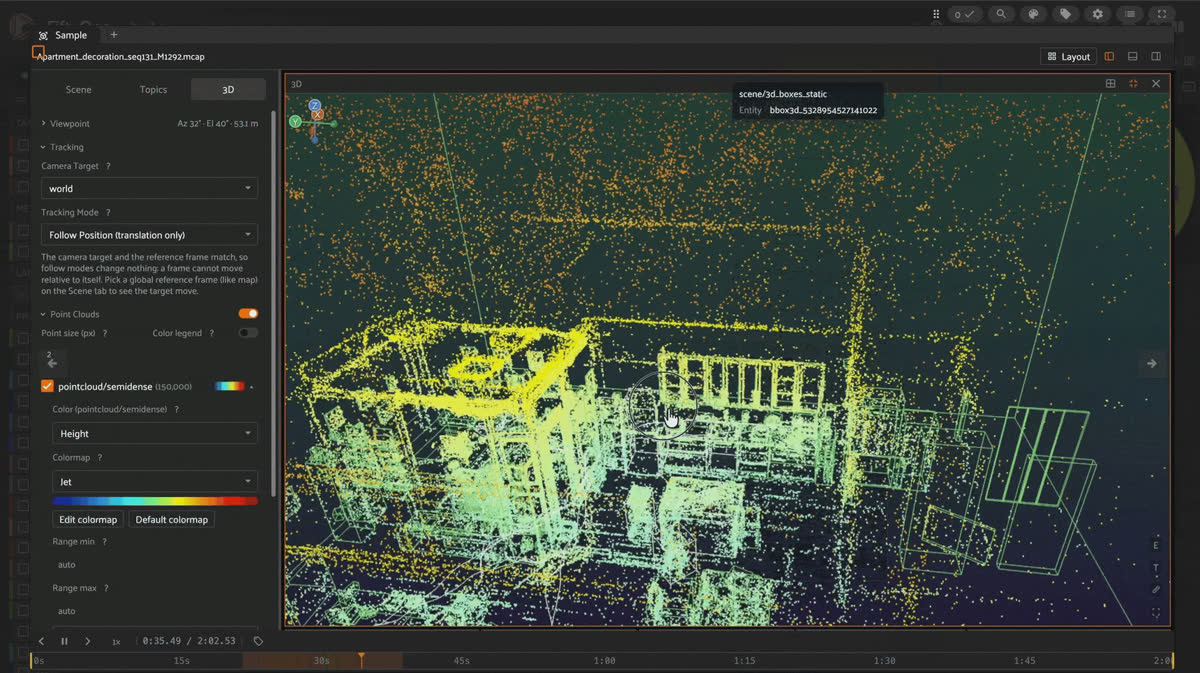
FiftyOne multimodal viewer playing an Aria Digital Twin MCAP episode, with the semi-dense point cloud, 3D bounding boxes, and synchronized synthetic, depth, segmentation, and RGB camera tiles on one timeline.
Download one Aria Digital Twin episode, author every ground-truth stream it ships with into a single synchronized MCAP file, and load it into FiftyOne’s multimodal viewer, using Meta’s own capture pipeline and about 300 lines of Python.
Aria Digital Twin (ADT) is a research dataset from Meta Reality Labs: real people performing everyday activities in two fully digitized rooms, recorded with Project Aria smart glasses and paired with millimeter-accurate six degrees of freedom (6DoF) ground truth for every object, person, and device in the scene. It ships as a
.vrs recording plus eight separate ground-truth zip files, each behind its own presigned URL. None of that is something FiftyOne (an open-source toolkit for visualizing and curating ML datasets; pip install fiftyone) opens directly.What FiftyOne’s multimodal viewer wants is one file per episode: a single timeline where the RGB video, depth, segmentation, synthetic renders, 2D and 3D object boxes, human skeletons, eye gaze, the semi-dense point cloud, the device’s 6DoF trajectory, and the inertial measurement unit (IMU) stream all play back in sync. That file is an MCAP: a container format for timestamped, multi-channel binary data, the same idea as a ROS bag but not tied to ROS.
Here’s the whole path from Meta’s download page to a dataset you can scrub through in FiftyOne, for one Apartment-scene episode, with every modality ADT ships turned into its own MCAP channel.
Keep it honest. Aria Digital Twin (Meta Reality Labs Research, arXiv:2306.06362) is licensed for personal, non-commercial research only, and the license explicitly bars distributing or publicly displaying the dataset “or any materials or works derived from it.” You need to accept that license yourself through Meta’s Aria Dataset Explorer before you get download links. This post shows code, not a copy of the data.
Key takeaways
- Aria Digital Twin (236 sequences as of this writing, up from the 200 in the original paper) ships as a raw
.vrsrecording plus ground-truth zips, served from presigned URLs gated by Meta’s license, six of which this pipeline actually reads. - One episode with every modality is a real download: 12.4 GB across seven files for a 145-second sequence, with the raw depth zip alone accounting for 7.8 GB of that.
AriaDigitalTwinDataProviderhands you per-frame images, boxes, skeletons, and gaze by timestamp; twelve foxglove channels turn those into one.mcapfile FiftyOne plays natively, with no exporter or custom loader.- Two silent gotchas: ADT’s world frame is Y-up while Foxglove/ROS 3D viewers assume Z-up, and writing each modality in its own loop desyncs playback unless you re-sort every message by
log_timeafterward. - A third gotcha only 3D boxes hit: 304 of this episode’s 354 tracked objects never move. Redrawing all of them every frame made that one channel 77 MB; logging the static ones once and only redrawing the 50 that actually move is the fix.
- The payoff: a 145-second episode becomes one 2.5 GB
.mcapwith 181,444 messages across 12 channels, synchronized, onefo.Sample(filepath=...)call away from FiftyOne’s multimodal viewer.
Installation
pip install foxglove-sdk projectaria-tools mcap pillow numpy pandas fiftyoneEvery code block in this post ran against
foxglove-sdk 0.26.0, projectaria-tools 2.2.0, mcap 1.3.1, pillow 11.3.0, numpy 2.4.6, pandas 3.0.0, and fiftyone 1.21.0. You’ll also need curl on your PATH for Step 1’s downloads.Step 1: Download one Aria Digital Twin episode
Request access to ADT through the Aria Dataset Explorer or the dataset download page, and accept the license. Meta returns a single JSON file, commonly called a “CDN file,” with two top-level keys:
sequences (every sequence name, each mapping component name to a presigned download URL, file size, and checksum) and sequence_config (which components exist). Save it locally; this post calls it adt_download_urls.json, but yours may be named differently. manifest["sequences"].keys() lists every sequence name available to pick from, including Apartment_release_multiskeleton_party_seq101_M1292, the one used throughout this post.Meta ships an official downloader for this file:
pip install projectaria-tools (already in this post’s Installation step) installs an aria_dataset_downloader command that reads a CDN file directly:aria_dataset_downloader \
--cdn_file adt_download_urls.json \
--output_folder adt_raw \
--sequence_names Apartment_release_multiskeleton_party_seq101_M1292 \
--data_types main_vrs main_groundtruth mps_slam_trajectories mps_slam_points segmentation depth syntheticThat downloads the raw files. Every modality below needs its own component from the CDN file:
| Component | Backs | Size (this episode) |
|---|---|---|
| main_vrs | RGB/SLAM images, IMU, calibration | 2,341 MB |
| main_groundtruth | 2D/3D boxes, instances, skeleton files, raw eye gaze | 97 MB |
| mps_slam_trajectories | Device 6DoF pose | 15 MB |
| mps_slam_points | Semi-dense point cloud | 624 MB |
| segmentation | Instance segmentation video | 573 MB |
| depth | Per-pixel metric depth video | 7,792 MB |
| synthetic | Photo-realistic synthetic render | 918 MB |
To see exactly what’s happening, and to go straight into the flat, extracted layout this pipeline expects, here’s the equivalent in plain Python instead of the CLI:
import json
import subprocess
import zipfile
from pathlib import Path

manifest = json.loads(Path("adt_download_urls.json").read_text())
entry = manifest["sequences"]["Apartment_release_multiskeleton_party_seq101_M1292"]

# Only the components this pipeline actually reads. The manifest offers more
# per sequence (mps_slam_calibration, mps_eye_gaze) -- see "Good to know" below.
NEEDED = [
    "main_vrs", "main_groundtruth", "mps_slam_trajectories",
    "mps_slam_points", "segmentation", "depth", "synthetic",
]

raw_dir, flat_dir = Path("adt_raw"), Path("adt_flat")  # raw_dir: downloaded files as-is; flat_dir: zip contents merged flat
raw_dir.mkdir(exist_ok=True)
flat_dir.mkdir(exist_ok=True)

for key in NEEDED:
    info = entry[key]
    dst = raw_dir / info["filename"]
    subprocess.run(["curl", "-sS", "-L", "-o", str(dst), info["download_url"]], check=True)
    if key != "main_vrs":  # main_vrs is a single .vrs file, not a zip -- nothing to extract
        with zipfile.ZipFile(dst) as zf:
            zf.extractall(flat_dir)

main_vrs_path = raw_dir / entry["main_vrs"]["filename"]
Good to know. Why not
mps_slam_calibration or mps_eye_gaze? They’re on Meta’s own recommended download list, but nothing in this pipeline reads online_calibration.jsonl or the MPS copy of general_eye_gaze.csv: eye gaze comes from eyegaze.csv in main_groundtruth, and camera calibration comes from the VRS file’s own embedded calibration, not the MPS refinement pass. AriaDigitalTwinDataPathsProvider.get_datapaths() doesn’t reference either file, which is how to check this for any zip you’re tempted to skip.AriaDigitalTwinDataProvider expects a specific directory layout: video.vrs plus an mps/slam/ subfolder. Symlink everything into that layout:# AriaDigitalTwinDataProvider expects a fixed layout: video.vrs at the
# sequence root, MPS SLAM outputs under mps/slam/, and every ground-truth
# file (2D/3D boxes, instances.json, skeleton files) flat at the root.
seq_dir = Path("adt_flat_structured")
(seq_dir / "mps" / "slam").mkdir(parents=True, exist_ok=True)
(seq_dir / "video.vrs").symlink_to(main_vrs_path.resolve())
for name in flat_dir.iterdir():
(seq_dir / name.name).symlink_to(name.resolve()) # 2d/3d boxes, instances.json, skeleton files
for name in ["closed_loop_trajectory.csv", "semidense_points.csv.gz"]:
(seq_dir / "mps" / "slam" / name).symlink_to((flat_dir / name).resolve())Step 2: Author the MCAP
This continues in the same script as Step 1:
seq_dir is the directory you just built there. Everything below writes into one foxglove.open_mcap(...) block. Set up the providers, instance metadata, and camera geometry first, since several streams share them:import io
from math import tan
import foxglove
import numpy as np
import pandas as pd
from foxglove import messages as msgs
from PIL import Image
from projectaria_tools.core.stream_id import StreamId
from projectaria_tools.core.sensor_data import TimeDomain
from projectaria_tools.projects.adt import (
AriaDigitalTwinDataPathsProvider,
AriaDigitalTwinDataProvider,
AriaDigitalTwinSkeletonProvider,
MotionType,
bbox3d_to_line_coordinates,
)
# Aria VRS stream IDs are fixed per device, not per episode: 214-1 is the
# RGB camera, 1202-1 is the right IMU.
RGB_STREAM = StreamId("214-1")
IMU_STREAM = StreamId("1202-1")
# paths_provider resolves every file path under seq_dir; gt_provider wraps
# both the raw VRS (images, IMU) and every ground-truth file (boxes,
# skeletons, gaze, poses).
paths_provider = AriaDigitalTwinDataPathsProvider(str(seq_dir))
gt_provider = AriaDigitalTwinDataProvider(paths_provider.get_datapaths())
# The master per-frame clock: every other stream below gets matched against
# these timestamps, one way or another.
ts_rgb = gt_provider.get_aria_device_capture_timestamps_ns(RGB_STREAM)
# The time window ADT's ground truth actually covers -- can be a frame or
# two narrower than the RGB recording itself.
adt_t_start, adt_t_end = gt_provider.get_start_time_ns(), gt_provider.get_end_time_ns()
traj_df = pd.read_csv(seq_dir / "mps" / "slam" / "closed_loop_trajectory.csv")
# Built once, reused for every 2D/3D box and skeleton entity below:
# per-instance metadata (name, motion_type, human vs. object) never changes
# mid-episode.
instance_info_cache = {
uid: gt_provider.get_instance_info_by_id(uid) for uid in gt_provider.get_instance_ids()
}
cam_calib_rgb = gt_provider.get_aria_camera_calibration(RGB_STREAM)
raw_provider = gt_provider.raw_data_provider_ptr()
# Needed to project 3D eye gaze into 2D pixel coordinates on the RGB image.
transform_cpf_sensor = raw_provider.get_device_calibration().get_transform_cpf_sensor(
cam_calib_rgb.get_label()
) # CPF = Aria's eye-tracking reference frame, centered between the two eyes
skeleton_ids = gt_provider.get_skeleton_ids() # one id per tracked person
joint_connections = AriaDigitalTwinSkeletonProvider.get_joint_connections() # joint-index pairs forming each limbGood to know. Doesn’t MCAP need real calendar timestamps for
log_time? No. log_time just needs to be in nanoseconds on a single consistent clock; MCAP doesn’t require wall-clock Unix epoch time. ts_rgb is nanoseconds since the Aria device booted, which puts this episode’s timestamps around 30 minutes past epoch. Any tool that prints log_time as a calendar date shows something in January 1970. That’s expected for this dataset, not a unit bug, and it doesn’t affect playback or sync, since every stream below shares the same clock.Good to know. Where does the axis and rotation math live? Three small helpers do all the geometry correction, reused by every 3D and image stream below:
def to_world_up_z(x, y, z):
    """ADT's world frame is Y-up; Foxglove/ROS 3D viewers assume Z-up."""
    return x, -z, y

def to_world_up_z_quat(qx, qy, qz, qw):
    """Same +90 deg X-axis correction as to_world_up_z(), applied to orientation."""
    s = 0.7071067811865476
    return (qw + qx) * s, (qy - qz) * s, (qy + qz) * s, (qw - qx) * s

def rotate_cw90(arr):
    """Aria's cameras are mounted rotated; raw frames come out sideways."""
    return np.rot90(arr, k=3)

def ts(ns: int) -> msgs.Timestamp:
    """Convert nanoseconds into the {sec, nsec} pair every Foxglove message timestamp uses."""
    return msgs.Timestamp(sec=ns // 1_000_000_000, nsec=ns % 1_000_000_000)
Open the MCAP and declare one channel per stream. IMU has no built-in Foxglove or ROS schema, so it gets a small custom JSON one:
img_schema = msgs.CompressedImage.get_schema()
tf_schema = msgs.FrameTransform.get_schema()
ann_schema = msgs.ImageAnnotations.get_schema()
pc_schema = msgs.PointCloud.get_schema()
scene_schema = msgs.SceneUpdate.get_schema()
IMU_SCHEMA = {
    "title": "imu_measurement", "type": "object",
    "properties": {k: {"type": "number"} for k in
                    ["accel_x", "accel_y", "accel_z", "gyro_x", "gyro_y", "gyro_z"]},
}

# One foxglove.Channel per MCAP topic. message_encoding must match how the
# schema is actually serialized below: protobuf for every foxglove.*
# schema, json for the custom IMU one.
with foxglove.open_mcap("episode_raw.mcap", allow_overwrite=True):
    rgb_ch = foxglove.Channel("/camera/rgb", schema=img_schema, message_encoding="protobuf")
    depth_ch = foxglove.Channel("/camera/depth", schema=img_schema, message_encoding="protobuf")
    seg_ch = foxglove.Channel("/camera/segmentation", schema=img_schema, message_encoding="protobuf")
    syn_ch = foxglove.Channel("/camera/synthetic", schema=img_schema, message_encoding="protobuf")
    ann_ch = foxglove.Channel("/annotations/rgb", schema=ann_schema, message_encoding="protobuf")
    tf_ch = foxglove.Channel("/tf", schema=tf_schema, message_encoding="protobuf")
    pc_ch = foxglove.Channel("/pointcloud/semidense", schema=pc_schema, message_encoding="protobuf")
    scene_ch = foxglove.Channel("/scene/3d_boxes", schema=scene_schema, message_encoding="protobuf")
    static_scene_ch = foxglove.Channel("/scene/3d_boxes_static", schema=scene_schema, message_encoding="protobuf")
    skel_ch = foxglove.Channel("/skeleton/3d", schema=scene_schema, message_encoding="protobuf")
    gaze_ch = foxglove.Channel("/gaze/3d", schema=scene_schema, message_encoding="protobuf")
    imu_ch = foxglove.Channel("/imu", schema=IMU_SCHEMA, message_encoding="json")
The 3D boxes: split static from dynamic before you write a single frame
ADT tags every object instance’s
motion_type. In this episode, 304 of 354 tracked objects (furniture, wall art, kitchenware) never move at all; only 50 (people, handled objects) do. dynamic_box_uids = {
uid for uid in instance_info_cache
if instance_info_cache[uid].motion_type != MotionType.STATIC
}
def bbox3d_scene_entity(uid, bbox3d, ts_msg, lifetime):
"""Build one 3D wireframe box entity for one object at one timestamp.
bbox3d.aabb is an axis-aligned box in the object's own local frame;
transform_scene_object maps its corners into world coordinates.
"""
T = bbox3d.transform_scene_object.to_matrix()
world_pts = [to_world_up_z(*(T @ np.append(pt, 1.0))[:3])
for pt in bbox3d_to_line_coordinates(bbox3d.aabb)]
is_human = instance_info_cache.get(uid) and instance_info_cache[uid].instance_type.name == "HUMAN"
color = msgs.Color(r=1.0, g=0.2, b=0.2, a=0.8) if is_human else msgs.Color(r=0.2, g=0.8, b=0.2, a=0.8)
return msgs.SceneEntity(
timestamp=ts_msg, frame_id="world", id=f"bbox3d_{uid}", lifetime=lifetime,
lines=[msgs.LinePrimitive(type=msgs.LinePrimitiveLineType.LineStrip, thickness=0.02, color=color,
points=[msgs.Point3(x=float(p[0]), y=float(p[1]), z=float(p[2])) for p in world_pts])],
)
# First RGB timestamp inside ADT's ground-truth window: the one snapshot
# that defines "the scene" for every object that never moves.
first_ts = next(int(t) for t in ts_rgb if adt_t_start <= t <= adt_t_end)
first_boxes = gt_provider.get_object_3d_boundingboxes_by_timestamp_ns(first_ts).data()
static_scene_ch.log(
msgs.SceneUpdate(entities=[
bbox3d_scene_entity(uid, b, ts(first_ts), msgs.Duration(sec=0, nsec=0)) # nsec=0 means persist forever
for uid, b in first_boxes.items() if uid not in dynamic_box_uids
]).encode(),
log_time=first_ts,
)Keep it honest. Why does this matter enough to be step one? Redrawing all 354 boxes as a full wipe-and-rebuild every frame at 30 Hz and
/scene/3d_boxes alone comes out to around 600 MB, roughly the same size as the RGB stream, because most of that geometry never changes. Logging the 304 static ones once with a persistent lifetime and only redrawing the 50 that move dropped this episode’s dynamic-box channel to 77 MB. The 3D tile has to rebuild far less geometry every frame, which is what keeps it from lagging behind the video.The semi-dense point cloud: republish it, don’t log it once
A point cloud logged at a single timestamp disappears from the 3D tile once playback scrubs past it. Republish the same encoded bytes roughly once a second instead:
    df = pd.read_csv(seq_dir / "mps" / "slam" / "semidense_points.csv.gz", compression="gzip")
    # Keep only points MPS's SLAM pipeline is confident about. inv_dist_std
    # and dist_std are its own uncertainty estimates; lower is better.
    df = df[(df["inv_dist_std"] < 0.002) & (df["dist_std"] < 0.05)]
    xyz = df[["px_world", "py_world", "pz_world"]].values.astype(np.float32)
    xyz = xyz[:, [0, 2, 1]] * np.array([1, -1, 1], dtype=np.float32)  # to_world_up_z, vectorized

    # One PointCloud message, encoded once and reused for every republish below.
    pc_bytes = msgs.PointCloud(
        timestamp=ts(int(ts_rgb[0])), frame_id="world", point_stride=12,
        fields=[msgs.PackedElementField(name=n, offset=o, type=msgs.PackedElementFieldNumericType.Float32)
                for n, o in [("x", 0), ("y", 4), ("z", 8)]],
        data=xyz.tobytes(),
    ).encode()

    # Log the same bytes roughly once per second of episode duration, so the
    # point cloud never falls fully outside the viewer's scrub window.
    duration_s = (ts_rgb[-1] - ts_rgb[0]) / 1e9
    step = max(1, int(len(ts_rgb) / duration_s))
    for ts_ns in ts_rgb[::step]:
        pc_ch.log(pc_bytes, log_time=int(ts_ns))
Device pose, downsampled from its native ~1 kHz rate to a lighter ~50 Hz, comfortably inside the 3D viewer’s staleness window for a moving transform:
    for row in traj_df.iloc[::20].itertuples():  # every 20th row: ~1 kHz native rate -> ~50 Hz
        ts_ns = int(row.tracking_timestamp_us * 1000)  # microseconds -> nanoseconds
        x, y, z = to_world_up_z(row.tx_world_device, row.ty_world_device, row.tz_world_device)
        qx, qy, qz, qw = to_world_up_z_quat(
            row.qx_world_device, row.qy_world_device, row.qz_world_device, row.qw_world_device
        )
        tf_ch.log(
            msgs.FrameTransform(timestamp=ts(ts_ns), parent_frame_id="world", child_frame_id="aria",
                                 translation=msgs.Vector3(x=x, y=y, z=z),
                                 rotation=msgs.Quaternion(x=qx, y=qy, z=qz, w=qw)).encode(),
            log_time=ts_ns,
        )
Good to know. Why does the downsample rate matter here? A
FrameTransform that carries a timestamp is a dynamic transform, and dynamic transforms only resolve within a boundary clamp of the current playhead (50 ms by default in FiftyOne’s viewer). At ~50 Hz, updates land every 20 ms, well inside that window. Downsample much further, to 10 Hz say, and the device marker starts flickering or briefly vanishing between updates instead of gliding smoothly.The per-frame loop: RGB, gaze, boxes, skeleton, depth, segmentation, synthetic
Everything else is keyed to the RGB camera’s own timestamps, one iteration per frame:
    for ts_ns in ts_rgb:
        img = gt_provider.get_aria_image_by_timestamp_ns(int(ts_ns), RGB_STREAM)
        if not img.is_valid():
            continue
        arr = rotate_cw90(img.data().to_numpy_array())
        img_h = arr.shape[0]  # needed below to rotate 2D box/gaze pixel coords the same way as the image
        ts_msg = ts(int(ts_ns))

        buf = io.BytesIO()
        Image.fromarray(arr.astype(np.uint8)).save(buf, format="JPEG", quality=75)
        rgb_ch.log(msgs.CompressedImage(timestamp=ts_msg, frame_id="camera_rgb",
                                         data=buf.getvalue(), format="jpeg").encode(), log_time=int(ts_ns))

        # Eye gaze: project once, reuse for the 2D pixel overlay and the 3D ray
        gaze_cpf = gaze_pixel_ann = None
        if adt_t_start <= ts_ns <= adt_t_end:
            eg_dt = gt_provider.get_eyegaze_by_timestamp_ns(int(ts_ns))
            if eg_dt.is_valid():
                eg = eg_dt.data()
                gaze_cpf = np.array([tan(eg.yaw), tan(eg.pitch), 1.0]) * eg.depth  # gaze target, in the CPF frame
                gaze_cam = transform_cpf_sensor.inverse().to_matrix() @ np.append(gaze_cpf, 1.0)  # CPF -> camera frame
                pixel = cam_calib_rgb.project(gaze_cam[:3] / gaze_cam[3])  # de-homogenize, then project to a pixel
                if pixel is not None:
                    u, v = float(pixel[0]), float(pixel[1])
                    gaze_pixel_ann = msgs.PointsAnnotation(
                        timestamp=ts_msg, type=msgs.PointsAnnotationType.Points,
                        points=[msgs.Point2(x=float(img_h - 1 - v), y=u)],
                        outline_color=msgs.Color(r=1.0, g=0.0, b=0.0, a=1.0), thickness=12.0,
                    )

        # 2D object/skeleton boxes + the gaze dot, one ImageAnnotations message
        if adt_t_start <= ts_ns <= adt_t_end:
            boxes_2d = dict(gt_provider.get_object_2d_boundingboxes_by_timestamp_ns(int(ts_ns), RGB_STREAM).data())
            boxes_2d.update(gt_provider.get_skeleton_2d_boundingboxes_by_timestamp_ns(int(ts_ns), RGB_STREAM).data())
            if boxes_2d or gaze_pixel_ann:
                points = [gaze_pixel_ann] if gaze_pixel_ann else []
                for uid, bb in boxes_2d.items():
                    if bb.visibility_ratio < 0.05:
                        continue
                    x0, x1, y0, y1 = bb.box_range  # rotate the box the same way as the image
                    points.append(msgs.PointsAnnotation(
                        timestamp=ts_msg, type=msgs.PointsAnnotationType.LineLoop,
                        points=[msgs.Point2(x=img_h - 1 - y1, y=x0), msgs.Point2(x=img_h - 1 - y0, y=x0),
                                msgs.Point2(x=img_h - 1 - y0, y=x1), msgs.Point2(x=img_h - 1 - y1, y=x1)],
                        outline_color=msgs.Color(r=0.2, g=1.0, b=0.2, a=0.9), thickness=2.0,
                    ))
                ann_ch.log(msgs.ImageAnnotations(timestamp=ts_msg, points=points).encode(), log_time=int(ts_ns))

        # 3D boxes: only the 50 dynamic ones, full wipe + redraw
        if adt_t_start <= ts_ns <= adt_t_end:
            boxes_3d = gt_provider.get_object_3d_boundingboxes_by_timestamp_ns(int(ts_ns)).data()
            scene_ch.log(msgs.SceneUpdate(
                deletions=[msgs.SceneEntityDeletion(type=msgs.SceneEntityDeletionType.All)],
                entities=[bbox3d_scene_entity(uid, b, ts_msg, msgs.Duration(sec=0, nsec=34_000_000))
                          for uid, b in boxes_3d.items() if uid in dynamic_box_uids],
            ).encode(), log_time=int(ts_ns))

        # 3D gaze ray: device origin to the projected gaze target
        if gaze_cpf is not None:
            pose_dt = gt_provider.get_aria_3d_pose_by_timestamp_ns(int(ts_ns))
            if pose_dt.is_valid():
                T = pose_dt.data().transform_scene_device.to_matrix() @ transform_cpf_sensor.to_matrix()  # CPF -> world
                origin = to_world_up_z(*(T @ np.array([0.0, 0.0, 0.0, 1.0]))[:3])  # the CPF origin itself
                end = to_world_up_z(*(T @ np.append(gaze_cpf, 1.0))[:3])  # the gaze target computed above
                gaze_ch.log(msgs.SceneUpdate(
                    deletions=[msgs.SceneEntityDeletion(type=msgs.SceneEntityDeletionType.All)],
                    entities=[msgs.SceneEntity(
                        timestamp=ts_msg, frame_id="world", id="gaze", lifetime=msgs.Duration(sec=0, nsec=34_000_000),
                        lines=[msgs.LinePrimitive(type=msgs.LinePrimitiveLineType.LineStrip, thickness=0.02,
                                                   color=msgs.Color(r=1.0, g=0.0, b=0.0, a=0.9),
                                                   points=[msgs.Point3(x=float(p[0]), y=float(p[1]), z=float(p[2]))
                                                           for p in (origin, end)])],
                    )],
                ).encode(), log_time=int(ts_ns))

        # 3D skeleton: every tracked person, one message per frame
        if adt_t_start <= ts_ns <= adt_t_end:
            skel_entities = []
            for skel_id in skeleton_ids:
                skel_dt = gt_provider.get_skeleton_by_timestamp_ns(int(ts_ns), skel_id)
                if not skel_dt.is_valid():
                    continue
                joints = skel_dt.data().joints
                limb_pts = []
                for j1, j2 in joint_connections:
                    p1, p2 = to_world_up_z(*joints[j1]), to_world_up_z(*joints[j2])
                    limb_pts += [msgs.Point3(x=p1[0], y=p1[1], z=p1[2]), msgs.Point3(x=p2[0], y=p2[1], z=p2[2])]
                skel_entities.append(msgs.SceneEntity(
                    timestamp=ts_msg, frame_id="world", id=f"skeleton_{skel_id}",
                    lifetime=msgs.Duration(sec=0, nsec=34_000_000),
                    lines=[msgs.LinePrimitive(type=msgs.LinePrimitiveLineType.LineList, thickness=0.04,
                                               color=msgs.Color(r=1.0, g=0.4, b=0.0, a=1.0), points=limb_pts)],
                ))
            skel_ch.log(msgs.SceneUpdate(
                deletions=[msgs.SceneEntityDeletion(type=msgs.SceneEntityDeletionType.All)],
                entities=skel_entities,
            ).encode(), log_time=int(ts_ns))

        # Depth and segmentation: PNG, not JPEG, or you corrupt the values you're trying to keep
        depth_dt = gt_provider.get_depth_image_by_timestamp_ns(int(ts_ns), RGB_STREAM)
        if depth_dt.is_valid():
            d_arr = rotate_cw90(depth_dt.data().get_visualizable().to_numpy_array())
            buf = io.BytesIO()
            Image.fromarray(d_arr.astype(np.uint8)).save(buf, format="PNG")
            depth_ch.log(msgs.CompressedImage(timestamp=ts_msg, frame_id="camera_rgb",
                                               data=buf.getvalue(), format="png").encode(), log_time=int(ts_ns))

        seg_dt = gt_provider.get_segmentation_image_by_timestamp_ns(int(ts_ns), RGB_STREAM)
        if seg_dt.is_valid():
            s_arr = rotate_cw90(seg_dt.data().get_visualizable().to_numpy_array())
            buf = io.BytesIO()
            Image.fromarray(s_arr.astype(np.uint8)).save(buf, format="PNG")
            seg_ch.log(msgs.CompressedImage(timestamp=ts_msg, frame_id="camera_rgb",
                                             data=buf.getvalue(), format="png").encode(), log_time=int(ts_ns))

        syn_dt = gt_provider.get_synthetic_image_by_timestamp_ns(int(ts_ns), RGB_STREAM)
        if syn_dt.is_valid():
            syn_arr = rotate_cw90(syn_dt.data().to_numpy_array())
            buf = io.BytesIO()
            Image.fromarray(syn_arr.astype(np.uint8)).save(buf, format="JPEG", quality=75)
            syn_ch.log(msgs.CompressedImage(timestamp=ts_msg, frame_id="camera_rgb",
                                             data=buf.getvalue(), format="jpeg").encode(), log_time=int(ts_ns))
Keep it honest. Why rotate the image, and rotate the boxes differently? Aria’s cameras are physically mounted rotated, so every image stream needs the same
rotate_cw90. A 90° clockwise pixel rotation maps (x, y) to (height - 1 - y, x), which is why the 2D box coordinates above get remapped with img_h, not just copied over. Skip either one and the boxes end up floating next to the objects they’re supposed to outline instead of on them.IMU comes straight off the raw VRS provider, not through the ground-truth API:
    n_imu = raw_provider.get_num_data(IMU_STREAM)
    imu_ts = raw_provider.get_timestamps_ns(IMU_STREAM, TimeDomain.DEVICE_TIME)
    for i in range(n_imu):
        imu = raw_provider.get_imu_data_by_index(IMU_STREAM, i)
        # accel_msec2/gyro_radsec are 3-element arrays; unpack into the flat
        # dict IMU_SCHEMA declared above.
        imu_ch.log(
            dict(zip(["accel_x", "accel_y", "accel_z"], map(float, imu.accel_msec2))) |
            dict(zip(["gyro_x", "gyro_y", "gyro_z"], map(float, imu.gyro_radsec))),
            log_time=int(imu_ts[i]),
        )
That’s
episode_raw.mcap done, with 12 channels written in 5 separate passes (static boxes, point cloud, pose, the big per-frame loop, IMU). One step left, and skipping it is expensive:from reorder_mcap import reorder_mcap # any mcap.Writer implementation works; see https://mcap.dev
reorder_mcap("episode_raw.mcap", "episode.mcap")Keep it honest. Why reorder at all? Each of those 5 passes writes its channel’s messages as one contiguous block spanning the full 145-second episode. A reader stepping through time then has to jump between physically distant regions of the file, once per channel, on every playback frame. That’s what a stuttering, out-of-sync multimodal viewer usually means.
reorder_mcap re-reads every message in log_time order and rewrites them so that each disk chunk holds a single narrow time slice across all channels instead.Run it end to end, and you get real numbers: 4,349 RGB frames, matching depth/segmentation/synthetic frames, 2,832 annotation and skeleton messages, 150 point cloud republishes, 7,198 pose messages, 145,371 IMU samples, and one static-box message covering 304 objects, for 181,444 messages total in one 2.5 GB file.
Good to know. Is a clean run enough to trust the file? No. Message counts and a successful reorder both pass even on a file with a real geometry bug baked in, the same way a program can run to completion and still return the wrong answer.
reorder_mcap does run a file-integrity check internally (which catches truncation and sparse-file holes), but that’s a structural check, not a correctness check. Add at least one physical-plausibility assertion before you trust the output. For the point cloud above, this episode’s semi-dense points span about 17-21 meters per axis, apartment-scale, which is the kind of check that catches a stray unit conversion or a botched axis swap that a message count never would:extent = xyz.max(axis=0) - xyz.min(axis=0)
assert extent.max() < 50, f"point cloud extent {extent} looks wrong for one apartment"Step 3: Create a FiftyOne dataset
This is the short part. FiftyOne treats one
.mcap file as one multimodal sample:import fiftyone as fo
dataset = fo.Dataset("adt_demo", persistent=True)
dataset.add_sample(fo.Sample(filepath="episode.mcap")) # one Sample = one whole episode
assert dataset.media_type == "multimodal" # confirms FiftyOne recognized the .mcap extension
session = fo.launch_app(dataset)That’s it. FiftyOne reads the file directly, so there’s no exporter or custom loader to write. Open the sample in the App and add tiles for whichever channels you want: RGB, depth, segmentation, and synthetic as Image tiles; 3D boxes/skeleton/gaze/point cloud/trajectory as 3D tiles; and IMU as a Plot tile, all sharing one playback clock. For more than one episode, loop
add_sample() over a directory of .mcap files and attach whatever per-episode fields you want to filter on later, such as duration, scene name, or which streams are present.Frequently Asked Questions
Because FiftyOne’s multimodal viewer decodes the same well-known foxglove.* protobuf schemas that Foxglove Studio does. Authoring against
foxglove-sdk produces a file that opens in either tool unmodified; nothing here is Foxglove-Studio-specific.Only if you want every stream.
main_vrs plus mps_slam_trajectories alone gets you RGB, pose, and IMU. Each additional zip (main_groundtruth, segmentation, depth, synthetic, mps_slam_points) unlocks exactly the streams named in the table in Step 1, nothing else.No. Meta’s license prohibits distributing or publicly displaying the dataset “or any materials or works derived from it,” and that includes an MCAP you author from it. Keep it local, or in a private repo you control.
It ships as raw, uncompressed per-pixel metric depth video, 7.8 GB for one 145-second episode before this pipeline ever touches it. The PNG-encoded
/camera/depth channel in the final MCAP is a small fraction of that, since PNG compresses the mostly-smooth depth values well.Two usual suspects, both covered above: you skipped the reorder_mcap pass, or you’re redrawing every 3D object, including the 304 out of 354 that never move, on every single frame instead of splitting static from dynamic.
Try it yourself
- Aria Digital Twin project page and license: projectaria.com/datasets/adt
- Paper: Aria Digital Twin: A New Benchmark Dataset for Egocentric 3D Machine Perception (arXiv:2306.06362)
- projectaria_tools docs: facebookresearch.github.io/projectaria_tools
- FiftyOne: pip install -U fiftyone
MCAP format: mcap.dev
Hacker-in-Residence
Harpreet is Hacker-in-Residence at Voxel51, where he turns cutting-edge AI ideas into open-source prototypes and demos that push the boundaries of deep learning. From building tools that inspire to creating content that educates, Harpreet helps the AI community level up—one wild idea at a time.
See all articles by Harpreet Sahota
Try Voxel51 for yourself
Loading related posts...
© 2026 Voxel51 All Rights Reserved


