Explore L2D in Voxel51: a hands-on tour of Yaak's Learning to Drive self-driving dataset
•
16 min read
Author

Director of Growth
Jesse Mostipak is the Director of Growth at Voxel51, where the work is helping humans find and trust what the brand knows, and teaching the Google knowledge graph and the LLMs answering on their behalf to do the same. That question, how knowledge gets built inside a system, is one Jesse has been chasing for years. Earlier versions of it ran through a New York City high school science classroom, data science and machine learning, and developer relations at Kaggle, Posit (formerly RStudio), and Baseten. The answer doesn't change much depending on whether the learner is a teenager, a software engineer, or a knowledge graph. Jesse holds a Master's in Education from CUNY Hunter College. LinkedIn
See all articles by Jesse Mostipak
In this article
Key takeawaysWho this post is forAbout the L2D datasetQuestion 1: What does one drive in L2D look like?Question 2: How much of this is the same drive?Question 3: Which rare events are in this L2D slice, and which are missing?Question 4: Where inside the drive is the moment, and how do I keep it?Before you train on L2D: six changes to makeWhat we coveredWhat we don't know yetFrequently asked questionsCredits and further readingNext in the series
In this article
Key takeawaysWho this post is forAbout the L2D datasetQuestion 1: What does one drive in L2D look like?Question 2: How much of this is the same drive?Question 3: Which rare events are in this L2D slice, and which are missing?Question 4: Where inside the drive is the moment, and how do I keep it?Before you train on L2D: six changes to makeWhat we coveredWhat we don't know yetFrequently asked questionsCredits and further readingNext in the series
Try Voxel51 for yourself
Free with a work or .edu email address. Nothing to install.
Key takeaways
- Yaak's L2D (Learning to Drive) is an open self-driving dataset released with Hugging Face's LeRobot team, and a 750-episode slice of it is free to explore in Voxel51 with a work or .edu email address. Each episode plays back as six synchronized cameras, a rendered map, vehicle state, and the driver's gas, brake, and steering.
- In the Voxel51 slice of L2D, every one of the 750 episodes shares footage with at least one other episode, and 588 pairs start 15.0 seconds apart. The 750 episodes hold 341.6 minutes of clips but only 182.8 minutes of unique driving.
- The 750-episode slice of Yaak's L2D in Voxel51 comes from 15 drive sessions on 13 cars, so it holds 15 drives, not 750 independent samples. A random episode split puts the same seconds of the same drive in training and evaluation.
- Yaak's L2D release on Hugging Face labels 99.7% of its 26.5 million frames as daytime and none as night, and the 750-episode slice in Voxel51 has no episodes labeled as rain.
- To check a driving dataset such as Yaak's L2D for rare conditions, read every weather and lighting filter in Voxel51 and then search the footage, because search surfaced damp roads and construction zones in L2D that no metadata field records.
Who this post is for
If you've ever downloaded a driving dataset, counted the episodes, and felt good about the number, this post is for you. Same if you're fine-tuning a vision-language-action (VLA) model or an end-to-end driving policy on LeRobot-format data.
This is the second post in a series where we take a public dataset, ask four questions you'd want answered before training on it, and answer them in the browser with Voxel51. The first one took the DROID robot manipulation dataset apart one demonstration at a time, and promised that the next one would be about rare events and redundancy. Here we go!
You don't need to install anything, and every section has a Where to click list with the exact buttons in order. If you only have five minutes, add the dataset and do Question 2. It's the one that changes how you'd split the data.
Terms you'll see in this post
Session: one continuous drive by one car, from the moment logging starts to the moment it stops.
Episode: a clip cut from a session, up to 30 seconds long in this dataset.
Policy: L2D uses the word in its driving-school sense. Expert means a driving instructor was at the wheel, and student means a learner driver was. It doesn't mean a trained model.
front_left: the name of the forward-facing camera stream that everything else in L2D is synchronized to. We'll call it the front camera.
About the L2D dataset
L2D (Learning to Drive) is Yaak's open self-driving dataset for training end-to-end driving models, announced in March 2025 with Hugging Face's LeRobot team. Yaak recorded it with driving-school cars in German cities, all with the same sensor kit: six RGB cameras, GPS, an inertial measurement unit (IMU), and the car's Controller Area Network (CAN) bus for speed, gas, brake, steering, gear, and turn signal. Every stream is synchronized to the front-left camera and resampled to 10 Hz. Each episode also carries a natural-language instruction built from the GPS trace, map matching, and OpenStreetMap, written to sound like turn-by-turn navigation ("In 100 m at the yield sign, when you have the right of way enter the roundabout and take the first exit"). Yaak's launch post has the details on how the instructions, waypoints, and releases were built.
Two details from the launch post matter for this tutorial. First, the expert and student split is a real feature. Yaak describes instructor drives as having zero driving mistakes and learner drives as having known suboptimality. Second, the weather fields (precipitation, conditions, and lighting) are joined to the drive at a one-hour tolerance, so they describe the weather that hour, which isn't always what the camera sees. We'll come back to that in Question 3.
| Property | L2D on Hugging Face (main branch) | L2D 750 in Voxel51 |
|---|---|---|
| Publisher | Yaak, with Hugging Face LeRobot | Same data, a 750-episode slice |
| Format | LeRobot dataset, Apache 2.0 | LeRobot, Apache 2.0 |
| Episodes | 100,000 | 750 |
| Size | 26,466,954 frames at 10 Hz (about 735 hours) | 341.6 minutes of clips, 182.8 minutes of unique driving |
| Episode length | up to about 30 seconds | up to 30 seconds |
| Cameras | 6 RGB plus a rendered map | 6 RGB plus a rendered map |
| Fleet | 60 cars in 30 German cities, per the launch post | 13 cars, 15 drive sessions |
| Lighting | 99.67% Day, 0.26% Dusk, 0.06% Sunrise, no Night (of frames) | Day for all 750 episodes |
| Conditions | Clouds 62.1%, Clear 28.0%, Rain 9.2%, Snow 0.45% (of frames) | Clear 391 episodes, Clouds 359 |
| Precipitation field above zero | 9.5% of frames | 0 episodes |
| Learner (student) share | 19.1% of frames | 103 of 750 episodes, from 2 sessions |
| Overlapping episodes | not measured | all 750, with 588 pairs starting 15.0 s apart |
The Voxel51 copy comes with segment-level embeddings precomputed with Qwen3-VL-Embedding-2B, which split each camera stream into short windows so a search can return a moment instead of a whole episode. Questions 2 through 4 use them.
Question 1: What does one drive in L2D look like?
What we're doing. Before we look at 750 episodes, we'll look at one, with the cameras and the driver's inputs side by side. We're using episode 16421 because it has a little bit of everything: a cyclist, a pedestrian, a yield sign, and a roundabout.
Where to click.
- Open the L2D link at the top of this post and sign up, or sign in, with a work or .edu email address. After the usual sign-up steps, you land on a page titled Add dataset to Voxel51 to continue exploring, with an L2D 750 card. Click Add on the card, then click Add dataset in the dialog. You can also find it on your own: click Explore in the top navigation, find the L2D 750 card, and click Add. The free plan holds three datasets, so if your workspace is full, remove one from the Datasets page first.
- In the sidebar, expand the Episode group and click the chevron on episode_index. Type 16421 into both boxes under the slider, pressing Enter after each, and the grid drops to one episode. Click it. The header reads "Episode 16421 · In 100 m at the yield sign, when you have the right of way enter the roundabout and take the first exit · 30s."
- Click the Streams tab on the left. You'll see seven image streams (front_left, left_forward, left_backward, right_forward, right_backward, rear, and map), then the vehicle state, the actions, and the instructions.
- Click Layout in the top right, then Plot. Click the new plot tile to select it, open the Plot tab on the left, expand observation.state.vehicle, and check speed.
- Add a second plot the same way, and this time expand action.continuous and check brake_pedal_normalized and steering_angle_normalized. Those are small normalized values (steering dips below zero when the wheel turns the other way), so they get their own tile instead of sitting flat underneath a speed line that reaches 20.
What you should see. Before you read the plots, take a guess. A car is approaching a yield sign at a roundabout. What does its speed do?
If you guessed "slows down, stops, then goes," you're partially correct! The speed trace starts around 20 km/h, eases down, and drops to almost zero at about 20 seconds. Then it creeps up to about 2 km/h around 21.5 seconds and drops back down before pulling away at about 23.5 seconds. The brake plot tells the same story as two separate presses, one from about 15.5 to 19.7 seconds and a second from about 21.5 to 23 seconds. That's the driver stopping, rolling forward to see past the corner, and stopping again before entering. Then the steering trace climbs to its peak around 27 seconds as the car turns into the roundabout. I love that you can read a whole driving decision off two lines.
Easy to miss. The instruction text can change partway through an episode, because Yaak attaches an instruction to every frame. The task field in the sidebar shows one instruction per episode. And if a plot goes blank after you play or scrub, reopen the episode and it'll draw again.
Question 2: How much of this is the same drive?
What we're doing. This is the question that matters most for L2D. 750 episodes sounds like 750 independent samples, so let's find out how many it really is.
Where to click (one pair).
- Go back to the grid with the arrow at the top left and clear the episode_index filter with the X on the count badge in the sidebar's search box.
- Set episode_index to 16490 the same way and open it. The header reads "Episode 16490 · Exit the roundabout using the first exit · 30s." It's a different episode with a different instruction, and your two plot tiles carry over.
- Look at the speed plot. Before you read on, take a second to think about what the first 15 seconds remind you of.
What you should see. The speed trace starts at about 14 km/h, dips to zero around 5 seconds, creeps, dips again around 8 seconds, and then climbs. That's the yield stop from Question 1, shifted 15 seconds earlier! The brake presses line up the same way, and the steering peak that sat at 27 seconds in episode 16421 sits at about 12 seconds here. Episode 16490 starts 15.0 seconds after episode 16421 inside the same drive, so the two episodes share about 15 seconds of footage.
You can check the timing yourself. The session_viewer_url field in the Episode group links each episode to Yaak's Nutron platform, and the link carries the start and end second of the episode within its drive: 1040.4 to 1070.3 for 16421, and 1055.4 to 1085.3 for 16490.
Then we did that for every episode in the slice, comparing each episode's start and end second with every other episode from the same drive. All 750 episodes share footage with at least one other episode. 588 pairs start 15.0 seconds apart, which looks like 30-second windows cut at a 15-second stride, and some instants show up in as many as four episodes. Add up the clip lengths and you get 341.6 minutes. Count each second of driving once and you get 182.8 minutes. That's 750 episodes holding a little over three hours of driving, and the overlap nearly doubles it on paper.
Yaak's launch post describes driving tasks with start and end timestamps but doesn't spell out how episodes were cut, so we're reporting the 15-second offset as something we observed in this slice, not a rule about all of L2D. And overlapping windows aren't a mistake! They're a reasonable design choice for training, because a policy sees each moment with different amounts of context around it. They only cause trouble when you split or count as if each episode stood on its own.
Where to click (sessions).
- Back in the grid, expand the Episode group, click the chevron on session, and click into its filter box. The list shows the end of each session name, which is the date and time the drive started. There are 15, with 10 to 81 episodes each, and the vehicle field shows 13 cars.
- Click the checkbox next to session to put the session name on every thumbnail, then scroll the grid. Notice how often neighboring thumbnails come from the same drive and look almost the same.
Where to click (embeddings).
- Clear the filters, click the plus next to the Samples tab, and choose Embeddings. Click the visualization named auto_segment_embeddings. Each point is one window from one camera stream, 25,086 in all.
- Click Color by, then Add fields at the bottom of the list, pick session and policy, and click Schedule. It takes about a minute. Click the refresh icon next to Add fields and both appear in the list.
- Color by session, then double-click the legend entry with 1,428 points, NIRO107-HQ/2024-11-07--08-54-33, to isolate it. The legend truncates long names, so the count is the easy way to find it.
What you should see. That drive's windows pull together into a couple of tight clumps, and the grid fills with apartment blocks, autumn leaves, gray sky, and supermarket parking lots. It's the only November drive in the slice. We can't tell from the plot alone whether the embedding model is responding to the season, the city, or the light, but windows from one drive clearly resemble each other, and a model will pick up on that too if the same drive sits on both sides of a split. The plot uses Uniform Manifold Approximation and Projection (UMAP), which keeps neighbors close but doesn't preserve distances, so use the plot to find candidates and the episode viewer to confirm them.
Easy to miss. Adding fields to Color by is a one-time run per visualization, so session and policy stay in the list next time. A selection in the plot also adds a filter in the sidebar, so clear both when you're done.
Your turn. Niro105-HQ/2023-06-15--05-10-16 is the longest drive in the slice, with 81 episodes. Filter to it, open a few episodes, and compare their session_viewer_url start times. How many of them overlap the one before?
Question 3: Which rare events are in this L2D slice, and which are missing?
What we're doing. Rare events can go wrong in four ways. Some are absent, some are too few, some all come from one drive, and some get counted several times because of the overlap from Question 2. We'll start with what's missing, because it's the easiest to overlook.
Where to click (conditions).
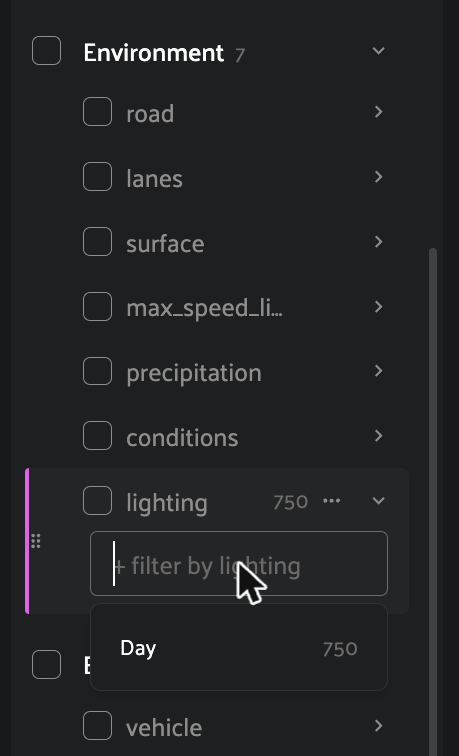
- Expand the Environment group, click the chevron on lighting, and click into its filter box. There's one value, Day, for all 750 episodes. Conditions has two (Clear 391 and Clouds 359), and precipitation is 0 for every episode.
- L2D's schema has room for rain, snow, dawn, and dusk, and the full release does contain some rain and a sliver of dusk and sunrise. None of it is labeled in these 15 drives.
Where to click (search the footage). The weather labels describe the hour, so let's look at the road. Search returns the 25 closest windows by default, so the counts below are how many episodes those 25 windows came from, not a count of every match in the dataset. Result order can shift a little between runs.
- Type driving on a wet road in the rain into the search bar at the top of the page and press Enter. We got 25 windows across 15 episodes.
- Keep the session checkbox on so the names show on the thumbnails.
What you should see. Twelve of the 15 come from the November drive, NIRO107-HQ/2024-11-07--08-54-33, and much of that pavement looks damp, with wet leaves in the gutters and headlights on under a gray sky. Those episodes all record Clouds and zero precipitation, which can both be true after rain has stopped. L2D doesn't have a road-surface-wetness field, so if wet roads matter for your model, the metadata won't find them, and search is how you'd collect candidates to confirm by eye.
Next, try driving at night in the dark with headlights on. We got 11 episodes, mostly from the same November drive, and every one is overcast daylight. Search always hands back its closest matches, so when something is missing from a dataset, it shows up as results that don't fit the query. That's your cue to check the metadata, and here it agrees: nothing in this slice is labeled night, and the full release has no night label either. Then try construction zone with red and white barriers and traffic cones, which returns 16 episodes from at least four drives with barriers and cones in view. No field labels construction, so search is the way in.
Where to click (maneuvers).
- Clear the search. In the Driving group, click the chevron on task and type stop sign into its filter box. Three instructions come up, with 5, 1, and 1 episodes. Click each one so all three are selected.
- Check the box next to policy so it shows on the thumbnails beside the session.
What you should see. Seven episodes, all labeled STUDENT and all from one drive, Niro096-HQ/2024-09-05--06-14-59. Two approach on a ramp and five show the car waiting at the same spot. Once you merge the episodes that overlap in time, they're one stretch of footage from one learner driver.
Here's how that plays out across more maneuvers. We counted the episodes whose sidebar instruction mentions each one, then merged episodes that overlap in time within a drive so each stretch of footage counts once.
| Maneuver in the instruction | Episodes | Distinct stretches of footage | Drive sessions | Learner episodes |
|---|---|---|---|---|
| Stop sign | 7 | 1 | 1 | 7 |
| U-turn | 8 | 2 | 2 | 3 |
| Yield sign | 4 | 2 | 1 | 0 |
| Roundabout | 18 | 9 | 5 | 0 |
| Tram tracks or rail crossing | 27 | 8 | 3 | 6 |
| Traffic light | 39 | 12 | 6 | 3 |
| Pedestrian crossing | 146 | 41 | 13 | 31 |
The learner column deserves a second look. All 103 learner episodes in the slice come from two sessions, Niro096-HQ/2024-09-05--06-14-59 and Niro101-HQ/2023-06-12--08-50-31, so in this slice "student versus expert" mostly means these two drives versus the other thirteen.
Easy to miss. The task filter matches any part of the instruction, so typing stop sign also finds instructions such as "In 350 m at the stop sign..." that start somewhere else. That's why one search turned up three different instructions.
Your turn. Type U-turn into the task filter and select every instruction that comes up. How many distinct U-turns do you count once you account for overlap, and who was driving?
Question 4: Where inside the drive is the moment, and how do I keep it?
What we're doing. An episode is 30 seconds at 10 Hz. When you search, Voxel51 returns the window inside the episode that matched, and the caption under each thumbnail names the camera it came from. So the question becomes which camera you're searching.
Where to click.
- Clear any filters. Type pedestrian crossing the road in front of the car into the search bar and press Enter. We got 25 windows across 18 episodes.
- Look at the caption under each thumbnail, which reads something like match: observation.images.front_left. Before you look closely, guess what share of the matches came from the front camera.
- Clear the top search bar. Open the Embeddings panel and click auto_segment_embeddings. Click Streams and uncheck every stream except observation.images.front_left.
- Click Search by text, make sure Visible streams only is checked, type the same query, and run it.
What you should see. In step 2, fewer than half of the captions we could read were the front camera. The rest were rear and side cameras, mostly showing someone walking along the sidewalk beside or behind the car. That's a fair match for the words "pedestrian" and "crossing," and it isn't what the query meant by "in front of the car." I'll admit our first read of these results was wrong. One screen of mostly rear-camera matches had us convinced the search leaned toward the rear camera, until we read the rest of the captions.
With only the front camera visible, the same query returns 25 windows across 16 episodes, all from front_left and mostly crosswalks at intersections. Look at the grid, though. Niro104, Niro105, and Niro102 each show up as pairs of near-identical thumbnails, because the overlap from Question 2 follows you everywhere. If you need 25 different moments, ask for more than 25 windows.
Where to click (keep it). These work the same way they did in the DROID post, so here's the short version.
- With the front-camera search applied, click Save as subset in the bar at the bottom of the grid, then New subset, give it a name, and click Save subset. It shows up in the dropdown next to the dataset name as 25 segments, so the windows stay windows.
- Open episode 16421, click the tag icon in the transport bar, and drag across the timeline from about 19.7 to 23.7 seconds, the stretch around the second stop. The Add temporal tag dialog fills in Start and End (we got 19.68 and 23.70 seconds), and you can nudge them with the plus and minus buttons. Type a label such as yield-stop and click Accept.
- Click More at the top right, choose Export dataset, pick Filepaths and tags on the Download tab, and click Download. As in the DROID post, the file lists episodes, and temporal tags and windows stay in Voxel51.
What you should see. A yield-stop track on the timeline, a subset in the dataset dropdown, and a downloaded list of episodes.
Before you train on L2D: six changes to make
Split by drive session, not by episode. Episodes in this slice overlap so much that a random episode split puts the same seconds of driving in training and evaluation, and part of your evaluation score ends up measuring memory. Hold out whole drives instead. In Voxel51 you can do it with clicks. Select one session in the session filter and save it as a subset. Then click the minus icon next to that same value, which switches the filter to Omitted (the grid shows 705 of 750 when you omit the November drive), and save everything else as a second subset. Export each one. Outside the browser, group by whatever identifies a drive in your copy of the data before you split.
Check what the held-out drive still shares with training. Driving-school cars tend to repeat the same routes, and in this slice the same car shows up in more than one session (Niro120 and Niro106 each appear twice). A held-out drive can still share streets, a car, or a city with the training set. With only 15 sessions, a session holdout is a coarse test, so write down what it covers, and if you can, hold out by car or city too.
Count distinct events, not episodes. Before you decide a maneuver is well covered, merge overlapping episodes and count drives. The seven stop-sign episodes are one learner at one spot.
Downweight idle time rather than deleting it. Waiting at a red light or a yield sign is real driving, and the yield creep in Question 1 is exactly what you'd want a policy to learn. The trouble is volume. In this slice, 118 of the 750 episodes average under 5 km/h, and 37 never go above 1 km/h. One whole session, Niro120-HQ/2023-04-27--12-38-41, is ten episodes of a car parked outside a driving-school storefront. Decide about that one on purpose.
Stratify learner and instructor driving by whole sessions. If you want both in training and evaluation, assign whole sessions to each side so the learner drives don't leak across the split. With two learner sessions in this slice, that's one each at most, which tells you how far this slice can take a student-versus-expert comparison.
Write down what isn't there. Nothing in this slice is labeled rain or night, and the full release has no night label at all. A missing label isn't proof the footage doesn't exist, as the wet roads showed, but if your model will drive at night, this slice won't tell you how it does. You'd want that note for any dataset, and now you have a way to find it in a few clicks.
None of this is specific to L2D. The Import button at the top of the page takes your own LeRobot datasets and MCAP recordings, and the sidebar, embeddings, search, subsets, and Export work on them once they load. If you want the bigger picture on why rare scenarios are the hard part of autonomous driving, the long-tail post makes that case, and the autonomous driving data curation glossary entry covers coverage and deduplication.
What we covered
| Question | What answered it | What we learned about L2D |
|---|---|---|
| What does one drive in L2D look like? | Synchronized cameras and two plot tiles | Episode 16421 reads as stop, creep, stop, and turn into the roundabout |
| How much of this is the same drive? | Two episodes side by side, the session field, and embeddings colored by session | All 750 episodes overlap another, 588 pairs start 15.0 s apart, and the slice is 15 drives |
| Which rare events are in this L2D slice? | Environment filters, natural-language search, and the task filter | No rain or night labels, damp roads the metadata can't see, and seven stop-sign episodes from one learner |
| Where is the moment, and how do I keep it? | Segment search restricted to one camera, subsets, temporal tags, and Export | Choose the camera before you search, and expect overlapping twins in the results |
What we don't know yet
We measured the overlap on 750 episodes. We don't know yet whether the full 100,000-episode release is cut the same way, or how Yaak chose the episodes in this slice. If you're working with the full L2D release and you've checked how its episodes overlap, I'd love to hear what you found, especially if it's different from what we saw here.
Frequently asked questions
L2D (Learning to Drive) is an open self-driving dataset from Yaak, announced with Hugging Face's LeRobot team in March 2025. It was recorded by driving-school cars in German cities, with six cameras, vehicle state, the driver's gas, brake, and steering, and a natural-language instruction for each episode. Its Hugging Face main branch holds 100,000 episodes in LeRobot format under an Apache 2.0 license. Yaak's L2D is unrelated to other uses of the abbreviation, such as learning to defer in machine learning and Live2D animation.
Yes, a 750-episode slice of L2D is free to explore in Voxel51 with a work or .edu email address. Add the L2D 750 card from the Explore library to your workspace and there's nothing to install.
L2D is in Voxel51's Explore library as the L2D 750 card. Follow the L2D link in this post and you land on a page that offers the dataset, or click Explore in the top navigation and find the card, then click Add. The free plan holds three datasets, so you may need to remove one first.
Yes, L2D episodes overlap in the 750-episode Voxel51 slice. Every episode shares footage with at least one other episode, and 588 pairs start 15.0 seconds apart, so the 750 episodes hold 341.6 minutes of clips but only 182.8 minutes of unique driving.
Split L2D by drive session rather than by episode, because overlapping episodes from the same drive would otherwise land on both sides of the split. In the Voxel51 slice that means grouping by the session field, which has 15 values. Then check whether the held-out drives share a car or a city with the training set.
L2D includes some rain but no night driving, going by its labels. The 100,000-episode release labels about 9.2% of frames as rain, 0.26% as dusk, and none as night. The 750-episode Voxel51 slice has no episodes labeled as rain and labels every episode as daytime.
Check an autonomous driving dataset for coverage of rare conditions in two passes: read the distribution of every weather, lighting, and road field, then search the footage itself, because metadata can be coarse or missing. In Voxel51 that means opening each Environment filter to see its values and counts, then running natural-language searches such as wet road, night driving, or construction zone and checking whether the results match. In L2D, the filters showed no night or rain labels, search found damp roads the labels can't describe, and search found construction zones that no field records. To judge whether there's enough, count distinct events and drive sessions rather than episodes, because overlapping episodes inflate the count.
Yes, Voxel51's Import button accepts LeRobot datasets and MCAP recordings along with images, video, point clouds, and common label formats. The sidebar, playback, segment search, subsets, and Export work on them once they load. The free plan holds three datasets of up to 10,000 samples each, with 20 GB of storage.
Credits and further reading
L2D was built by Yaak and released with Hugging Face's LeRobot team. The launch post is by Yaak co-founder Harsimrat Sandhawalia and Remi Cadene, then on Hugging Face's AI for robotics team. The dataset card has the schema and license, and Nutron, Yaak's own platform, is where the session_viewer_url links open each episode in context. On the Voxel51 side, the segment-level embeddings post explains how the search windows work, and Harpreet Sahota's LeRobot dataset quality check looks for repeated demonstrations in 383 robot episodes.
Next in the series
The next post in this series goes back to robots and takes a LeRobot dataset built from many people's recordings through the same four questions. This time they'll be about what happens when lots of different robots, cameras, and task descriptions end up in one training set.
Director of Growth
Jesse Mostipak is the Director of Growth at Voxel51, where the work is helping humans find and trust what the brand knows, and teaching the Google knowledge graph and the LLMs answering on their behalf to do the same. That question, how knowledge gets built inside a system, is one Jesse has been chasing for years. Earlier versions of it ran through a New York City high school science classroom, data science and machine learning, and developer relations at Kaggle, Posit (formerly RStudio), and Baseten. The answer doesn't change much depending on whether the learner is a teenager, a software engineer, or a knowledge graph. Jesse holds a Master's in Education from CUNY Hunter College. LinkedIn
See all articles by Jesse Mostipak