EmbeddingGemma 2 in FiftyOne: Search Video by Text, Sound, or Your Webcam
Author

Hacker-in-Residence
Harpreet is Hacker-in-Residence at Voxel51, where he turns cutting-edge AI ideas into open-source prototypes and demos that push the boundaries of deep learning. From building tools that inspire to creating content that educates, Harpreet helps the AI community level up—one wild idea at a time.
See all articles by Harpreet Sahota
In this article
Key takeawaysWhat is EmbeddingGemma 2?What can you do with EmbeddingGemma 2?The dataset: VGGSoundStep 1: Register the modelStep 2: Load VGGSoundStep 3: Embed the clips three waysStep 4: Build a LanceDB index for each fieldWhy LanceDB for a multimodal index?Step 5: Search with textStep 6: Let a sound search videosStep 7: Find the clips worth your timeStep 8: Classify without training anythingTry it without code: the Cross-Modal Retrieval panelKeep it honestTry it yourselfFrequently asked questions
In this article
Key takeawaysWhat is EmbeddingGemma 2?What can you do with EmbeddingGemma 2?The dataset: VGGSoundStep 1: Register the modelStep 2: Load VGGSoundStep 3: Embed the clips three waysStep 4: Build a LanceDB index for each fieldWhy LanceDB for a multimodal index?Step 5: Search with textStep 6: Let a sound search videosStep 7: Find the clips worth your timeStep 8: Classify without training anythingTry it without code: the Cross-Modal Retrieval panelKeep it honestTry it yourselfFrequently asked questions
Try Voxel51 for yourself
One model, one 768-dimensional space, three LanceDB indexes: search 10,000 VGGSound clips with a sentence, a soundtrack, or a recording of your own, in a few lines of Python or a few clicks.
You have 10,000 video clips and a sound stuck in your head. A church bell, maybe. The clips have no labels for it, or the labels are wrong, or the thing you want lives in the audio track that no image model ever looked at.
Searching media by meaning has usually meant stitching models together: one for frames, one for audio, one for text, and a vector store for each. Then you compare scores across models that were never trained to agree.
EmbeddingGemma 2, released by Google DeepMind on October 6, 2026, removes the stitching. One 740M-parameter model maps text, images, video, and audio into a single 768-dimensional space. The sentence “church bell ringing,” a photo of a bell tower, and the sound of a bell all land near each other.
This post runs it end to end in FiftyOne on VGGSound, a dataset of 10-second YouTube clips. You’ll build three LanceDB indexes over the same clips, search them with text, search pictures with sound, and then use the Cross-Modal Retrieval panel to do the same thing with an upload, your microphone, or your webcam.
Key takeaways
- EmbeddingGemma 2 (740M parameters, Apache 2.0) embeds text, images, video, and audio into one 768-dimensional space, and its Matryoshka training lets you truncate vectors to 512, 256, or 128 dimensions.
- In FiftyOne, EmbeddingGemma 2 is a remote zoo model: register it once, then
model.embed_dataset()fills one vector field per modality. - With EmbeddingGemma 2, VGGSound ends up with three vector fields (
eg2_video,eg2_audio,eg2_av) and three LanceDB similarity indexes built withfob.compute_similarity(..., backend="lancedb"). - Because EmbeddingGemma 2 puts every modality in one space, a text query can search all three indexes, and a clip’s soundtrack can search other clips’ frames.
- The same EmbeddingGemma 2 vectors drive uniqueness, representativeness, UMAP layouts, and zero-shot classification of VGGSound’s 309 sound classes.
- The Cross-Modal Retrieval panel installs with two
fiftyone plugincommands and lets you search by text, selected samples, or media you upload or record. You can also try it in a Hugging Face Space without installing anything.
What is EmbeddingGemma 2?
EmbeddingGemma 2 is Google DeepMind’s open multimodal embedding model. It’s built on the Gemma 4 architecture and combines a 270M-parameter text model with optional vision (170M) and audio (300M) encoders. You load only the encoders you need.
- One space. You can compare any vector to any other, so cosine similarity works between a sentence and a sound.
- Matryoshka dimensions. The first 512, 256, or 128 numbers of a vector are a usable embedding on their own, so you can use smaller indexes without retraining anything.
- An 8K-token context. Per the launch post, that fits up to 5.5 minutes of audio, 29 images, or 58 video frames in a single input.
What can you do with EmbeddingGemma 2?
One shared space turns several separate projects into the same three steps: embed, index, query.
- Find clips by describing them. “Rain on a window” against a pile of unlabeled video.
- Search across modalities. A sound finds pictures, and a picture finds sounds. In a grouped dataset, a video’s vector can pull the music that fits.
- Pick what to label or drop. Uniqueness and representativeness scores computed from the vectors rank clips by how redundant or typical they are.
- Label without training. Compare each clip’s vector to the text of your class names for zero-shot classification.
- Search with your own media. Record a clap, a photo, or a few seconds of video and use it as the query.
The dataset: VGGSound
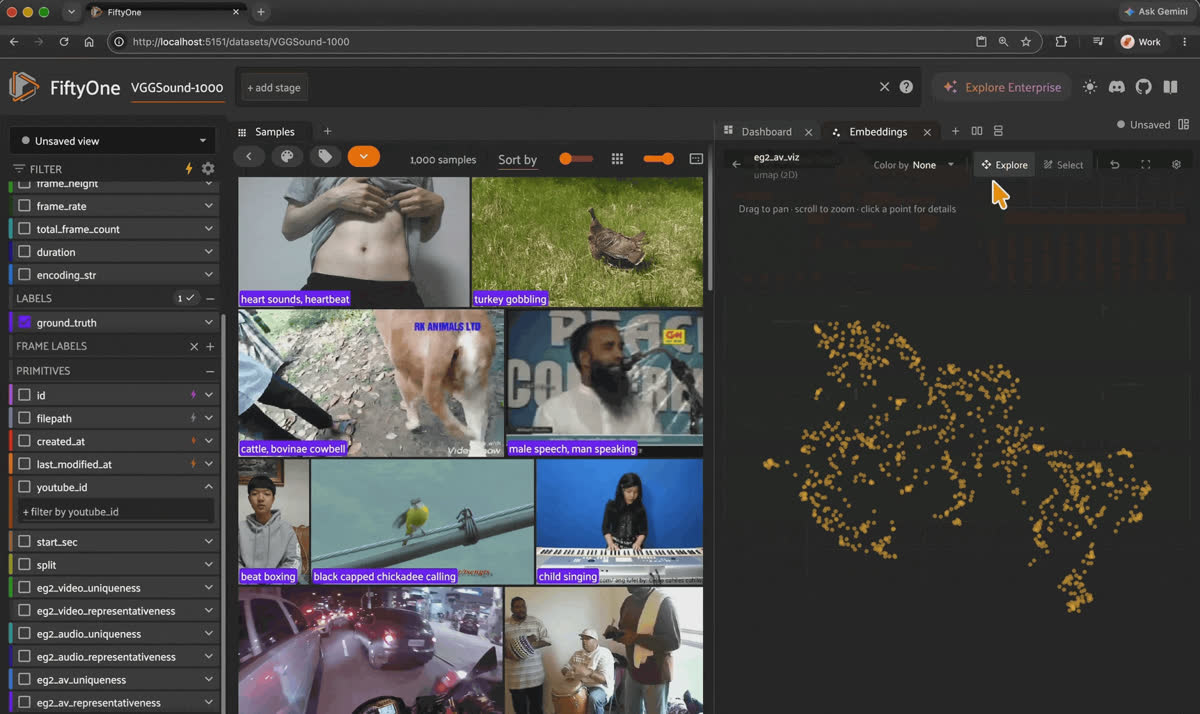
The VGGSound dataset in the FiftyOne App, with label counts, uniqueness and representativeness scores, and an embeddings view.
VGGSound is a set of 10-second YouTube clips, each labeled with one of 309 sound classes. The sound source is visible in the clip. This FiftyOne build holds the first archive shard: 10,000 of the 199,467 clips in the full release.
Sample fields you’ll use:
ground_truth (a Classification with the sound class), youtube_id, start_sec, and split. The Hub copy also carries the vectors this post computes: eg2_video, eg2_audio, and eg2_av, each 768-dimensional.Keep it honest. VGGSound labels come from an automated pipeline (visual verification, audio verification, iterative noise filtering), not from human annotators. Treat
ground_truth as a strong signal that can still be wrong.Step 1: Register the model
import fiftyone as fo
import fiftyone.brain as fob
import fiftyone.zoo as foz
from fiftyone import ViewField as F

# One-time: point FiftyOne at the remote zoo model source
foz.register_zoo_model_source(
    "https://github.com/harpreetsahota204/EmbeddingGemma2", overwrite=True
)

# Load the vision and audio encoders so one model handles video, audio, and both
model = foz.load_zoo_model(
    "google/embeddinggemma-2",
    media_type="video",
    modalities=["vision", "audio"],
)
The weights download on first use, and the repo is public, so you don’t need a Hugging Face login. It runs on CPU, and a GPU makes embedding a video dataset much faster.
Step 2: Load VGGSound
from fiftyone.utils.huggingface import load_from_hub

dataset = load_from_hub("harpreetsahota/VGGSound")
Good to know. Do you have to recompute the embeddings? No. The Hub copy ships with the three
eg2_* vector fields and the uniqueness and representativeness scores. Skip Step 3 and go straight to Step 4, which builds the LanceDB indexes on your machine from those vectors. Step 3 is the code to run on your own media. The full download is 16.6 GB.Step 3: Embed the clips three ways
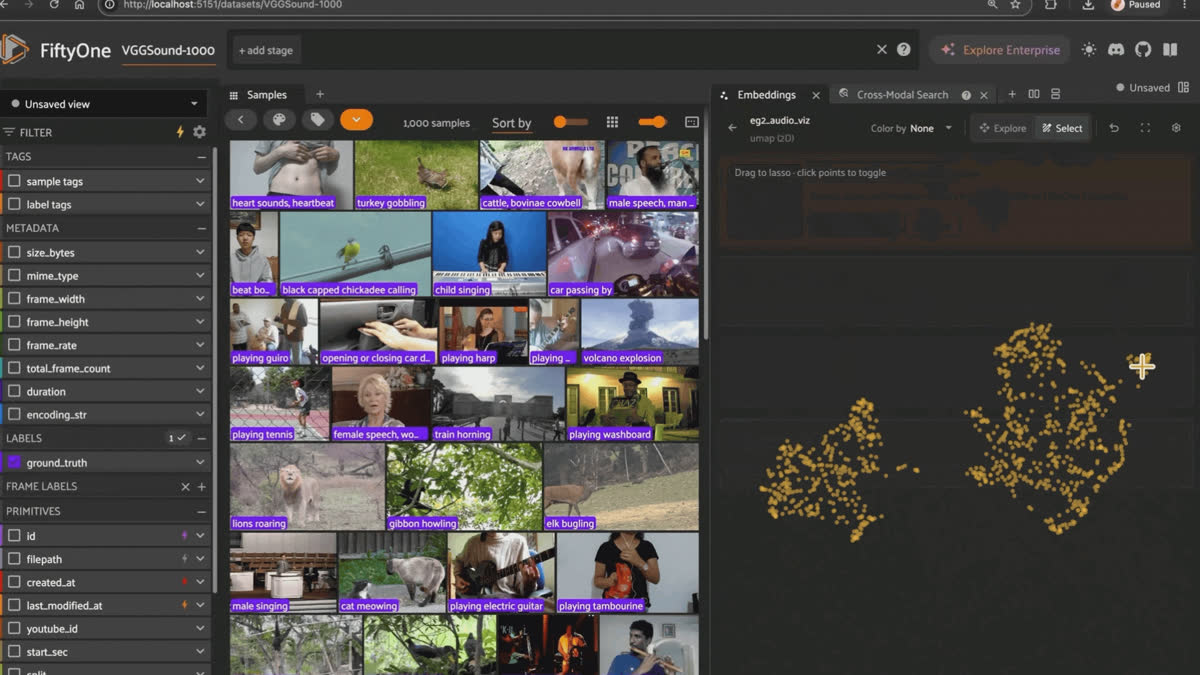
The three EmbeddingGemma 2 vector fields on VGGSound, explored as UMAP layouts in the Embeddings panel.
# Frames only: sampled at 1 fps, up to 32 frames spread over the clip
model.embed_dataset(dataset, "eg2_video", modality="video")

# Soundtrack only: the first 30 seconds, resampled to 16 kHz mono
model.embed_dataset(dataset, "eg2_audio", modality="audio")

# Frames and soundtrack together, as one vector
model.embed_dataset(dataset, "eg2_av", modality="video+audio")Each call reads the
filepath of every sample and stores one VectorField. FiftyOne’s compute_embeddings() only accepts image and video collections, so embed_dataset() is the route for audio and for video plus audio. Clips that fail to decode, such as a video with no audio track, get None and a logged warning.Step 4: Build a LanceDB index for each field
index_settings = {
    "eg2_video": {"media_type": "video"},
    "eg2_audio": {"media_type": "audio"},
    "eg2_av": {"media_type": "video", "modalities": ["vision", "audio"]},
}

for key, model_kwargs in index_settings.items():
    fob.compute_similarity(
        dataset,
        embeddings=key,                   # reuse the stored vectors
        model="google/embeddinggemma-2",  # pass the zoo model name so text queries work
        model_kwargs=model_kwargs,
        backend="lancedb",
        brain_key=key,
    )
Each index is an ordinary FiftyOne similarity index backed by its own LanceDB table, so image, video, audio, and video + audio indexes of the same dataset sit side by side.
Good to know. Where do the tables live? FiftyOne’s LanceDB backend reads its storage location from your brain config, and the default is
/tmp/lancedb. Many systems clear /tmp on restart. Set a permanent location in ~/.fiftyone/brain_config.json before you build:{
"similarity_backends": {
"lancedb": {"uri": "~/fiftyone/lancedb"}
}
}Why LanceDB for a multimodal index?
LanceDB is an open-source vector database with FiftyOne Brain support built in.
- Embedded, no server. It runs inside the FiftyOne process and stores tables as files, on local disk or in cloud storage.
- Built for ML data. Tables use the Lance columnar format, designed for fast random access to large vectors.
- Scales past memory. Tables live on disk, so an index doesn’t have to fit in RAM.
- One table per index. A video, an audio, and a video + audio index of the same clips don’t interfere with each other.
Step 5: Search with text
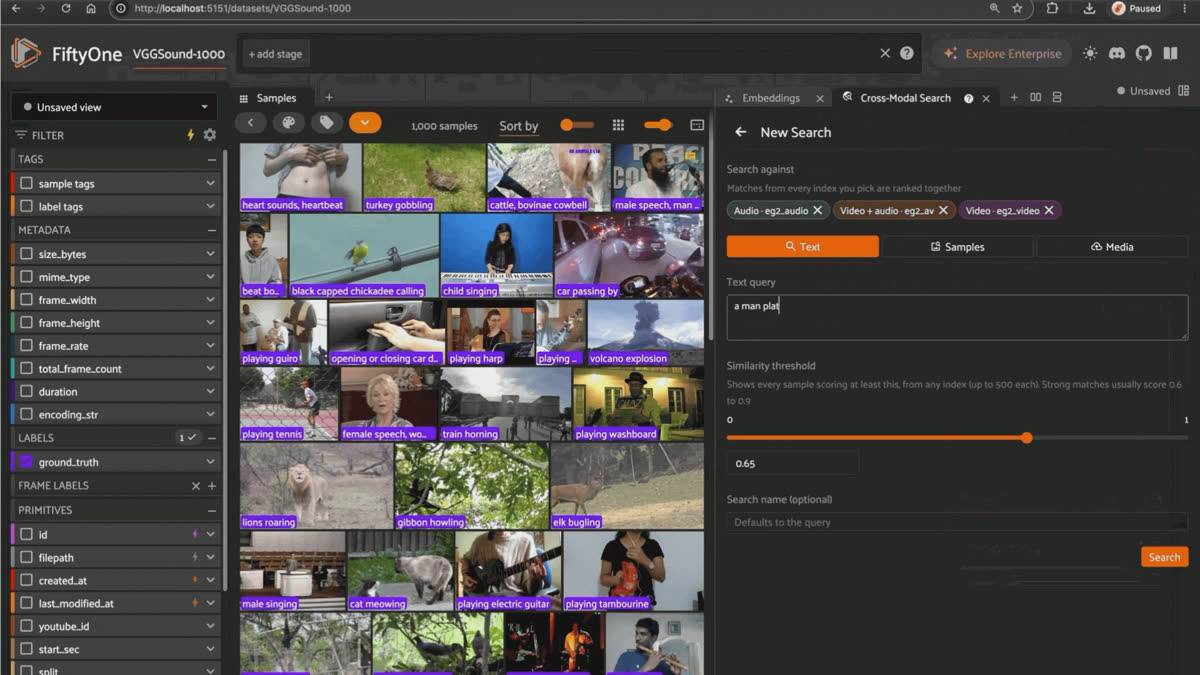
Text queries in the Cross-Modal Retrieval panel return matches from the video, audio, and video + audio indexes at once.
view = dataset.sort_by_similarity("church bell ringing", k=10, brain_key="eg2_av")

session = fo.launch_app(view)
Text queries are prefixed with the model’s
SearchQuery prompt, which tells it the text is a search query rather than a document. Run the same query against each index, and each one ranks the clips by different evidence:In this 100-clip sample, the video and video + audio indexes put four church bell clips in their top eight. The audio index puts an orchestra first and finds bells at ranks 3, 5, and 6. Colored bars are clips labeled
church bell ringing.Step 6: Let a sound search videos
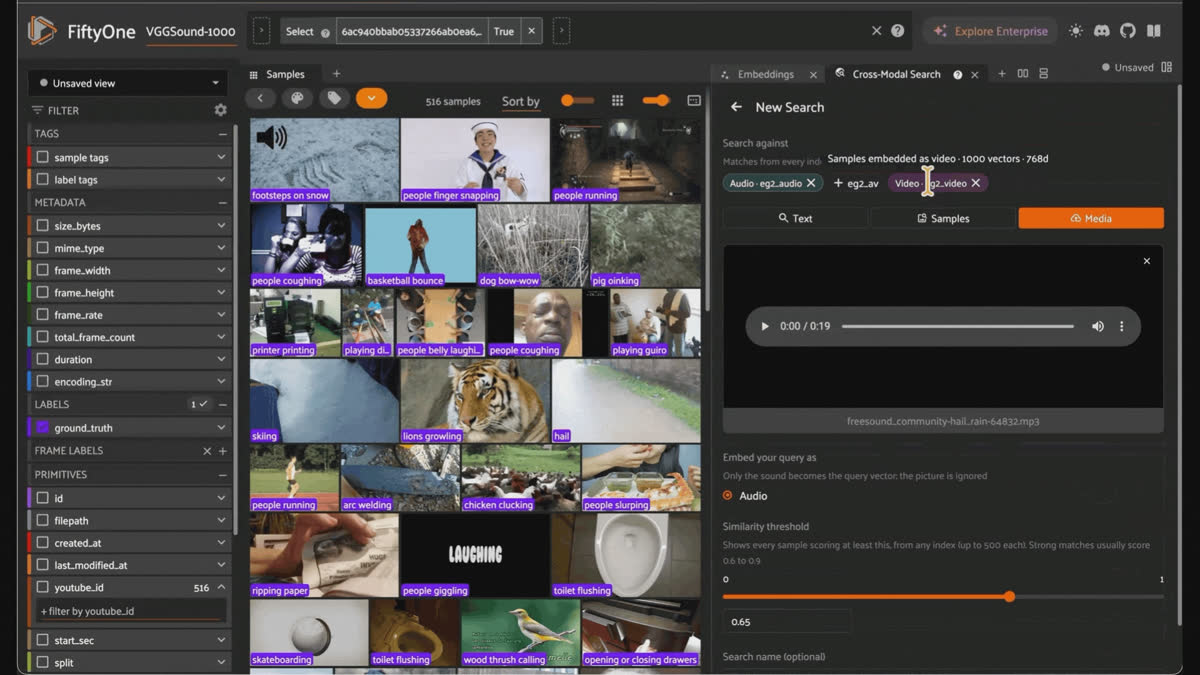
Audio and video queries in the Cross-Modal Retrieval panel find VGGSound clips by what they show and how they sound.
Take the soundtrack vector of one clip and search the frames-only index, which contains no sound at all:
# A clip labeled "female singing"
clip = dataset.match(F("ground_truth.label") == "female singing").first()

# Its soundtrack vector queries the frames-only index; the clip itself is excluded
matches = dataset.exclude([clip.id]).sort_by_similarity(
    clip["eg2_audio"], k=10, brain_key="eg2_video"
)The chart above shows a sample of 100 clips. On the full 10,000 clips, the top 10 for a
female singing query is dominated by singing: male singing, female singing, and child singing, plus a few neighbors such as playing ukulele and people cheering. The query never saw a frame, and the index never heard a sound.Step 7: Find the clips worth your time
The vectors you just built also answer curation questions.
eg2_av embeds frames and sound together, so it’s the one to use here:# Uniqueness: high scores mark clips with few close neighbors
fob.compute_uniqueness(
dataset, embeddings="eg2_av", uniqueness_field="eg2_av_uniqueness"
)
# Representativeness: high scores mark clips near the center of a cluster
fob.compute_representativeness(
dataset,
embeddings="eg2_av",
representativeness_field="eg2_av_representativeness",
method="cluster-center",
)
# A 2D layout you can explore in the Embeddings panel (needs umap-learn)
fob.compute_visualization(
dataset, embeddings="eg2_av", method="umap", brain_key="eg2_av_viz", seed=51
)Sort by
eg2_av_uniqueness to find outliers worth a look. Sort by eg2_av_representativeness to pick a small set that stands in for the whole. The Hub copy already stores both scores as sample fields for each of the three vector fields, for example, eg2_audio_uniqueness.Step 8: Classify without training anything
# Use the 309 VGGSound class names as the label set
model.classes = dataset.distinct("ground_truth.label")

# Compare stored vectors to the class text; no media is decoded again
model.classify_dataset(dataset, "eg2_zeroshot", embeddings_field="eg2_av")

# Score the zero-shot labels against ground truth
dataset.evaluate_classifications(
    "eg2_zeroshot", gt_field="ground_truth", eval_key="eg2_eval"
)
Open the Model Evaluation panel, and the confusion matrix shows which sound classes the model separates and which it mixes up.
Keep it honest.
eg2_zeroshot is model output, not ground truth. Expect near-neighbor classes to mix. VGGSound lists dog barking, dog bow-wow, and dog growling as separate classes, and a zero-shot model has little to separate them with.Try it without code: the Cross-Modal Retrieval panel
The Cross-Modal Retrieval panel runs the same searches from the App, and it lets you search with media you have in your hands right now. For how plugins and panels are built, see FiftyOne Plugins for MCAP and LeRobot Data Curation.
Install
fiftyone plugins download https://github.com/harpreetsahota204/cross_modal_similarity_search
fiftyone plugins requirements @harpreetsahota/cross-modal-retrieval --install
Requirements:
- FiftyOne 1.22.0 or later
lancedb,transformers>=5.18,torch,av, andhuggingface-hub, all installed by the second command- The EmbeddingGemma 2 weights in your model zoo. Download them once (about 1.5 GB) so your first search doesn’t stall:
import fiftyone.zoo as foz

foz.register_zoo_model_source(
    "https://github.com/harpreetsahota204/EmbeddingGemma2", overwrite=True
)
foz.download_zoo_model("google/embeddinggemma-2")
A GPU is optional. The webcam and microphone options need the App on
localhost or https, which is a browser rule.Don’t want to install anything?
Try the EmbeddingGemma 2 in FiftyOne Space on Hugging Face and use the panel in your browser.
Open the panel and build an index
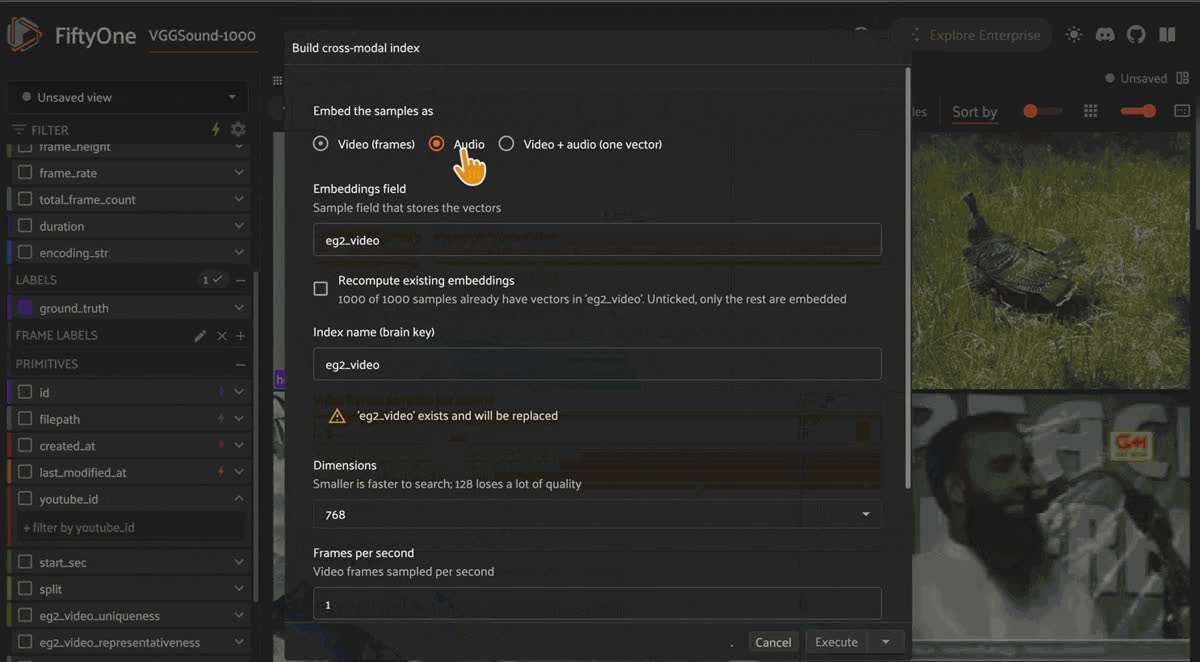
The Build Cross-Modal Index form, where you choose what part of each sample becomes its EmbeddingGemma 2 vector.
Open a dataset in the App, click the + next to the grid’s tab, and choose Cross-Modal Search. Indexes you built in Python with this model, such as the ones in Step 4, show up in the panel. To make a new one, click Build Cross-Modal Index.
When you build an index, you choose what part of each sample becomes its vector:
| Embed the samples as | What goes into the vector | Finds samples by |
|---|---|---|
| Image | the image | what they show |
| Video | frames sampled from the video, with the sound ignored | what they show |
| Audio | the soundtrack, or the audio file | what they sound like |
| Video + audio | frames and soundtrack together, as one vector | both at once |
The form also lets you pick Dimensions (768, 512, 256, or 128), frame sampling for video, and how many seconds of audio to use. Building runs in the background if you have delegated operations set up.
Search with text
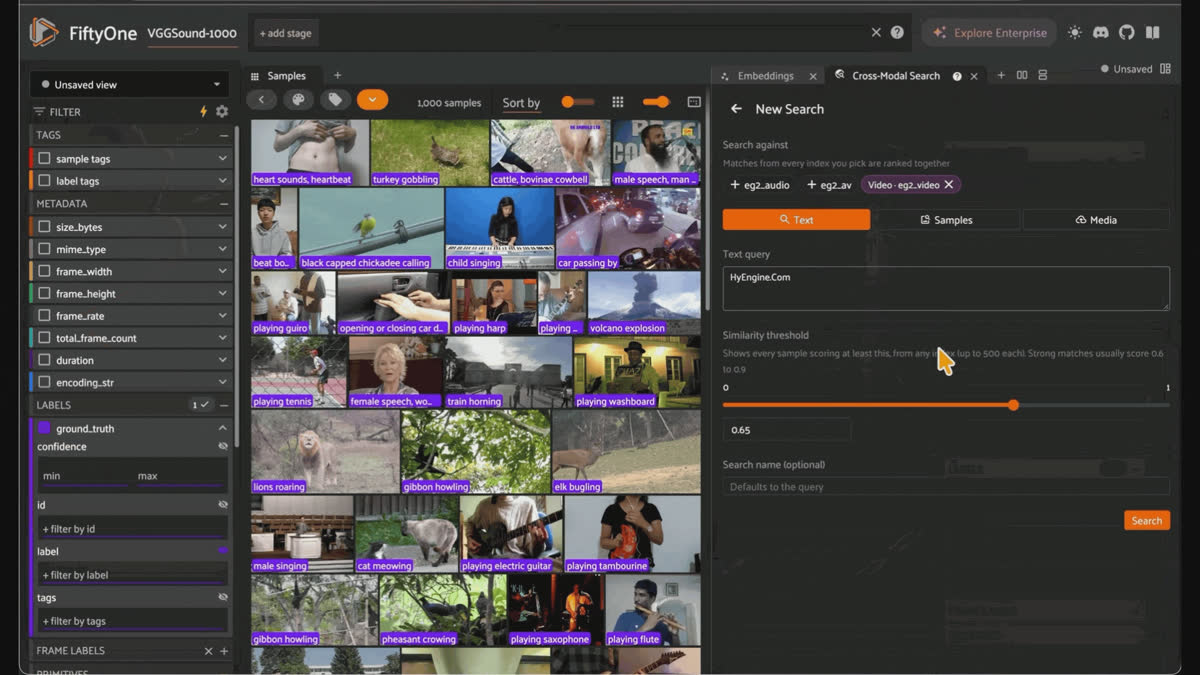
Text searches in the Cross-Modal Retrieval panel, with a colored chip for each index's results.
Click New Search. Under Search against, pick one or more indexes. Each returns its own matches. Choose Text, describe what you want, and click Search. Try “church bell ringing,” “rain on a window,” or “a crowd cheering.”
The matches open in the grid, best first. A search across several indexes returns a colored chip for each index, and you can click chips to turn each index’s results on or off.
Search with other samples
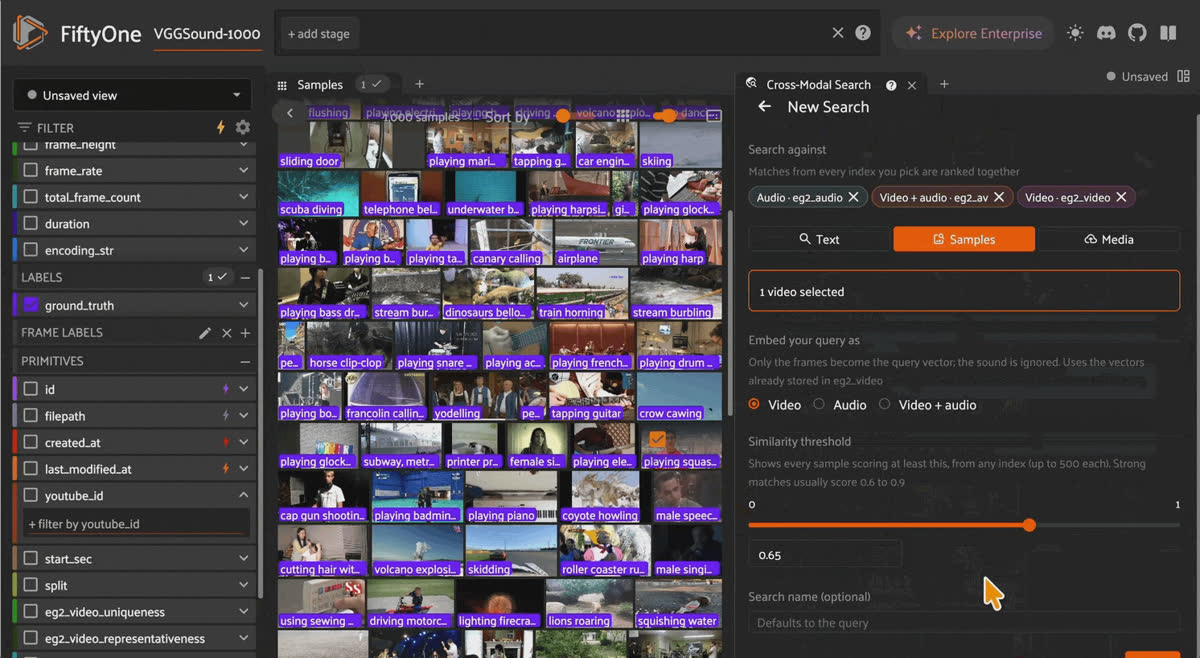
Searching with selected samples, which the panel averages into one query.
Select samples in the grid, then choose Samples and search. The selected samples are excluded from the results. Several selected samples are averaged into one query, so selecting three clips of dogs barking finds “dogs barking” better than a single example does.
For video samples, embed your query as chooses what part of the clip becomes the query: its frames, its sound, or both. Search an audio index with the clip's frames to find what sounds like what the clip shows.
Search with your own media
Under Media, use something that isn’t in the dataset. Nothing you upload or record is added to the dataset.
- Upload an image, video, audio, or MCAP file.
- The microphone records up to 30 seconds of audio.
- The webcam records up to 30 seconds of video with sound or takes a single photo.
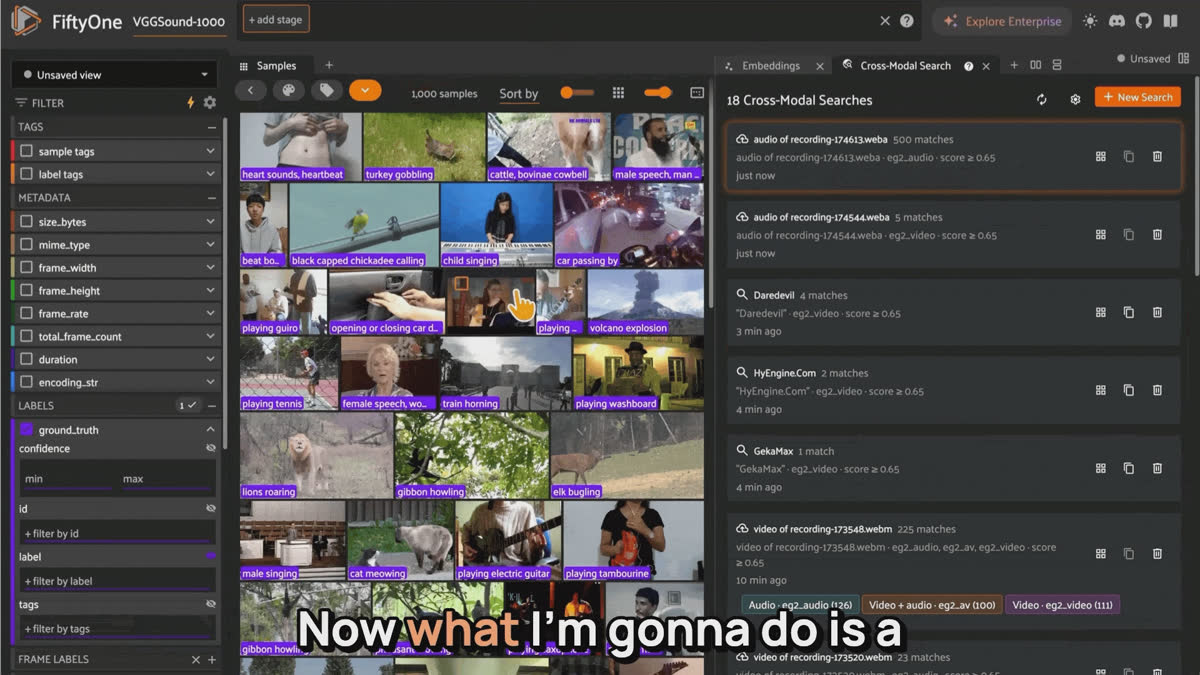
A microphone recording searches the VGGSound clips directly, without being added to the dataset.
The browser asks for permission the first time you use the webcam or microphone.
Tune the search and keep your results
Set a Similarity threshold, and the panel returns every sample from any index whose cosine similarity to your query meets it. The default is 0.65, which suits most searches, and strong cross-modal matches usually score between 0.6 and 0.9. Lower it if a search comes back empty. Each index returns at most 500 results.
Every search is saved on the panel’s home page. Click one to bring its results back, Clone one to tweak and rerun it, or Delete the ones you don’t need.
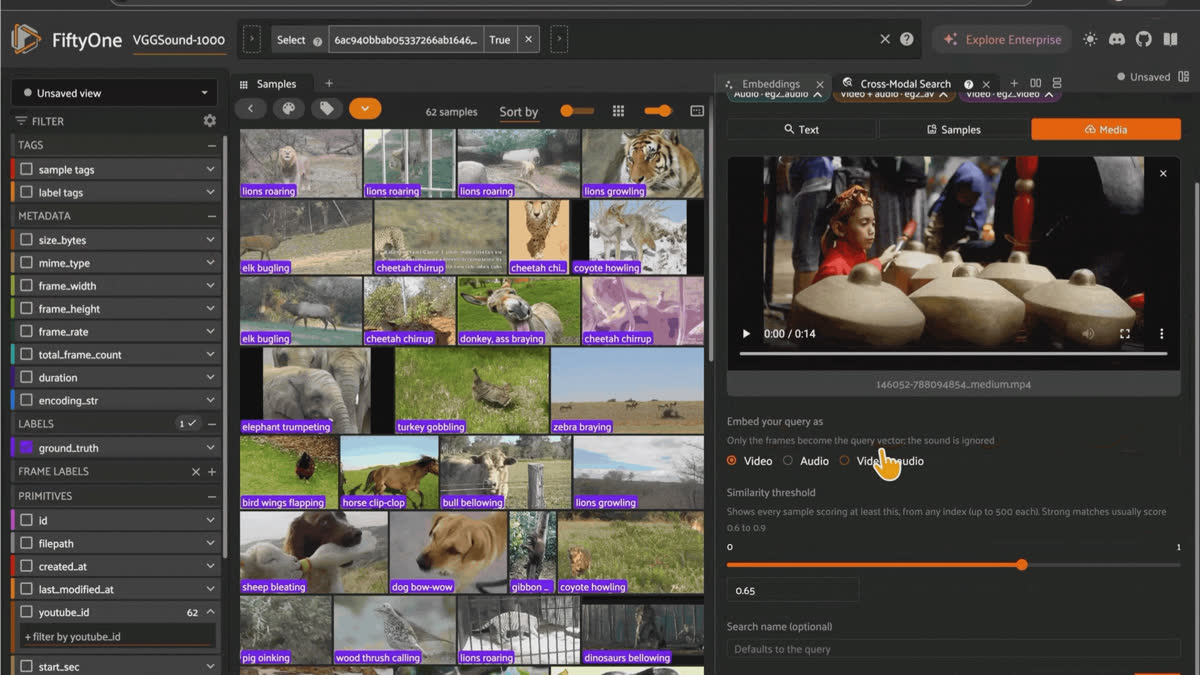
Saved searches on the Cross-Modal Retrieval panel's home page, ready to reopen, clone, or delete.
Because every index is a standard FiftyOne similarity index, the App’s own similarity search and
view.sort_by_similarity() work on the same indexes the panel uses.Keep it honest
- This is one shard of VGGSound. Everything here uses 10,000 of the 199,467 clips.
- Read scores as a ranking. Text-to-clip similarity sits in a narrow band, and matching clips score only slightly higher than the rest. Compare scores within one search, not across searches.
- Audio-only is the weakest index on VGGSound. The class names sound sources that are visible in the frames, so the video and video + audio indexes find them more reliably. Audio alone does better when the classes are defined by sound.
- 128 dimensions costs quality. The model card reports a large drop for multimodal tasks at 128. Use 768 or 512 unless storage forces your hand.
- Retrieval figures in this post come from a 100-clip sample. The church bell and sound-to-frames charts illustrate behavior and aren’t benchmark results.
Try it yourself
- EmbeddingGemma 2 in FiftyOne Space: the panel on VGGSound, no install
- Cross-Modal Retrieval plugin: the panel and operators
- EmbeddingGemma 2 FiftyOne integration: the remote zoo model, with a notebook
- VGGSound on Hugging Face: 10,000 clips with vectors, uniqueness, and representativeness scores
- EmbeddingGemma 2 model card and Google’s launch post
- FiftyOne Brain similarity docs
Frequently asked questions
EmbeddingGemma 2 is an open, 740M-parameter embedding model from Google DeepMind, released under Apache 2.0. It maps text, images, video, and audio into a single 768-dimensional vector space so that you can compare any modality with any other.
To use EmbeddingGemma 2 in FiftyOne, register the remote zoo source with
foz.register_zoo_model_source("https://github.com/harpreetsahota204/EmbeddingGemma2"), then load google/embeddinggemma-2 with foz.load_zoo_model(). Use dataset.compute_embeddings() for images and video, or model.embed_dataset() for audio and video plus audio.Cross-modal retrieval is searching one media type with another, such as finding video clips with a text query or finding pictures with a sound. It works when one model embeds every modality into the same space, which EmbeddingGemma 2 does.
To build a multimodal index in FiftyOne with LanceDB, store embeddings in a vector field, then call
fob.compute_similarity(dataset, embeddings="eg2_av", model="google/embeddinggemma-2", model_kwargs={...}, backend="lancedb", brain_key="eg2_av"). Each index becomes its own LanceDB table so that you can keep video, audio, and video + audio indexes of the same dataset together.Yes, EmbeddingGemma 2 can search video by its sound. Build an audio index
(media_type="audio") or a video + audio index (modalities=["vision", "audio"]) and query with text, or query with another clip’s eg2_audio vector.No. EmbeddingGemma 2 runs on CPU in float32 and uses bfloat16 on CUDA. A GPU makes embedding a large video dataset much faster. float16 is refused because it returns NaN or degraded vectors.
Start with 768, the full EmbeddingGemma 2 dimension. Use 512 or 256 to cut storage and search time. At 128, multimodal quality drops noticeably.
FiftyOne stores LanceDB vectors in the location set under
similarity_backends.lancedb.uri in ~/.fiftyone/brain_config.json, which defaults to /tmp/lancedb. Point it somewhere permanent before you build indexes.Browsers allow camera and microphone access only on
localhost or https. Run the App locally or serve it over https.Hacker-in-Residence
Harpreet is Hacker-in-Residence at Voxel51, where he turns cutting-edge AI ideas into open-source prototypes and demos that push the boundaries of deep learning. From building tools that inspire to creating content that educates, Harpreet helps the AI community level up—one wild idea at a time.
See all articles by Harpreet Sahota
Try Voxel51 for yourself
Loading related posts...
© 2026 Voxel51 All Rights Reserved