Few-Shot Image Retrieval in FiftyOne: Mining Edge Cases from Partially Labeled Data
Author

Principal Machine Learning Engineer
Machine Learning and Perception Leader with 20 years of experience defining technical strategy and leading the end-to-end development of production ML systems. I specialize in translating advances in computer vision and deep learning into robust, scalable systems deployed across autonomous vehicles, consumer robotics, and industrial automation.
See all articles by Lorenzo Riano
In this article
Key takeawaysThe premise: Intentionally binary, positive vs. negativeInstallationStarting a sessionEmbeddings: compute once, reuse oftenLabeling: Just positives and negativesTraining: Rocchio-style prototypes that work out of the boxInference: Views, working subsets, and samplingWriting predictions back: Making it realWrapping up
In this article
Key takeawaysThe premise: Intentionally binary, positive vs. negativeInstallationStarting a sessionEmbeddings: compute once, reuse oftenLabeling: Just positives and negativesTraining: Rocchio-style prototypes that work out of the boxInference: Views, working subsets, and samplingWriting predictions back: Making it realWrapping up
Talk to an AI expert
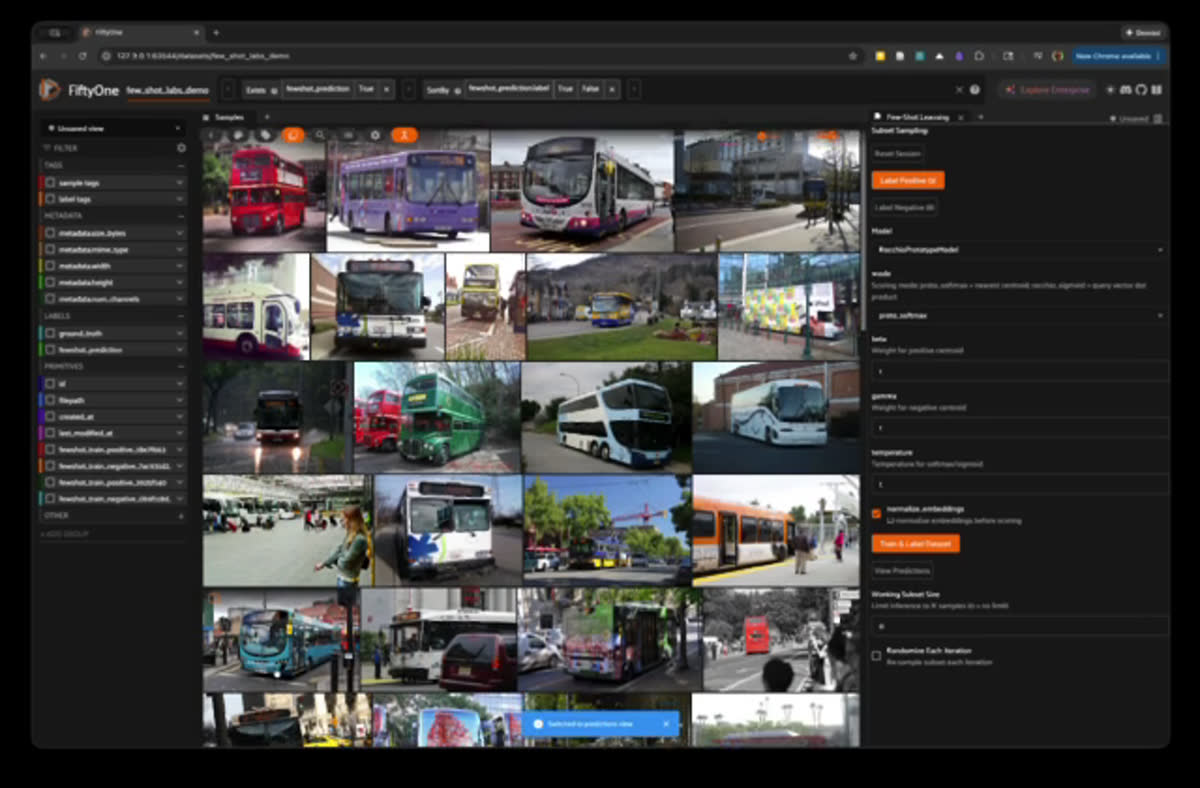
Many real-world datasets are partially labeled or not labeled at all. Or you already have a model, but it fails on some niche cases, and you want to find more examples of those failures in a large unlabeled pool. Or you simply want image retrieval: show a few examples of what you care about (and maybe a few counterexamples) and surface similar images.
The Few-Shot Learning plugin in FiftyOne Labs is built for exactly these situations. It’s not a giant foundation model or an AutoML black box. It’s a lightweight workflow that turns a handful of labeled positives and negatives plus precomputed embeddings into a similarity signal you can use to retrieve relevant samples directly in the FiftyOne App.
Key takeaways
- The plugin learns a binary notion of similarity: “like my positives” vs. “not like my positives”.
- It uses embeddings from standard models (ResNet, CLIP, DINOv2) and a prototype-style scorer.
- You mark a few positives (things you want) and negatives (things you don’t), then rank the rest of the dataset.
- It works even when your dataset is partially labeled or unlabeled, and is ideal for:
- Mining model failures and edge cases
- Growing niche classes from a few seeds
- General image retrieval / query-by-example
- The workflow is built for fast iteration on large datasets via sampling and stable working subsets.
The premise: Intentionally binary, positive vs. negative
The plugin is intentionally binary: positive vs. negative.
You’re teaching the dataset what “the thing” looks like. Everything else becomes “not the thing.” That constraint makes the workflow simple, fast, and easy to reason about when you’re still exploring.
Under the hood, the workflow is:
- Pick an embedding model (ResNet / CLIP / DINOv2).
- Compute embeddings if they’re missing.
- Label a few positives and negatives.
- Train a lightweight prototype-style scorer.
- Write predictions back onto the dataset.
- Iterate until the results stabilize enough for your use case.
Installation
Getting started with the Few-Shot Learning plugin requires two steps:
- Install FiftyOne Labs: FiftyOne Labs gives you early access to the latest ML capabilities before they're officially released. Find the installation instructions on GitHub.
- Download the Few-Shot Learning plugin: Find the instructions on GitHub.
Starting a session
When you click Start Session, the plugin first validates that the embedding field you selected matches the embedding model you chose. If you're not sure which embedding model to use, we wrote a practical guide on choosing embeddings for image classification.
- DINOv2 (e.g.
dinov2-vitb14-torch) expects 768‑dimensional vectors. - CLIP ViT-B/32 (e.g.
clip-vit-base32-torch) expects 512‑dimensional vectors. - ResNet50 (e.g.
resnet50-imagenet-torch) expects 2048‑dimensional vectors.
The session also creates a few dataset fields behind the scenes:
- A prediction field (by default something like
fewshot_prediction). - Two boolean training label fields with random suffixes for positives and negatives.
Those boolean fields are session-specific and are cleaned up when you reset the session.
Embeddings: compute once, reuse often
Embeddings are the backbone of this workflow.
The plugin will compute embeddings for any samples that are missing the selected embedding field. It uses FiftyOne’s model zoo integration, so you can choose models like:
dinov2-vitb14-torchclip-vit-base32-torchresnet50-imagenet-torch
Under the hood, it simply calls
compute_embeddings() on the current view.A key detail: it only computes what’s missing. If most of your dataset already has embeddings, the plugin reuses them and only fills the gaps. That keeps the setup cost low, even on large datasets.
Labeling: Just positives and negatives
Once the session is active, you interact directly in the App:
- Select samples in the grid.
- Click Label Positive or Label Negative in the plugin panel.
The plugin:
- Tracks labeled sample IDs in the session state.
- Writes those labels into the session-specific boolean fields so you can see your training labels in the grid and filters.
This keeps the mental model simple: you’re curating a small set of positives and negatives that define your concept.

Training: Rocchio-style prototypes that work out of the box
When you click Train & Label Dataset, the plugin trains a prototype-style model inspired by Rocchio.
In practice, the steps look like:
- Compute the centroid of positive embeddings.
- Compute the centroid of negative embeddings.
- Score candidate samples based on their relationship to those centroids.
- Convert that score into a probability in [0, 1].
The implementation exposes two scoring modes:
- Distance-based mode
Compare distances to the positive and negative centroids and convert the relative distance into a score. - Query-vector mode
Build a query vector:q = beta * positive_centroid - gamma * negative_centroidand score samples via dot products with (q).
You get a simple but effective classifier that reflects the small set of labels you’ve provided.
Inference: Views, working subsets, and sampling
Inference runs over an inference view, which can be:
- The entire current App view (respecting any filters you’ve applied), or
- A working subset if you enable sampling for speed.
The subset logic is designed for iterative workflows:
- It always includes your labeled samples, so your training data is part of the inference context.
- It fills the remainder with randomly sampled unlabeled samples from the current view.
- If you disable randomization, the subset is cached and reused until your view changes.
This lets you iterate on a stable pool of samples instead of rescoring hundreds of thousands of samples every time you add a label.
Writing predictions back: Making it real
After scoring, the plugin writes an
fo.Classification into the prediction field (by default fewshot_prediction) with:- A
labelof"positive"or"negative". - A
confidencevalue that reflects the model’s score.
For samples you explicitly labeled, the plugin overwrites predictions to match your labels and sets
confidence = 1.0. This keeps the dataset consistent with your ground truth.Once predictions are written, you can:
- Sort by confidence to inspect high-confidence positives or negatives.
- Use filters in the App to focus on edge cases or potential failure modes.
- Run the classic loop:
label → train → inspect → label more → repeat until the results are good enough for your task.
Wrapping up
The Few-Shot Learning plugin gives you a tight feedback loop:
- Choose an embedding model.
- Label a handful of examples.
- Train a simple prototype classifier.
- Push predictions back into the dataset.
- Iterate in the FiftyOne App at interactive speed.
It’s a small, practical tool, but it fits naturally into how ML teams explore datasets, validate hypotheses, and stand up early-stage classifiers—without leaving the data-centric workflow you already have in FiftyOne.
Principal Machine Learning Engineer
Machine Learning and Perception Leader with 20 years of experience defining technical strategy and leading the end-to-end development of production ML systems. I specialize in translating advances in computer vision and deep learning into robust, scalable systems deployed across autonomous vehicles, consumer robotics, and industrial automation.
See all articles by Lorenzo Riano
Talk to an AI expert
Loading related posts...
© 2026 Voxel51 All Rights Reserved