Robots Can See. They Still Can't Feel: 8 Tactile LeRobot Datasets in FiftyOne
Author

Hacker-in-Residence
Harpreet is Hacker-in-Residence at Voxel51, where he turns cutting-edge AI ideas into open-source prototypes and demos that push the boundaries of deep learning. From building tools that inspire to creating content that educates, Harpreet helps the AI community level up—one wild idea at a time.
See all articles by Harpreet Sahota
In this article
Key takeawaysWhy touch matters for robot learningThree shapes of tactile dataWhy tactile data is hard to collect and harder to readThe FiftyOne LeRobot schema for tactile dataThe 8 tactile datasets at a glanceThe 8 tactile datasets in detailCurating tactile data: where the real gains areFrequently asked questions
In this article
Key takeawaysWhy touch matters for robot learningThree shapes of tactile dataWhy tactile data is hard to collect and harder to readThe FiftyOne LeRobot schema for tactile dataThe 8 tactile datasets at a glanceThe 8 tactile datasets in detailCurating tactile data: where the real gains areFrequently asked questions
Try Voxel51 for yourself
A field guide to touch as a robot-learning modality, plus 8 LeRobot v3.0 datasets that record it (1,679 episodes of gel-sensor video, taxel grids, and fingertip force/torque), loaded into FiftyOne with their exact keys and quirks.
Try tying your shoes with numb fingers. You can watch your hands the whole time and still fumble it, because the information you need lives at the point of contact. Is the lace slipping? Is the knot tight? How hard am I pulling? Your eyes can't answer any of that. Your fingertips answer it constantly, and you never notice.
That's roughly where most robot learning sits today. Vision-language-action models have gotten good at the "where": where's the cup, where's the gripper, where should the arm go next. They're still mostly blind to what's happening at the contact surface.
Tactile sensing fills that gap. Getting good tactile data, and then making sense of it, is one of the more interesting data problems in physical AI right now.
We pulled together 8 tactile datasets that ship as LeRobot v3.0, from a bimanual Flexiv rig packing earbuds into cases to a handheld gripper with two taxel pads, and loaded each one into FiftyOne. This guide covers why touch matters, what tactile data looks like on disk, why it's hard to collect and harder to read, and what to check before you train on it. Each dataset links to its FiftyOne version, its source repo, and its license.
Key takeaways
- 8 tactile LeRobot datasets, 1,679 episodes, and 1,877,818 frames, all loadable with
fiftyone.utils.huggingface.load_from_hub. Xense's earbud-case insertion set alone holds 1,213,518 of those frames (65%). - Tactile data shows up in three shapes. 7 of the 8 store gel-sensor touch as video under
observation.images.*, 4 carry force/torque vectors, and only Grabette stores taxel grids (6×6 and 4×8 int16). Tactile video plays in FiftyOne like any camera, and numeric tactile streams can be plotted in the episode viewer, but they stay in parquet and don't become sample fields you can filter on. - There's no naming standard for tactile keys, even inside these 8 datasets.
observation.tactileis a 60-D fingertip force/torque vector in SharpaDex and the prefix of a taxel grid in Grabette. - In the one SharpaDex season here (
assemble_gears_on_base, 410 episodes), the right index finger and right thumb register contact in 61% and 42% of 302,020 frames. Five of the ten fingertips rarely do. - Licenses: Apache-2.0 for the three Xense sets and Grabette, CC-BY-4.0 for SharpaDex, and none declared for the three Intern sets.
- The evidence that tactile input helps robot policies is real but conditional. LeFlexiTac reports 7/30 → 23/30 on an in-bag pen task, FreeTacMan reports 21% → 71% average success, and an open T-Rex issue measured an offline benefit within ±0.9% on the full Sharpa data.
Why touch matters for robot learning
Vision fails at the moment of contact. When a gripper closes on an object, the fingers usually block the camera's view of what you care about. Inserting a plug, threading a cable, unscrewing a cap: the critical action happens in a region the camera can't see well.
Slip is invisible. An object starting to slide out of a grasp often doesn't look like anything until it's already falling. A tactile sensor picks up the shear well before that.
Force is not a pixel. Wiping a table, peeling a sticker, or holding an egg all need the right amount of pressure. You can't reliably infer pressure from an RGB frame.
Materials feel different than they look. A soft plastic bottle and a rigid one can look identical. They respond very differently when squeezed.
The early results back this up. LeFlexiTac added a FlexiTac sensor (a 12×32 taxel map) to the low-cost SO-100/SO-101 arm and fed it to four policy families through a single
observation.tactile.primary stream. On an in-bag pen retrieval task, where the camera can't see what the gripper is reaching for, vision-only Action Chunking with Transformers (ACT) succeeded 7 of 30 times. With tactile input, it succeeded 23 of 30. FreeTacMan ran five contact-rich tasks with ACT: vision-only averaged 21% success, adding tactile input raised that to 55%, and adding their visuo-tactile pretraining raised it to 71%.Keep it honest. An open issue on the T-Rex GitHub repo reports training T-Rex on the full Sharpa dataset (64 GPUs, six epochs) and comparing real tactile input against neutral input on 64 fixed samples. Overall action mean squared error (MSE) dropped from 0.0768 to 0.0295 across checkpoints, but the benefit of real touch over neutral input swung between −0.90% and +0.89%. That's offline action prediction, not closed-loop success, which is where touch is supposed to pay off. My read isn't that touch doesn't help. Touch helps when the task needs it and when the data is clean enough for a model to learn from it. That second condition is where most of the work is.
Three shapes of tactile data
"Tactile" isn't one data type. Depending on the sensor, it lands on disk in one of three shapes, and each one needs a different way of looking at it:
- Images or video from camera-based gel sensors. These at least look like something, though a raw gel frame is hard to read without context.
- Low-resolution arrays from taxel pads and gloves, such as a 12×32 or 6×6 grid of pressure values. You can't view these as an image until you turn them into a heatmap.
- Time series of force and torque. These only make sense plotted over time, next to what the robot was doing.
How a gel sensor turns a press into an image
Most of the touch in this roundup comes from camera-based sensors. A soft gel with a reflective coating sits on a clear support. LEDs light it from the edges, often in three colors, and a camera underneath films the coating. When an object presses in, the coating bends, the shading shifts, and the camera records it. Subtract a frame taken with nothing touching the sensor, and you get a map of where the gel moved.
That's why datasets often ship more than one stream per sensor. SharpaDex stores
observation.images.tactile_raw (the camera's view), observation.images.tactile_deform (a deformation map), and a 60-D force/torque signal in observation.tactile. The Intern sets store observation.images.tactile_*_aug_diff, which by its name looks like a difference image, though the card only calls them "touch images."No standard sensor
Vision has converged on "an RGB camera." Touch hasn't converged on anything. You've got camera-based gel sensors (GelSight, DIGIT, Xense), taxel pads, fingertip sensors that report six-axis force and torque, and full-hand pressure gloves. The OmniViTac dataset alone uses four different visuo-tactile sensor types. Each produces data with a different shape, resolution, and meaning, and each fails in its own way.
Gels tear and degrade. The lighting inside camera-based sensors shifts. Baselines move between sessions. If you've done any work with lab assays, you'll recognize this immediately: it's a batch effect. Data collected on Tuesday with a fresh gel doesn't look like data collected on Friday with a worn one, and a model will happily learn that difference instead of the task.
Why tactile data is hard to collect and harder to read
Teleoperators can't feel what the robot feels. Most demonstrations come from a human driving a robot remotely. Without haptic feedback, operators guess at contact forces, so demonstrations are only as good as those guesses. Projects such as HapTile are starting to feed haptic signals back to the operator, but that's still the exception.
Human gloves have an embodiment gap. Tactile gloves let you collect natural human manipulation at scale. But a human hand isn't a robot hand, and a glove's pressure map doesn't translate cleanly to a two-finger gripper or a 22-degree-of-freedom (DoF) dexterous hand.
Scale is still small. Open X-Embodiment pooled more than 1 million real robot trajectories across 22 embodiments. The largest public tactile datasets are in the thousands to tens of thousands of episodes: SharpaDex v1.0 has 28,993, and T-Rex has 5,464. The 8 datasets in this roundup add up to 1,679. Several announced tactile datasets, such as RoboTacDex and DexViTac, say they'll release their data later.
Formats are inconsistent, even within one standard. LeRobot has become the default format for robot-learning data, which helps. It doesn't settle where touch goes.
Inside these 8 datasets alone,
observation.tactile means a force vector in one and a taxel-grid prefix in another. Xense names its overhead camera head in two sets and top in the third. All three Intern sources stored their task text as a pandas index in meta/tasks.parquet, which had to be rewritten before the standard loader would read it. Their tactile video was MJPEG inside MP4, which browsers can't play, so the FiftyOne versions are H.264 re-encodes. Outside this list, T-Rex encodes its tactile streams losslessly in an H.264 profile most browsers can't decode either.None of these are bugs exactly. They're reasonable decisions made by different people. Together they mean that before you can learn anything from tactile data, you spend a lot of time getting it to show up correctly.
Synchronization is easy to get wrong. Tactile sensors, cameras, and robot state often run at different rates. If the tactile spike from a grasp lands a few frames away from the gripper-close event, the model learns the wrong cause and effect.
The FiftyOne LeRobot schema for tactile data
All 8 datasets are loaded into FiftyOne with
fo.types.LeRobotDataset, the same way as in our 11-dataset LeRobot v3.0 roundup. Each one is a multimodal dataset where one sample equals one episode, with the same sample-level fields: media_reference, episode_index, task, tasks, length, duration, robot_type, and fps. Per-frame data stays in the LeRobot data/*.parquet and videos/*/*.mp4 files, and media_reference points into them.What changes for touch is where each shape ends up:
| Tactile shape | Example key | In FiftyOne |
|---|---|---|
| Gel-sensor video | observation.images.left_tactile_left | A video stream in the episode viewer, next to the RGB cameras |
| Force/torque vector | observation.tactile (SharpaDex), observation.wrench (Intern) | Per-dimension series in the viewer's Plot and Message tiles. Stays in data/*.parquet, not a sample field |
| Taxel grid | observation.tactile.right_sensor_1 (Grabette) | Flattened to one series per taxel (36 for a 6×6 grid) in the Plot and Message tiles. Stays in data/*.parquet, not a sample field |
Where touch lands when a LeRobot dataset is loaded into FiftyOne.
Good to know. Can you filter on numeric tactile data? Not directly. The episode viewer reads every numeric feature from parquet, so you can plot any taxel or force axis over time and step through exact values. FiftyOne's queries and aggregations, though, run on sample fields in its database, and LeRobot per-frame data deliberately stays in the source files behind
media_reference. To sort or filter episodes by touch, reduce each stream to a few per-episode numbers and write them back as fields (see the curation section below). A plot tile also shows a grid as 36 separate lines, not a heatmap, so render it yourself if you want to see the contact patch.Loading any of the 8 takes two lines:
import fiftyone as fo
from fiftyone.utils.huggingface import load_from_hub

dataset = load_from_hub("Voxel51/xense-strap-tape-120ep")
session = fo.launch_app(dataset)
The 8 tactile datasets at a glance
All 8 are real-world data, and 7 are complete imports of their source repos. The exception is SharpaDex: the FiftyOne version is one collection season (19.6 GB) of a 3.4 TB release.
| Dataset | Task | Tactile streams | Episodes/frames | Robot | License |
|---|---|---|---|---|---|
| Xense Earbud Case | Insert earbuds into cases, close the lid, and box them | 4 gel videos (400×700) | 834 / 1,213,518 | Bimanual Flexiv Rizon 4 | Apache-2.0 |
| Xense Strap Tape | Grab the tape and strap it | 4 gel videos (400×700) | 120 / 191,261 | Bimanual Flexiv Rizon 4 | Apache-2.0 |
| Xense Tron2 RT Pick and Place | Put the block into the box | 4 gel videos (400×700) | 115 / 48,999 | tron2_rt | Apache-2.0 |
| Intern Pour | Pour water from a cup into a beaker | 2 touch-image videos (700×400) + 6-D wrench | 51 / 44,042 | 7-DoF arm + Robotiq gripper, GELLO teleop | None declared |
| Intern Screw | Unscrew a cap from a bottle a person is holding | 2 touch-image videos + 6-D wrench | 50 / 31,960 | Same | None declared |
| Intern Shiguan | Insert a test tube into a rack | 2 touch-image videos + 6-D wrench | 51 / 26,665 | Same | None declared |
| SharpaDex Assemble Gears | Gear assembly on a base | Raw + deformation video, 60-D fingertip force/torque | 410 / 302,020 | Bimanual 7-DoF arms + 22-DoF hands | CC-BY-4.0 |
| Grabette Tactile | Put the white cube in the correct cup | 2 taxel grids (6×6, 4×8 int16) | 48 / 19,353 | Grabette handheld gripper | Apache-2.0 |
The 8 tactile LeRobot v3.0 datasets, with task, tactile streams, size, robot, and license.
The 8 tactile datasets in detail
Xense: three bimanual sets, four tactile streams each
Xense Robotics builds visuo-tactile sensors and publishes datasets recorded with its own LeRobot fork,
lerobot-xense, a LeRobot v5.1 fork that adds Flexiv Rizon4, Elite CS66, and ARX5 arms plus tactile grippers. All three sets share one layout: 3 RGB cameras, 4 tactile video streams (a left and right pad on each gripper, 400×700), and a 20-D state and action vector (left_tcp.{x,y,z,r1..r6}, right_tcp.{x,y,z,r1..r6}, and both gripper positions), all at 30 fps. Every stream is standard H.264 yuv420p, so the tactile video plays in a browser with no transcoding.Keep it honest. None of the three cards name the tactile sensor or say what the tactile pixels physically mean.
Xense Earbud Case: 834 episodes of long-horizon insertion
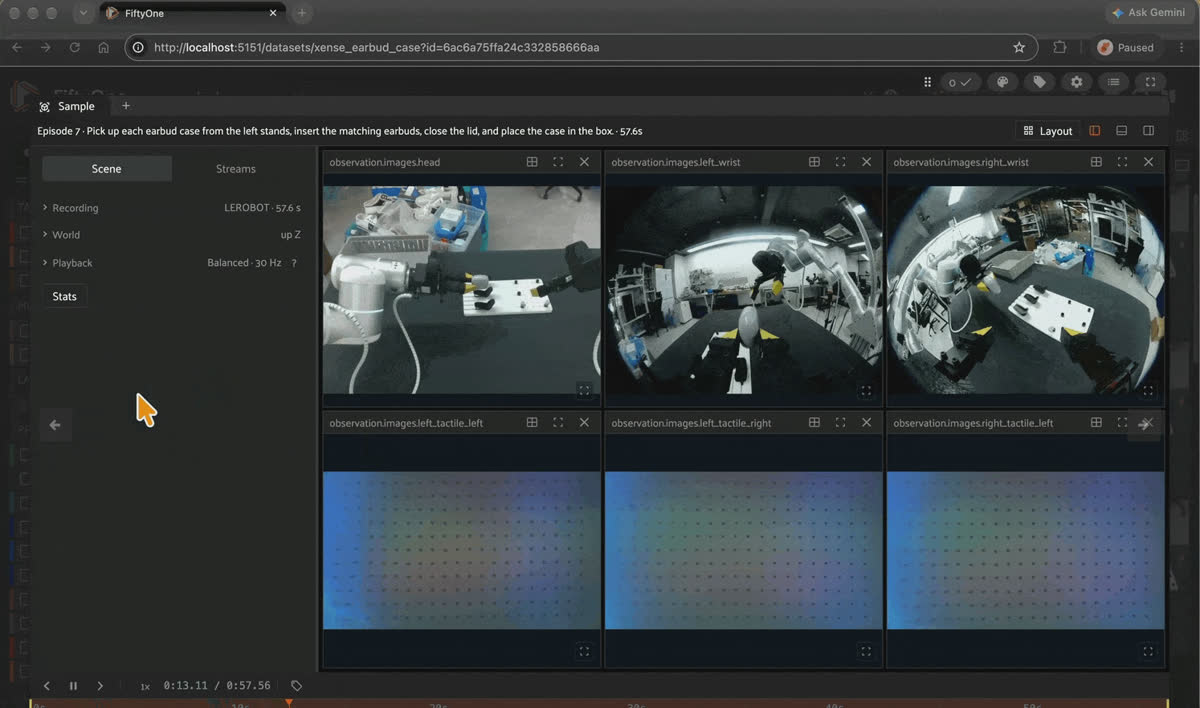
An Xense Earbud Case episode in FiftyOne, with the RGB cameras and tactile streams playing in sync.
- FiftyOne Format Dataset on Hugging Face: Voxel51/xense-earbud-case-834ep
- Original Dataset:
Xense/earbud_case_insertion_teleop_0515 - License: Apache-2.0
This is the biggest dataset in the roundup by a wide margin: 834 teleoperated episodes and 1,213,518 frames on a bimanual Flexiv Rizon 4 (
bi_flexiv_rizon4_rt). Each episode runs the whole sequence: pick up an earbud case from the stands, insert the matching earbuds, close the lid, and place the case in a box. Episodes run 32.3 to 78.1 seconds. During insertion, fingers hide the contact from the cameras, making this a good set for asking what the tactile streams add.Fields you get: 3 RGB streams (
head, left_wrist, right_wrist, 480×640), 4 tactile streams (left_tactile_left, left_tactile_right, right_tactile_left, right_tactile_right, 400×700), and the 20-D observation.state and action.Known quirks. The source repo is still growing. An earlier snapshot listed 726 episodes and 1,065,060 frames, and this import has 834, so pin a revision if you need reproducible numbers. At 6.9 GB, it's also the largest download of the three Xense sets.
Xense Strap Tape: deformable tape, the longest episodes
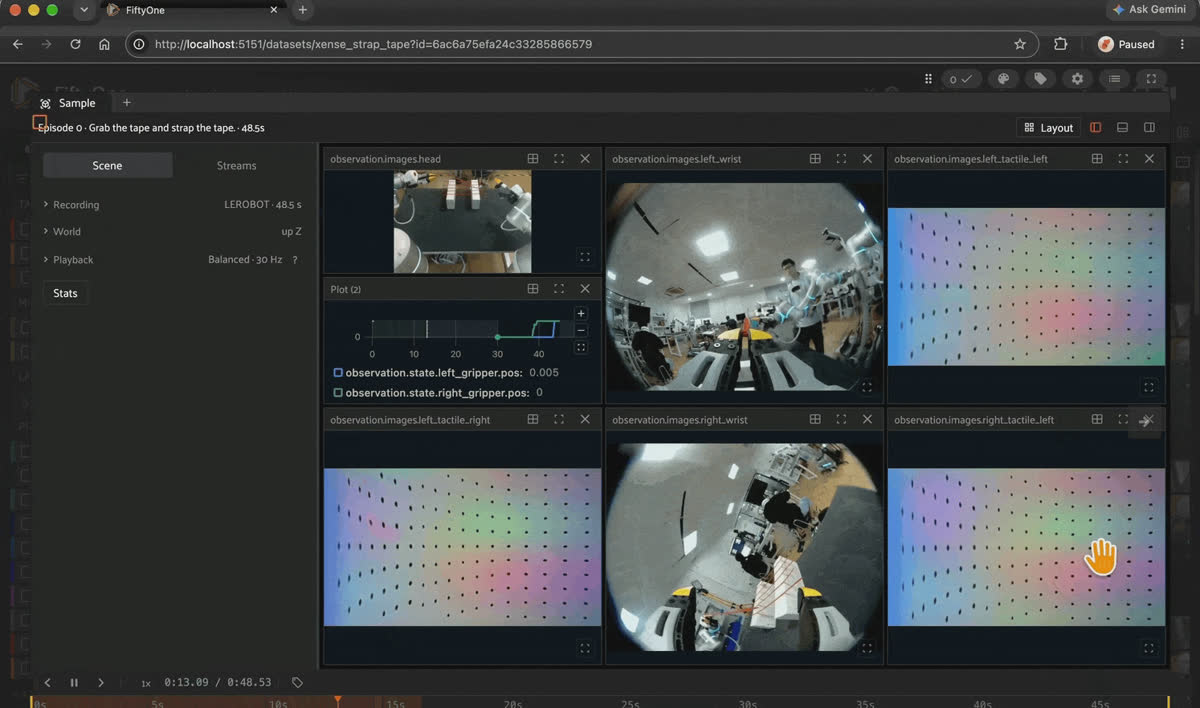
Xense Strap Tape in FiftyOne, with gripper positions plotted next to the four tactile streams.
- FiftyOne Format Dataset on Hugging Face: Voxel51/xense-strap-tape-120ep
- Original Dataset:
Xense/strap-tape-taccap-0929 - License: Apache-2.0
120 episodes of "Grab the tape and strap the tape" on the same bimanual Flexiv rig, 191,261 frames in total. Tape is deformable, so the grip changes as it stretches and sticks. Episodes run 33.9 to 95.2 seconds, the longest in the roundup. At 0.84 GB, it's the smallest download with tactile video and the easiest place to start.
Fields you get: the same 3 RGB streams, 4 tactile streams, and 20-D state and action as the earbud set.
Known quirks. The
taccap in the repo name probably refers to Xense's TacCap-Gripper, a wearable two-finger tactile data-collection device the company debuted at ICRA 2026, but the card doesn't say so. The episode count has also changed over time (an earlier snapshot showed 98).Xense Tron2 RT Pick and Place: short episodes, a different robot
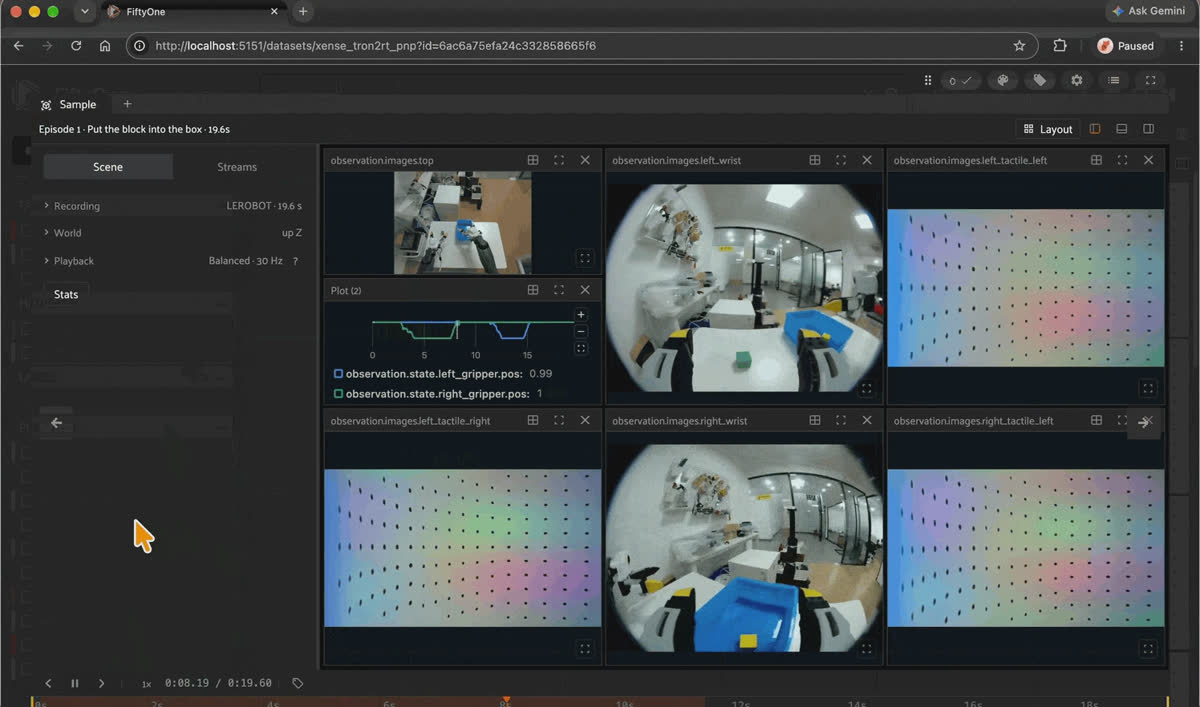
Xense Tron2 RT Pick and Place in FiftyOne, from the sample grid to a single episode.
- FiftyOne Format Dataset on Hugging Face: Voxel51/xense-tron2rt-pnp-115ep
- Original Dataset:
Xense/tron2rt-pnp-0918 - License: Apache-2.0
115 episodes of "Put the block into the box" on robot type
tron2_rt, 48,999 frames in total. Episodes are short (10.7 to 22.2 seconds), so this is the quickest Xense set to scrub through when you want to see what a grasp looks like across all four tactile pads.Fields you get: 3 RGB streams (
top, left_wrist, right_wrist), 4 tactile streams, and the same 20-D tool center point (TCP) state and action layout.Known quirks. The overhead camera is
observation.images.top here and observation.images.head in the other two Xense sets, so code that hard-codes camera keys will break across them. Unlike its siblings, the card carries no code link or citation.Intern: three GELLO-teleoperated tasks with touch images and wrench
The three Intern sets are community uploads by
cloudfan that share one robot schema, intern_gello_7dof_robotiq: a 7-DoF arm with a Robotiq gripper, teleoperated with a GELLO leader arm. Each episode carries two RGB views (cam_high, cam_front), two tactile image streams (tactile_left_aug_diff, tactile_right_aug_diff, 700×400), a 6-D observation.wrench with per-axis observation.wrench_valid flags, an 8-D joint observation.state, an 8-D GELLO action, observation.eef_pose, and the original source_timestamp.The source README says these are meant for training with the InternVLA A-series project. The robot config that ships with them maps only the two RGB views and describes the tactile and wrench channels as "preserved as auxiliary data, not automatically added to the RGB baseline." Out of the box, the touch data is along for the ride.
Keep it honest.
- No license is declared on any of the three source repos, so you can't assume reuse rights.
- No episode was filtered for success. The task string is the goal, not a guarantee that the demonstration achieved it.
- The FiftyOne versions are lossy H.264 re-encodes (
libx264,-crf 18) of the source MJPEG video. Frame counts and timestamps match the source, but the pixels don't match bit for bit.
Intern Pour: 51 pouring demonstrations, 3 with missing force
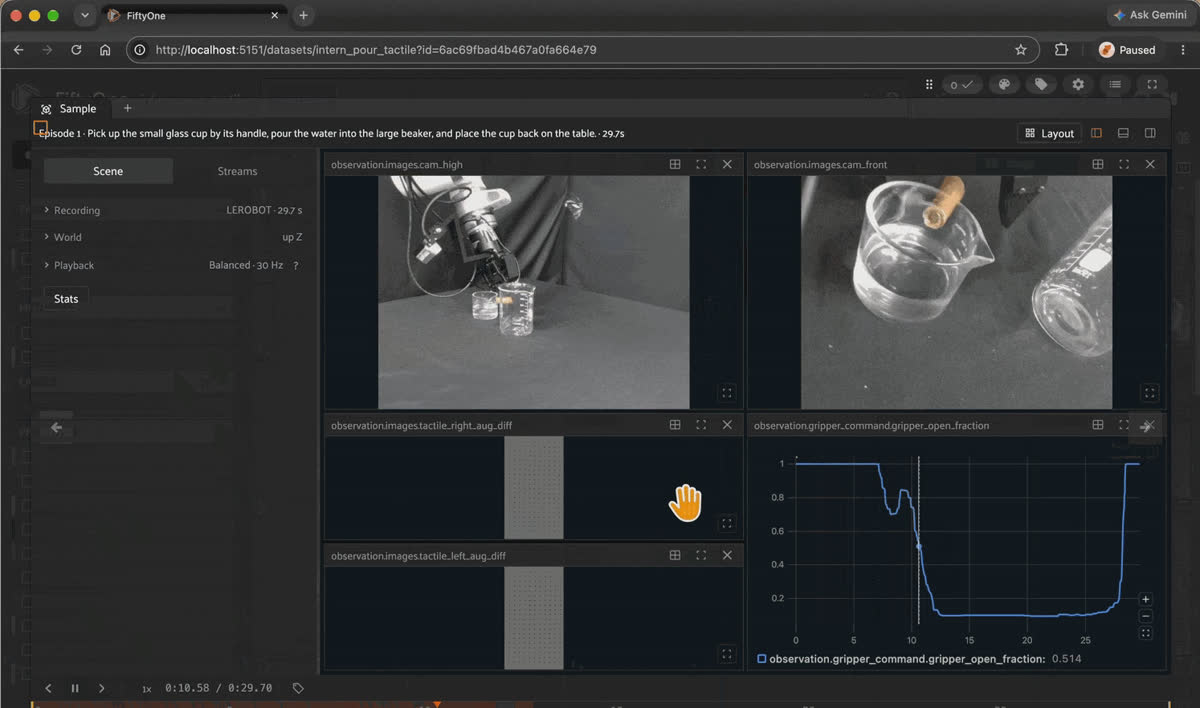
Intern Pour in FiftyOne, with the tactile streams and gripper command plotted over a pour.
- FiftyOne Format Dataset on Hugging Face: Voxel51/intern-pour-lerobot-51ep
- Original Dataset:
cloudfan/intern-pour-lerobot - License: None declared in the source repo
51 demonstrations of "Pick up the small glass cup by its handle, pour the water into the large beaker, and place the cup back on the table," 44,042 frames at 30 fps, 21.6 to 39.3 seconds each. Pouring changes the weight in the gripper as the water leaves, which is a force signal no camera frame carries directly.
Fields you get: the shared Intern layout above.
Known quirks. Episodes 13, 34, and 42 have missing force readings that were filled with zeros, and
observation.wrench_valid flags them. Filter on the validity flags, not on the zeros, or those frames will look like moments of no contact.Intern Screw: unscrewing a cap from a bottle a person holds
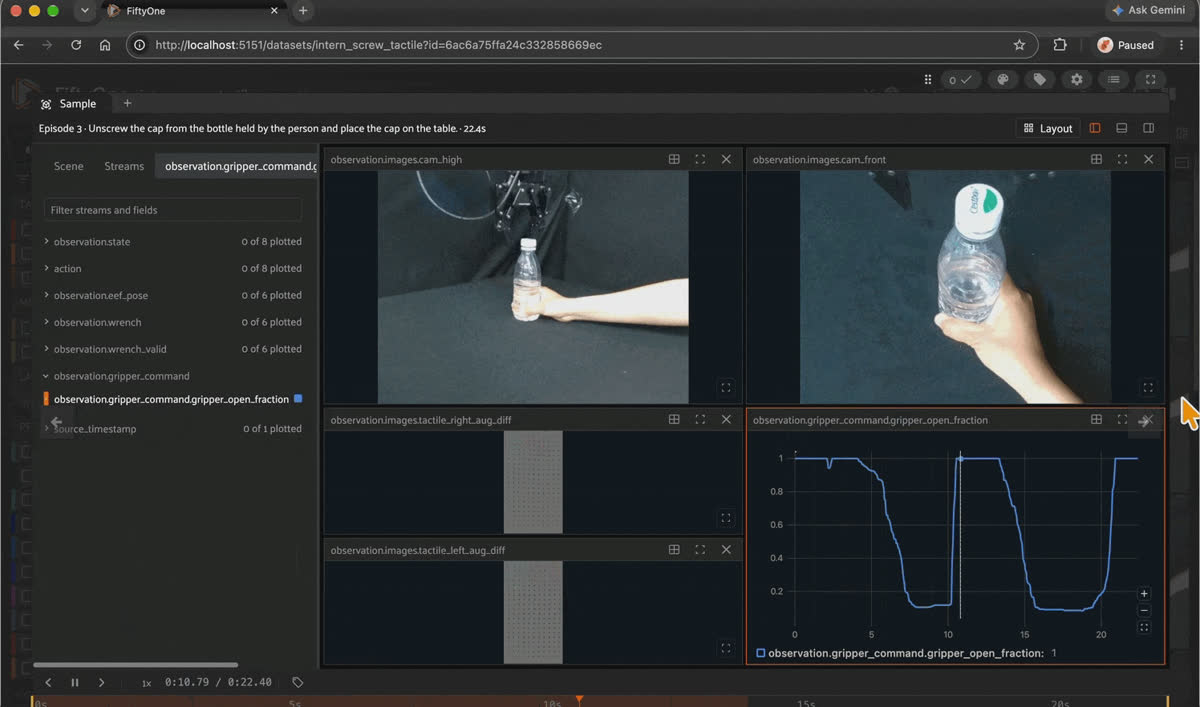
Intern Screw in FiftyOne, with the gripper command plotted next to the tactile streams as the cap comes off.
- FiftyOne Format Dataset on Hugging Face: Voxel51/intern-screw-lerobot-50ep
- Original Dataset:
cloudfan/intern-screw-lerobot - License: None declared in the source repo
50 demonstrations of "Unscrew the cap from the bottle held by the person and place the cap on the table," 31,960 frames, 17.6 to 43.5 seconds each. The bottle is held by a person, not clamped, so the counter-force comes from a moving human hand.
Fields you get: the shared Intern layout above.
Known quirks. None beyond the shared ones. Every frame has valid wrench readings.
Intern Shiguan: test-tube insertion
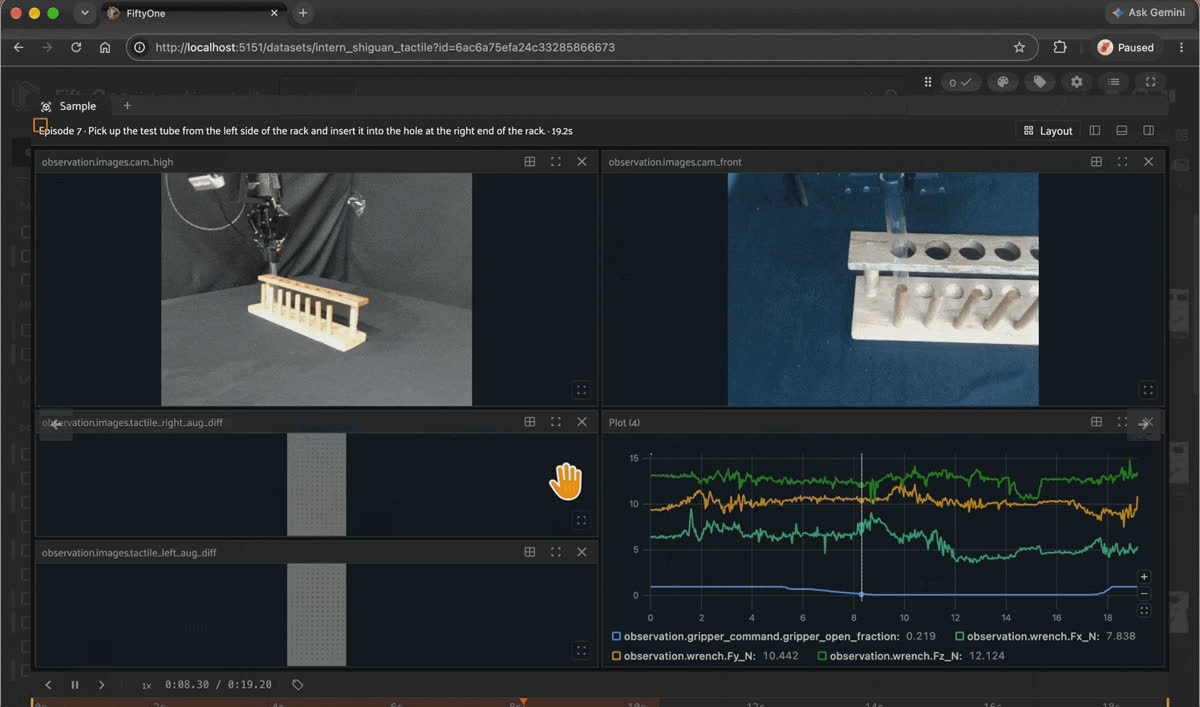
Intern Shiguan in FiftyOne, with wrench forces plotted during a test-tube insertion.
- FiftyOne Format Dataset on Hugging Face: Voxel51/intern-shiguan-lerobot-51ep
- Original Dataset:
cloudfan/intern-shiguan-lerobot - License: None declared in the source repo
"Shiguan" is the pinyin for 试管, test tube. 51 demonstrations of "Pick up the test tube from the left side of the rack and insert it into the hole at the right end of the rack," 26,665 frames, 11.0 to 26.0 seconds each. It's the shortest of the three Intern tasks and the closest to a classic peg-in-hole insertion.
Fields you get: the shared Intern layout above.
Known quirks. None beyond the shared ones. Every frame has valid wrench readings.
SharpaDex Assemble Gears: dexterous hands, ten fingertip sensors
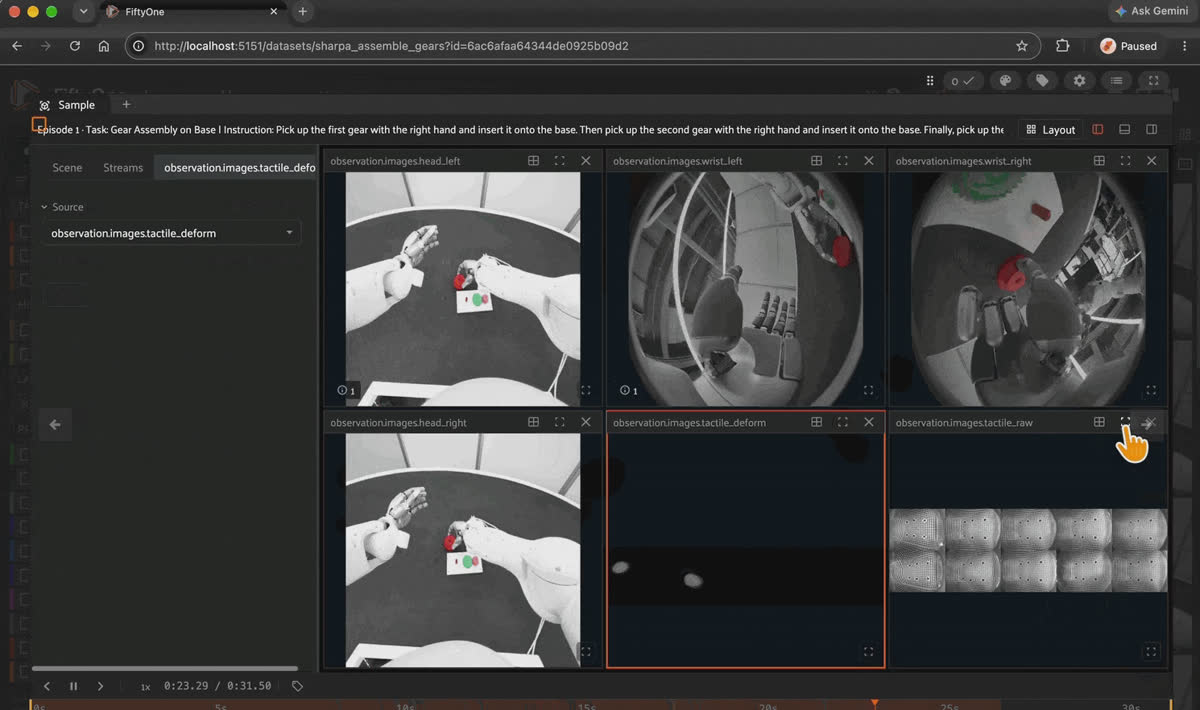
SharpaDex Assemble Gears in FiftyOne, with the raw and deformation tactile streams next to the RGB views.
- FiftyOne Format Dataset on Hugging Face: Voxel51/sharpa-assemble-gears-410ep
- Original Dataset:
Sharpa-Robotics/SharpaDex-v1.0(28,993 episodes, 59 tasks, 495 seasons, about 300 hours) - License: CC-BY-4.0
SharpaDex v1.0 is teleoperated bimanual dexterous manipulation on a rig with two 7-DoF arms, two 22-DoF hands, four RGB cameras, and tactile sensors on every fingertip. The full release covers assembly, tool use, deformable objects, cleaning, material transfer, and long-horizon tasks, exported as both LeRobot v3.0 and v2.1.
This FiftyOne version is one collection season (
season_POC22027_2026_04_30_15_04_50_train) of the assemble_gears_on_base task: 410 episodes, 302,020 frames at 30 fps, 17.4 to 36.7 seconds each. It's a single contiguous season, not a random sample of the task or the release.Fields you get: 4 RGB streams (
head_left, head_right, wrist_left, wrist_right, 480×480), 2 tactile video streams (tactile_deform at 480×1200 and tactile_raw at 480×1600), a 65-D observation.state, action, and observation.state.joint_torque (left arm, left hand, right arm, right hand, and torso), a 24-D observation.state.tcp (pose and force/torque per arm), observed and commanded TCP poses, a per-frame subtask_index, and the 60-D observation.tactile: left and right thumb, index, middle, ring, and little fingertips, each with fx, fy, fz, tx, ty, tz. The task field holds structured text with Task, Instruction, Scene, and Success sections.Known quirks.
- Touch is concentrated in two fingers. With a contact threshold of 1.0 on per-fingertip force magnitude, the right index finger crosses it in 61% of frames and the right thumb in 42%. Left ring (9.5%) and left little (2.2%) come next, and the other five fingertips rarely cross it. That's consistent with a right-hand pinch doing the gear work, but check it against the tactile video before you trust the channel labels.
robot_typeis the literal string robot in the sourceinfo.json.- The source README says the export doesn't fully declare TCP units, reference frames, or rotation convention, so don't infer Euler angles or quaternions from vector width alone.
subtask_indexsurvives in the parquet, but the subtask text and skill labels it points to live in the source'smeta/subtasks.parquet, which the FiftyOne LeRobot exporter doesn't carry.
Keep it honest. The T-Rex issue mentioned earlier, the one that found almost no offline benefit from real touch, trained on the full Sharpa dataset. A 410-episode slice can't settle that question, but it's a good place to look at what the tactile channels contain.
Grabette Tactile: a handheld gripper with two taxel pads
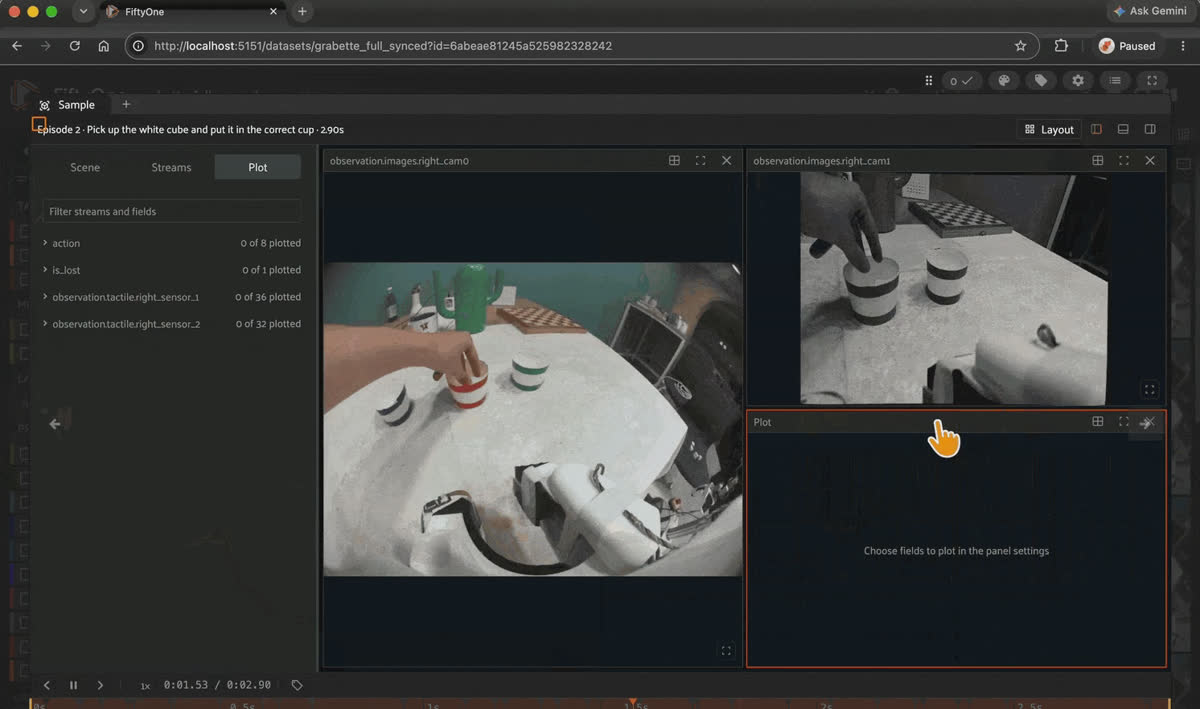
Grabette Tactile in FiftyOne. Taxel values plot as one series per cell, and episode 2 reads zero throughout.
- FiftyOne Format Dataset on Hugging Face: Voxel51/grabette-tactile-full-synced-48ep
- Original Dataset:
CarolinePascal/grabette-tactile-full-synced - Additional Resources: Grabette release post · ACT policy trained on a derived version: CarolinePascal/act_tactile_grabette
- License: Apache-2.0
Grabette is an open, low-cost handheld gripper from Pollen Robotics, released on the Hugging Face blog in July 2026 and inspired by Stanford's Universal Manipulation Interface (UMI). You hold it, perform the task by hand, and its cameras, inertial measurement unit (IMU), and gripper encoders record the demonstration. Simultaneous localization and mapping (SLAM) recovers the 6-DoF trajectory, and the output is a standard LeRobot dataset. A matching motorized gripper, Gripette, runs the learned policy on a robot arm.
This dataset adds two taxel sensors to the right gripper. It has 48 episodes of "Pick up the white cube and put it in the correct cup," 19,353 frames at 50 fps, 2.9 to 10.7 seconds each. It's the only dataset in the roundup that stores touch as a raw pressure grid.
Fields you get: 2 RGB streams (
right_cam0, right_cam1, 960×720), an 8-D action (right_x, right_y, right_z, right_ax, right_ay, right_az, right_proximal, right_distal), an is_lost flag, and two int16 taxel grids, observation.tactile.right_sensor_1 (6×6) and observation.tactile.right_sensor_2 (4×8).Known quirks.
- The taxel grids show up in the episode viewer as one plottable series per taxel, but they aren't sample fields (see the schema section above). The arrays are in
data/chunk-000/file-000.parquet. - Episode 2 has no tactile signal at all: all 68 taxels read 0 for all 145 frames. It's also the shortest episode, so it may be an aborted take.
- The card doesn't state units, taxel layout, or the sensor model. Across all 19,353 frames, the raw values range from 0 to 1,774 on
right_sensor_1and 0 to 2,133 onright_sensor_2, and every taxel varies at some point, so no cells are dead. is_lostis 0 in every frame. It likely flags SLAM tracking loss, which the Grabette pipeline checks for before conversion, but the card doesn't define it.- The release post describes Grabette as a robot-free, by-hand capture device and doesn't mention tactile sensing. The card doesn't say how they recorded these 48 episodes.
Curating tactile data: where the real gains are
This is the part I care most about, because it's where a small amount of effort pays off the most.
- Dead or flatlined sensors. A taxel that reads zero for an entire episode, or a gel camera that's frozen, is pure noise. Flag those channels and drop them.
- Saturation. If a sensor is pinned at its maximum, you've lost the information about how hard the contact actually was.
- Drift across sessions. Compare at-rest baselines across collection days. If they wander, normalize per session, or at least know which episodes came from which sensor state.
- Episodes where touch never happens. If the tactile signal barely moves during an episode, that episode teaches the model nothing about contact. It may be fine for vision training and useless for tactile learning.
- Contact alignment. Check that tactile onset lines up with what the cameras and gripper state say is happening. A misalignment is a sync problem, not a learning problem.
- The rare, valuable moments. Slips, regrasps, and near-failures are where touch matters most, and they're usually a small fraction of the data. Find them and make sure they're represented.
Split by episode, not by frame.
Consecutive tactile frames are nearly identical. The RCT authors measured what that does to evaluation: with the encoder held fixed, and only the test split changed, tactile-to-text Recall@1 was 80.0% under a frame-random split and 62.3% once whole contact sequences were held out, a 17.7-point drop. Random frame splits will make your tactile model look much better than it is.
Step 1: Turn numeric touch into per-episode fields
FiftyOne's queries and aggregations run on sample fields, and per-frame LeRobot data stays in parquet, so this step uses pandas to read the frames and FiftyOne to store, sort, and filter the results. Here's the pattern on SharpaDex: read
observation.tactile, compute per-fingertip force magnitude, and write two per-episode fields back onto the samples.import glob
import numpy as np
import pandas as pd
import fiftyone as fo
dataset = fo.load_dataset("sharpa_assemble_gears")
root = "sharpa-assemble-gears-410ep" # local snapshot of the Hub repo
df = pd.concat(
pd.read_parquet(f, columns=["episode_index", "observation.tactile"])
for f in glob.glob(f"{root}/data/*/*.parquet")
)
# (frames, 10 fingertips, fx fy fz tx ty tz)
ft = np.stack(df["observation.tactile"].to_numpy()).reshape(-1, 10, 6)
force = np.linalg.norm(ft[:, :, :3], axis=-1)
df["peak_force"] = force.max(axis=1)
df["in_contact"] = (force > 1.0).any(axis=1)
stats = df.groupby("episode_index").agg(
peak_force=("peak_force", "max"),
contact_fraction=("in_contact", "mean"),
)
ep = dataset.values("episode_index")
dataset.set_values("peak_tactile_force", stats.loc[ep, "peak_force"].tolist())
dataset.set_values("contact_fraction", stats.loc[ep, "contact_fraction"].tolist())
session = fo.launch_app(dataset.sort_by("contact_fraction"))The threshold of 1.0 is a starting point, not a calibrated contact definition, since the README doesn't declare units. Plot the distribution before you pick one.
Step 2: Look at the extremes
In this season, every one of the 410 episodes has contact for between 39% and 93% of its frames (median 64%). Per-episode peak force ranges from 10.9 to 48.9 in the sensor's raw units. Sorting by
contact_fraction puts episodes 327, 318, and 326 at the top, all near 39%. Those are the first ones to open in the App and watch next to their tactile video. A low value could mean a fast, clean assembly or a fumbled grasp, and only watching tells you which.The same pattern works for the other datasets. On the Intern sets, compute the fraction of frames where
observation.wrench_valid is all ones. On Grabette, compute the per-episode peak and the per-taxel variance of each grid, so a dead cell shows up as a zero.None of this is exotic. It's the same discipline that worked for image datasets: look at your data, find the problems, fix them, find the gaps, fill them. For touch, that means catching drift, dead sensors, and misaligned timestamps before they reach training.
Frequently asked questions
Tactile data is anything a robot measures at the point of contact. In LeRobot datasets, it shows up as video from camera-based gel sensors (for example
observation.images.left_tactile_left in the Xense sets), low-resolution pressure grids (observation.tactile.right_sensor_1 in Grabette), or force/torque vectors (observation.tactile in SharpaDex, observation.wrench in the Intern sets).All 8 in this roundup load with
load_from_hub("Voxel51/<repo>"). They are xense-earbud-case-834ep, xense-strap-tape-120ep, xense-tron2rt-pnp-115ep, intern-pour-lerobot-51ep, intern-screw-lerobot-50ep, intern-shiguan-lerobot-51ep, sharpa-assemble-gears-410ep, and grabette-tactile-full-synced-48ep. Each one is a multimodal FiftyOne dataset with one sample per episode.Yes, as time series. The episode viewer reads every numeric LeRobot feature, so
observation.tactile.right_sensor_1 (6×6) and observation.tactile.right_sensor_2 (4×8) appear as one series per taxel in the Plot and Message tiles. They aren't sample fields, so to filter episodes by touch, compute per-episode statistics with pandas and write them back with set_values. For a spatial view of the contact patch, render the grids as heatmaps yourself.No. In SharpaDex,
observation.tactile is a 60-D vector: 10 fingertips × 6-axis force/torque. In Grabette, observation.tactile.* is the prefix for two int16 taxel grids. Check meta/info.json for shape and dtype before you assume what a tactile key holds.The cards don't define it. The source README calls
tactile_left_aug_diff and tactile_right_aug_diff "700 x 400 RGB touch images." The name suggests a difference from a reference frame, which is a common way to show where a gel sensor deformed, but treat that as a guess until the uploader documents it.The source stores video as MJPEG inside MP4, which browsers can't decode, so it wouldn't play in the FiftyOne App. All four streams in every episode were re-encoded to H.264 (
libx264, -crf 18, yuv420p). Frame counts and timestamps match the source, but it's a lossy re-encode, so go back to the source repo if you need the original pixels.The three Xense sets and Grabette are Apache-2.0, and SharpaDex is CC-BY-4.0. Both licenses permit commercial use under their terms (attribution for CC-BY). The three Intern sets declare no license, so you can't assume any reuse rights.
No. LeFlexiTac (7/30 → 23/30 on an in-bag pen task) and FreeTacMan (21% → 71% average success across five tasks) report large gains on contact-rich tasks. An open issue on the T-Rex repo found that the offline benefit of real touch over neutral input on the full Sharpa data stayed within ±0.9%. Touch tends to help when the task depends on contact and when the tactile data is clean.
Hacker-in-Residence
Harpreet is Hacker-in-Residence at Voxel51, where he turns cutting-edge AI ideas into open-source prototypes and demos that push the boundaries of deep learning. From building tools that inspire to creating content that educates, Harpreet helps the AI community level up—one wild idea at a time.
See all articles by Harpreet Sahota
Try Voxel51 for yourself
Loading related posts...
© 2026 Voxel51 All Rights Reserved


