Vibe-Checking Qwen3.8-Max on Hard Visual Grounding Tasks
Author

Hacker-in-Residence
Harpreet is Hacker-in-Residence at Voxel51, where he turns cutting-edge AI ideas into open-source prototypes and demos that push the boundaries of deep learning. From building tools that inspire to creating content that educates, Harpreet helps the AI community level up—one wild idea at a time.
See all articles by Harpreet Sahota
In this article
Key takeawaysWhy OpenLogo, not another bounding-box flexWhy "can it draw a box" isn't the real questionHow I vibe-checked it (without writing custom eval infra)Round 1: straight boxes, ground-truth scoredThe coordinate-convention rabbit hole: why Qwen3.8-Max guesses its own pixel canvasRound 2: point to it, keypoints on small and crowded targetsRound 3: tracing outlines (not quite segmentation masks)Round 4: can it rotate the box?Classification: who's actually in the picture?A quick detour into plain VQASo, is Qwen3.8-Max actually good at visual grounding?Try it yourselfFrequently Asked Questions
In this article
Key takeawaysWhy OpenLogo, not another bounding-box flexWhy "can it draw a box" isn't the real questionHow I vibe-checked it (without writing custom eval infra)Round 1: straight boxes, ground-truth scoredThe coordinate-convention rabbit hole: why Qwen3.8-Max guesses its own pixel canvasRound 2: point to it, keypoints on small and crowded targetsRound 3: tracing outlines (not quite segmentation masks)Round 4: can it rotate the box?Classification: who's actually in the picture?A quick detour into plain VQASo, is Qwen3.8-Max actually good at visual grounding?Try it yourselfFrequently Asked Questions
Try Voxel51 for yourself
Everyone's screenshotting Qwen3.8-Max drawing bounding boxes. I used FiftyOne to ground-truth-score it on rotation, outline tracing, and 27,083 real logos instead: the tasks that actually matter if you're pointing this thing at a robot.
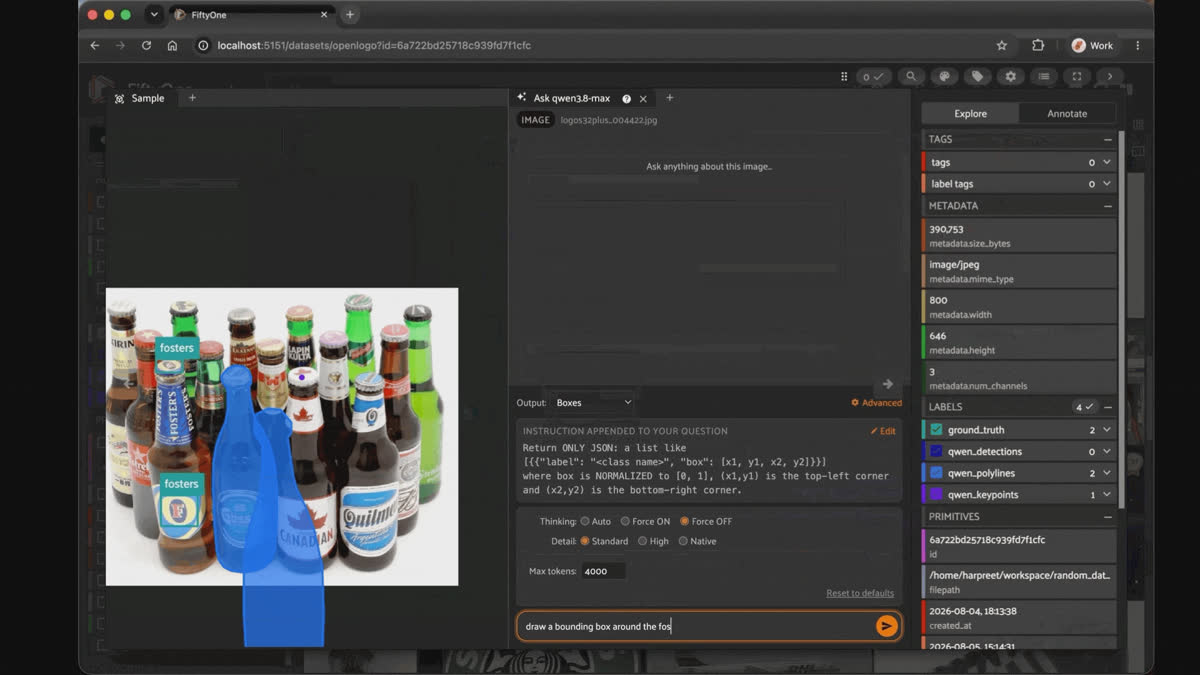
The FiftyOne App chat panel asking Qwen3.8-Max to point to a Canadian beer cap, with its live thinking trace beside a photo of stacked beer bottles.
Qwen3.8-Max has been all over my timeline this week. There have been various social media posts that show it reading satellite imagery, counting Lego bricks, and splitting restaurant bills. Genuinely impressive stuff, and it's reportedly landing high on various visual-reasoning leaderboards, all while being a fraction of the cost of the models at the frontier.
Almost all of it is bounding boxes on obvious objects, though. That's the demo-friendly task: draw a box, show a screenshot, move on. It's also the task every VLM has been optimized for since 2023.
So I built a FiftyOne plugin that wires Qwen3.8-Max into
fo.Detections, fo.Keypoints, and fo.Polylines, pointed it at QMUL-OpenLogo (27,083 images across 352 logo classes), and spent a day asking it to do the things nobody's tweeting screenshots of: trace an outline around a tilted object, rotate a box to match a bottle lying on its side, find a small brand mark buried in scene clutter. Then I scored the answers against real ground truth instead of eyeballing them.Key takeaways
- Scored against ground truth on OpenLogo, Qwen3.8-Max's box detection swings from clean wins (0.72-0.94 IoU) to complete misses (0.0 IoU) depending on thinking mode and image detail level. For at least one sample (
redbull), two calls with byte-identical input and identical settings landed 3/5 matches vs. 0/5. Same request, different answer. - It reasons in a guessed pixel canvas it invents from vibes (
"the image is roughly 1024x504") before dividing down to the normalized[0,1]coordinates it's asked for, even when the prompt states the real pixel size up front. This is the root cause of most of the other failures below. - Told to find the same logo with only the verb changed ("mask out the UPS logo" vs. "draw segmentation masks around the UPS logo"), it silently switched from a 0-1000 quantized grid to normalized
[0,1]coordinates. Same logo, same image, same conversation, different coordinate convention. - Given a genuinely tilted object (a Heineken bottle lying on gravel, a Starbucks cup held at a steep angle), it produced real rotated quadrilaterals, up to 38° off-axis, cutting wasted background area by half or more versus an axis-aligned box. It also correctly did not invent rotation for two frontal control shots (0.0° and 0.7° off-axis). It just has no native OBB output mode, so this only works via prompt engineering with no ground truth to check it against.
- Polygon tracing burns roughly 14x more reasoning tokens than answer text on average, and up to 4x more than box/point tasks on the same image. The model largely talks itself through pixel arithmetic in
reasoning_content, not through actually tracing an outline. - Detect, keypoints, and polygon don't always agree on how many instances of a logo are even in a photo. A Kia dealership shot got 1 box, 1 polygon, and 2 keypoints for the same target. A busier BMW-Sauber F1 press photo got a clean 4-for-4 across all three tasks, none of which matched ground truth's single labeled instance.
- Classification's habit of volunteering brands you didn't ask about is a genuine double-edged sword: it correctly identified 5 real sponsor logos in one F1 photo and real background brands in two others, but also hallucinated a photographer's watermark as a second watch brand, at higher confidence (0.92) than some of its genuine catches.
- Plain VQA doesn't share any of this instability. The same detail-level swap that flips coordinate conventions and IoU scores by 80+ points for grounding tasks produced word-for-word identical answers on a "who is this person" question. The instability is specific to tasks that need sub-percent pixel precision, not a general property of the model.
- None of this needed custom eval infra: FiftyOne's
match()/take()views, IoU scoring, and the chat panel's live "Thinking" trace + Convert to FiftyOne button are enough to ground-truth-score any prompted VLM you can wire into a plugin, not just this one.
Why OpenLogo, not another bounding-box flex
I wanted a dataset where I couldn't just eyeball whether a box "looked right," with real ground truth to score against and objects that actually stress a grounding model instead of flattering it.
QMUL-OpenLogo fits on every axis I care about. It's an aggregation of 7 existing logo-detection datasets (FlickrLogos-27/32, Logo32plus, BelgaLogos, WebLogo-2M, Logo-in-the-Wild, SportsLogo) into 352 classes and 27,083 images. The paper's own stats describe exactly the kind of long-tail, small-object mess real deployments look like: instances-per-class ranging from 10 to 1,902 (mean 88), and logo-to-image scale ratio ranging from 0.0014% to 100% of the frame (mean 6.09%). Some logos fill the picture; plenty of others are a few dozen pixels in a cluttered scene. Text-heavy brand wordmarks, small fine-grained objects, and a genuine long tail of rare classes, in one place, with real bounding-box ground truth to score against.
I pulled the dataset via the Voxel51/OpenLogo build on Hugging Face and loaded it as a persistent FiftyOne dataset (
ground_truth field, fo.Detections).Why "can it draw a box" isn't the real question
Boxes are the easy demo because a box is cheap: 4 numbers, fast to draw, fast to eyeball. But a box is also the crudest possible geometric proxy for an object, and it shows up fast the moment you point a model at anything physical:
- A CVPR 2025 study on robotic manipulation found a clean ordering when it swapped the visual-grounding representation feeding a grasp policy: points (32% success) < boxes (38%) < segmentation masks (42%), with masks running 4-12 percentage points ahead of boxes specifically because they preserve real object shape instead of a rectangle's worth of background.
- Voxel51's own comparison of segmentation maps to bounding boxes makes the same point from the annotation side: a box around a cyclist includes a wedge of background on every side; a mask doesn't, and that difference is exactly what a gripper or a collision-avoidance system needs to reason about.
- On the rotation side, a 2025 study applying YOLOv11-OBB to robotic grasping reports 98.5% mAP50 on the Cornell Grasping Dataset specifically because an oriented box can encode the gripper's approach angle directly, something an axis-aligned box structurally cannot represent no matter how tight it is.
None of this is exotic. It's the standard argument for why physical AI and robotics research keeps reaching past boxes. But it means "draw a box around the dog" is close to the least informative grounding question you can ask a VLM if the eventual consumer is anything that has to touch the object.
How I vibe-checked it (without writing custom eval infra)
Good to know. What does "ground-truth-informed" mean here? Instead of guessing a target class and hoping the model finds something plausible, every prompt in this post was built from a sample's real ground_truth.detections, so scoring against IoU is meaningful, not just vibes-based.
The whole workflow lives inside FiftyOne:
import fiftyone as fo
from fiftyone.utils.huggingface import load_from_hub
dataset = load_from_hub("Voxel51/OpenLogo")
view = dataset.match(fo.ViewField("ground_truth.detections").length() > 0)
samples = view.take(5, seed=20260805)

for sample in samples:
    classes = sorted({d.label for d in sample.ground_truth.detections})
    target = f'the "{classes[0]}" logo'  # built from real GT, not guessed
From there, the `qwen38-max-fiftyone` plugin handles the actual model call: prompt templating, the
dimensions_hint anchor, a defensive pixel-space rescue, and stamping every resulting label with qwen_thinking / qwen_prompt / qwen_raw_output so the reasoning trace travels with the box, not just the final answer.Under the hood of the plugin, the results are written back as FiftyOne Label types so you can visualize them in the App next to ground truth. For the free-form chat-panel version, every response streams both the answer and the "Thinking" trace live, and a Convert to FiftyOne button turns whatever comes back into a real
fo.Detections / fo.Keypoints / fo.Polylines field on the sample you're looking at. That's the same App session used for every screenshot below.Round 1: straight boxes, ground-truth scored
Of course, the natural place to start is an easy image with a bounding box.
The Kraft jars are meant to be an easy control case.The image is 272x176, two jars, one red oval each, and the plugin prepends the truth before every question:
This image is exactly 272x176 pixels (width x height).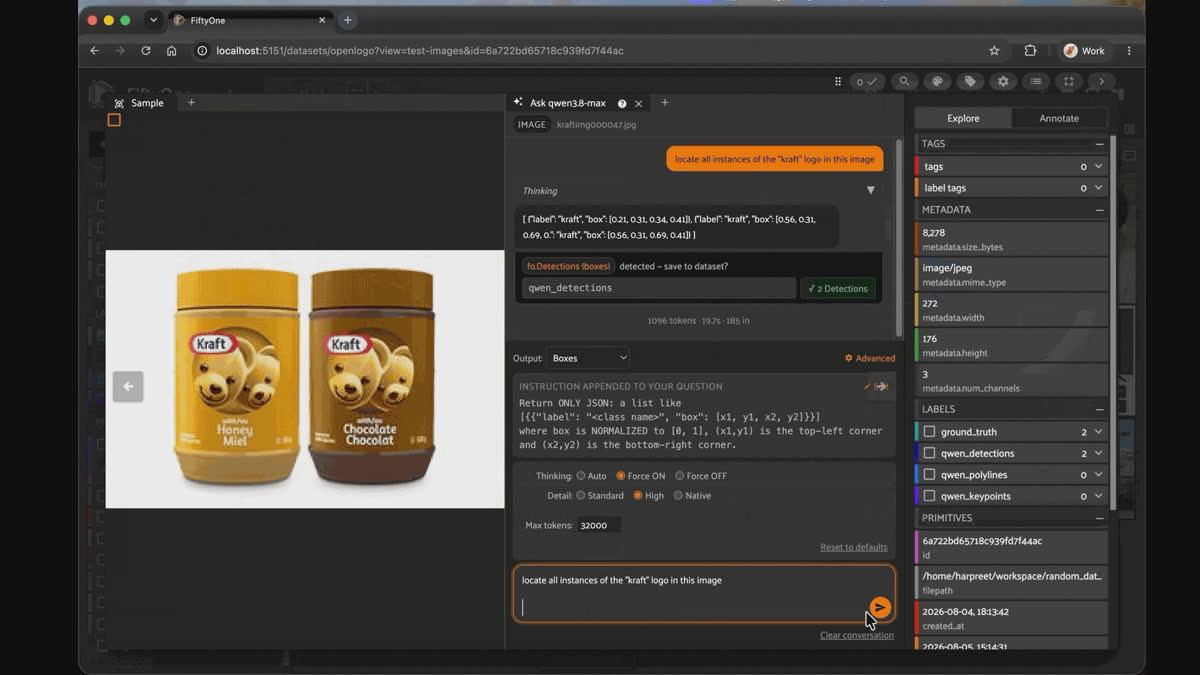
Qwen3.8-Max returning bounding boxes for the Kraft logo on two peanut butter jars in the FiftyOne App chat panel.
In the first turn of the conversation I set Force ON, but the model still starts in pixels anyway. Watch the trace: "The image is 272x176. The left jar occupies roughly x from 45 to 135, and the right jar occupies x from 140 to 230," then "Left jar's Kraft logo: around x 57-90, y 55-72," then a second pass tightening to "(57, 55) to (92, 73)." 1096 reasoning tokens and 19.7 seconds to divide two rectangles by 272 and 176. The boxes land: [0.21, 0.31, 0.34, 0.41] and [0.56, 0.31, 0.69, 0.41], labeled kraft. I rerun the same prompt and thinking mode but set the detail to High. It gave me the boxes as [0.21, 0.31, 0.33, 0.41] and [0.55, 0.31, 0.68, 0.41], agreeing with the previous reply to within a hundredth.
Thinking off is where it gets strange, and the strangeness is not that it gets it wrong. With thinking off, and the answer arrives in 79 tokens and 1.5 seconds as [214, 312, ...] and [557, 318, ...]. Those look broken, since 312 is taller than the image and 557 is wider. They aren't. Divide by 1000 and you get the thinking-on answer back. That's the 0-1000 grid, showing up on the easiest image in the post.
Force OFF at Native detail, same prompt: 79 tokens, 1.5s. Thirteen times cheaper, thirteen times faster, and it returns [214, 312, ...] and [557, 318, ...]. Those look broken, because 312 is larger than the image is tall and 557 is wider than the image is wide. They aren't broken. Divide all four numbers by a thousand, and you recover the thinking-on floats to within a hundredth. It quietly switched to a 0-1000 grid and answered the question correctly in a convention nobody asked for.
A fresh conversation at Force OFF and Standard detail did it a fourth time in 87 tokens and 1.6s: [214, 306, 329, 403] and [557, 316, 671, 408], same 0-1000 grid, and now with two new quirks stacked on top. Meanwhile, the class name kept wandering: "kraft" on both thinking runs, then the "kraft" logo, then "kraft logo," the model echoing my own prompt phrasing back at me as a category. Four runs of one prompt, three class names, eight detections saved against a ground truth of two.
So, the model can see these logos. It found every one, every time, in every mode. What it won't do is commit to a coordinate space. Thinking mode doesn't help it commit; it just makes it show you arithmetic instead of looking harder at the pixels. If you're building on top of this, the parser is where the work is, not the prompt.
I ran an experiment on five random samples, using default settings (thinking on Standard/1280px detail, what the plugin's operator gives you out of the box), and here’s what I noticed:
| Sample ID | GT boxes | predicted | matched | mean IoU | what happened |
|---|---|---|---|---|---|
| 6a722bd65718c939fd7f44ac | 2 | 2 | 2/2 | 0.715 | Clean win, both jars |
| 6a722bd65718c939fd7f4219 | 1 | 3 | 0/1 | 0.0 | See below |
| 6a722bd45718c939fd7f2c90 | 1 | 2 | 1/1 | 0.147 | Found it, box too low |
| 6a722bd45718c939fd7f311b | 1 | 1 | 1/1 | 0.06 | Scope disagreement, not a miss |
| 6a722bd95718c939fd7f6010 | 1 | 4 | 0/1 | 0.0 | See below |
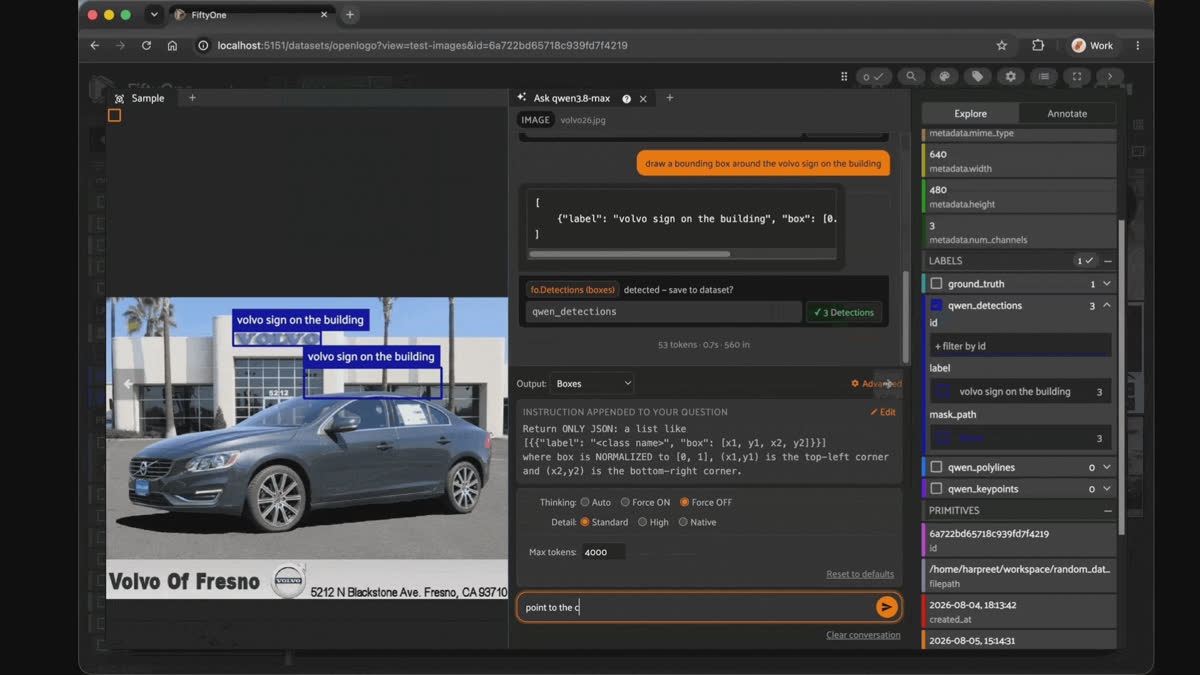
On Sample ID 6a722bd65718c939fd7f4219 we’re looking for a Volvo logo. This is where the units problem stops being an anecdote, because you can watch the box move without the model changing its answer.
In the first round, I ask it to draw a bounding box around the volvo sign on the building. Thinking off: 45 tokens, 0.8s, raw output
[315, 112, 534, 161]. The panel divides by 640x480 and paints a box across the showroom windows, down and right of the wordmark. That reads as a localization miss, and it isn't one. The real wordmark sits at roughly x 205-343, y 59-85 in true pixels, which is 320-536 and 123-177 on a 0-1000 grid. The model said 315, 112, 534, 161. That box is nearly perfect. It was in per-mille and my divisor threw it into the glass.Now the same question with thinking forced on, Native detail. The trace opens with a stutter, "TheThe user wants a bounding box normalized to [0,1] for the Volvo sign on the building. The image is 640x480," and 702 tokens and 12.6 seconds later returns
[0.492, 0.233, 0.834, 0.335]. Check that against the previous run: 315/640 = 0.4922, 112/480 = 0.2333, 534/640 = 0.8344, 161/480 = 0.3354. Thinking spent 702 tokens carefully performing the exact same wrong division the parser had already done for free. Byte-identical wrong box, arrived at twice, independently.Third ask, thinking off at Standard detail: 53 tokens, 0.7s, actual floats, box tight on the sign.
Then switch the panel to Keypoints and ask it to point to the volvo logo on the car.
{"point": [94, 569]} in 34 tokens, and 569 is louder about the convention than the box was, because the image is only 480 tall. Divide by 1000 and it's dead on the grille badge. Divide by 480, which is what the parser does, and the keypoint renders as a purple dot in the grey dead space below the image. Rerun at High detail: [94, 569] again, byte-identical, dot outside the frame again.The last run in the GIF is the only place in three sessions where thinking earns its cost, and it earns it as a units check, not as vision:
"The logo on the car's grille appears to be around x=93, y=568? Wait, the image height is 480, so y can't be 568. Let me look again."
Then it stops looking and rebuilds the scene from priors instead: "Let me set up approximate coordinates based on a typical rendering: the image is 640x480. The top dealership building occupies about the top 45% of the image. The car is in the middle, from about y=150 to y=375." 1071 tokens, 19.3s, final answer
[0.093, 0.568], and the dot lands on the emblem. Look at how: it divided the 93 by a thousand and the 273 by 480. One axis per-mille, one axis pixels, in the same coordinate pair, two errors cancelling into the right point.Keep it honest. OpenLogo's ground truth is sparser than it looks: several images genuinely contain more real logo instances than are labeled. Raw IoU-vs-GT both understates the model in these cases and correctly catches its real misses in others. Don't take a 0.0 IoU at face value without looking at the crop.
The larger, harder second batch (5 new samples, all originals over 1280px so detail level actually changes what bytes the model sees) makes the inconsistency the headline instead of a footnote. Same ground-truth-informed prompt, run across all 6 combinations of thinking (on/off) x detail (Standard/High/Native):
| Sample ID | best config | best IoU | worst configs | pattern |
|---|---|---|---|---|
| 6a722bda5718c939fd7f7014 | thinking-on + Native | 0.656 | all other 5 configs | 0.0, only one config found the real sign |
| 6a722bda5718c939fd7f6bdb | thinking-on, any detail | 0.84-0.94 | thinking-off, any detail | 0.0-0.07, thinking mode is the whole story |
| 6a722bd45718c939fd7f2ae5 | thinking-on/off + Standard | 0.149 / 0.073 | High, Native (both thinking modes) | 0.0, the downscaled option was the only one that worked at all |
| 6a722bd75718c939fd7f501c | thinking-on, any detail | 0.82-0.90 | thinking-off, any detail | 0.0, cleanest thinking-mode split in the batch |
| 6a722bda5718c939fd7f6b65 | thinking-on + High | 3/5 matched, 0.703 | thinking-on + Native (byte-identical to High) | 0/5, pure non-determinism |
That last row is the one worth sitting with.
thinking_on/high and thinking_on/native sent the same bytes (the source image is 1500x1000, under both ceilings) with the same thinking=True setting, the only two calls in this whole batch with zero difference in the request. One found 3 of 5 Red Bull logos at 0.70 mean IoU. The other found none. That's not a detail-level effect or a thinking-mode effect; it's the model disagreeing with itself.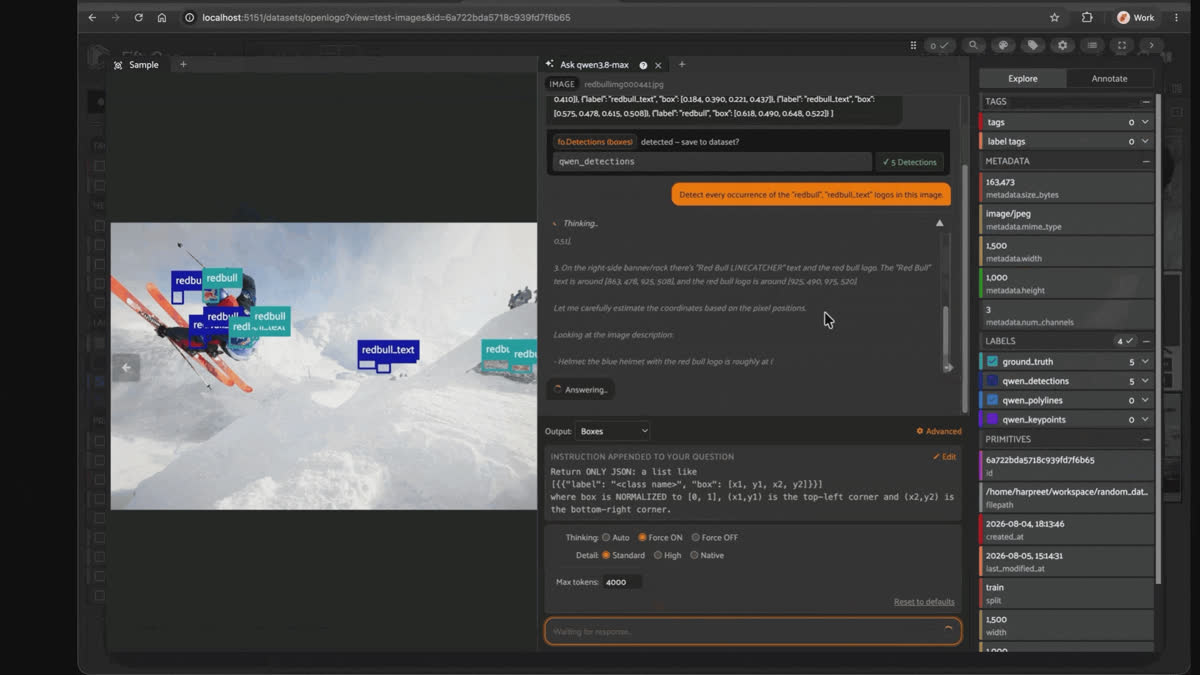
Sample ID 6a722bda5718c939fd7f6b65, using various generation configs (thinking on/off x Standard/High/Native), GT (teal) vs Qwen3.8-Max (blue); thinking-on/high and thinking-on/native sent byte-identical input and landed 3/5 vs 0/5 matches
Across the full 15-run batch: thinking ON found the real box (fully or partially) in 9/15 runs; thinking OFF managed it in 2/15, both weak (IoU 0.06-0.07). There's no detail level that consistently wins. Native won for Costco; Standard was the only level that worked at all for 3M; High beat an identical-bytes Native for redbull. Whatever config you pick, treat it as a per-image experiment, not a default to set once.
The coordinate-convention rabbit hole: why Qwen3.8-Max guesses its own pixel canvas
Here's the mechanism behind essentially every failure above, and it's stranger than "the model sometimes gets it wrong."
Every grounding prompt in this plugin explicitly asks for
NORMALIZED [0, 1] coordinates, and, since Qwen3.8-Max has no native box/point/polygon output mode, this is pure prompt engineering: the plugin even prepends the image's exact real pixel size ("This image is exactly 1024x685 pixels...") to remove any guesswork. It doesn't stop the model from guessing anyway. A detection trace, prompt stating real size included:"The image dimensions are probably 768x1152 or something close to that... Wait, the width can't exceed 768. So the width might be 1024?... Given width 1024 and height 1536? Hmm, the height might be 1536."
It tells the truth and re-derives a wrong answer from visual proportions instead. Then, in the same response, it computes a normalized-looking box deep in its reasoning and reverts to a raw pixel-space tuple as the literal final answer. Two conventions, one message, ~15 lines apart.
There turn out to be (at least) three coordinate conventions in circulation, not the two you'd guess (normalized vs. pixels): a genuine 0-1000 quantized grid, native to some Qwen-VL-family models regardless of what the prompt asks for. A number like
716 in a returned box is ambiguous on its own: it could be a grid coordinate, a raw pixel value, or a pixel value from an entirely different guessed canvas the model forgot to divide back down.The choice of phrasing in the query can dictate the resulting convention, even when all other variables remain identical. In the session below, I wanted to see if using the thinking mode would result in better geometric accuracy on polygon shapes, basically trying to have Qwen 3.8-Max generate segmentation masks. The results were interesting to see, and observing its shortcomings was more captivating than the actual outcome.
![Sample ID 6a722bd35718c939fd7f2738, only 3 of the 4 visible logos annotated in ground truth, output mode set to Polygons, and an instruction appended to every question demanding ONLY JSON with NORMALIZED [0, 1] coordinates listed in order around the boundary.](https://image.mux.com/UI2cDzLcrXE7QI3bMMk6e16n5jeR006evbDhKUewd1j00/thumbnail.jpg?width=1200)
Sample ID 6a722bd35718c939fd7f2738, only 3 of the 4 visible logos annotated in ground truth, output mode set to Polygons, and an instruction appended to every question demanding ONLY JSON with NORMALIZED [0, 1] coordinates listed in order around the boundary.
In the first turn, I ask the model to "mask out all occurrences of the UPS logo," with Thinking Force ON and Detail Native.
The model does not start in the coordinate space you asked for. It starts in pixels, tail by tail, narrating like someone reading measurements off a ruler: "Third tail (partially hidden behind the second): A partial UPS logo is visible, with the 'S' visible around [642, 278] to [695, 348]." "Fourth tail (right side): approximately [878, 256] to [953, 383]." Then it wonders aloud about a fifth tail at the far right, notes that a partial tail is there but the logo isn't visible, and moves on. Then comes the part that made me stop the recording and scroll back. It converts to normalized floats by doing long division in the trace, one vertex at a time, line after line. 898/1024=0.8770. 262/695=0.3770. 917/1024=0.8955. 258/695=0.3712. Dozens of lines of arithmetic homework. The polygons that came out of it were correctly shield-shaped, four of them, and slid a full logo-height down the tail so they hung off onto the fuselage. Right shape, right count, wrong place.
In the second ask, I used the same settings, but one verb changed: "draw segmentation masks around all occurrences of the UPS logo." 2876 tokens, 50.2s, 1446 in. This time the trace opens in normalized floats already ("Top right: (0.952, 0.27), Right side: (0.95, 0.33), Bottom point: (0.915, 0.385)"), then talks itself into a second pass with the single strangest line in either session: "Let me double-check the pixel estimates by looking at the described image." Not the image. The described image. It re-estimates the fourth logo at x 880-955, y 178-265, tells itself to "refine the polygons with more points to follow the shield shape better," and this time the polygons land spot on the logos. Whether the verb swap did that or it was just rerun variance, I can't separate it from one session, and I won't pretend the phrasing caused it.
I then wanted to see what happened when I set it to Thinking Force OFF, Detail Standard. And in just 728 tokens, 13.0s, a quarter of the tokens and a quarter of the wall clock, polygons just as tight on the logos. All that visible effort bought nothing. And when I cleared the conversation and asked one more time at those same off/Standard settings, with nothing in the instruction changed, it dropped normalization entirely and handed back integers in the image's own pixel scale: [[117, 258], [182, 258], ...] and [[520, 253], [564, ...]]. Four runs, twelve polylines piled into one field with no dedupe, against a ground truth of three.
Keep it honest. Across a 10-image batch probe, reasoning_tokens outnumbered the actual answer text by roughly 14x on average. Most of every call's latency and cost is the model silently working through pixel arithmetic, not producing output, and polygon tracing specifically burned 2-4x the reasoning budget of a box or point call on the same image (1,773-4,090 reasoning tokens vs. 800-1,000 for detect).
| Task | Native output mode | How this post got it | Ground truth available to score against |
|---|---|---|---|
| Bounding boxes | None | Prompted JSON, parsed to fo.Detections | Yes, OpenLogo axis-aligned boxes |
| Keypoints | None | Prompted JSON, parsed to fo.Keypoints | No, scored by inspection |
| Polygons | None | Prompted JSON, parsed to fo.Polylines | No, OpenLogo has no masks or polygons |
| Oriented boxes | None | Ad hoc 4-corner prompt | No, ground truth is axis-aligned only |
| Classification | Text | Untargeted "identify every logo" prompt | Partial, one labeled brand per image |
Round 2: point to it, keypoints on small and crowded targets
Keypoints are the cheapest possible grounding answer: one x,y pair per instance, no box math, no outline to argue about.
That should make them the easiest task to get right consistently. Mostly it does. The wrinkle that shows up instead is instance count:
detect, keypoints, and polygon run back to back on the same image and the same target string, don't always agree on how many things are actually in the picture.A red-roofed Kia dealership makes the case cleanly. Ground truth labels one KIA oval on the showroom door. The model's own trace shows it arguing with itself over whether that second instance even counts:
"The text 'PARAMOUNT KIA' is text, not necessarily a logo, but the question says 'kia logo.'... But maybe the text 'PARAMOUNT KIA'..." (kiaimg000127.json, keypoints)
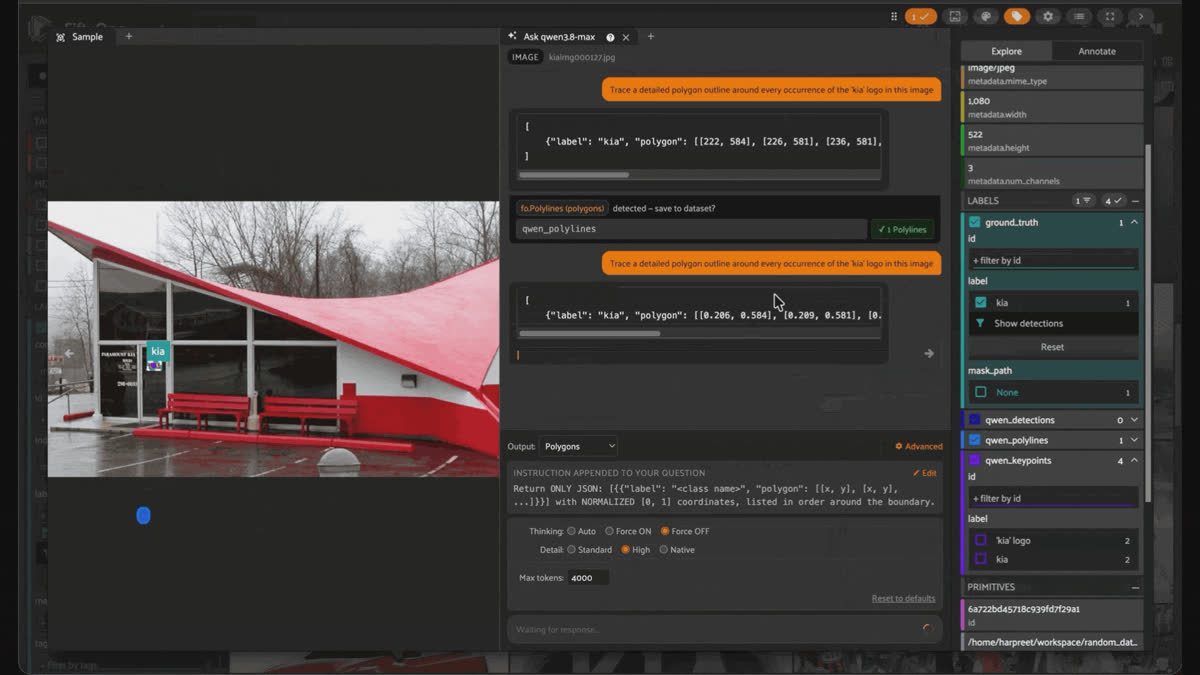
Sample ID 6a722bd45718c939fd7f29a1: Qwen3.8-Max for keypoints and polygons for the "kia" logo; keypoints performed spot on
Neither answer is wrong exactly. "PARAMOUNT KIA" painted on the glass is a real occurrence of the word, just not the emblem ground truth is scoring against. But three separate calls, same photo, same target, landed on two different opinions about how many things to count. Matching instance counts across detect, keypoints, and polygon isn't a free consistency check; don't treat it as one.
Crowded scenes land on full agreement more often than that example suggests, though. A Medibank storefront has three real occurrences of the wordmark: the large sign out front, plus two smaller repeats visible through the shop window. All three tasks found all three, in the same three places:
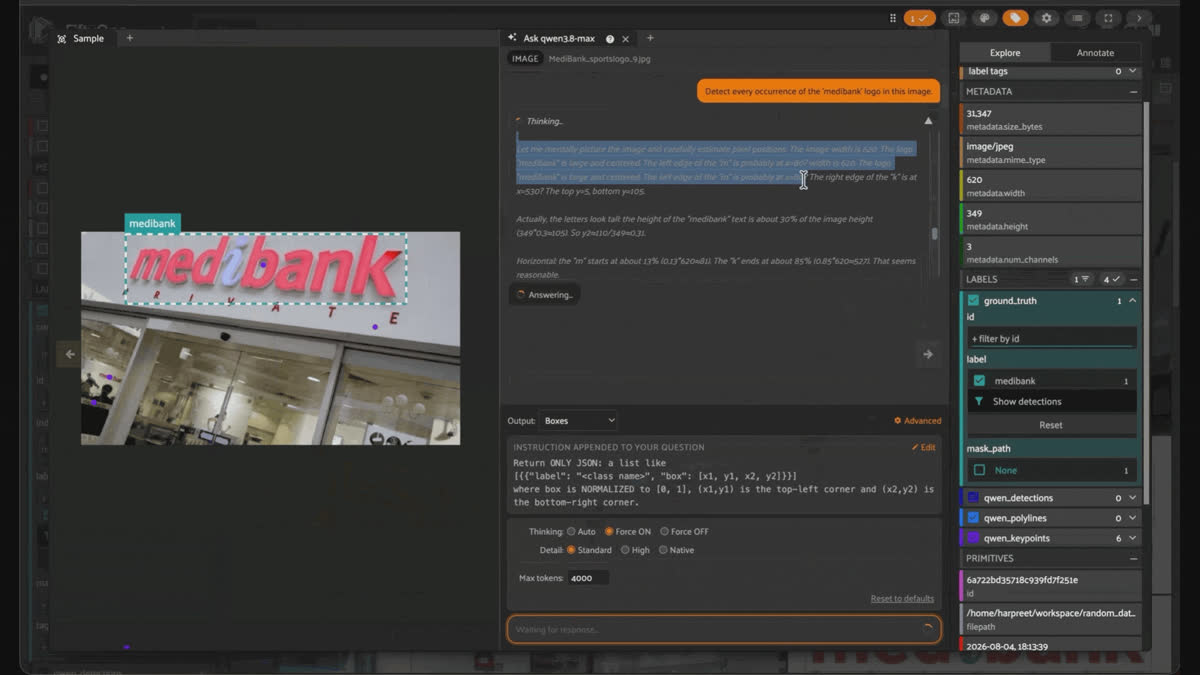
Sample ID 6a722bd35718c939fd7f251e: GT (green, 1 box, the large sign only) vs Qwen3.8-Max detect (3 boxes), keypoints (3 points), and polygon (3 outlines); all three tasks agree on the two smaller storefront instances ground truth doesn't label
Ground truth only labels the large sign, so the six smaller-instance detections across all three tasks (two window instances each, times three tasks) score as "hallucinations" against IoU, even though every one of them is a real, correctly located Medibank logo. Same pattern as the Volvo and Nike examples back in Round 1, showing up again in a different task entirely.
That agreement scales further than three instances, too. A BMW-Sauber Formula 1 press conference with four separate BMW roundels (a driver's racing suit, two nameplate cards on the table, and a podium sign behind the microphones) got the same four locations back from
detect, keypoints, and polygon alike, even though ground truth labels only one of the four. That same photo also produced the single richest classification result in this whole batch, more on that further down.Round 3: tracing outlines (not quite segmentation masks)
Good to know. Is this actually a segmentation mask? Not a raster one. The plugin's polygon task returns a vector outline (fo.Polyline(closed=True, filled=True)), and OpenLogo itself has no ground-truth masks or polygons to score against. The batch examples below are scored qualitatively against what's actually in the image, not IoU-scored the way the boxes in Round 1 were.
Circular logos are a good stress test for outline tracing specifically, since a circle has no straight edges or corners to anchor on the way a box does. Asked to trace the round BMW roundel on a wet car hood (the same photo everyone's screenshotting for basic detect calls), the model spent 61 seconds and 3,121 reasoning tokens, more than 18x the length of its own final answer, working through an 11-point outline. The result is a genuinely circular polygon, not a rough rectangle standing in for one:
Compare that to the same photo's
detect call, which needed a fraction of the reasoning budget to draw an axis-aligned box around the same roundel. The box is a correct rectangle: four numbers. The polygon is a correct circle: 11 pairs of numbers, each one reasoned through individually instead of computed from a formula. That gap, one shape you can derive with arithmetic and one you have to walk point byRound 4: can it rotate the box?
This is the task nobody in my feed is testing, and Qwen3.8-Max has no native oriented-bounding-box mode to fall back on. So I wrote an ad hoc prompt asking for the 4 corners of the "tightest rotated rectangle" and picked 5 OpenLogo images by hand instead of by random seed, because this test only means something if the object is actually tilted: a Heineken bottle lying on gravel, a Starbucks cup held at a steep angle, a FedEx truck panel with mild camera-perspective skew, plus two frontal controls (a Corona box, an Audi grille) to check the model doesn't just invent rotation everywhere.
The Heineken bottle is an interesting example, and its own
reasoning_content explains why: "there are actually two places where the 'Heineken' text appears: one is on the neck of the bottle..., and the other is on the main label." The model correctly noticed both real instances. The regular detect call on the same image found both, matching the two real logo locations. Still, the single-target OBB prompt picked the neck text and rotated a genuinely tight box around it (38.1° off-axis, cutting wasted area by 74% versus its own axis-aligned envelope). OpenLogo's ground truth happens to label the other instance, the main label lower on the bottle, so the OBB scores 0.0 IoU against it. Not because the rotation is wrong, but because it's a tight, correct answer to a legitimately ambiguous question, the same "GT only labeled one of several real instances" pattern from the box-detection round above.Keep it honest. This whole round is a prompt-engineered stretch task with zero ground-truth OBB annotations to check it against. I'm scoring geometric self-consistency (does the shape look right, is it tighter than the box around it), not accuracy against a labeled angle. Treat it as "here's what's possible if you need this," not a benchmark result.
Classification: who's actually in the picture?
Classification asks a different question than everything above: not "where is X" but "what brands are visible at all." The batch's
classify prompt is untargeted on purpose: "identify every distinct brand/logo visible," no specific name mentioned, run against images each labeled with one ground-truth logo for the other tasks. The model routinely volunteers far more than that one labeled brand, confidence score attached, and that over-reporting is a genuine double-edged sword. Both edges show up in the same 10-image batch.The most convincing catch is the BMW-Sauber Formula 1 press photo from the keypoints section above, ground truth labeled for one
BMW box. The same generic "identify every brand" prompt came back with four brands, not one: BMW, Intel, Puma, Credit Suisse. Every one of those is a real sponsor patch actually printed on the driver's racing suit or the team's signage in frame, not invented: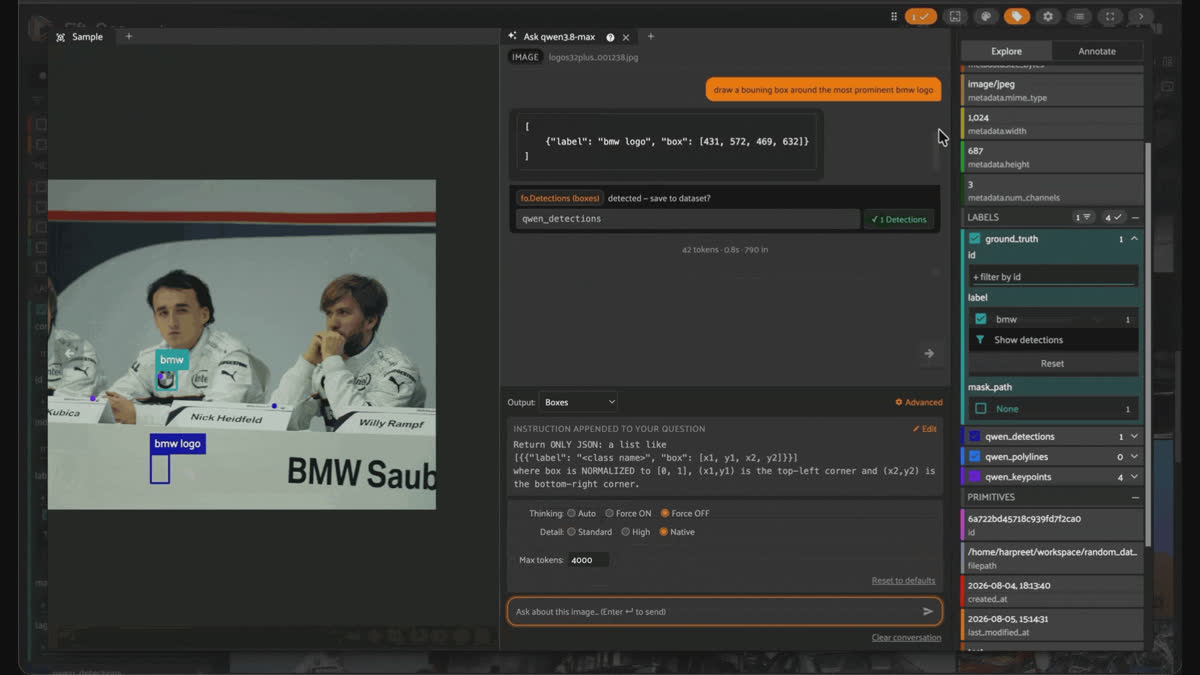
BMW-Sauber F1 press conference; classify identified 7 real brands (BMW, Sauber, Intel, Puma, Bridgestone, Credit Suisse, Petronas) from one untargeted "identify every logo" prompt
Two smaller catches follow the same pattern. A street-corner photo labeled for
Coca-Cola also returned JCDecaux, the outdoor-advertising company whose name is printed at the bottom of the ad frame in the same shot, and Invader, the Space Invader-style street art visible on the building itself. Both are real, and neither is something a Coca-Cola-specific search would have surfaced on its own. A golf-course lawn mower shot labeled for Allett also volunteered "Manchester United (MANUTD.COM)" (real stadium signage in the background; this was shot pitchside at Old Trafford) and "Buffalo 34" (the mower's actual model name, printed on its body). Used well, an untargeted classify call turns a single-label ground truth into a free scene inventory.The other edge: a watch-dial photo labeled for
Benrus came back with Benrus (0.98) correctly, and AbslomRob (0.92), which isn't a real brand anywhere. It's a photographer's watermark in the corner, small and slightly blurred, that the model read as a second logo and assigned real confidence to.Keep it honest. There's no way to tell "real secondary brand you didn't think to ask about" from "confident misread of blurry text" just by looking at the confidence score. AbslomRob came back at 0.92, higher than Petronas' genuine 0.55 in the F1 photo above. If you're using classification output as a scene inventory, verify anything you didn't explicitly ask about before you trust it; the confidence number alone won't tell you which bucket it's in. Label casing isn't normalized either (benrus in, Benrus out), so fold case yourself if you're matching against a fixed taxonomy downstream.
A quick detour into plain VQA
Everything above is a grounding task: the model has to say where something is, down to a coordinate. Plain visual question answering, where it only has to say what something is, doesn't share any of the instability documented in this post.
Asked "who is the person on the left" against the same image at Standard, High, and Native detail settings in the same conversation, thinking on, the answer came back identical all three times: Lewis Hamilton, his McLaren-Mercedes team, his teammate Heikki Kovalainen, and the correct multi-year window (roughly 2007-2010). Same facts, near-identical wording, no drift. The same detail-level swap that flipped coordinate conventions and IoU scores by 80+ points earlier in this post did nothing here.
That's a useful line to draw. Detail level and thinking mode are real levers specifically for tasks that need the model to resolve where something is to sub-percent precision. Identifying a person, describing a scene, answering "what is this" doesn't route through the same guessed-pixel-canvas machinery that's the root cause of most of the failures in this post, so it doesn't inherit the same instability. Don't burn a Native-detail, thinking-on budget on a task that was never going to need it.
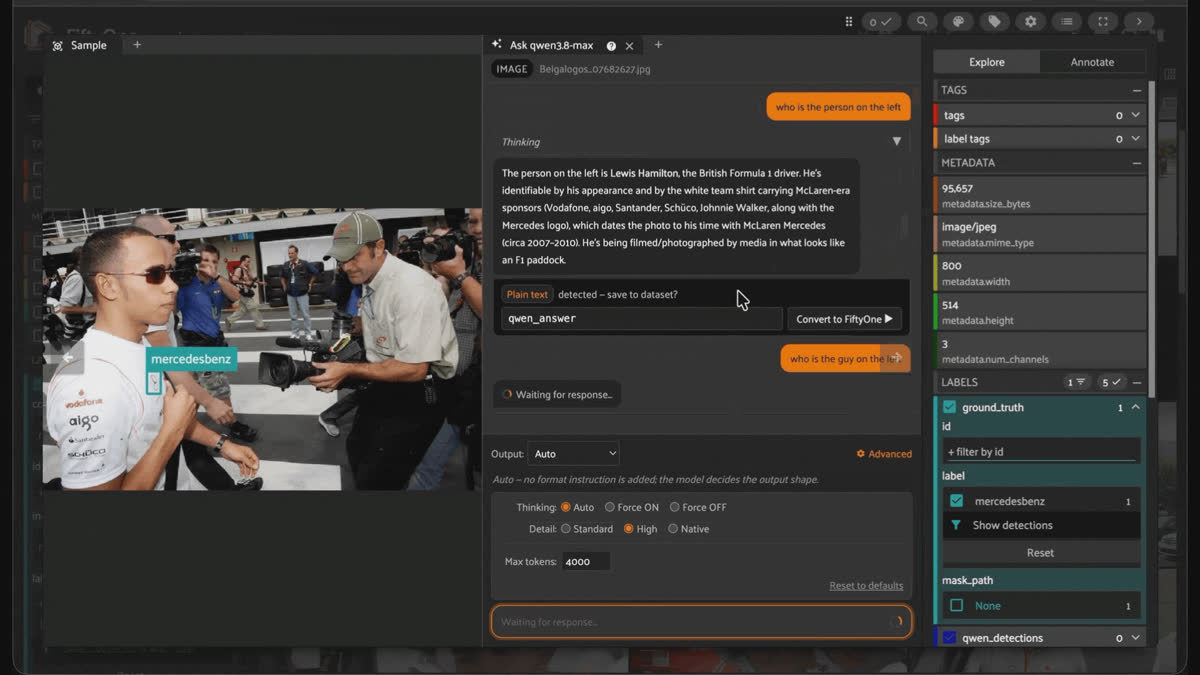
Qwen3.8-Max answering "who is the person on the left" for a Formula 1 paddock photo of Lewis Hamilton, with its reasoning trace shown in the FiftyOne chat panel.
So, is Qwen3.8-Max actually good at visual grounding?
It depends, and I mean that more specifically than the hedge it sounds like: it depends on configuration, and the gap between configurations is not small.
Abus and Hisense both went from ~0.85-0.90 IoU with thinking on to a dead 0.0 with thinking off, on the same image, same prompt. Redbull went from 3/5 matched to 0/5 with nothing in the request different. Ship this model for grounding without pinning thinking mode and detail level, and you're not shipping a slightly-worse detector. You're shipping a coin flip with good PR.What it gets right is real, though, and worth being fair about: clean box wins on well-defined targets (kraft, abus, hisense under the right config), genuinely rotated quadrilaterals that track real-world tilt rather than faking it (Heineken, Starbucks), correct restraint on frontal objects instead of hallucinating rotation everywhere, keypoints landing dead-on even for a 20-pixel-tall target, and a classification habit that named 7 real sponsor logos in one photo from a single generic "identify every logo" prompt. A single screenshot at default settings won't show you any of that variance, in either direction. Ground-truth-informed, multi-config testing will, and it's a few
match()/take() calls and an IoU function inside FiftyOne, not custom eval infra.Try it yourself
- Plugin + prompts + parser: `qwen38-max-fiftyone` on GitHub
- Dataset: `Voxel51/OpenLogo` on Hugging Face
- Source paper: Open Logo Detection Challenge (Su, Zhu, Gong 2018)
Frequently Asked Questions
No. Its product page lists text as its only output modality. Every box, point, and polygon in this post came from asking for JSON coordinates in free text and parsing the response (qwen38_parser.py), the same approach this plugin uses for all grounding tasks, not a built-in vision_config-style extension.
Non-determinism, most visibly when thinking mode is on. In one controlled case (redbullimg000441.jpg), two calls with byte-identical image input and identical thinking=True/detail settings matched 3 of 5 ground-truth boxes in one run and 0 of 5 in the other. This isn't unique to this model, but it means a single run at default settings tells you almost nothing about typical performance.
No, check what it actually says against the real encoded size. Even when the prompt explicitly states the true pixel dimensions, the reasoning trace regularly re-derives (and contradicts) a different, guessed canvas size instead, and the final coordinate convention follows whichever guess it settled on, not the stated truth.
Not a raster one. It's a vector polygon outline (fo.Polyline(closed=True, filled=True)), which is what was actually validated against the model's output, not a per-pixel fo.Segmentation mask. Rasterize the returned points yourself (e.g., PIL.ImageDraw.polygon) if you need one.
No, there's no native OBB mode in the plugin or the model. The oriented-box results in this post came from an ad hoc prompt asking for 4 rotated corners, scored qualitatively (rotation angle, tightness vs. the axis-aligned envelope) since OpenLogo's own ground truth is axis-aligned boxes only, with no labeled angle to check against.
Not always. On one image, keypoints found 2 instances of a target while detect and polygon both found 1; on another, all three tasks agreed on 4 instances the ground truth didn't fully label. Instance count agreement across tasks isn't guaranteed just because they're pointed at the same target string and image.
Both, in the same 10-image batch. It correctly named 7 real sponsor logos in an F1 photo from one generic, untargeted "identify every logo" prompt, and correctly caught real background brands in two other images. It also hallucinated a photographer's watermark as a second watch brand, at a higher confidence score than some of its genuine catches. Confidence alone doesn't tell you which case you're looking at.
No. Asking a fact-based question ("who is this person") across three different image-detail settings produced identical answers all three times, in a session where the same detail-level change flipped grounding results by 80+ points of IoU. The instability documented throughout this post is specific to tasks that require sub-percent coordinate precision, not a general property of the model.
Hacker-in-Residence
Harpreet is Hacker-in-Residence at Voxel51, where he turns cutting-edge AI ideas into open-source prototypes and demos that push the boundaries of deep learning. From building tools that inspire to creating content that educates, Harpreet helps the AI community level up—one wild idea at a time.
See all articles by Harpreet Sahota
Try Voxel51 for yourself
Loading related posts...
© 2026 Voxel51 All Rights Reserved


