Building Production-Ready AI Document Understanding Pipelines with GLM-OCR
Author

Hacker-in-Residence
Harpreet is Hacker-in-Residence at Voxel51, where he turns cutting-edge AI ideas into open-source prototypes and demos that push the boundaries of deep learning. From building tools that inspire to creating content that educates, Harpreet helps the AI community level up—one wild idea at a time.
See all articles by Harpreet Sahota
In this article
What is document understanding?How GLM-OCR differs from traditional OCR vision systemsThe FiftyOne document understanding integrationGetting started with your document understanding integrationFour operation modes for document understandingReal-world document understanding exampleVisualizing resultsPerformance optimizationReal-world structured output use casesMulti-mode processing for complex document understandingQuality assurance workflowsArchitecture deep diveOCR vision system best practicesThe future of OCR workflows with AI-powered document understandingGLM-OCR next stepsResources
In this article
What is document understanding?How GLM-OCR differs from traditional OCR vision systemsThe FiftyOne document understanding integrationGetting started with your document understanding integrationFour operation modes for document understandingReal-world document understanding exampleVisualizing resultsPerformance optimizationReal-world structured output use casesMulti-mode processing for complex document understandingQuality assurance workflowsArchitecture deep diveOCR vision system best practicesThe future of OCR workflows with AI-powered document understandingGLM-OCR next stepsResources
Talk to an AI expert
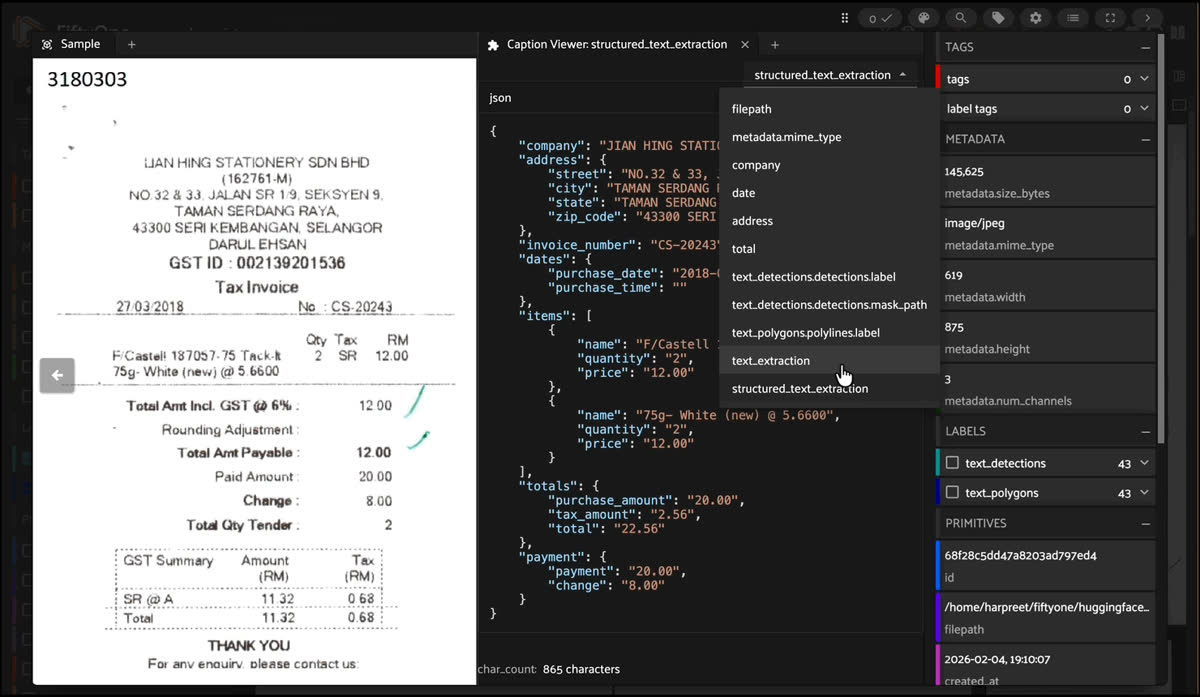
Document understanding has long been one of the most challenging problems in computer vision. Traditional OCR vision systems excel at character recognition but struggle with complex layouts, tables, formulas, and structured data extraction. Enter GLM-OCR—a lightweight yet powerful multimodal model that's changing how we approach document parsing.
In this post, we'll explore what document understanding is and how to build efficient, production-ready AI document understanding pipelines using GLM-OCR integrated with FiftyOne, a powerful dataset management and visualization platform. We'll cover everything from basic text extraction to advanced structured data parsing, with practical document understanding integration examples you can run today.
What is document understanding?
Document understanding is an AI-powered approach that goes beyond traditional OCR, enabling machines to read, interpret, and extract structured data from documents. By combining vision and language understanding, AI document understanding systems can handle tables, formulas, and layouts, making OCR vision systems smarter and streamlining workflows with seamless document understanding integration.
How GLM-OCR differs from traditional OCR vision systems
GLM-OCR represents a fundamental shift in how we approach document understanding. To appreciate its value, we need to understand how it differs from traditional OCR vision systems.
Traditional OCR vision systems: Character recognition only
Classic OCR vision systems like Tesseract, PaddleOCR, or commercial solutions follow a character-by-character recognition approach:
- Image preprocessing: binarization, noise reduction
- Text detection: finding text regions
- Character recognition: identifying individual characters
- Post-processing: spell checking, language models
Limitations:
- Outputs flat text strings—no understanding of document structure.
- Struggles with complex layouts (tables become garbled text).
- Cannot handle formulas (mathematical expressions become meaningless text).
- Requires extensive post-processing to extract structured data.
- No semantic understanding—just character patterns.
GLM-OCR: Document understanding through multimodal AI
GLM-OCR takes a completely different approach. Instead of treating documents as collections of characters, it uses vision-language models to understand documents semantically:
- Visual-Language Fusion: The CogViT encoder captures both pixel-level details AND layout semantics simultaneously.
- Contextual Reasoning: Uses language understanding to interpret relationships between text blocks, tables, and figures.
- Structure-Aware Generation: Generates structured outputs (Markdown, JSON, LaTeX) that preserve document semantics.
- Multi-Token Prediction: Predicts multiple tokens per step and uses context to correct errors—like semantic proofreading.
Key differences:
Why GLM-OCR vision systems matters
Traditional OCR vision systems give you text, but you still need to parse tables manually or with complex regex, reconstruct formulas from text descriptions, build custom parsers for each document type, and handle edge cases and formatting variations.
GLM-OCR gives you semantic structure directly:
- Tables are already in HTML/Markdown format.
- Formulas are ready-to-render LaTeX.
- Structured data matches your exact schema.
- Document hierarchy is preserved.
This fundamentally changes how you build document processing pipelines—from "extract text then parse" to "extract structure directly".
Key Advantages:
- Lightweight: At 0.9B parameters, it runs efficiently on consumer hardware.
- Multimodal: Handles PDFs and images with equal proficiency.
- Structure-First: Outputs semantic Markdown, JSON, or LaTeX—not just text.
- Open Source: Apache-2.0 licensed, deployable anywhere.
- Context-Aware: Uses language understanding to improve accuracy.
The FiftyOne document understanding integration
While GLM-OCR is powerful on its own, integrating document understanding with FiftyOne unlocks several key benefits:
- Efficient Batching: Native support for batched inference, dramatically improving throughput.
- Dataset Management: Seamless integration with FiftyOne's dataset workflows.
- Visualization: Built-in tools for exploring OCR results and debugging.
- Flexibility: Easy switching between operation modes without reloading models.
Getting started with your document understanding integration
Installation
First, install the required dependencies. Since GLM-OCR is relatively new, you'll need the latest transformers from source:
pip install git+https://github.com/huggingface/transformers.git
pip install -U timm fiftyone
For the best text viewing experience in FiftyOne, install the Caption Viewer plugin:
fiftyone plugins download https://github.com/harpreetsahota204/caption_viewerThis plugin provides intelligent formatting for OCR outputs with proper line breaks, table rendering, and JSON pretty-printing—essential for reviewing complex document extractions.
Loading your dataset
FiftyOne makes it easy to work with document datasets. Let's start with a sample dataset from Hugging Face Hub:
import fiftyone as fo
from fiftyone.utils.huggingface import load_from_hub

dataset = load_from_hub(
  "Voxel51/scanned_receipts",
  overwrite=True,
  persistent=True,
  name="scanned_receipts",
  max_samples=50
)
This loads 50 scanned receipt images—perfect for demonstrating GLM-OCR's capabilities.
Registering and loading GLM-OCR
The FiftyOne integration makes GLM-OCR available as a zoo model:
import fiftyone.zoo as foz

# Register the model source
foz.register_zoo_model_source(
  "https://github.com/harpreetsahota204/glm_ocr",
  overwrite=True
)

# Load the model
model = foz.load_zoo_model("zai-org/GLM-OCR")
The model automatically detects and uses the best available device (CUDA, MPS, or CPU), making it easy to get started regardless of your hardware setup.
Four operation modes for document understanding
GLM-OCR supports four distinct operation modes, each optimized for different use cases:
1. Text recognition
The most straightforward mode—extract plain text while preserving formatting:
model.operation = "text"
dataset.apply_model(
  model,
  label_field="text_extraction",
  batch_size=8,
  num_workers=2
)
Output: Clean text with preserved layout and structure. Perfect for general OCR tasks where you need readable text output.
2. Formula recognition
Extract mathematical formulas in LaTeX format—essential for scientific and technical documents:
model.operation = "formula"
dataset.apply_model(model, label_field="formulas", batch_size=8)
Output: LaTeX-formatted mathematical expressions ready for rendering in scientific documents or notebooks.
3. Table recognition
Parse complex table structures into HTML or Markdown:
model.operation = "table"
dataset.apply_model(model, label_field="tables", batch_size=8)
Output: Properly structured tables in HTML or Markdown format, preserving cell relationships and hierarchies.
4. Custom structured extraction
The most powerful mode—extract structured data using custom JSON schema prompts:
model.operation = "custom"
model.custom_prompt = """请按下列JSON格式输出图中信息:
{
  "company": "",
  "address": {
    "street": "",
    "city": "",
    "state": "",
    "zip_code": ""
  },
  "invoice_number": "",
  "dates": {
    "purchase_date": "",
    "purchase_time": ""
  },
  "items": [
    {"name": "", "quantity": "", "price": ""}
  ],
  "totals": {
    "purchase_amount": "",
    "tax_amount": "",
    "total": ""
  },
  "payment": {
    "payment": "",
    "change": ""
  }
}
"""

dataset.apply_model(
  model,
  label_field="structured_extraction",
  batch_size=8,
  num_workers=2
)
Output: JSON-formatted structured data matching your exact schema. This is incredibly powerful for building ETL pipelines, data warehouses, or API integrations.
Real-world document understanding example
Let's see GLM-OCR's document understanding in action with a real receipt. After running text extraction, here's what we get:
Sarang Hae Yo
TRENDYMAX (M) SDN. BHD.
Company Reg. No.: (583246-A).
P6, Block C, GM Klang Wholesale City,
Jalan Kasuarina 1,
41200 Klang, Selangor D.E.
Whatsapp : +6012-5060668
www.saranghaeyo.com
GST Reg : 000384098304

TAX INVOICE
CB#: GM3-46792 15/01/2018 1:48:36 PM
Cashier: W001 - erah @ C6
Remarks:

Qty Description Price Disc Total
1 MS LOYALTY PACKAGE
15.00 0.00 15.00 SR
10 IB-RDM IRON BASKET ROUND 27 * 25
28.90 -28.90 260.10 SR
...
The text extraction preserves the layout beautifully. But with structured extraction, we get machine-readable JSON:
{
  "company": "Sarang Hae Yo",
  "address": {
    "street": "P6, Block C, GM Klang Wholesale City, Jalan Kasuarina 1,",
    "city": "Klang",
    "state": "Selangor D.E.",
    "zip_code": "41200"
  },
  "invoice_number": "GM3-46792",
  "dates": {
    "purchase_date": "2018-01-15",
    "purchase_time": "14:36 PM"
  },
  "items": [
    {
      "name": "MS LOYALTY PACKAGE",
      "quantity": "1",
      "price": "15.00"
    },
    {
      "name": "IB-RDM IRON BASKET ROUND 27 * 25",
      "quantity": "10",
      "price": "28.90"
    }
  ],
  "totals": {
    "purchase_amount": "329.10",
    "tax_amount": "329.10",
    "total": "329.10"
  }
}
This structured output can be directly ingested into databases, analytics systems, or financial software—no manual parsing required.
Visualizing results
One of FiftyOne's greatest strengths is its visualization capabilities. Launch the app to explore your results:
session = fo.launch_app(dataset)Using the caption viewer plugin
The caption viewer plugin transforms how you review OCR vision system outputs:
- Click on any sample to open the modal view
- Click the + button to add a panel
- Select "Caption Viewer" from the panel list
- In the panel menu (☰), select the field you want to view:
text_extractionfor plain OCR textstructured_extractionfor JSON outputs- Any other text field
The plugin automatically:
- Renders line breaks properly
- Converts HTML tables to markdown
- Pretty-prints JSON content
- Shows character counts
This makes it easy to spot issues, verify accuracy, and understand what the model extracted.
Performance optimization
GLM-OCR vision system delivers impressive throughput: approximately 1.86 pages/second for PDFs and 0.67 images/second. The FiftyOne integration's batching support significantly improves efficiency.
Batch size recommendations
Choose your batch size based on available hardware:
- CPU:
batch_size=2-4(slower but works anywhere) - GPU (8GB):
batch_size=8-16(good balance) - GPU (16GB+):
batch_size=16-32(maximum throughput)
Runtime configuration
One of the integration's best features is the ability to change operation modes without reloading the model:
# Start with text recognition
model.operation = "text"
dataset.apply_model(model, label_field="text")

# Switch to table recognition
model.operation = "table"
dataset.apply_model(model, label_field="tables")

# Use custom prompt for structured extraction
model.operation = "custom"
model.custom_prompt = "Extract invoice data as JSON..."
dataset.apply_model(model, label_field="invoice_data")
You can also adjust generation parameters such as increasing max tokens for longer outputs:
# Increase max tokens for longer outputs
model.max_new_tokens = 16384

# Adjust batch size for memory constraints
model.batch_size = 4
Real-world structured output use cases
The true power of GLM-OCR vision systems emerges when you need structured data, not just text. Here are practical use cases where structured extraction is essential, along with how to use the output downstream.
Use case 1: Financial document processing
Challenge: Extract structured financial data from invoices, receipts, and statements for accounting automation.
Why structured output is essential: Financial systems require specific fields (amounts, dates, line items) in exact formats. Flat text requires complex parsing that breaks with format variations.
Implementation:
model.operation = "custom"
model.custom_prompt = """Extract invoice information as JSON:
{
  "vendor": "",
  "invoice_number": "",
  "date": "",
  "due_date": "",
  "line_items": [
    {"description": "", "quantity": "", "unit_price": "", "total": ""}
  ],
  "subtotal": "",
  "tax": "",
  "total": "",
  "payment_terms": ""
}"""

dataset.apply_model(model, label_field="invoice_data")
Downstream Usage:
import json
from accounting_system import InvoiceProcessor

processor = InvoiceProcessor()

for sample in dataset:
  invoice_json = json.loads(sample.invoice_data)

  # Direct database insertion
  invoice_id = processor.create_invoice(
    vendor=invoice_json["vendor"],
    invoice_number=invoice_json["invoice_number"],
    date=invoice_json["date"],
    total=float(invoice_json["total"])
  )

  # Add line items
    for item in invoice_json["line_items"]:
      processor.add_line_item(
        invoice_id=invoice_id,
        description=item["description"],
        quantity=float(item["quantity"]),
        unit_price=float(item["unit_price"])
  )

  # Trigger approval workflow if amount exceeds threshold
  if float(invoice_json["total"]) > 10000:
    processor.send_for_approval(invoice_id)
Benefits: No manual data entry, automatic categorization, immediate integration with accounting software.
Use case 2: Medical record digitization
Challenge: Extract structured patient information from scanned medical forms, lab reports, and prescriptions.
Why structured output is essential: Healthcare systems require structured data for EHR integration, insurance claims, and clinical decision support. Unstructured text cannot be reliably parsed.
Implementation:
model.operation = "custom"
model.custom_prompt = """Extract patient information from medical document as JSON:
{
  "patient_name": "",
  "date_of_birth": "",
  "patient_id": "",
  "visit_date": "",
  "vital_signs": {
    "blood_pressure": "",
    "heart_rate": "",
    "temperature": "",
    "weight": ""
  },
  "diagnosis": [],
  "medications": [
    {"name": "", "dosage": "", "frequency": ""}
  ],
  "lab_results": [
    {"test_name": "", "value": "", "unit": "", "reference_range": ""}
  ],
  "physician": ""
}"""

dataset.apply_model(model, label_field="medical_data")
Downstream usage:
from hl7 import create_patient_message
from ehr_system import EHRClient

ehr = EHRClient()

for sample in dataset:
  medical_json = json.loads(sample.medical_data)

  # Create HL7 message for EHR integration
  hl7_message = create_patient_message(
    patient_id=medical_json["patient_id"],
    name=medical_json["patient_name"],
    dob=medical_json["date_of_birth"]
  )

  # Send to EHR system
  ehr.send_message(hl7_message)

  # Extract and validate lab results
  for lab in medical_json["lab_results"]:
    ehr.add_lab_result(
      patient_id=medical_json["patient_id"],
      test_name=lab["test_name"],
      value=float(lab["value"]),
      unit=lab["unit"],
      reference_range=lab["reference_range"]
    )

    # Flag abnormal values
    if not ehr.is_normal_range(lab["value"], lab["reference_range"]):
      ehr.alert_physician(medical_json["physician"], lab)

  # Check for drug interactions
  medications = [m["name"] for m in medical_json["medications"]]
  interactions = ehr.check_drug_interactions(medications)
  if interactions:
    ehr.alert_pharmacist(interactions)
Benefits: Automated EHR population, real-time alerts for abnormal values, drug interaction checking, reduced manual data entry errors.
Use case 3: Legal document analysis
Challenge: Extract structured information from contracts, NDAs, and legal agreements for compliance monitoring and analysis.
Why structured output is essential: Legal analysis requires identifying specific clauses, dates, parties, and obligations. These must be structured for automated compliance checking and risk assessment.
Implementation:
model.operation = "custom"
model.custom_prompt = """Extract contract information as JSON:
{
  "parties": [
  {"name": "", "role": ""}
  ],
  "effective_date": "",
  "expiration_date": "",
  "key_clauses": {
    "termination": "",
    "liability": "",
    "confidentiality": "",
    "payment_terms": "",
    "governing_law": ""
  },
  "obligations": [
    {"party": "", "obligation": "", "deadline": ""}
  ],
  "financial_terms": {
    "amount": "",
    "currency": "",
    "payment_schedule": ""
  },
  "renewal_terms": ""
}"""

dataset.apply_model(model, label_field="contract_data")
Downstream usage:
from contract_analyzer import ContractAnalyzer
from compliance_checker import ComplianceChecker

analyzer = ContractAnalyzer()
compliance = ComplianceChecker()

for sample in dataset:
  contract_json = json.loads(sample.contract_data)

  # Store in contract management system
  contract_id = analyzer.store_contract(contract_json)

  # Check compliance against company policies
  violations = compliance.check_policy(
    liability_clause=contract_json["key_clauses"]["liability"],
    termination_clause=contract_json["key_clauses"]["termination"],
    payment_terms=contract_json["key_clauses"]["payment_terms"]
  )

  if violations:
    analyzer.flag_for_review(contract_id, violations)

  # Extract obligations for tracking
  for obligation in contract_json["obligations"]:
    analyzer.create_task(
      contract_id=contract_id,
      assigned_to=obligation["party"],
      description=obligation["obligation"],
      deadline=obligation["deadline"]
    )

  # Set expiration reminders
  analyzer.set_expiration_alert(
    contract_id=contract_id,
    expiration_date=contract_json["expiration_date"],
    days_before=90
  )

  # Generate summary for legal team
  summary = analyzer.generate_summary(contract_json)
  analyzer.notify_legal_team(contract_id, summary)
Benefits: Automated compliance checking, obligation tracking, expiration monitoring, risk flagging, reduced manual review time.
Use case 4: Academic paper processing
Challenge: Extract structured metadata, formulas, and references from research papers for knowledge base construction.
Why structured output is essential: Academic databases require structured metadata (authors, affiliations, citations). Formulas must be in LaTeX for rendering. References need to be parseable for citation networks.
Implementation:
# First, extract structured metadata
model.operation = "custom"
model.custom_prompt = """Extract paper metadata as JSON:
{
  "title": "",
  "authors": [
    {"name": "", "affiliation": "", "email": ""}
  ],
  "abstract": "",
  "keywords": [],
  "publication_date": "",
  "journal": "",
  "doi": "",
  "references": [
    {"title": "", "authors": "", "year": "", "doi": ""}
  ],
  "sections": [
    {"heading": "", "content": ""}
  ]
}"""

dataset.apply_model(model, label_field="paper_metadata")

# Then extract formulas separately
model.operation = "formula"
dataset.apply_model(model, label_field="formulas")
Downstream usage:
from knowledge_graph import KnowledgeGraph
from citation_network import CitationNetwork
from latex_renderer import render_formula

kg = KnowledgeGraph()
citation_net = CitationNetwork()

for sample in dataset:
  metadata = json.loads(sample.paper_metadata)

  # Create paper node in knowledge graph
  paper_id = kg.create_paper(
    title=metadata["title"],
    abstract=metadata["abstract"],
    doi=metadata["doi"],
    publication_date=metadata["publication_date"]
  )

  # Add authors and affiliations
  for author in metadata["authors"]:
    author_id = kg.get_or_create_author(author["name"])
    kg.link_author_to_paper(author_id, paper_id)

    if author["affiliation"]:
      org_id = kg.get_or_create_organization(author["affiliation"])
      kg.link_author_to_org(author_id, org_id)

  # Build citation network
  for ref in metadata["references"]:
    cited_paper_id = citation_net.get_or_create_paper(
      title=ref["title"],
      authors=ref["authors"],
      year=ref["year"]
    )
    citation_net.add_citation(paper_id, cited_paper_id)

  # Extract and render formulas
  if sample.formulas:
    formulas = sample.formulas.split("\n\n") # Assuming formulas separated by double newline
    for i, formula in enumerate(formulas):
      rendered_image = render_formula(formula)
      kg.add_formula(paper_id, formula, rendered_image, position=i)

  # Extract key concepts from sections
  for section in metadata["sections"]:
    concepts = kg.extract_concepts(section["content"])
    for concept in concepts:
      kg.link_paper_to_concept(paper_id, concept)

  # Generate recommendations based on citation network
  similar_papers = citation_net.find_similar(paper_id, limit=10)
  kg.add_recommendations(paper_id, similar_papers)
Benefits: Automated knowledge graph construction, citation network analysis, formula rendering, concept extraction, paper recommendations.
Use case 5: Supply chain document processing
Challenge: Extract structured data from shipping manifests, customs forms, and delivery receipts for logistics automation.
Why structured output is essential: Logistics systems require structured data for tracking, customs clearance, and inventory management. Each document type has specific fields that must be extracted accurately.
Implementation:
model.operation = "custom"
model.custom_prompt = """Extract shipping manifest information as JSON:
{
  "shipper": {
    "name": "",
    "address": "",
    "contact": ""
  },
  "consignee": {
    "name": "",
    "address": "",
    "contact": ""
  },
  "shipment_id": "",
  "tracking_number": "",
  "ship_date": "",
  "expected_delivery": "",
  "items": [
    {
      "description": "",
      "quantity": "",
      "weight": "",
      "value": "",
      "hs_code": ""
    }
  ],
  "total_weight": "",
  "total_value": "",
  "carrier": "",
  "service_type": "",
  "special_instructions": ""
}"""

dataset.apply_model(model, label_field="manifest_data")
Downstream usage:
from logistics_system import LogisticsSystem
from customs_api import CustomsAPI
from inventory_system import InventorySystem

logistics = LogisticsSystem()
customs = CustomsAPI()
inventory = InventorySystem()

for sample in dataset:
  manifest = json.loads(sample.manifest_data)

  # Create shipment in logistics system
  shipment_id = logistics.create_shipment(
    tracking_number=manifest["tracking_number"],
    shipper=manifest["shipper"],
    consignee=manifest["consignee"],
    carrier=manifest["carrier"],
    service_type=manifest["service_type"]
  )

  # Submit customs declaration
  customs_declaration = customs.create_declaration(
    shipment_id=shipment_id,
    items=manifest["items"],
    total_value=float(manifest["total_value"]),
    total_weight=float(manifest["total_weight"])
  )

  # Check for restricted items
  for item in manifest["items"]:
    if customs.is_restricted(item["hs_code"]):
      logistics.flag_for_review(shipment_id, item)

    # Update inventory system
    inventory.update_in_transit(
      item_description=item["description"],
      quantity=int(item["quantity"]),
      expected_delivery=manifest["expected_delivery"]
    )

  # Calculate shipping costs
  cost = logistics.calculate_cost(
    weight=float(manifest["total_weight"]),
    service_type=manifest["service_type"],
    destination=manifest["consignee"]["address"]
  )
  logistics.set_cost(shipment_id, cost)

  # Set up tracking alerts
  logistics.set_delivery_alerts(
    shipment_id=shipment_id,
    consignee_email=manifest["consignee"]["contact"],
    expected_delivery=manifest["expected_delivery"]
  )

  # Generate shipping labels
  label = logistics.generate_label(shipment_id)
  logistics.print_label(shipment_id, label)
Benefits: Automated customs processing, real-time tracking, inventory updates, cost calculation, delivery notifications.
Multi-mode processing for complex document understanding
To understand some documents, they require multiple extraction modes. Here's how to combine them:
# Extract text for full-text search
model.operation = "text"
dataset.apply_model(model, label_field="full_text")

# Extract tables for data analysis
model.operation = "table"
dataset.apply_model(model, label_field="tables")

# Extract formulas for rendering
model.operation = "formula"
dataset.apply_model(model, label_field="formulas")

# Extract structured metadata
model.operation = "custom"
model.custom_prompt = "Extract key information as JSON..."
dataset.apply_model(model, label_field="metadata")
Now each document has multiple representations, enabling different downstream uses:
- Full text: Search and retrieval
- Tables: Data analysis and visualization
- Formulas: Rendering in documentation
- Metadata: Database storage and filtering
Quality assurance workflows
Use FiftyOne's filtering and evaluation capabilities to build QA workflows:
# Filter samples with empty extractions
empty_data = dataset.match(F("structured_extraction") == None)
print(f"Found {len(empty_data)} samples with no structured extraction")

# Review problematic samples
session = fo.launch_app(empty_data)

# Validate JSON structure
import json
invalid_json = []
for sample in dataset:
  if sample.structured_extraction:
    try:
      json.loads(sample.structured_extraction)
    except json.JSONDecodeError:
      invalid_json.append(sample.id)

if invalid_json:
  print(f"Found {len(invalid_json)} samples with invalid JSON")
  review_view = dataset.select(invalid_json)
  session = fo.launch_app(review_view)
Architecture deep dive
Understanding GLM-OCR's vision system architecture helps optimize your usage:
Three-stage pipeline
- Visual ingestion: CogViT visual encoder captures pixel-level and layout information.
- Multimodal reasoning: GLM-V-based vision-language fusion aligns visual features with language understanding.
- Structured generation: Decoder with Multi-Token Prediction (MTP) generates structured output while correcting errors.
The MTP mechanism is particularly clever—it predicts multiple tokens per step and uses context to fix errors on the fly, acting like semantic proofreading rather than naive character recognition.
Batching implementation
The FiftyOne integration implements efficient batching through:
- SupportsGetItem: Custom GetItem transform loads images as PIL Images.
- TorchModelMixin: Enables DataLoader-based batching.
- Left padding: Correctly handles decoder-only model generation.
- Variable-size images: Handles different image sizes in the same batch.
This architecture allows processing multiple documents simultaneously while maintaining accuracy.
OCR vision system best practices
1. Choose the right operation mode
- Use
textfor general OCR and human-readable output - Use
formulafor scientific documents with mathematical expressions - Use
tablewhen you need structured table data - Use
customfor domain-specific structured extraction
2. Optimize batch sizes
Start with smaller batches and increase until you hit memory limits. Monitor GPU/CPU usage to find the sweet spot.
3. Store raw outputs
Always store the raw GLM-OCR output (Markdown/JSON) alongside processed data. This allows reprocessing as your downstream logic evolves.
4. Combine with LLMs
GLM-OCR excels at structure extraction. Feed its output into LLMs for:
- Summarization
- Question answering
- Risk analysis
- Report generation
5. Handle edge cases
For low-quality scans, consider preprocessing:
- Binarization
- De-skewing
- Noise reduction
This helps the visual encoder and improves structure detection.
The future of OCR workflows with AI-powered document understanding
GLM-OCR vision systems combined with FiftyOne provides a powerful, flexible solution for AI-powered document understanding. The integration's batching support, visualization capabilities, and multiple operation modes make it suitable for everything from quick prototypes to production pipelines.
Key takeaways:
- Fundamentally different: GLM-OCR understands document semantics, not just characters.
- Structure-first output: Get Markdown, JSON, and LaTeX directly—no parsing needed.
- Lightweight yet powerful: 0.9B parameters with SOTA accuracy (94.62 on OmniDocBench V1.5).
- Structured extraction: Extract domain-specific data via custom prompts.
- Open source: Apache-2.0 licensed, deployable anywhere.
- Developer-friendly: Easy integration with existing workflows via FiftyOne.
Whether you're building ETL pipelines, processing receipts, analyzing contracts, extracting data from scientific papers, or digitizing medical records, GLM-OCR with FiftyOne gives you the tools to build robust document understanding systems that output structured data ready for downstream processing.
GLM-OCR next steps
- Try it yourself: Run the example notebook with your own documents.
- Experiment with modes: Test different operation types on your use case.
- Build a pipeline: Integrate structured extraction into your workflow.
- Optimize: Tune batch sizes and parameters for your hardware.
- Extend: Combine with LLMs for end-to-end document understanding.
The future of AI document understanding is here—and it's more accessible than ever.
Resources
- GLM-OCR FiftyOne Implementation
- GLM-OCR Model Card
- Example Notebook
- FiftyOne Documentation
- Caption Viewer Plugin
Hacker-in-Residence
Harpreet is Hacker-in-Residence at Voxel51, where he turns cutting-edge AI ideas into open-source prototypes and demos that push the boundaries of deep learning. From building tools that inspire to creating content that educates, Harpreet helps the AI community level up—one wild idea at a time.
See all articles by Harpreet Sahota
Talk to an AI expert
Loading related posts...
© 2026 Voxel51 All Rights Reserved


