MiniMax Just Raised Another ~$2B. Its Frontier Model Now Runs Inside The FiftyOne App
Author

Hacker-in-Residence
Harpreet is Hacker-in-Residence at Voxel51, where he turns cutting-edge AI ideas into open-source prototypes and demos that push the boundaries of deep learning. From building tools that inspire to creating content that educates, Harpreet helps the AI community level up—one wild idea at a time.
See all articles by Harpreet Sahota
In this article
Try Voxel51 for yourself
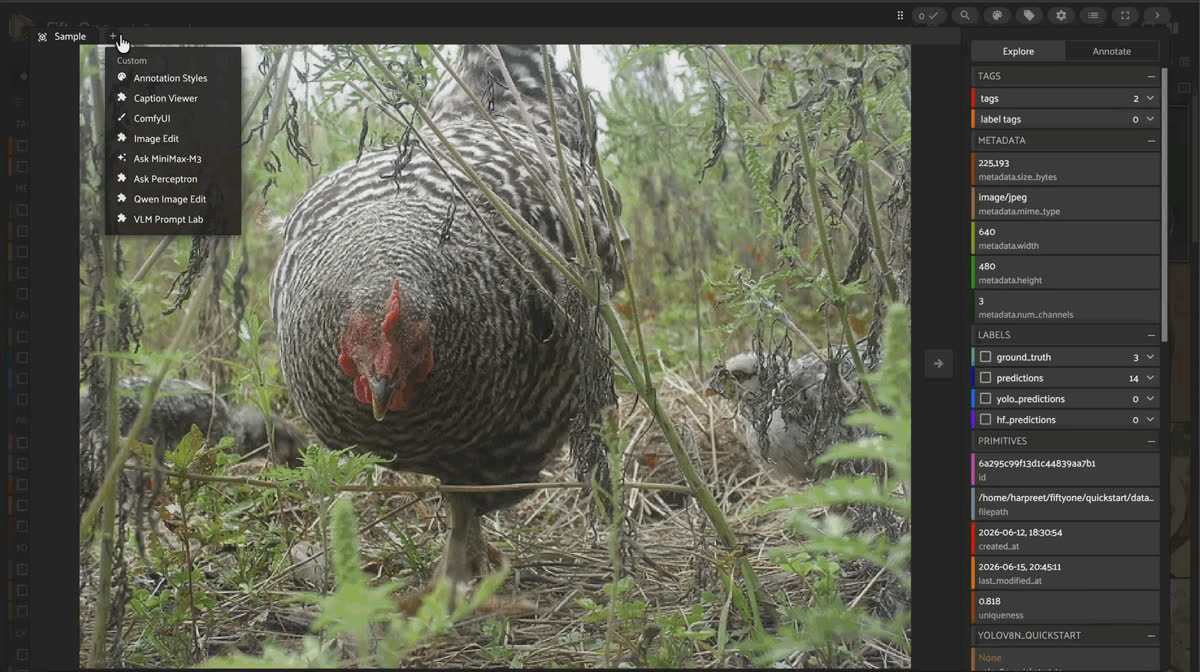
FiftyOne App grid view of the yolo-lineage-demo dataset before running MiniMax-M3.
MiniMax’s Hong Kong-listed stock is back in the headlines for its balance sheet. This post is about something more useful to you: a FiftyOne plugin that puts MiniMax-M3 (detection, keypoints, captioning, VQA, temporal event search, and a full chat panel) directly onto your samples, with no fine-tuning and no model server to host.
MiniMax spent the first week of July 2026 back in the financial press. The Shanghai-based AI lab, which listed on the Hong Kong Stock Exchange on January 9 at a ~$6.5B valuation and then popped 109% on day one to a market cap north of $13B, just announced a private placement plus convertible-bond raise reported at roughly HK$16 billion (on the order of $2B USD), its first major fundraising move since the IPO, with the bulk earmarked for model R&D and infrastructure.
None of that is why you’d install a FiftyOne plugin.
What matters for a computer vision workflow is what MiniMax shipped alongside that momentum: MiniMax-M3, a natively multimodal model with roughly 428B total parameters (~23B activated per token, Mixture-of-Experts) and a 1M-token context window, built around a new sparse-attention mechanism the company calls MiniMax Sparse Attention (MSA). It’s a model you can point at an image or a video and get back structured labels, not just prose, which means it’s a model you can drop straight into a labeling pipeline. So we built the plugin that does that.
Key Takeaways
- MiniMax-M3 is a ~428B-parameter (≈23B activated) native multimodal model with a 1M-token context, using MiniMax Sparse Attention to reduce per-token attention compute; the model card reports 9× prefill and 15× decode speedups over its predecessor, M2, at 1M context.
- The
minimax-m3-fiftyoneplugin exposes M3 as both a FiftyOne Zoo model (foz.load_zoo_model("minimax/minimax-m3", task="detect")) and an App operator + chat panel, no training, no endpoint to stand up, just anHF_TOKEN. - It covers nine tasks end-to-end:
detect,keypoints,frame_detect,find_event,key_moments,caption_concise,caption_detailed,classify_single,classify_multi, andvqa, writing realfo.Detections,fo.Keypoints,fo.TemporalDetections, andfo.Classification(s)objects, not raw text that you have to parse yourself. - Every grounded task is steered by prompting alone: M3 is asked for ONLY JSON in a fixed shape, and the coordinates come back normalized to
[0, 1], which FiftyOne consumes with no rescaling. - The
Ask MiniMax-M3chat panel lives inside the sample modal: it streams multi-turn answers for each sample and includes a Convert to FiftyOne button that converts a JSON-shaped reply into a label field (m3_detections,m3_keypoints,m3_events, etc.) without leaving the modal. - Every label the plugin writes carries its own provenance: the exact prompt, the raw model output, the thinking mode, and the sampling parameters, stamped as
minimax_*attributes on the label object itself.
What MiniMax actually shipped
Good to know. What’s under the hood? M3 pairs native multimodal training (text, image, and video mixed in from the first training step, not bolted on later) with MSA, a blockwise sparse attention mechanism described in MiniMax’s own technical report (arXiv:2606.13392). In that paper’s controlled ablation on a 109B-parameter model, MSA matched standard Grouped Query Attention on downstream benchmarks while cutting per-token attention compute by 28.4× and delivering 14.2× prefill / 7.6× decode speedups at 1M context on H800 GPUs.
Keep it honest. Those 28.4×/14.2×/7.6× figures are from the paper’s internal ablation model, not M3 itself. The separately reported, production numbers for the actual M3 release, per its Hugging Face model card, are 9× prefill and 15× decode speedups compared to M2 at 1M context. Both numbers describe real, sourced results, but they’re not interchangeable, and neither is a claim about latency on the smaller, frame-sampled requests this plugin actually sends.
On public evals, M3 is currently reporting 80.5 on SWE-bench Verified, 59 on SWE-bench Pro, 78.1 on MMMU_Pro, and 85.4 on Video-MME v2 (per its Hugging Face leaderboard entries), genuinely frontier-tier on coding and multimodal reasoning benchmarks. None of that is why a computer vision engineer should care, though. What matters here is narrower: can it point at things in an image, and can it do that reliably enough to bootstrap real FiftyOne labels?
From API call to FiftyOne label
MiniMax-M3 writing object detection and keypoint labels on a FiftyOne quickstart sample, with an m3_detections field in the sidebar.
M3 has no annotation-specific fine-tuning behind this plugin. Every grounded task is pure prompt engineering: the plugin asks for JSON in an exact shape and parses whatever comes back.
Detect the main objects in this image. Return ONLY JSON: a list like
[{"label": "dog", "box": [x1, y1, x2, y2]}]
where box is NORMALIZED in [0, 1], (x1,y1)=top-left, (x2,y2)=bottom-right.
Run against a sample from FiftyOne’s
quickstart dataset, M3’s raw response is:[{"label": "chicken", "box": [0.247, 0.000, 0.679, 0.870]}]which the plugin’s parser (
minimax_parser.to_fiftyone) turns directly into fo.Detection(label="chicken", bounding_box=[0.247, 0.0, 0.432, 0.87]), FiftyOne’s [x, y, w, h] convention, computed from M3’s top-left/bottom-right box. Ask for keypoints on the same image, and you get four labeled points back: chicken head, chicken body, chicken tail, chicken feet, each a normalized [x, y] pair.Video works the same way, just frame-sampled first.
FiftyOne App grid of the random_short_videos dataset used for MiniMax-M3 frame-sampled detection and temporal event search.
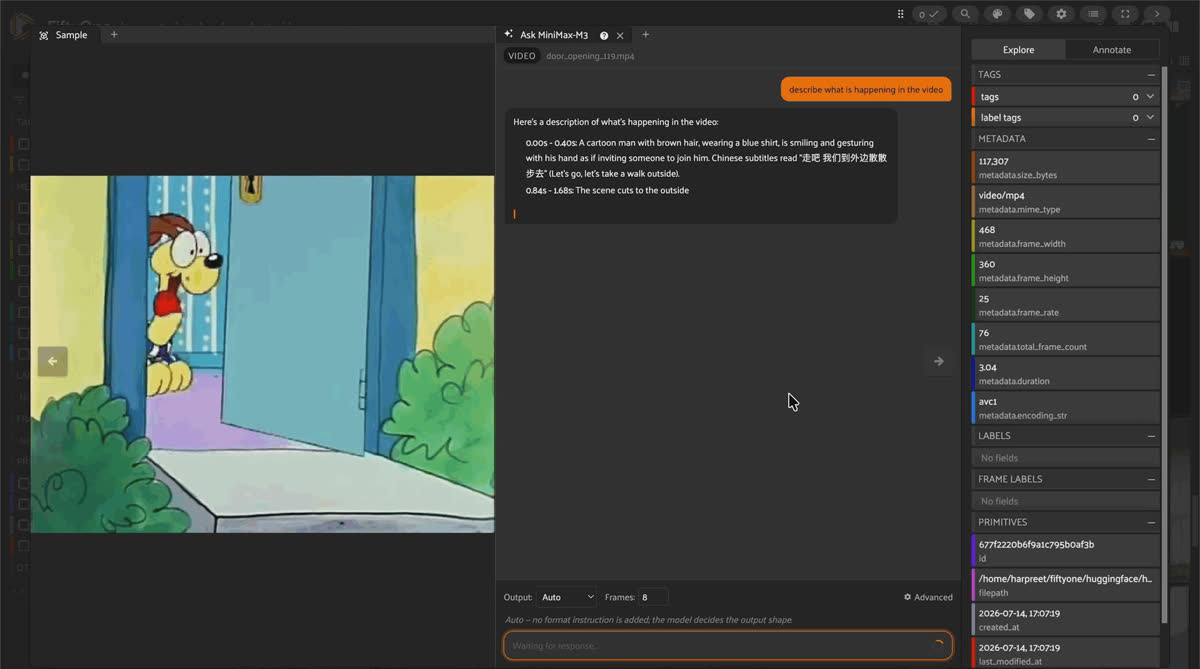
M3 has no native video-upload path on the Hugging Face Inference router, so the plugin decodes evenly spaced frames, timestamps each one, and sends the strip as a sequence of images. Ask it to detect objects across a sampled frame from a dashcam clip, and it returns nine boxes in one call:
truck, car, two building instances, stop sign, street lamp, trash can, commercial sign, person, each with a normalized box. Ask it when an event happens over the whole sampled strip (“identify distinct events/activities and WHEN they occur”), and it responds with start/end seconds directly:[{"label": "driving a bus down a city street", "start": 0.00, "end": 3.97}]which becomes an
fo.TemporalDetection with support=[start_frame, end_frame] computed from the video’s frame rate, plus the raw t_start_seconds / t_end_seconds kept as attributes.Keep it honest. M3 has no audio modality on this path. Point the ASR-style prompt (“transcribe any spoken words… with timestamps”) at a video and it correctly returns [] rather than hallucinating a transcript from the visual frames, a good sign for how the model handles a modality it doesn’t have, but a hard limitation if you were hoping to get captions for free.
The parser is intentionally forgiving
M3 is prompted, not fine-tuned, so its JSON isn’t always byte-perfect.
minimax_parser.py strips <think> blocks and code fences, then scans left-to-right for the first balanced JSON span rather than assuming the whole response is clean JSON, so stray prose before or after the payload doesn’t break parsing. It also tolerates alternate key names (box / bbox / bbox_2d / bounding_box; label / class / category), wrapper objects ({"detections": [...]}) instead of bare lists, and falls back gracefully: a keypoints request that gets a bounding box back just uses the box’s center instead of dropping the item.Two ways in: bootstrap a whole view, or chat with one sample
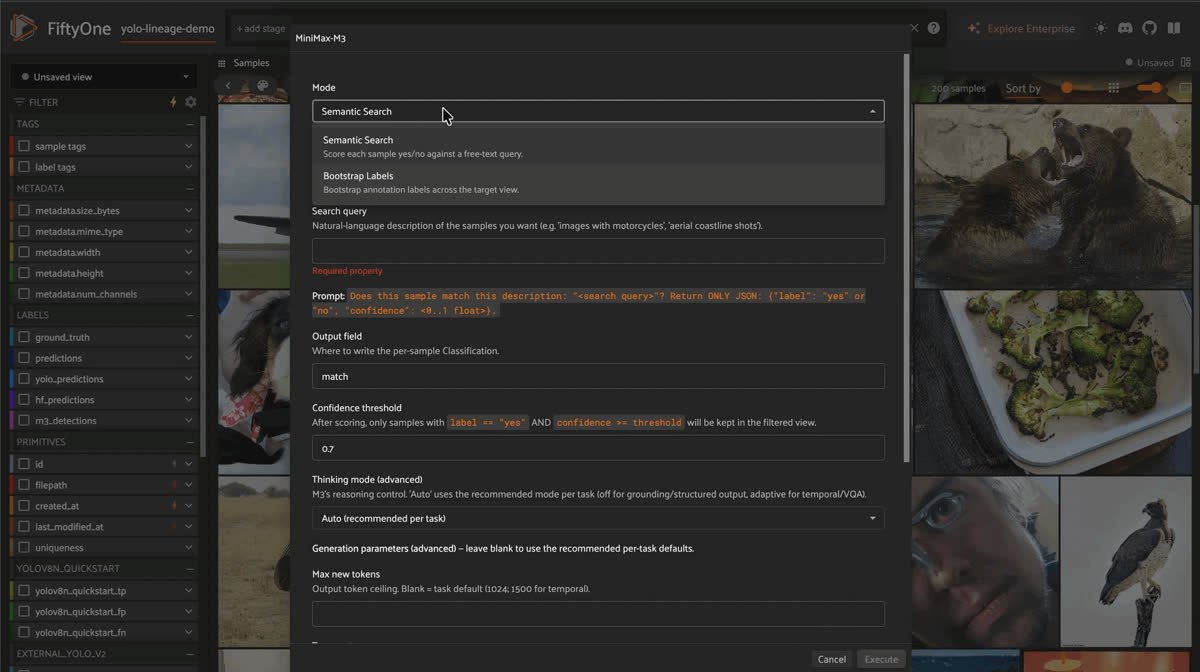
MiniMax-M3 bootstrapping object detections across a FiftyOne view, showing normalized bounding boxes written as an m3_detections field.
The
MiniMax-M3: run task operator works across a view. It has three modes, and the form reshapes itself depending on which one you pick and whether your dataset is images or video:- Bootstrap Labels. Pick a task (
detect,keypoints, per-frameframe_detect,key_moments,classify_single/multi,caption_concise/detailed, orvqa) and label the entire target view in a single run. You can type target classes as chips, or point it at an existing sample field (a string field, or a label field whose class names become the prompt) and skip samples with nothing to say. - Semantic Search. Describe what you’re looking for in plain English (“images with motorcycles”); every sample gets scored
{"label": "yes"/"no", "confidence": <float>}and the view filters to matches above your threshold. - Event Search (video only). Describe a moment (“a pedestrian crosses in front of a car”); M3 scans the sampled-frame strip for each video and writes a
TemporalDetectionwherever it finds a match, then switches the App to a clips view, one row per event.
Every run registers as a FiftyOne custom run, and the results panel reports elapsed time and token usage (
prompt_tokens / completion_tokens) so cost isn’t a mystery after the fact.Ask
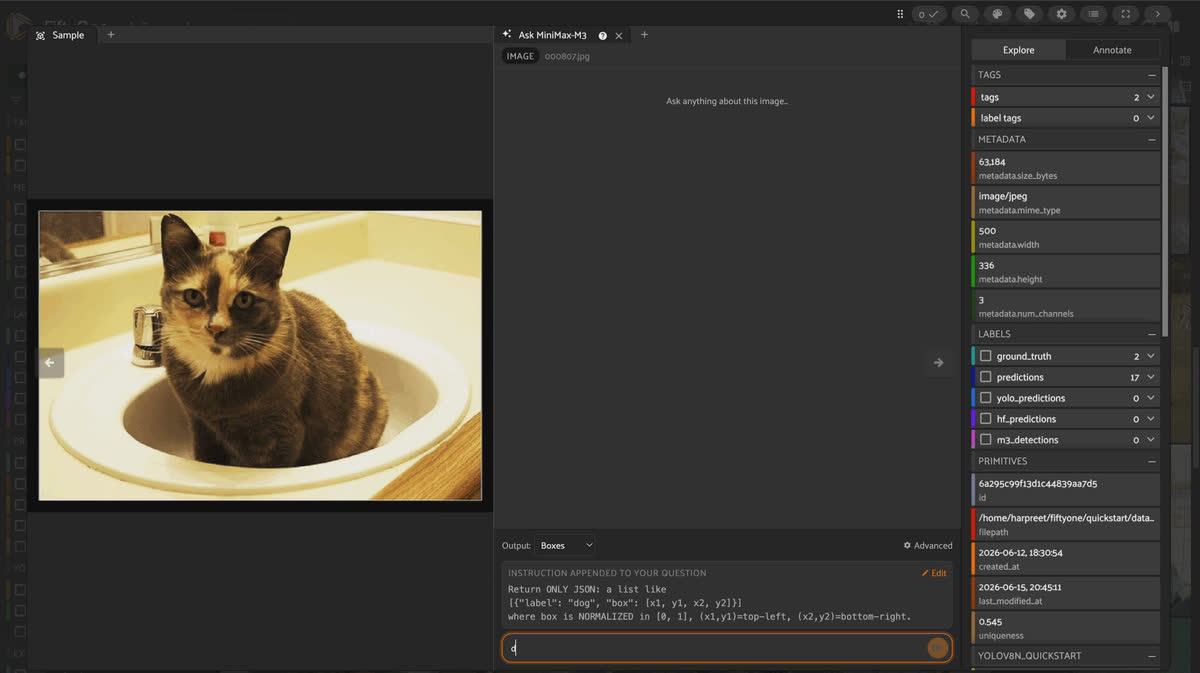
MiniMax-M3: the chat panel is a different shape entirely; it lives inside the sample modal for interrogating one sample conversationally. Answers stream token-by-token, conversations are multi-turn and saved per sample, and an Output selector lets you steer the reply toward Boxes / Keypoints / Temporal JSON instead of free text. When a reply is recognized as structured JSON, a Convert to FiftyOne bar appears under the message: confirm the field name (it defaults to something sensible per shape, like m3_detections or m3_keypoints) and the label writes to the sample, with its overlay appearing in the already-open modal, prev/next navigation intact.Good to know. What happens to the streamed answer once you convert it?
save_stream_as_label parses the stream file, writes the field, and (this took real engineering effort to get right) refreshes the open sample via FiftyOne’s own useRefreshSample hook rather than reloading the page, so the modal doesn’t tear down and lose its navigation context. The one caveat: writing into a brand-new field needs a one-time close-and-reopen of that sample so the App’s sidebar picks up the new schema path; every conversion after that first one is instant.Thinking modes
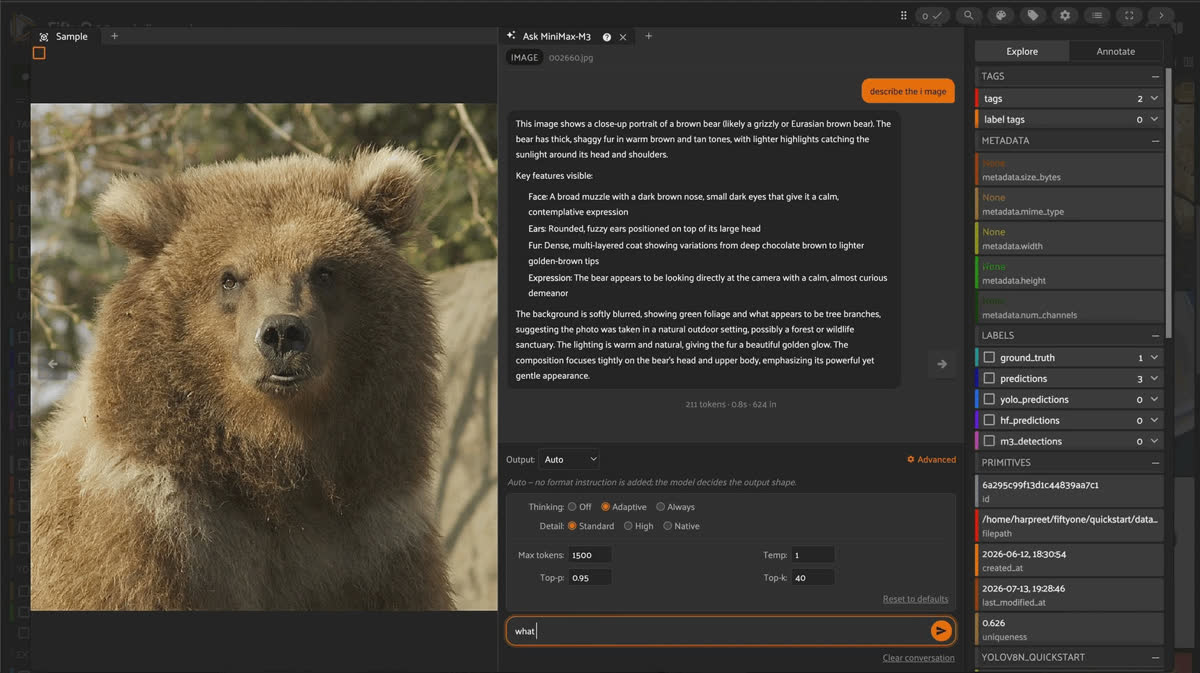
Running the MiniMax-M3 operator and Ask MiniMax-M3 chat panel inside the FiftyOne App sample modal.
M3 can optionally reason before it answers, and the plugin exposes all three modes it supports: in the operator form, the chat panel’s dropdown, and the Zoo model’s
thinking= argument:| Mode | Behavior |
|---|---|
| disabled | No reasoning. Fastest, cleanest JSON. The plugin’s default for grounding tasks (detect, keypoints, frame_detect, classification, captioning). |
| adaptive | M3 decides whether reasoning would help. Default for find_event, key_moments, and vqa. |
| enabled | Always reason first. |
Keep it honest. On the wire,
thinking has to be sent as an object ({"type": "disabled"}), not a bare string, a detail easy to get wrong if you’re calling the HF router directly instead of going through the plugin or Zoo model.Try it yourself
fiftyone plugins download https://github.com/harpreetsahota204/minimax-m3-fiftyone
pip install openai opencv-python pillow numpy
export HF_TOKEN="hf_..."
fiftyone app launch
Or skip the App entirely and run it as a Zoo model in a notebook:
import fiftyone.zoo as foz

foz.register_zoo_model_source(
    "https://github.com/harpreetsahota204/minimax-m3-fiftyone"
)

model = foz.load_zoo_model(
    "minimax/minimax-m3",
    task="detect",       # detect | keypoints | caption_* | classify_* | vqa | ...
    # thinking="disabled",
    # n_frames=8,         # frames sampled per video
)

dataset.apply_model(model, label_field="m3")- Plugin repo: github.com/harpreetsahota204/minimax-m3-fiftyone
- Model: huggingface.co/MiniMaxAI/MiniMax-M3
- MSA technical report: arXiv:2606.13392
- FiftyOne docs: docs.voxel51.com
Frequently Asked Questions
Do I need to fine-tune MiniMax-M3 to use this plugin?
No. Every task is driven by prompt templates in
prompts.py that ask M3 for JSON in a fixed shape; minimax_parser.py converts whatever comes back into fo.Detections, fo.Keypoints, fo.TemporalDetections, or fo.Classification(s). There’s no training step.What coordinate system does M3 use for boxes and keypoints?
Normalized
[0, 1], top-left/bottom-right for boxes ([x1, y1, x2, y2]) and [x, y] for points. FiftyOne consumes these directly; no per-sample rescaling against image dimensions is needed.Does this support video natively?
Not via native video upload. M3’s inference on the Hugging Face router is image/text. The plugin decodes evenly-spaced frames (8 by default, configurable), timestamps them, and sends them as an image sequence, either as one frame-strip request (
find_event, key_moments, and shared tasks on video) or as N separate per-frame requests (frame_detect, for per-frame boxes with no cross-frame instance IDs; pair it with a downstream tracker if you need identity continuity).What does the plugin need before I can run per-frame detection on video?
sample.metadata.frame_rate on every sample in the target view, since per-frame boxes need to be mapped back to a frame index. Run dataset.compute_metadata() once if you haven’t; the operator’s form blocks with an explicit error if metadata is missing.Can I use my own field names for the labels this writes?
Yes. Every mode (bootstrap, semantic search, event search, and chat-panel conversions) exposes an editable output field name in its form, with a sensible default for each task (
m3_detections, m3_keypoints, m3_class, m3_answer, m3_caption, m3_key_moments).Is the model’s transcript/answer ground truth or a prediction?
It’s always a model prediction. The plugin stamps every label it writes with
minimax_prompt, minimax_raw_output, minimax_thinking, and the sampling parameters used to generate it, so you (or a reviewer) can always trace a label back to exactly how M3 produced it.What tasks does the MiniMax-M3 FiftyOne plugin support?
Ten tasks end to end:
detect, keypoints, frame_detect, find_event, key_moments, caption_concise, caption_detailed, classify_single, classify_multi, and vqa. Grounded tasks write real FiftyOne label objects (fo.Detections, fo.Keypoints, fo.TemporalDetections, and fo.Classification(s)), and captioning and VQA write text fields.How do I install the MiniMax-M3 plugin?
Download it with
fiftyone plugins download https://github.com/harpreetsahota204/minimax-m3-fiftyone, pip install openai opencv-python pillow numpy, set an HF_TOKEN, and launch the App. You can also register it as a Zoo model and call foz.load_zoo_model("minimax/minimax-m3", task="detect") in a notebook.Hacker-in-Residence
Harpreet is Hacker-in-Residence at Voxel51, where he turns cutting-edge AI ideas into open-source prototypes and demos that push the boundaries of deep learning. From building tools that inspire to creating content that educates, Harpreet helps the AI community level up—one wild idea at a time.
See all articles by Harpreet Sahota
Try Voxel51 for yourself
Loading related posts...
© 2026 Voxel51 All Rights Reserved


