How to Find Edited Copies of Images: Image Copy Detection with pHash, CLIP, and FiftyOne
Author

Hacker-in-Residence
Harpreet is Hacker-in-Residence at Voxel51, where he turns cutting-edge AI ideas into open-source prototypes and demos that push the boundaries of deep learning. From building tools that inspire to creating content that educates, Harpreet helps the AI community level up—one wild idea at a time.
See all articles by Harpreet Sahota
In this article
Key takeawaysWhat is image copy detection?Where edited copies cost youWhy exact duplicates and single embeddings fall shortTwo signals, two blind spotsCombine them with a rule you controlWhere FiftyOne and its plugin ecosystem fitStep 1: Install the plugin and compute signalsStep 2: Find copiesStep 3: Read the graphStep 4: Score the rule and compare alternativesStep 5: Act on the resultsRun the same workflow from PythonHow it's builtTry it yourselfFrequently asked questions
In this article
Key takeawaysWhat is image copy detection?Where edited copies cost youWhy exact duplicates and single embeddings fall shortTwo signals, two blind spotsCombine them with a rule you controlWhere FiftyOne and its plugin ecosystem fitStep 1: Install the plugin and compute signalsStep 2: Find copiesStep 3: Read the graphStep 4: Score the rule and compare alternativesStep 5: Act on the resultsRun the same workflow from PythonHow it's builtTry it yourselfFrequently asked questions
Try Voxel51 for yourself
Exact-duplicate search misses a mirrored, cropped, or filtered copy of an image, so this post combines a perceptual hash and a CLIP embedding into one rule you control and shows the copies as a graph in FiftyOne.
Your model's test metrics look great. Then someone opens the test set and finds a mirrored copy of a training image. Then another one, with a filter on it. Then a third, cropped and covered in emoji.
You run a duplicate check. It finds nothing.
That's because duplicate checks look for the same bytes, and an edited copy has different bytes. A mirrored JPEG is a different file from the original. To a hash of the file contents, the two are strangers. To a person, they're the same picture.
The task is called image copy detection. Given a query image, decide whether it's an edited copy of an image in a reference collection, and say which one. This post walks through one practical approach: compute two signals per image, combine them with a rule you control, and read the result as a graph where every link comes with evidence. It's packaged as an open-source FiftyOne plugin called Image Link Lab, but the idea carries over to any dataset where copies hide behind edits.
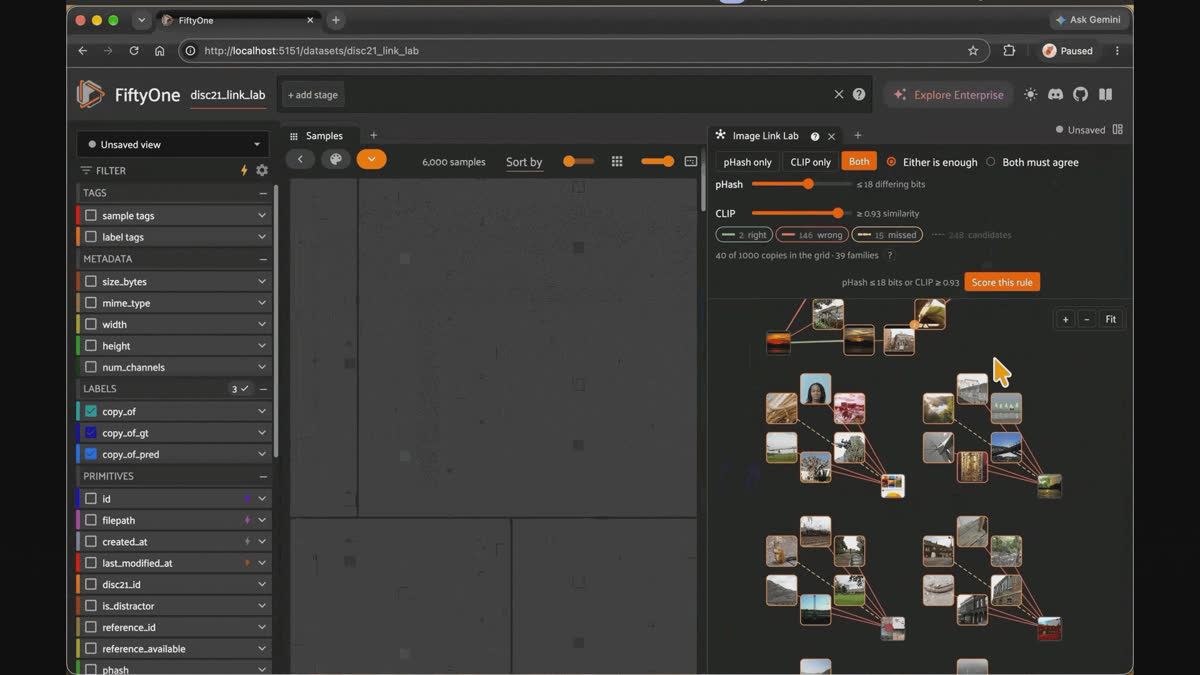
Image Link Lab in FiftyOne. Tune the pHash and CLIP limits, and the copy graph redraws as you drag.
Key takeaways
- Image copy detection asks whether a query image is an edited copy of a reference image, and which one.
compute_exact_duplicatescan't answer that, because edits change the bytes. - A perceptual hash (pHash) summarizes pixel layout in 64 bits. It tolerates recompression and small blurs and breaks on mirrors, rotations, and big crops.
- A CLIP embedding (
clip-vit-base32-torchfrom the FiftyOne model zoo) summarizes what the picture shows. It survives mirrors and crops and gets fooled by look-alikes. - Each signal's blind spot is the other's strength, so the plugin computes both and lets you choose how they combine: link a pair if either signal passes (
combine: "any"), or only if both do ("all"). - Moving a limit changes the answer. The Image Link Lab panel redraws the links as you drag the sliders and shows the numbers behind every line. Given a truth field, it scores each rule with FiftyOne's native evaluation so you can compare rules in Model Evaluation.
- The output is ordinary FiftyOne data: a phash field, a
copy_of Classificationfield, andcopies_*evaluation runs. You can tag copies, save views, and filter a test split cleanly with the code you already use.
What is image copy detection?
Image copy detection is the task of deciding whether a query image is a modified copy of any image in a reference corpus. The edits can be mundane (crop, resize, or re-compress) or hostile (mirror, overlay text, blend with another image, or screenshot it on a different device).
The standard benchmark is DISC21, the dataset behind the Image Similarity Challenge at NeurIPS 2021. Its authors describe the goal as determining "whether a query image is a modified copy of any image in a reference corpus of size 1 million," with edits that include automated transformations, hand-crafted changes, and machine-learning-based manipulations. Both the query set and the reference set are mostly distractors that match nothing, a needle-in-a-haystack setting like real life. The paper is The 2021 Image Similarity Dataset and Challenge.
Copy detection is a different question from "which images look like this one?" A similarity search returns neighbors. Copy detection has to commit: this query is a copy of that original, or it isn't a copy of anything.
Where edited copies cost you
You don't need a content moderation team to care about this. Four situations come up again and again:
- Train/test leakage. A mirrored copy of a training image in your test set inflates your metrics. You don't find out until the model meets real data.
- Labeling cost. You pay to label the same picture several times, sometimes with conflicting answers.
- Licensing and attribution. You need to know where an image came from, and a cropped copy hides its source.
- Moderation and forensics. A known-bad image comes back filtered, or shows up on a second device.
The first two hit any training pipeline. The last two are what DISC21 was built around: its authors say the benchmark mimics social media problems such as misinformation and objectionable content.
Why exact duplicates and single embeddings fall short
FiftyOne already handles two nearby problems.
compute_exact_duplicates finds byte-identical files. compute_near_duplicates, along with the Similarity Search panel, finds neighbors by a single embedding.Neither is built for edited copies. Exact matching fails the moment a pixel changes. A single embedding gives you a ranked list of look-alikes, with one similarity score per pair and no way to say which kind of evidence you trust. If the score is wrong, you can't tell whether the embedding was fooled or the copy was over-edited.
What's missing is a way to combine two different kinds of similarity with a rule you control, and a way to see which image is linked to which, and why.
Two signals, two blind spots
The approach starts from a simple observation. Pixels and meaning fail on different edits.
A perceptual hash (pHash) summarizes an image's pixel layout in 64 bits. Two images whose hashes differ in only a few bits look the same at a glance. It's fast, needs no model, and shrugs off recompression and a small blur. It's defeated by anything that moves pixels around: a mirror, a rotation, or a big crop.
A CLIP embedding summarizes what the picture shows. Two images with a high cosine similarity are about the same thing. It survives mirrors and crops. It's fooled by look-alikes: two different photos of the same kind of scene can score higher than a heavily blurred copy of the same photo.
The four pairs above show it. A mirrored copy is invisible to pHash and obvious to CLIP. A striped and blurred copy is the reverse. A look-alike that isn't a copy nearly gets linked by CLIP. And a flipped, blurred, filtered copy beats both.
Good to know. Why not train a copy-detection model? You can, and the DISC21 challenge exists to push that line of work. The two-signal approach is for the common case where you have a dataset on disk, no labeled copy pairs, and a question to answer this afternoon. Both signals work off the shelf.
Combine them with a rule you control
Each signal gets a limit. For pHash, it's the most bits two hashes may differ by. For CLIP, it's the least cosine similarity two images must reach. Then you choose how the signals combine:
- Either signal is enough (
any): link the pair if pHash or CLIP passes. You get more links, and more wrong ones. - Both must agree (
all): link only if both pass. You get fewer links, and almost all of them right.
Moving a limit is the whole game. Loosen the pHash limit, and you catch more heavily edited copies and start linking images that only look alike. Tighten it to all, and the wrong links disappear along with most of the right ones. No setting gets everything.
That's why the plugin doesn't give you a single "is copy" score. It shows you where the trade-off sits for your data and lets you pick.
Keep it honest. There is no universal threshold. A limit that works on re-uploaded product photos will behave differently on a collection full of heavy crops and overlays. If you have even a small set of known copy pairs, use it to calibrate the rule.
Where FiftyOne and its plugin ecosystem fit
FiftyOne is an open-source tool for building high-quality datasets and visual AI models. It gives you the dataset layer: samples with fields you can filter and sort on, views, tags, the App for looking at your images, and native tools for similarity search and model evaluation.
It can't ship every check that depends on your data. That's the job of plugins.
A FiftyOne plugin is a folder FiftyOne discovers at runtime. It includes a manifest (
fiftyone.yml), Python code, and optionally a React front end. You add a button, a form, a background job, or a whole panel to the App without forking FiftyOne or waiting for a release. Plugins come in two kinds:- Operators are actions. You trigger one, it runs, it finishes.
- Panels are UI that stays open next to your data and reacts when you filter the grid.
Plugin code runs on the FiftyOne server in Python so that it can use NumPy, PyTorch, a GPU, or any library you can
pip install. Long jobs can be delegated to a background worker so the App stays free. Every operator also has a URI, so anything that can call it, from a button to a notebook to an AI agent, runs the same code. For a deeper tour of how operators and panels work, see Your Robot Data Needs Custom Tools. Build Them as FiftyOne Plugins.Image Link Lab is built from standard parts: two operators (
compute_signals, find_copies), one hybrid panel (image_link_lab), native similarity indexes, and native evaluation runs. The plugin adds only what FiftyOne lacks: a perceptual hash, a rule over two signals, and the graph.Step 1: Install the plugin and compute signals
Install the plugin and its requirements:
fiftyone plugins download https://github.com/harpreetsahota204/image_link_lab
fiftyone plugins requirements @harpreetsahota/image_link_lab --install
The plugin needs
fiftyone>=1.22.1. CLIP runs on CPU but is much faster on a GPU.Open any image dataset in the App, click + next to Samples, and add the Image Link Lab panel under Custom. Click Compute signals, keep both boxes ticked, and execute.
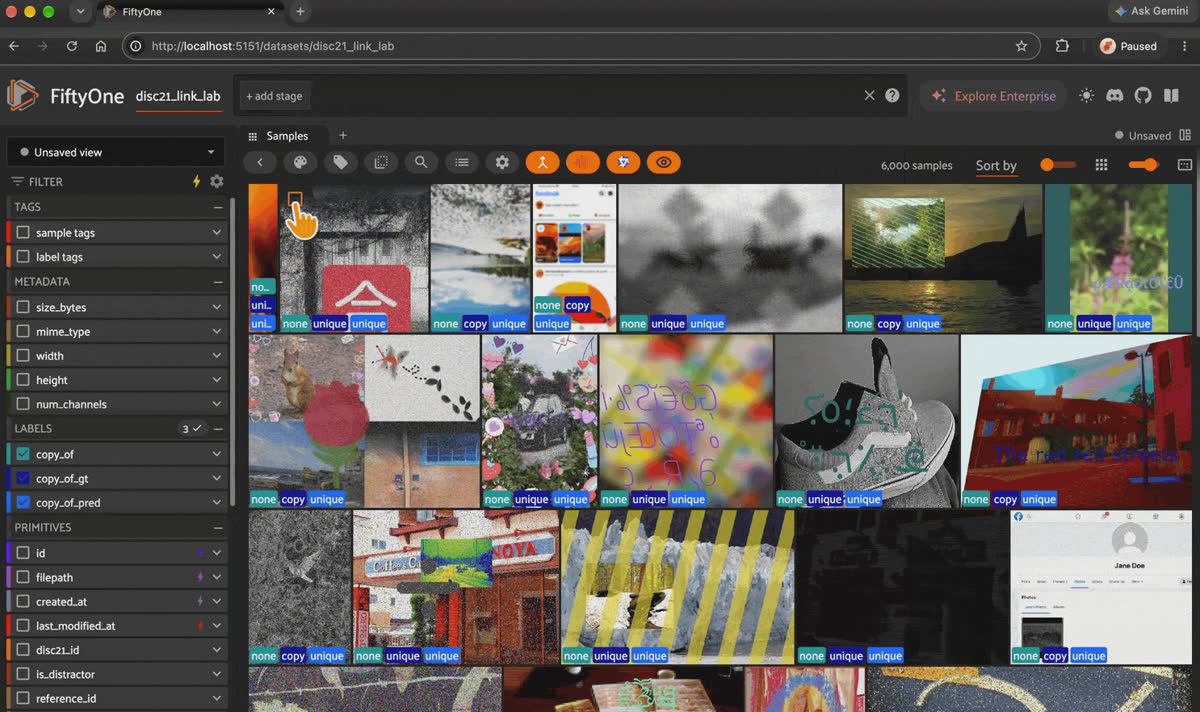
Computing the pHash and CLIP signals with the Image Link Lab operator.
The operator writes three things:
| Where | What |
|---|---|
phash field | the 64-bit pHash of each image, as hex |
brain key phash | the hash bits as a native similarity index, so sort-by-similarity in the App works on pHash too |
brain key clip | a native CLIP similarity index (clip-vit-base32-torch from the model zoo) |
It runs delegated by default, so start a worker with
fiftyone delegated launch or choose "Execute now" in the form. pHash takes about a minute per 10,000 images, plus CLIP time. Signals that are already computed are left alone unless you tick them.Step 2: Find copies
Click Find copies and fill in the form.
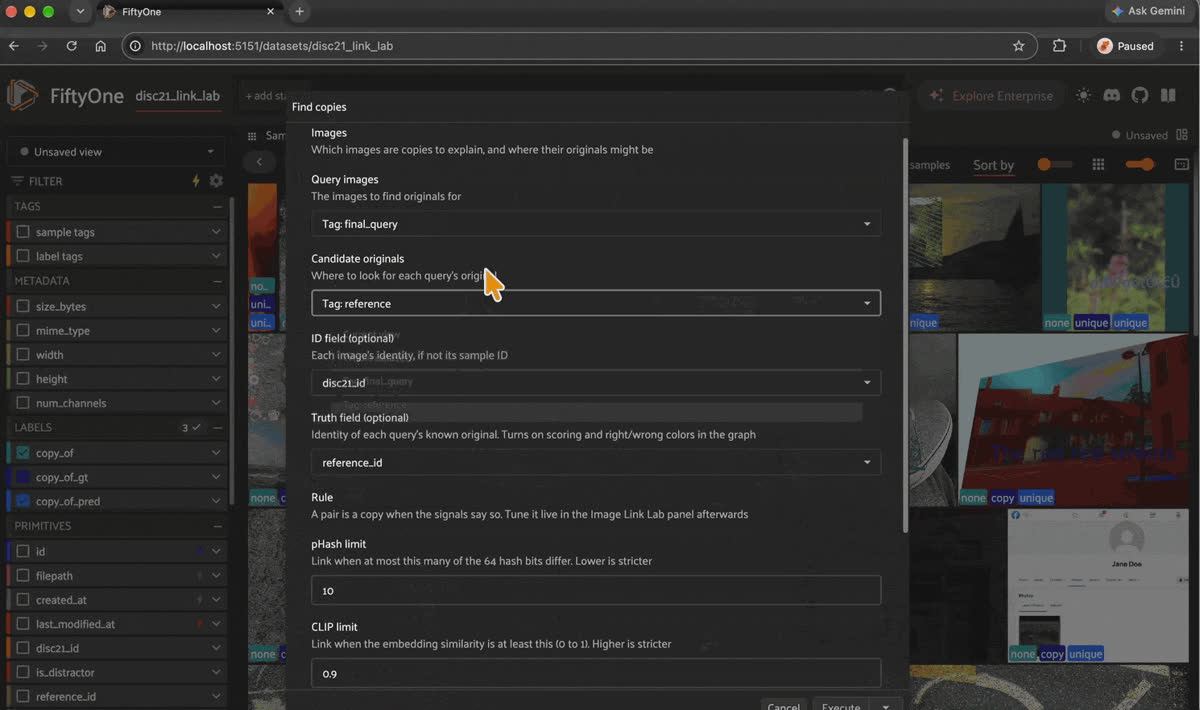
Filling in the find copies form: queries, candidate originals, an optional truth field, and the starting rule.
- Query images are the ones you want explained. Each is linked to at most one original.
- Candidate originals are where to look. Both can be the current view, the whole dataset, or a tag. They can overlap, and an image is never linked to itself.
- ID field (optional) is what to call each image, if your dataset identifies images by something other than the sample ID.
- Truth field (optional) holds, for each query, the ID of its known original. This is your ground truth, supplied by your dataset, not computed by the plugin. Set it, and you get scoring. Leave it empty, and the plugin works unsupervised: links are drawn, nothing is judged.
- Rule sets the starting pHash limit, CLIP limit, and
anyorall. You'll change these in the panel, so this is just where the first result comes from.
Behind the form, the operator does three things:
- Gathers candidates. For each query, it takes the 5 nearest originals by pHash and the 5 nearest by CLIP, plus the true original if a truth field is set. It stores both signals' values for every candidate. This is the slow step, about 4 seconds for 1,000 queries against 5,000 originals, and every later run reuses it.
- Applies the rule and writes
copy_of, aClassificationper query whose label is the linked original's ID, or none.copy_ofis a prediction from your rule, not a human label. When several candidates pass, the one passing the most signals wins, then the highest CLIP similarity, then the fewest differing bits.
Scores, if a truth field is set.
Step 3: Read the graph
The panel draws whatever queries are in the current grid view, up to 40 at a time. Filter the grid and the graph redraws.
- Nodes are images. Copies have a gray border. Originals have an orange border and, when more than one copy points at them, a badge with the count.
- Lines are candidate pairs the rule has something to say about. With a truth field set, green is a correct link, red is an incorrect link, and dashed amber is a missed original. Thick lines pass both signals, and thin lines pass one.
- Images joined by lines form families, laid out as a star with the original in the middle. A loose rule joins families through wrong links, and you'll see red lines bridging two stars.
- Queries with nothing to draw sit in a strip at the bottom. For a distractor with no original, that's the correct outcome.
Click an image and the grid filters to that image and everything it has a line to, including originals your current view doesn't contain. Click a line and an evidence pane opens with the copy and the original side by side, then one row per signal:
pHash   pixels    30 bits differ    limit ≤ 10    fails
CLIP    meaning   0.731 similar     limit ≥ 0.90  fails
Below the rows is a verdict in a sentence, such as "Not linked: pHash and CLIP are outside the limit. This is the true original, so the rule missed it." You can check every statement against the numbers above it. No model decides behind the scenes.
Move the sliders. The rule runs in the browser against the stored candidate values, so lines and counts update as you drag, with no server round trip.
Good to know. Does the graph work without ground truth? Yes. Without a truth field, every link is drawn green, and nothing is dashed. The colors mean "linked," not "right."
Step 4: Score the rule and compare alternatives
If you set a truth field, click Score this rule. The plugin runs the rule over every query, not just the 40 on screen, writes
copy_of, and records a native FiftyOne evaluation named after the rule, such as copies_phash10_or_clip90. Then it opens Model Evaluation.The evaluation is binary, per query. Ground truth is copy if the query has a known original and unique if it doesn't. The prediction is copy if the rule linked the query to its true original, and unique otherwise. FiftyOne computes precision, recall, F1, and a 2×2 confusion matrix from those two labels.
One definition matters: a copy linked to the wrong original counts as a miss, not a false positive. The evaluation asks whether you found the true original, and the answer is no.
The loop looks like this:
- Score the starting rule and open its evaluation in Model Evaluation.
- Click the false-negative cell. The grid filters to the misses, and the graph redraws them with dashed amber lines to their originals. Click a line to see which signal failed and by how much. That tells you which slider might help.
- Change a limit, score again, and you get a second evaluation key.
- Open one and compare it with the other.
- Mark the rule you keep as Reviewed and delete the rest with
dataset.delete_evaluation(key).
The false-positive cell is the other one worth clicking. Those are distractors the rule linked, usually look-alikes, which is CLIP's failure mode. Comparing a pHash-only run with a CLIP-only run shows which edits each signal survives.
Keep it honest. Model Evaluation scenarios, which break results down by edit type, are a Voxel51 feature. In open-source FiftyOne, filter the grid by an edit-type field and read the chips, or compute the numbers in Python.
Step 5: Act on the results
copy_of is an ordinary label field, so everything else in FiftyOne works on it:from fiftyone import ViewField as F
copies = dataset.match(F("copy_of.label") != "none")
copies.tag_samples("copy")
dataset.save_view("copies", copies)
# Keep a test split clean
clean_test = dataset.match_tags("test").match(F("copy_of.label") == "none")
# Everything linked to one original
dataset.match(F("copy_of.label") == "R003513")Typical setups differ only in what you pass as queries and originals:
| Situation | Queries | Originals | Truth |
|---|---|---|---|
| Dedup a collection | whole dataset | whole dataset | none |
| Check a test split for leakage | tag test | tag train | none |
| Match seized images against a known-bad list | the seized images | the known-bad list | none, or a case label |
| Benchmark a rule | the edited images | the originals | the original's ID |
Run the same workflow from Python
Everything the App does is an operator, so a notebook, a script, or an agent can run it:
import fiftyone as fo
import fiftyone.operators as foo

dataset = fo.load_dataset("disc21_link_lab")

# Step 1: signals (delegate=False runs it in this process)
foo.execute_operator(
    "@harpreetsahota/image_link_lab/compute_signals",
    {"dataset": dataset, "params": {"phash": True, "clip": True, "delegate": False}},
)

# Step 2: copies, with a rule, scored against a truth field
result = foo.execute_operator(
    "@harpreetsahota/image_link_lab/find_copies",
    {
        "dataset": dataset,
        "params": {
            "queries": "tag:final_query",      # or "view", "dataset", "tag:<tag>"
            "originals": "tag:reference",
            "id_field": "disc21_id",           # optional
            "truth_field": "reference_id",     # optional; turns on scoring
            "phash_max": 10,
            "clip_min": 0.90,
            "combine": "any",                  # "any" or "all"
            "delegate": False,
        },
    },
)
print(result.result)

# The results are ordinary FiftyOne fields and runs
dataset.load_evaluation_results("copies_phash10_or_clip90").print_report()
Run
find_copies again with a different rule and the candidates are reused, so it takes about a second and adds another evaluation run to compare.Both operators have typed inputs and show up through the FiftyOne Model Context Protocol (MCP) server (
list_operators, get_operator_schema, execute_operator), so an AI agent can compute signals, try a rule, and read back precision and recall.How it's built
The plugin is small on purpose. The Python operators and the pure-Python core (hashing, candidate gathering, the rule) are tested with pytest. The panel UI is built in React with VOODO, the component library the FiftyOne App itself uses.
The rule exists twice on purpose: in Python for the operators and in TypeScript so the sliders can run it in the browser. A shared fixture,
tests/fixtures/rule_cases.json, feeds both test suites, so the two can't drift.Everything else is native FiftyOne. CLIP comes from
compute_similarity, the pHash bits are registered as a second similarity index, results are plain Classification fields, scoring is evaluate_classifications, and rule history lives in evaluation runs.Keep it honest. The demo dataset,
disc21_link_lab, is a subset of DISC21: 1,000 edited queries and 5,000 originals, with a known original for 500 of the queries. The rest are distractors. The full benchmark has a reference corpus of 1 million images, so don't read results from this subset as benchmark numbers. DISC21's edits are also deliberately brutal (heavy crops, overlays, and blends), so recall will be low on it. On a collection of ordinary re-uploads, pHash alone will catch most copies.Try it yourself
- Image Link Lab plugin on GitHub
- Try the plugin on the DISC21 dataset on this Hugging Face space
- FiftyOne on GitHub
- FiftyOne plugin docs
- The 2021 Image Similarity Dataset and Challenge (paper)
- Your Robot Data Needs Custom Tools. Build Them as FiftyOne Plugins
Frequently asked questions
Image copy detection is the task of deciding whether a query image is an edited copy of an image in a reference collection, and identifying which one. It differs from similarity search, which returns neighbors without committing to a match.
Compute more than one kind of similarity, since no single signal survives every edit. Image Link Lab computes a perceptual hash in the phash field and a CLIP similarity index, then links pairs with a rule over both.
find_copies writes the result to a copy_of field.Not reliably. A pHash summarizes how pixels are laid out, so anything that moves pixels around (a mirror, a rotation, or a big crop) defeats it. A CLIP embedding survives those edits, which is why the plugin uses both.
compute_exact_duplicates finds byte-identical files. compute_near_duplicates finds neighbors by a single embedding. Image Link Lab links each query to at most one original using two signals and a rule you set, and shows the evidence for every link.Run
find_copies with queries set to tag:test and originals set to tag:train. Then match copy_of.label != "none" on the test split to see which test images link to a training image.No. Without a
truth_field, the plugin draws links, and nothing is judged. With one, you get right, wrong, and missed colors, counts, and a native evaluation per rule.Candidates are gathered with dense distance matrices, which works fine for tens of thousands of originals. Beyond that, narrow the originals to a tag or a view.
Not from the form. The plugin is deliberately opinionated: one signal for pixels, one for meaning. To swap models, change
CLIP_MODEL in constants.py to any zoo model that produces embeddings.It's the only model in the pipeline, and it runs once. On CPU, budget about a second per image. On a GPU, a few minutes for several thousand.
Hacker-in-Residence
Harpreet is Hacker-in-Residence at Voxel51, where he turns cutting-edge AI ideas into open-source prototypes and demos that push the boundaries of deep learning. From building tools that inspire to creating content that educates, Harpreet helps the AI community level up—one wild idea at a time.
See all articles by Harpreet Sahota
Try Voxel51 for yourself
Loading related posts...
© 2026 Voxel51 All Rights Reserved


