In this article
Try Voxel51 for yourself
Human pose understanding has become a foundational task in computer vision pipelines, enabling machines to infer spatial relationships, movement dynamics, and semantic body structure from visual data. At its core, pose estimation is a technique that detects and localizes anatomical features within images and video streams.
Recent advances in deep learning, particularly convolutional neural networks (CNNs), transformer-based vision architectures, and heatmap regression methods, have dramatically improved the robustness and precision of pose estimation models under challenging conditions such as occlusion, motion blur, crowd density, and viewpoint variation. State-of-the-art frameworks now support real-time multi-person tracking, temporal pose consistency, and high-dimensional skeletal reconstruction for applications ranging from autonomous systems and robotics to biomechanics, sports analytics, healthcare diagnostics, surveillance, and augmented reality. This progress has made human pose estimation a core problem in modern AI systems, and a key area of applied research.
In this pose estimation tutorial, we will explore how to create, configure, and annotate pose skeletons in FiftyOne using keypoint-based annotations and CVAT integration. We will also walk through how pose estimation works in practice, from dataset preparation to skeleton definition and annotation workflows.
What is pose estimation?
Pose estimation is a computer vision task that detects and localizes anatomical keypoints from humans, animals, or objects within images and video streams. These keypoints represent semantically meaningful landmarks such as joints, facial features, or limb extremities and are typically connected into skeletal graph structures for spatial reasoning.
Modern pose estimation systems use deep neural networks to predict 2D or 3D coordinate locations for each keypoint, often alongside confidence scores and skeletal connectivity. These models are foundational for applications including activity recognition, biomechanics, robotics, AR/VR, healthcare analytics, surveillance, and motion tracking.
How does pose estimation work?
Pose estimation pipelines generally consist of feature extraction, keypoint localization, and skeleton construction stages.
First, a neural network backbone extracts hierarchical spatial features from the input image. The model then predicts anatomical landmark locations either through heatmap generation or direct coordinate regression. Each predicted keypoint corresponds to a predefined semantic label such as a wrist, shoulder, knee, or eye.
After localization, detected keypoints are connected using predefined skeletal edge relationships to form structured pose graphs. In multi-person systems, additional association algorithms group detected keypoints into individual subjects.
Training these systems requires accurately annotated datasets containing labeled keypoints and skeletal metadata, making annotation workflows and tools like FiftyOne and CVAT essential for developing reliable pose estimation models.
Pose estimation tutorial: Creating pose skeletons with FiftyOne
In computer vision, pose skeletons are vital for understanding human or animal motion in images or videos, facilitating identification of precise body position and movement annotation. They also play a crucial role in human pose estimation datasets, aiding machine learning model training for applications in human-computer interaction, surveillance, and healthcare.
In FiftyOne, pose skeletons are stored with the Keypoints class. The Keypoints class represents a collection of keypoint groups in an image. Each element of this list is a Keypoint object whose points attribute contains a list of (x, y) coordinates defining a group of semantically related keypoints in the image.
For example, if you are working with a person model that outputs 18 keypoints (left eye, right eye, nose, etc.) per person, then each Keypoint instance would represent one person, and a Keypoints instance would represent the list of people in the image.
Pose estimation tutorial: Preparing your dataset
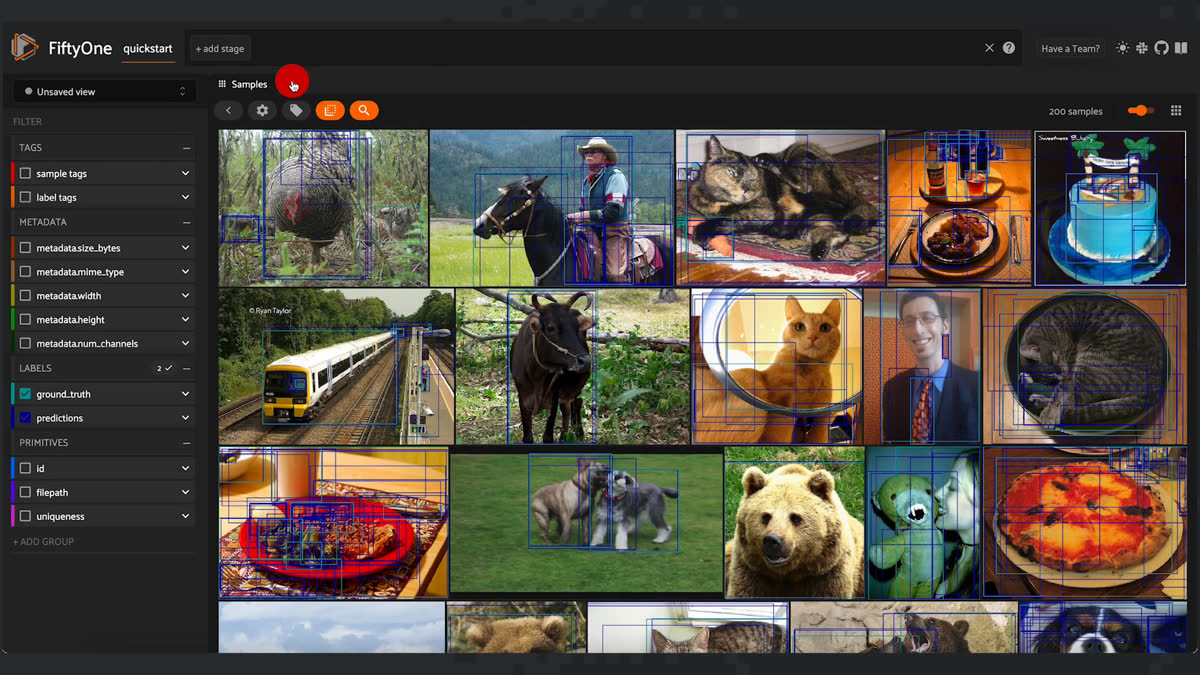
Creating your own skeletons in FiftyOne is easy and quick. If you are starting from just images, start by creating a view or a dataset of the images you plan on annotating with skeletons. I chose to use the quickstart dataset as a nice example.
import fiftyone as fo
import fiftyone.zoo as foz


dataset = foz.load_zoo_dataset(
   "quickstart",
   dataset_name="skeletons"
)


session = fo.launch_app(dataset)
Using the FiftyOne App, I am going to tag the first person I see, which happens to be this cool skateboarder, in order to then automatically send it out for keypoint annotation using an annotation integration (in this case CVAT).
To do so, simply select the image, click on the tag image and add “annotate” to its sample tags.
Next, we need to prepare our dataset to expect keypoint skeletons. Using dataset.skeletons, we can add our expected labels and connections for our fo.KeypointSkeleton. Two inputs are provided, labels and edges. Labels will be the parts of the skeleton we are interested in and edges are how they are connected. Note that for labels and edges, the index will always correspond to the keypoint index. Hence, in my example, “left hand” will always be my first keypoint. I also chose to break my edges into two groups whose points will connect with each other, but not the other group.
dataset.skeletons = {
   "points": fo.KeypointSkeleton(
       labels=[
           "left hand" "left shoulder", "right shoulder", "right hand",
           "left eye", "right eye", "mouth",
       ],
       edges=[[0, 1, 2, 3], [4, 5, 6]],
   )
}


dataset.save()
Pose estimation tutorial: Annotating your skeleton
To create a skeleton we are going to need some annotated keypoints on our image. If you already have annotations prepared you can skip this step. If you are starting from scratch, no problem. Follow along to create some keypoints with FiftyOne’s CVAT integration. If you haven’t created a CVAT account yet, you will need to hop over to create one. The first step is to plug in your username and password to environmental variables.
!export FIFTYONE_CVAT_USERNAME=""
!export FIFTYONE_CVAT_PASSWORD=""
Next, let's grab the sample we tagged earlier and create a view for annotation.
ann_view = dataset.match_tags("annotate")
ann_view
After, we want to launch the CVAT tool with our image. We provide an annotation key to retrieve our results later, as well as the new label field and type that we will be annotating for.
# A unique identifer for this run
anno_key = "skeleton"


# Upload the sample and launch CVAT
anno_results = ann_view.annotate(
   anno_key,
   label_field="points",
   label_type="keypoints",
   classes=["person"],
   launch_editor=True,
)
As we annotate, make sure to annotate the keypoints in the correct order for the skeleton! After you are finished and the job is completed, load the new keypoints in.
We can load our annotations back to FiftyOne like so after completion:
ann_view.load_annotations("skeleton", cleanup=True)


session.view = ann_view
Practical pose estimation with FiftyOne and CVAT
Just like that, we've explored the smooth process of preparing your dataset and annotating it with skeletons using FiftyOne. Whether you're starting from scratch or have existing annotations, FiftyOne's annotation integrations and keypoints simplified skeleton workflow allows you to efficiently define labels and connections for keypoints on your images.
With just a few lines of code, your dataset can be configured to expect keypoint skeletons, and the CVAT tool facilitates the creation of annotated skeletons in the correct order. You can easily load these annotations back into your dataset for further analysis, providing a valuable resource for enhancing your computer vision and machine learning projects. Not only is FiftyOne open source, but it makes the entire process accessible to both beginners and experienced practitioners, empowering you to tackle complex tasks and develop advanced computer vision models.
Enjoy your skeletons.
Loading related posts...
© 2026 Voxel51 All Rights Reserved