In this article
Talk to an AI expert
Polyline annotation with FiftyOne Open Source enables more precise object representation than traditional axis-aligned bounding boxes, making it an essential technique for modern image annotation workflows. Whether you are tracking object contours, defining regions of interest, building rotated bounding boxes, or creating 3D cuboid annotation pipelines, polylines provide the flexibility needed to accurately model complex visual data.
In this tutorial, we will explore polyline annotation using FiftyOne, our open source product, and demonstrate how to create custom labels directly in Python. We will start with the basics of what is a polyline and how polylines are represented as connected line segments within normalized image coordinates. From there, we will build increasingly advanced annotations, including polygons, rotated bounding boxes, and cuboids generated from 3D-inspired geometry.
By leveraging fo.Polyline, fo.Polyline.from_rotated_box(), and fo.Polyline.from_cuboid(), you can quickly prototype sophisticated annotation workflows for computer vision datasets. These techniques are especially valuable for applications such as autonomous driving, object tracking, scene understanding, OCR, robotics, and spatial reasoning systems where annotation precision directly impacts model performance.
What is a polyline in computer vision?
In computer vision, a polyline is a sequence of connected line segments used to represent and approximate the shape of an object or region within an image. Polylines are commonly employed in computer vision tasks such as image annotation, object tracking, and shape analysis.
Polylines can be used to represent the trajectory of an object or map and route representations. Polylines can also be filled to represent different polygons’ regions of interest. With FiftyOnes implementation of polylines, we will help you understand what a polyline is and use the labels to be as creative as you want.
Creating polylines in your samples
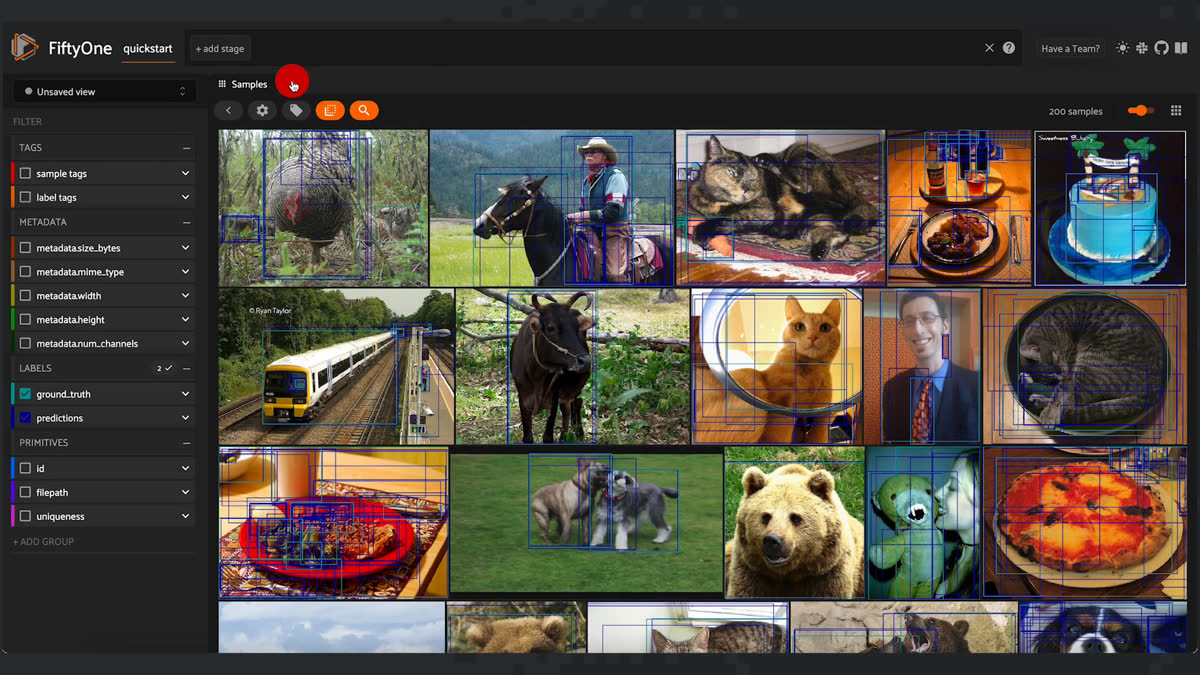
import fiftyone as fo
import fiftyone.zoo as foz


dataset = foz.load_zoo_dataset(
   "quickstart",
   dataset_name="polylines"
)


session = fo.launch_app(dataset)
Using the FiftyOne app, you’re going to tag a non-busy picture for use in the example. To do so, simply select the image, click on the tag image and add “polylines” to its sample tags.
Let’s walk through some examples and how they can be used in various use cases. You grab our sample to draw on it next.
example_view = dataset.match_tags("polylines")
sample = example_view.first()
Classic polylines
The most basic polyline is a line defined by its points. It could be pointing in the direction of a trajectory, or simply be a label for the divide between two regions of interest. To define a Polyline label, provide a list of points in (x,y) bounded by (0,1) for x and y.
You also pass the argument closed=False to denote that you are not closing the polyline, and filled=False to likewise express that you don’t want the polyline to be filled.
# A simple polyline
polyline1 = fo.Polyline(
   points=[[(0.3, 0.3), (0.7, 0.3), (0.7, 0.3)]],
   closed=False,
   filled=False,
)
Classic polygon with polylines
Similar to the last example, you can define polygons with a set of points and close and fill the shape. Just like with any other label, you can add custom attributes to the polyline as well. In this case, you will create a triangle and specify it as a right triangle.
To close a shape, only the vertices are required and there is no need to specify the first vertex again.
You can add these to our sample using Polylines, a group of polylines, and save your view to look at your new polylines. If it makes it easier to see, you can turn off seeing the ground_truth or prediction labels by unchecking their box under labels in the app.
# A closed, filled polygon with a label
polyline2 = fo.Polyline(
   label="triangle",
   points=[[(0.1, 0.1), (0.3, 0.1), (0.3, 0.3)]],
   closed=True,
   filled=True,
   kind="right",  # custom attribute
)


sample["polylines"] = fo.Polylines(polylines=[polyline1, polyline2])
sample.save()
example_view.save()
session.view = example_view
Cuboids: 3D bounding boxes
Cuboids, or 3D bounding boxes, are essential in computer vision for a range of applications. They serve to detect and localize objects in a three-dimensional environment, making them valuable in autonomous driving, object tracking, augmented reality, robotics, depth sensing, gesture recognition, human pose estimation, indoor navigation, industrial automation, and virtual reality. Cuboids help model the 3D extent of objects, enabling accurate perception, tracking, and interaction with the three-dimensional world in various domains.
Today, we will be looking at how we can use polylines to create cuboids on your 2D image. FiftyOne also supports 3D boxes for point clouds.
You will define a function that will create a random cuboid label for your sample. Cuboids are defined with 8 points in the following sequence:
   7------------ 6
  /|   	     /|
 / |  	    /  |
3--------  2     |
|  4-----  |---- 5
| /  	  |   /
|/   	  | /
0--------  1
Using the
fo.Polyline.from_cuboid() method, we are able to easily create a cuboid once we have our 8 points.import numpy as np
def random_cuboid():
x0, y0 = [0, 0.2] + 0.8 * np.random.rand(2)
dx, dy = (min(0.8 - x0, y0 - 0.2)) * np.random.rand(2)
x1, y1 = x0 + dx, y0 - dy
w, h = (min(1 - x1, y1)) * np.random.rand(2)
front = [(x0, y0), (x0 + w, y0), (x0 + w, y0 - h), (x0, y0 - h)]
back = [(x1, y1), (x1 + w, y1), (x1 + w, y1 - h), (x1, y1 - h)]
return fo.Polyline.from_cuboid(front + back, label="cuboid")
sample["polyline"] = random_cuboid()
sample.save()
example_view.save()
session.view = example_view
Here is what a finished result could look like:
Rotated bounding box
Rotated bounding boxes are essential for tasks like object detection, localization, and tracking, particularly when objects are not aligned with the standard horizontal and vertical axes. They're valuable in applications such as text detection in images, scene text recognition, and irregular object localization. These bounding boxes represent objects' orientations more accurately, allowing for precise positioning and analysis in situations where traditional axis-aligned boxes wouldn't suffice. To use a rotating bounding box in FiftyOne, we can use fo.Polyline.from_rotated_box(), where you provide the center of the box in xc,yc as well as the width, height, and the angle at which the box in rotated.
def random_rotated_box():
   xc, yc = 0.2 + 0.6 * np.random.rand(2)
   w, h = 1.5 * (min(xc, yc, 1 - xc, 1 - yc)) * np.random.rand(2)
   theta = 2 * np.pi * np.random.rand()

   return fo.Polyline.from_rotated_box(xc, yc, w, h, theta, label="box")


sample["polyline"] = random_rotated_box()
sample.save()
example_view.save()
session.view = example_view
A finished result I ran was this:
Improving computer vision labels with polylines
Polylines, cuboids, and rotated bounding boxes serve as indispensable tools in computer vision, each tailored to address specific challenges and scenarios. Polylines enable intricate shape delineation, enhancing applications like image segmentation and contour tracking. Cuboids, or 3D bounding boxes, are invaluable for accurately capturing the spatial dimensions of objects, significantly improving object detection, tracking, and augmented reality tasks. Meanwhile, rotated bounding boxes cater to objects with non-standard orientations, greatly enhancing precision in tasks such as text detection and irregular object localization.
These diverse labeling techniques empower computer vision professionals to more effectively and precisely address a wide array of real-world problems, facilitating better representation and understanding of complex visual data. There is no better place to implement these labels than FiftyOne.
Loading related posts...
© 2026 Voxel51 All Rights Reserved