Exploring MR-RATE: Brain MRI at Scale with FiftyOne
Author

Chief Community Officer
Jimmy is the Chief Community Officer at Voxel51, where he leads developer relations and growth. With 25+ years of experience connecting developers and enterprises to cutting-edge ML and open-source solutions, Jimmy drives impactful content, events, and education that fuel awareness, adoption, and community engagement.
See all articles by Jimmy Guerrero
In this article
Try Voxel51 for yourself
A massive vision-language dataset of 700,000+ brain MRI volumes — and how to dig into it interactively with an open-source data curation library
There's no shortage of medical imaging datasets, but most are narrow: a few hundred scans, one scanner, one institution, one task. MR-RATE is something different. It's a sprawling, radiologist-paired dataset of brain and spine MRI volumes that dwarfs nearly everything else in the open research space — and it just landed on HuggingFace.
This post introduces the dataset, explains why FiftyOne is the right tool to explore it, and walks you through the key steps of a hands-on tutorial: from downloading your first 200 scans to running visual similarity search across pathology categories.
What is MR-RATE?
MR-RATE (Magnetic Resonance Radiology And Text with Embeddings) follows in the footsteps of CT-RATE, which paired CT volumes with radiology reports. The brain MRI equivalent had never been done at this scale — until now.
Here’s the characteristics of the dataset in brief:
- 705K - MRI volumes across all sequences
- 98K - Imaging studies from real clinical scans
- 83K - Unique patients represented
Every study comes paired with a written radiology report from a radiologist — findings, impressions, technique, and clinical context — plus structured metadata: acquisition sequence, patient age, sex, scanner manufacturer, and array spacing. On top of that, a separate pathology labels CSV tags each study with binary indicators for dozens of specific conditions.
The MRI sequences span the full clinical range: T1-weighted, T2-weighted, FLAIR, susceptibility-weighted imaging (SWI), and MRA. Scans are provided in NIfTI format (converted from DICOM via
dcm2niix), the standard for neuroimaging research.MR-RATE offers brain and spine MRI volumes matched with corresponding radiology reports and metadata, all freely accessible to researchers.
The dataset is available on HuggingFace under a CC-BY-NC-SA 4.0 license. Access requires agreeing to research-use terms and is gated behind a HuggingFace login — appropriate given the clinical sensitivity of the data.
Pathologies in the dataset
The label CSV covers a clinically realistic spectrum of findings. Here's a sample of what's tagged:
- Gliosis
- Mastoiditis
- Metastatic malignant neoplasm to brain
- Normal
- White matter changes
- Chronic small vessel disease
- Intracranial hemorrhage
- Cerebral edema
- Hydrocephalus
- Sinusitis
- Cerebral atrophy
- Meningioma
- + dozens more
Why FiftyOne?
Most people's first instinct with a new dataset is to open it in a notebook, run some
df.head() calls, maybe plot a histogram. That works fine for tabular data. It completely fails for 3D medical images.FiftyOne is an open-source library from Voxel51 purpose-built for annotation, visual dataset curation and model evaluation. It gives you a browser-based UI that lets you scroll through images, filter by any metadata field, read attached text fields (like full radiology reports) directly on the image, and build embedding visualizations — all without writing a single line of visualization code. By importing MR-RATE into Fiftyone we’ll be able to perform the following actions:
Sidebar filtering
Click any field in the sidebar to filter your dataset instantly — by pathology, modality (T1/T2/FLAIR/SWI), normal vs abnormal, manufacturer, and more.
Inline radiology reports
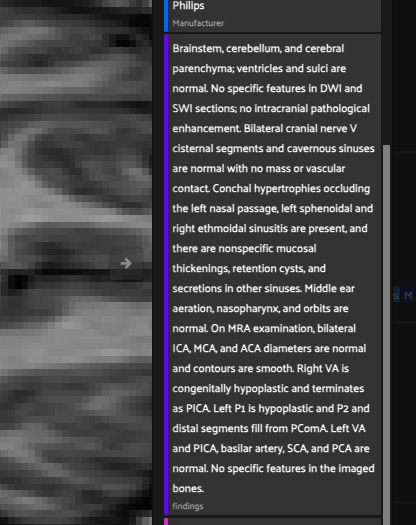
Click any image to pull up the full radiology report — findings, impressions, technique — right alongside the scan.
Embedding visualization
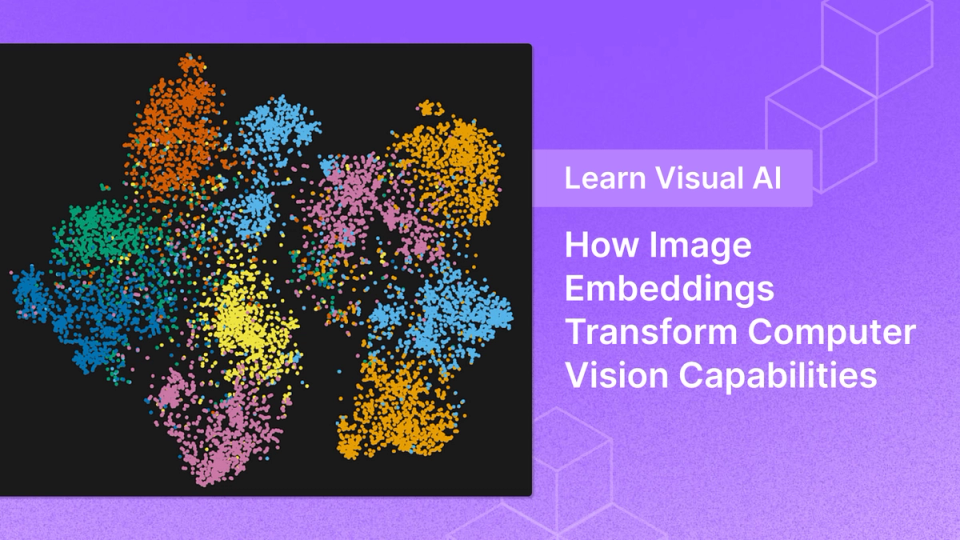
The Embeddings panel renders a 2D t-SNE scatter plot of your scans, colored by pathology — so you can see visual clusters form by condition.
Similarity search
Using
fiftyone.brain, you can query by a sample's image embedding to surface the 5 most visually similar scans across the dataset.The key insight is that FiftyOne treats each scan as a sample — a first-class object that carries its image, every metadata field, multi-label classification tags, full text fields, and computed embeddings all together. Once the dataset is loaded, filtering and exploring feels like browsing a photo library rather than running SQL queries.
Tutorial walkthrough
The companion notebook to this blog post covers the full pipeline on how to get MR-RATE into FiftyOne and perform the tasks highlighted in the previous section. Below is a high-level walkthrough of the key sections of the notebook.
Setups 1-2: Imports and Logging into HuggingFace
Tweak these instructions to taste, but for the purposes of this walkthrough I targeted Python 3.10 in a clean virtual environment. Note that FiftyOne has specific dependency requirements — particularly around
pymongo, starlette, and strawberry-graphql — that can conflict with newer environments. The setup also patches NumPy 2.0's removed np.unicode_ attribute, which would otherwise silently break things downstream.Steps 3–4: Downloading the data, metadata, and images
The tutorial downloads data in two passes. First, the lightweight CSVs — metadata, reports, and pathology labels — which are just kilobytes. Then 20 study ZIP files from the MRI batch, each containing one study's full series of NIfTI volumes.
# Download the three CSV files first
for filename in [
    "metadata/batch00_metadata.csv",
    "reports/batch00_reports.csv",
    "pathology_labels/mrrate_labels.csv",
]:
    hf_hub_download(
        repo_id="Forithmus/MR-RATE",
        repo_type="dataset",
        filename=filename,
        local_dir=local_dir,
    )
Steps 5-6: Merging metadata - the join that unlocks everything
This is a subtle but important step. The three CSVs are joined on
study_uid, creating a single merged dataframe. One naming wrinkle: the metadata's series_id column contains only the sequence name (e.g. flair-raw-sag), while the NIfTI filenames contain both study UID and series (e.g. 25OMBCSHXB_flair-raw-sag.nii.gz). The notebook splits filenames on _ to correctly match rows.Steps 7-8: NIfTI to PNG - Making scans displayable
FiftyOne works with 2D images. Each NIfTI file is a 3D volume — a stack of axial slices. The notebook extracts the middle slice from each volume (the most clinically informative cut), normalizes intensity to 0–255, and saves it as a PNG. This runs in about 1–2 minutes for 200 files and the results are cached, so reruns are instant.
def nifti_to_png(nifti_path, out_path):
    vol = nib.load(nifti_path).get_fdata()
    if vol.ndim == 4:
        vol = vol[..., 0]       # first timepoint if 4D
    mid = vol.shape[2] // 2   # middle axial slice
    slc = vol[:, :, mid]
    slc = (slc / slc.max() * 255).astype(np.uint8)
    Image.fromarray(slc).save(out_path)
Step 9: Building FiftyOne samples
This is where the dataset comes together. For each NIfTI file, the notebook creates a
fo.Sample with its PNG path, then attaches: acquisition metadata, full radiology report fields (findings, impression, technique), pathology labels as fo.Classifications for multi-label support, a normal boolean, and a primary_pathology string for easy coloring in the embeddings panel.Steps 10-12: Launching the FiftyOne App
With the dataset loaded, this cell launches the app:
session = fo.launch_app(dataset, port=5151)
# Then open http://localhost:5151 in your browser
Open the browser and you have a full visual explorer: scroll through 200 axial MRI slices, filter by any attached field, and click any image to read its associated radiology report in full.
Steps 13-15: Embeddings and similarity search
The final section is where FiftyOne's analytical power really shows. A pretrained ResNet18 is used to extract a 512-dimensional embedding from each scan — with grayscale-to-3-channel conversion so the ImageNet-pretrained model can process MRI images. These embeddings are then reduced to 2D via t-SNE for visualization and indexed for nearest-neighbor search.
# ResNet18 with classification head removed
model = models.resnet18(weights="ResNet18_Weights.IMAGENET1K_V1")
model = torch.nn.Sequential(*list(model.children())[:-1])

# Compute t-SNE scatter + similarity index
fob.compute_visualization(dataset, embeddings=embeddings,
    method="tsne", brain_key="img_viz")

fob.compute_similarity(dataset, embeddings=embeddings,
    brain_key="img_sim")
Once indexed, you can query by pathology to find visually similar scans:
# Find the 5 most visually similar scans to a Gliosis sample
query = dataset.match(
    fo.ViewField("primary_pathology") == "Gliosis"
).first()

similar_view = dataset.sort_by_similarity(
    query.id, k=6, brain_key="img_sim"
)
The t-SNE plot in FiftyOne's Embeddings panel,
colored by primary_pathology, is where things get genuinely interesting: you can visually see whether the ResNet embeddings cluster by condition. Spoiler — they do, at least partially, even though the model was never trained on brain MRIs.FiftyOne UI quick reference
Conclusion
The combination of scale, paired text reports, and structured pathology labels makes MR-RATE genuinely useful for several research directions: training vision-language models for radiology report generation, learning visual representations of neurological conditions, building retrieval-augmented diagnostic tools, and studying how MRI acquisition parameters relate to diagnostic content.
The FiftyOne workflow demonstrated here — download → convert → load → embed → explore — is a reusable template. Swap in a different slice extraction strategy, a different embedding model (a medical foundation model like BioViL would be particularly interesting), or extend it to the spine sequences in later batches.
The dataset is large enough to be scientifically meaningful and gated enough to be ethically responsible. Getting 200 samples running interactively on a laptop is a genuinely low barrier to entry for a dataset of this clinical richness.
Keep exploring visual AI in healthcare
Walking through MR-RATE is really a warm-up for a bigger question: how do you build and trust models when the ground truth is a radiologist's report and the stakes are clinical? That's exactly what Nick Lotz's workshop, Visual AI in Healthcare: Ground Truth in the Foundation Model Era, digs into. It s live on June 9, 2026, and available on demand afterward, so you can watch whenever it fits your schedule. If curating a dataset like MR-RATE scratched an itch, this is the natural next step. Save your spot.
Chief Community Officer
Jimmy is the Chief Community Officer at Voxel51, where he leads developer relations and growth. With 25+ years of experience connecting developers and enterprises to cutting-edge ML and open-source solutions, Jimmy drives impactful content, events, and education that fuel awareness, adoption, and community engagement.
See all articles by Jimmy Guerrero
Try Voxel51 for yourself
Loading related posts...
© 2026 Voxel51 All Rights Reserved