How FiftyOne's Model Evaluation Helped Me Reduce False Positives by 70.9% Without Retraining
Author

Machine Learning Engineer
Interested in everything anything related to AI. Have lived the life of a ML Engineer and also have worked in a GTM organization that sold software exclusively to MLEs. Im driven my passion to teach and help others understand AI and technology.
See all articles by Sid Mehta
In this article
Step 1: Set up YOLO11 on Ring camera footageStep 2: Running model evaluation in FiftyOneStep 3: Reading the metrics; something feels offStep 4: Using sample-level debugging to find the root causeStep 5: The fix—tuning post-processing, not the modelStep 6: Before vs. after resultsKey takeawaysGive it a try
In this article
Step 1: Set up YOLO11 on Ring camera footageStep 2: Running model evaluation in FiftyOneStep 3: Reading the metrics; something feels offStep 4: Using sample-level debugging to find the root causeStep 5: The fix—tuning post-processing, not the modelStep 6: Before vs. after resultsKey takeawaysGive it a try
Talk to an AI expert
Article Summary:
This post, from an ML Engineer's point of view, shows how sample-level debugging turns aggregate metrics into concrete, actionable insight, and how the right tooling can resolve a critical model performance issue without retraining from scratch.
When your object detection model isn't performing well, the natural next step is to retrain. Most of us turn to trying out a bigger architecture, tuning hyperparameters, and adding more data. But before going down that path, it's worth asking: have you actually looked at what your model is getting wrong?
This post walks through how I debugged my YOLO11 model and identified the root cause of poor performance. Through this process, I improved precision by 16.5% and reduced false positives by 70.9% without retraining a single weight.
Aggregate metrics like precision, recall, and accuracy are useful, but they flatten a lot of signal. An accuracy of 0.715 tells you the model is wrong roughly 3 out of 10 times, but it says nothing about where, why, or what kind of wrong. Is the model confusing classes? Detecting phantom objects? Producing duplicate boxes? You can't tell from a single number. That's exactly why sample-level debugging matters, because it turns a vague metric into a concrete, actionable problem.
Step 1: Set up YOLO11 on Ring camera footage
I was training a YOLO11 model via Ultralytics to detect objects in footage from my Ring security camera. Rather than jumping straight to labeling, I followed a curate first, then label approach using FiftyOne to deduplicate frames, remove low-quality samples, and ensure visual diversity before sending anything to annotation. This matters more than it might seem: labeling redundant or low-value frames wastes annotation budget and can skew your training distribution. You can find the full curation and labeling pipeline in this GitHub repo. If you're working at a larger scale, Voxel51's ZCore technique takes this further with zero-shot coreset selection, automatically finding the most valuable subset of your data without any labels or domain expertise. In this post, we'll pick up from the point where the dataset is ready, and predictions have been generated.
You can find the full data collection and labeling pipeline in this GitHub repo.
To run inference and store model predictions directly on my FiftyOne dataset, I used a script that looked roughly like this:
from ultralytics import YOLO
import fiftyone as fo

MODEL_PATH = "path/to/your/best.pt"
PREDICTION_FIELD = "yolo11_predictions"
BATCH_SIZE = 32

dataset = fo.load_dataset("ring-camera-detections")
model = YOLO(MODEL_PATH)

dataset.apply_model(
    model,
    label_field=PREDICTION_FIELD,
    batch_size=BATCH_SIZE,
    skip_failures=True,
)
At this point, your dataset has both ground truth labels and model predictions living side-by-side on every sample, which is exactly what you need for evaluation.
Step 2: Running model evaluation in FiftyOne
With predictions stored on the dataset, I headed into the FiftyOne App to kick off an evaluation run using the Model Evaluation Panel—no SDK required.
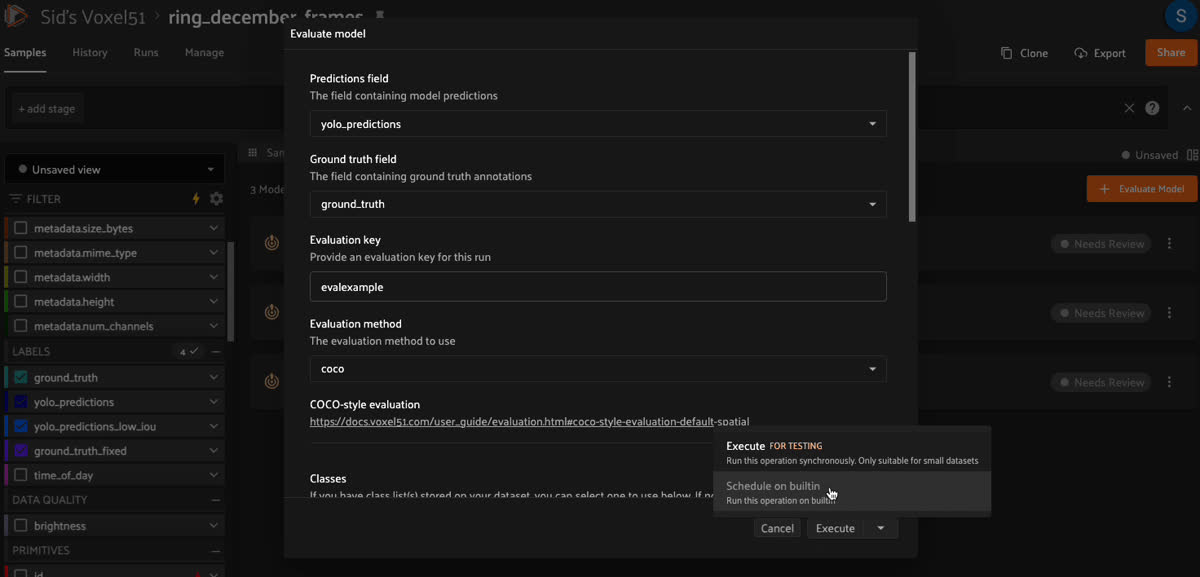
Opening the Model Evaluation Panel in the FiftyOne App and configuring an evaluation run — selecting the prediction field, ground truth field, and IoU threshold
The panel walks you through selecting your prediction field, your ground truth field, and an IoU threshold for matching predictions to ground truth boxes. Under the hood, FiftyOne's
evaluate_detections is computing standard detection metrics (precision, recall, F1, mAP) and crucially tagging every single prediction as a true positive, false positive, or false negative at the sample level.That last part is what unlocks everything that follows.
Step 3: Reading the metrics; something feels off
After the evaluation run completes, the Model Evaluation Panel surfaces a summary of your metrics:
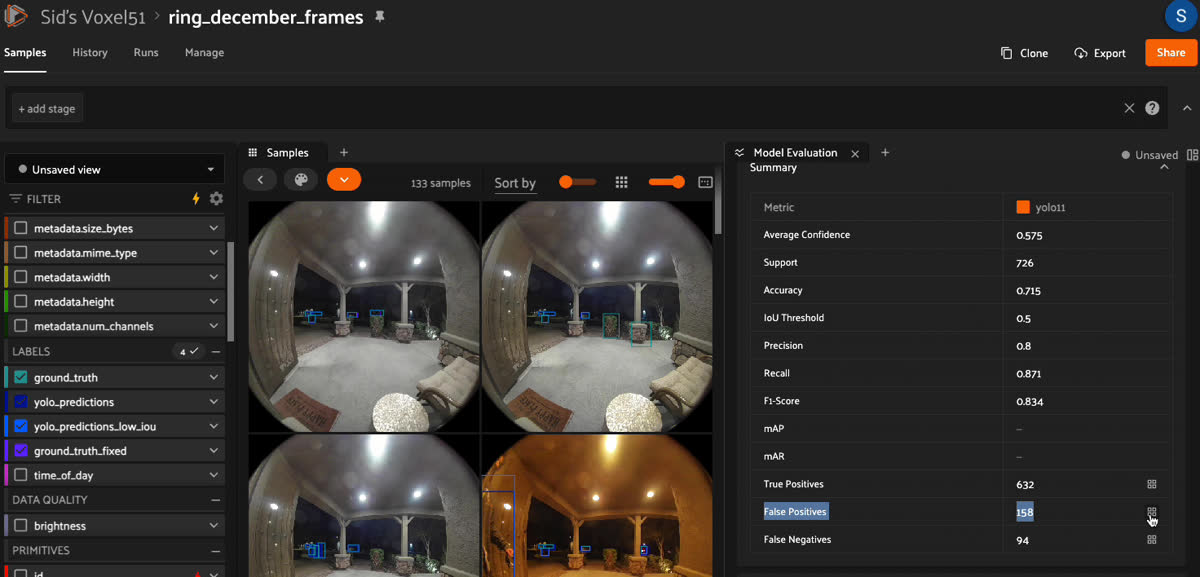
Most of the numbers looked reasonable. But one stood out immediately: 158 false positives across 726 detections.
Before digging in, it's worth briefly explaining what false positives mean in object detection and why they matter. A false positive is a prediction your model made that doesn't match any ground truth annotation; the model "saw" something that wasn't there or wasn't labeled. False positives hurt model performance in ways that go beyond just a lower precision score. In a real-world deployment, they translate directly to wasted compute processing phantom detections, downstream logic acting on objects that don't exist, and eroded user trust when a system repeatedly flags things incorrectly. In a security camera context like mine, a false positive means a spurious alert, and enough of those, and users start ignoring all alerts, defeating the purpose entirely. When you encounter a high false positive count, there are two common explanations:
- Missing annotations — your ground truth labels are incomplete, and the model is actually detecting real objects that just weren't labeled. This is surprisingly common and worth ruling out first. To rule it out, you can visually inspect the flagged false positive samples directly in FiftyOne and check whether a real object exists in the frame that simply wasn't labeled. For a more systematic approach, FiftyOne also has dedicated tooling for finding annotation mistakes and label errors during the curation and annotation phase — it's worth running this before evaluation so you can be confident your ground truth is clean before drawing conclusions from your metrics.
- Model error — the model is genuinely detecting things that aren't there, or producing duplicate detections on the same object.
Labeling gaps are one of the most common causes of downstream model failures. Read more ->
In my case, I was confident in the quality of my annotations, so 158 false positives were a real signal that something was wrong. But aggregate metrics alone couldn't tell me what. That's where sample-level debugging comes in.
Step 4: Using sample-level debugging to find the root cause
This is where FiftyOne really earns its keep. After running the evaluation, FiftyOne automatically tags each sample with fields like
yolo11_fp and yolo11_tp based on the eval key you set. From there, it's as simple as using the sidebar filter to filter samples down to only those with false positives — no code needed.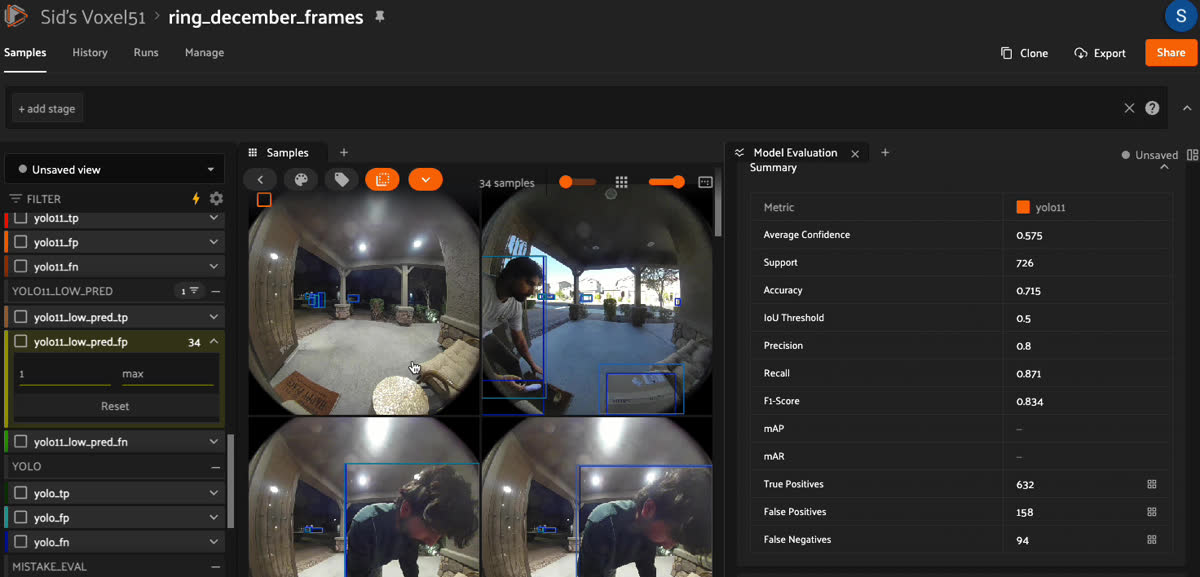
Opening a sample from this filtered view in the FiftyOne App, the problem was immediately obvious:
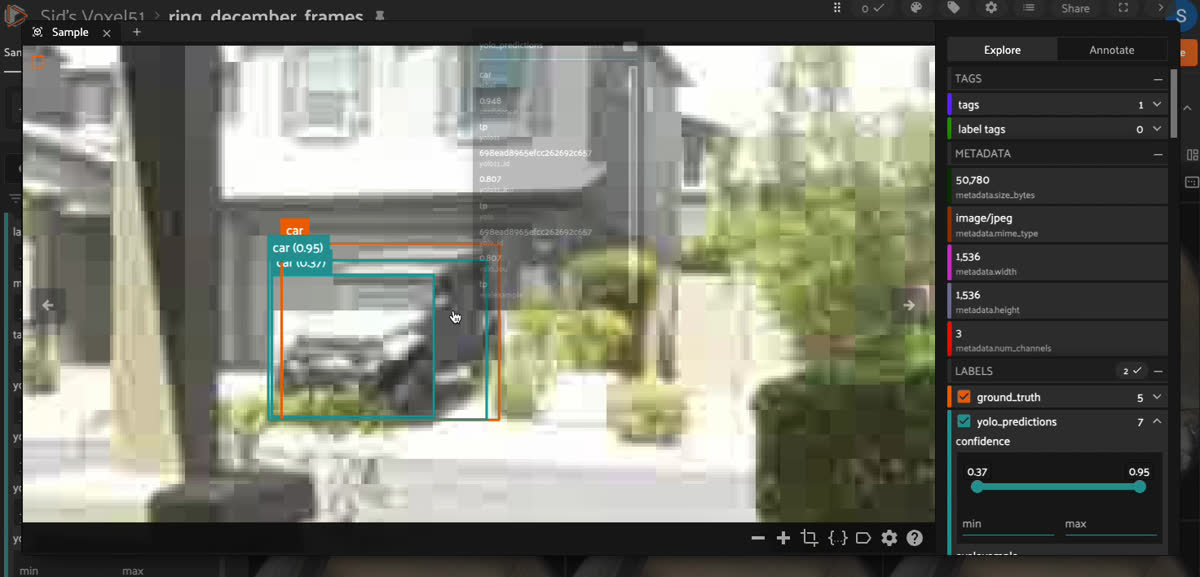
The model was drawing two bounding boxes on the same car. Not two cars—one car, detected twice, with slightly different box coordinates. This is a classic Non-Maximum Suppression (NMS) failure.
NMS is the post-processing step that eliminates duplicate detections by suppressing boxes that overlap too heavily with a higher-confidence prediction. The key parameter controlling this is the IoU threshold. If two boxes overlap by more than this value, the lower-confidence one gets discarded. Getting this right matters more than it might seem: when NMS is too permissive, duplicate detections survive and get counted as false positives, which directly tanks your precision. Worse, these aren't real errors your model is making; they're artifacts of post-processing that inflate your error rate and can mask how well the model is actually performing.
YOLO's default NMS IoU threshold is 0.7, meaning two boxes need to overlap by 70% before one gets removed. For my use case, this was too permissive, slightly offset duplicate detections were surviving NMS because their overlap was just under that threshold.
The fix wasn't retraining. It was tightening a single post-processing parameter.
Step 5: The fix—tuning post-processing, not the model
I reran inference with a lower NMS IoU threshold of
0.4 and stored the results in a new label field so I could compare both sets of predictions side-by-side in FiftyOne.from ultralytics import YOLO
import fiftyone as fo
MODEL_PATH = "path/to/your/best.pt"
PREDICTION_FIELD = "yolo11_low_pred" # new field to store tuned predictions
BATCH_SIZE = 32
dataset = fo.load_dataset("ring-camera-detections")
model = YOLO(MODEL_PATH)
dataset.apply_model(
model,
label_field=PREDICTION_FIELD,
iou=0.4, # tighter NMS threshold — more aggressive duplicate suppression
batch_size=BATCH_SIZE,
skip_failures=True,
)
Storing predictions in a separate field is a small but important detail. It means you can run a second evaluation in the Model Evaluation Panel and compare both models simultaneously — not just in aggregate metrics, but sample-by-sample, side-by-side.
Step 6: Before vs. after results
Here's what happened after that single parameter change:
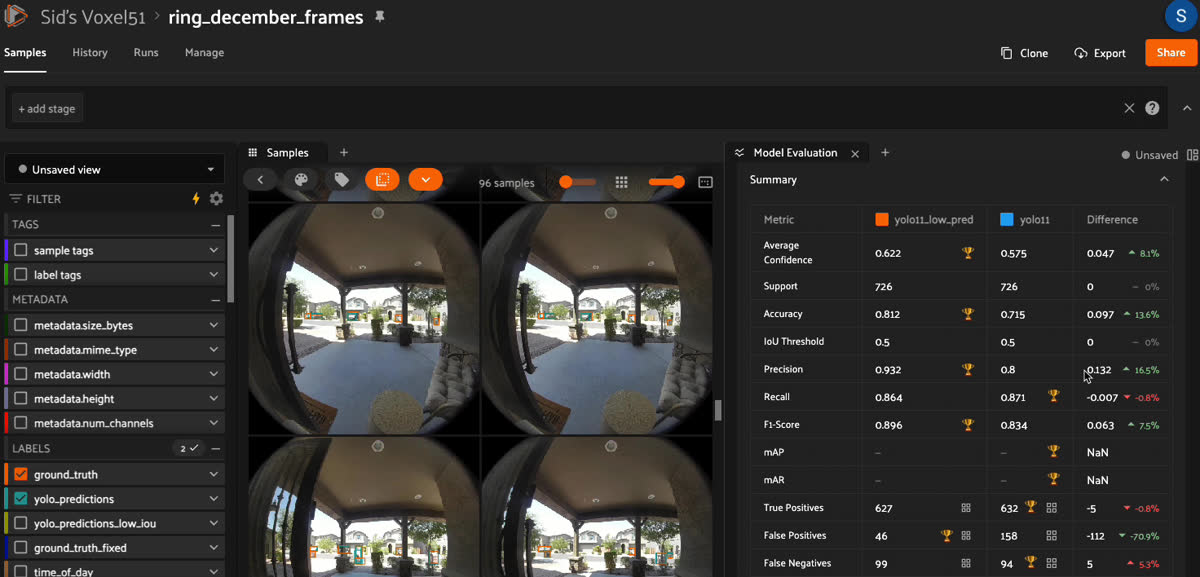
No new training data. No GPU hours. No architecture search. Just a few minutes of sample-level debugging and one parameter change.
Key takeaways
Stop and look at your data before you retrain. The reflex to try a new architecture or tune hyperparameters is strong. Aggregate metrics tell you that something is wrong. Sample-level debugging tells you why. Those are very different problems with very different solutions.
Post-processing is an underrated lever. Most practitioners spend the bulk of their optimization effort on model architecture and training. But inference-time parameters like NMS IoU threshold and confidence threshold can have an outsized impact on real-world performance, and they're free to tune.
False positives are always worth investigating. A high false positive count isn't always a model problem; sometimes it's a labeling gap. Either way, FiftyOne makes it easy to look at those samples directly and tell the difference quickly, rather than guessing from aggregate numbers alone.
FiftyOne's Model Evaluation Panel closes the loop. The ability to run an evaluation, filter to failure cases, inspect them visually, apply a fix, store new predictions in a separate field, and compare evaluations side-by-side, all within the same tool, is what made this debugging session fast and decisive.
Give it a try
If you're training vision models and evaluating them only on aggregate metrics, you're likely missing insights that are hiding in plain sight. Give sample-level debugging a try on your next model evaluation. You might be surprised by what you find when you actually look at your data.
Helpful resources:
- FiftyOne Model Evaluation Docs
- Evaluate detections API Reference
- Learn more about broader model failure modes
Curious how Voxel51 could be helpful for your enterprise workflows? Talk to our CV experts.
Machine Learning Engineer
Interested in everything anything related to AI. Have lived the life of a ML Engineer and also have worked in a GTM organization that sold software exclusively to MLEs. Im driven my passion to teach and help others understand AI and technology.
See all articles by Sid Mehta
Talk to an AI expert
Loading related posts...
© 2026 Voxel51 All Rights Reserved


